
AI ecommerce personalization: How it works and what moves sales


Contents
AI ecommerce personalization pays off when a store has enough traffic, clean event data and a way to prove incremental lift. Below that threshold, simple rules usually beat machine learning.
This guide explains how the models work, which tactics move conversion, what data and delivery architecture they need, how to choose between tools and a custom build, and how to measure real ROI with holdout tests instead of attributed revenue claims.
What is AI ecommerce personalization?
AI ecommerce personalization uses models such as collaborative filtering inside a product recommendation engine to choose products and dynamic content for each shopper from behavioral and profile data. Inputs are clickstream events, catalog and order data, and consented profile attributes.
Outputs are ranked products, reordered category pages, and tailored messages. Basic personalization applies hand-written segments; AI models relearn from every session. Beyond recommendation widgets, conversational AI shopping assistants apply the same behavioral and profile data to guide shoppers through a personalized journey in real time.
Pilots tend to stall on stale product feeds, unresolved identities, and offline accuracy that disagrees with online conversion. Netguru designs and builds ecommerce platforms, recommendation systems and data integrations for retail and marketplace clients. We recommend starting with rules on one placement and a 10% holdout when traffic is thin, because a model needs enough events per product to beat a hand-written rule.
AI vs rule-based segments: What changes
Rule-based segmentation beats AI below a traffic and event threshold, and AI wins once segments change faster than a team can edit them. A rule such as "returning visitor with cart value over $100" is explicit, and a merchandiser can audit it.
The approaches side by side:
| Rule-based segmentation | AI-driven personalization | |
|---|---|---|
| Segment definition | Hand-written conditions | Micro-segments learned from behavior, re-formed as it shifts |
| Update cadence | When someone edits the rule | Per session or per retrain |
| Data needed | Few events | Enough events per item and shopper to learn; cold start problem for new items and visitors |
| Typical methods | Static lists, if/then logic | Session-based recommendations, multi-armed bandit for offer allocation |
| Failure mode | Rule sprawl and conflicts | Opaque ranking and drift |
The practical change is that AI systems analyze event streams as they arrive and rebuild micro-segments continuously. Assume a model scores a session at 80% purchase intent after three product views and a size-guide open (an illustrative score, not a benchmark).
A rule only catches that path if someone anticipated it. The model can route that shopper to a bandit-selected offer and keep discounts away from high-intent sessions.
We recommend staying with rules while a holdout group cannot reach significance on revenue per visitor within a normal test window. Switch when any of these holds:
- You maintain more rules than the team can review in one sprint.
- Rules start to conflict.
- Segment performance decays between reviews.
A caveat: the model also needs usable identity resolution, or session signals fragment across devices. Netguru builds both approaches, from rule engines to next-best-offer pipelines. For the wider trend picture, see our AI in ecommerce overview.
How is AI used for personalization? Four tactics that move conversion
AI personalization moves conversion through four tactics: product recommendations, search reranking, dynamic content, and triggered email. Each needs different data, reports a different KPI, and breaks in a different way. The same logic carries beyond retail: see how generative AI drives personalization in real estate, where content adapts to user context.
The tactics side by side:
| Tactic | Data | KPI | Build note | Failure mode |
|---|---|---|---|---|
| Product recommendation engine | Catalog feed, view, add-to-cart and purchase events, session ID | Revenue per visitor, attach rate | Ship session-based similar-items first for cold start; add collaborative filtering once purchase history accumulates | Stale feed surfaces sold-out or repriced items |
| Search reranking (Algolia Personalization) | Query logs, click and conversion events | Search conversion rate, zero-result rate | Rerank inside the relevance ranking, never replace it | Thin catalog leaves nothing to reorder |
| Dynamic content | Identity-resolved profile or contextual signals, page slots | Revenue per visitor against a holdout | Decide the variant server-side or at the edge | Flicker and layout shift |
| Triggered email | CDP profile, send history, consent flags | Revenue per recipient, unsubscribe rate | One frequency cap across all flows | Over-sending |
Recommendations fail when the catalog sync runs nightly and inventory changes hourly. An early sign is a high click-through rate on recommendation slots with a low add-to-cart rate for specific SKUs. Apply stock and price as filters at serve time, outside the model.
Algolia Personalization reranks results using per-user affinity built from click and conversion events. On a catalog of a few hundred SKUs, or for queries that return a handful of hits, there is little to reorder. If personalized and default rankings look nearly identical in an A/B test, spend the effort on synonyms and relevance tuning first.
Client-side variant swaps render the default and then replace it, which shows up as flicker and as Cumulative Layout Shift regressions on the tested pages. Bloomreach's AI looks at many contextual data points to pick the best variant for each visitor. That only pays off if the decision arrives before first paint.
Email fails through volume. Each flow (cart abandonment, replenishment, back-in-stock) optimizes its own send, and together they flood the inbox. Watch for unsubscribe rates rising while revenue per email holds steady, and cap sends across flows.
The same logic applies to features built into the product. Color iQ, the foundation matching service from Sephora, uses AI to help customers find their perfect foundation match.
Measure every tactic with holdout group testing on revenue per visitor. Offline ranking metrics do not reliably predict online lift, a gap documented in recommender-systems research at ACM RecSys.
What data does AI personalization need?
AI personalization needs three inputs: consented first-party behavioral events, a clean catalog feed, and a stable customer ID. Zero-party data (preferences customers state on purpose, such as quiz answers) is an optional fourth layer that mainly helps with cold start.
A customer data platform holds the profile and runs identity resolution. A feature store serves that profile to models at request time. Dynamic micro-segments that adapt to behavior need streaming events, because a nightly batch leaves them a day stale.
A minimal event schema carries these fields on every event:
- event_id, timestamp, event_type (view, search, add_to_cart, purchase)
- product_id and session_id
- anonymous_id and a nullable customer_id
- consent_state, so models can filter out profiling-restricted users
- device, locale and referrer
The thresholds below are our rules of thumb, not benchmarks:
| Tactic | Rough minimum before the model beats a rule | Fallback below it |
|---|---|---|
| Collaborative filtering | Tens of thousands of purchase and add-to-cart events per month, with repeat interactions on most active SKUs | Best-sellers by category, co-purchase rules from the order table |
| Session-based recommendations | A few thousand sessions a day with 3+ events each | Recently viewed, same-category items |
| Bandit-driven dynamic content | Low hundreds of conversions per placement per week | Fixed A/B test with a holdout |
Identity resolution fails in predictable places. A shared household tablet merges two people into one profile. Logged-out sessions and expiring cookies split one person into several. Guest checkout with a different email creates a new ID. We recommend deterministic matching on login or hashed email only, and leaving ambiguous merges unresolved.
Consent gates all of it. Profiling falls under GDPR, and automated decisions with legal or similarly significant effects fall under Article 22 (ICO (Information Commissioner's Office)). In SCHUFA (C-634/21), the CJEU held that automated scoring can itself be the decision under GDPR Article 22 when a third party relies strongly on it (Legiscope, GDPR Article 22: Automated Decision-Making).
Does AI personalization work for anonymous and first-time visitors?
AI personalization works partly for anonymous and first-time visitors: session-based recommendations can adapt within a few clicks, but the cold start problem means the first page view has almost nothing to personalize on.
The practical question is which signal to trust at each depth of visit. Our suggested starting rule, with thresholds to tune in a test, not as fixed benchmarks:
| Depth of visit | Signals to use | Fall back to |
|---|---|---|
| Landing, 0 events | Referral source, campaign parameters, device, coarse location, season | Popularity within the referral category or region |
| Early, 1-3 events | Viewed categories, search queries, co-view relations between items | Category-filtered popularity |
| Engaged, 4+ events | Session-based model over the click sequence | Popularity for slots where model confidence is low |
| Identified, returning | Profile from the customer data platform via identity resolution | Collaborative filtering, then session model |
Fall back to popularity whenever the session model cannot beat a popularity baseline in a holdout group test. Measure revenue per visitor, not click-through rate, because popularity often wins on clicks and loses on margin.
Two caveats apply. Location and referral signals need a consent basis that fits your jurisdiction, and a first-visit model trained on a small catalog or low traffic may never clear the popularity baseline. In that case, spend the effort on zero-party data capture, such as a short quiz, instead.
Abandoned-cart and post-purchase flows with dynamic content
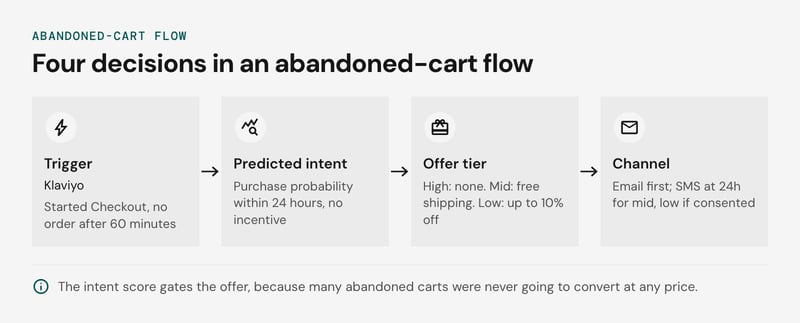
An abandoned-cart flow with dynamic content in Klaviyo is four decisions in sequence: the trigger, a predicted-intent score, an offer tier (the next-best-offer, meaning the single incentive or message most likely to move this shopper), and a channel. Every figure below is an assumption for illustration, not a benchmark.
The average documented online shopping cart abandonment rate is 70.22%, based on 50 studies compiled by Baymard Institute (Baymard Institute, 2026).
Many of those carts were never going to convert at any price, which is why the score gates the offer.
Assume a $120 cart, a 40% gross margin ($72 cost), and a 20% post-discount margin floor.
| Step | Input | Rule |
|---|---|---|
| Trigger | Started Checkout event, no order after 60 minutes | Start the flow; exit on any order |
| Predicted intent | Model score: probability of purchase within 24 hours with no incentive | High above 0.6, mid 0.3-0.6, low below 0.3 |
| Offer tier | Score, cart value, unit cost | High: none. Mid: free shipping. Low: up to 10% off |
| Channel | Consent flag, score | Email first. SMS at 24 hours for mid and low scores, consented profiles only |
The margin floor caps the whole discount budget. At $72 cost and a 20% floor, the price cannot drop below $90, so the maximum concession is $30 (25%), shipping subsidy included. The tier rule is min(tier discount, price - cost / 0.8), evaluated before the message renders. Dynamic content then fills the email with the cart's actual items and live stock.
Bloomreach's Loomi AI applies the same logic by choosing, per customer, between a discount, free shipping, or an upgrade.
The post-purchase flow uses the same structure. The trigger is the order, and the offer is a complementary or replenishment item chosen by collaborative filtering, usually with no discount. Send it at an assumed day 7 by email.
Keep a 10% holdout that receives no tiered offers, and judge the flow on revenue per visitor, not recovered carts. A widely repeated claim says Amazon cut abandonment by 25% within a month using AI retargeting with dynamic discounts. No primary source we can point to backs it, so don't use it as a target.
How do you serve personalization without slowing the page?
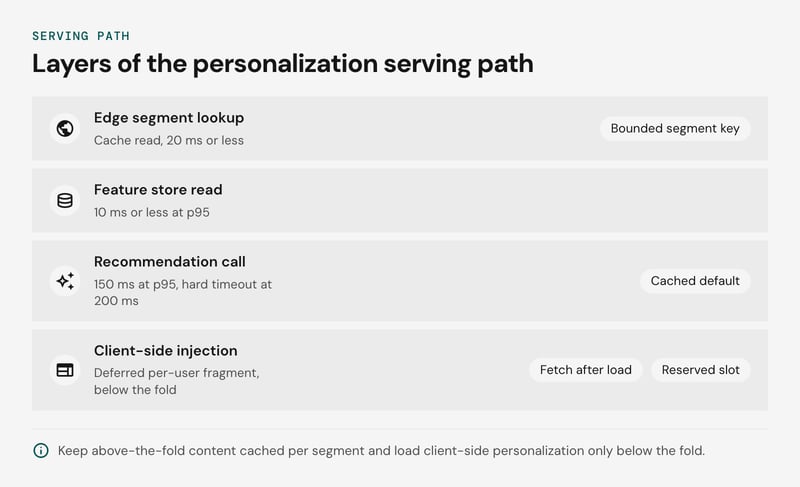
Render above-the-fold dynamic content with server-side rendering or at the edge, cached per segment, and load client-side personalization only below the fold to protect Core Web Vitals. The trade-offs side by side:
| Approach | Latency cost | LCP effect | CLS effect | Cache fit |
|---|---|---|---|---|
| Origin SSR | Recommendation call sits inside TTFB | Slow API calls delay LCP directly | None | Per segment key |
| Edge rendering | Decision runs near the user on a precomputed segment | Lowest TTFB of the three | None | Per segment plus variant |
| Client-side injection | Shell is fast, personalized slot arrives after hydration | Safe below the fold, harmful if it swaps the hero | High unless the slot is reserved | Fully cacheable shell |
web.dev's Core Web Vitals thresholds call LCP good at 2.5 seconds or less and CLS good at 0.1 or less, both at the 75th percentile of page loads. Treat those as the ceiling for the whole personalization path, then split the allowance into per-stage budgets.
The targets below are illustrative examples, so replace them with your own p75 and p95 measurements:
| Stage | Example target (illustrative) | If it is exceeded |
|---|---|---|
| Edge segment lookup and cache read | 20 ms or less | Check segment key cardinality |
| Feature store read | 10 ms or less at p95 | Move hot keys closer to the edge |
| Recommendation call | 150 ms at p95, hard timeout at 200 ms | Serve the cached default |
| Deferred per-user fragment | Fetch after load, 300 ms at p95 | Keep the default in the reserved slot |
| Segment HTML cache | 5 minute TTL, stale-while-revalidate for 1 hour | Serve stale, refresh in the background |
| Recommendation list cache | 15 minute TTL per segment | Lengthen TTL if hit rate is low |
With these example targets, the worst-case server-side addition is about 230 ms (20 + 10 + the 200 ms timeout). That leaves most of the 2.5 second LCP allowance for images, scripts and the rest of the page (DEV Community - Mastering LCP: A Step-by-Step Guide).
Cache on a bounded segment key (for example, locale, device class, and one of a dozen behavioral segments), never on a user ID. A per-user key gives a near-zero hit rate. Keep per-user slots, such as a recently viewed carousel, as separate fragments filled by an edge include or a deferred fetch.
Flicker comes from swapping content after first paint. Anti-flicker snippets that hide the body trade it for worse LCP, so reserve fixed-height slots and ship a default in the cached HTML. Bestsellers work well here because they also cover the cold start problem.
Now a worked example. Take the purchase-intent score from earlier: inference runs in the event stream and writes the score to the feature store.
The request path then needs only a key-value read, which fits the 10 ms line above. Running the model inside the request could consume much of the 150 ms recommendation budget, depending on model size.
Top AI personalization platforms for ecommerce, by store type
The best AI personalization platform for ecommerce depends on storefront stack, traffic, and catalog size: Shopify merchants usually start with Rebuy or Klaviyo, while larger retailers choose Nosto, Bloomreach, or Braze. Off-the-shelf tools won't suit every catalog or data setup, so it's worth weighing a custom integration approach before committing to a vendor.
The options side by side. Traffic fit and integration effort are our judgement, not vendor-published thresholds:
| Option | Best for | AI features | Integration effort | Traffic fit |
|---|---|---|---|---|
| Rebuy | Shopify stores raising order value | Cart and checkout upsells, recommendations, post-purchase offers | Low: app install | Small to mid |
| Klaviyo | Email and SMS retention built on first-party customer data | Predictive analytics (expected next order date, lifetime value), segmentation | Low | Any; value grows with list size |
| Nosto | Catalog-heavy fashion, home, and beauty stores | Product recommendation engine, behavioral dynamic content, category merchandising | Low to medium: script or API plus catalog feed | Mid to high |
| Bloomreach | Retailers wanting search, merchandising, and a customer data platform together | Loomi AI offer selection, contextual variant choice | Medium to high | High traffic, large catalogs |
| Braze | App-first, multi-channel brands with engineering capacity | Canvas journeys, send-time optimization, item recommendations | Medium to high: SDK plus event streaming | Large known-user base |
| Netguru (custom build) | Proprietary data or unusual catalog logic | Session-based and collaborative filtering models on your events, feature store, holdout group testing | High: weeks to months | High traffic or niche catalogs |
Where a custom build overtakes SaaS
We recommend a custom build only when at least two of these conditions hold:
- Your event stream and identity resolution already exist, so a SaaS tool would duplicate the pipeline.
- Catalog logic defeats generic models: compatibility, size and fit, or rental availability.
- Per-session or per-event pricing grows faster than the cost of a small ML team. Check this against your own quote.
- You need holdout group testing and revenue per visitor measured in your own warehouse, not in a vendor dashboard.
Below that bar, SaaS wins. A small catalog or young store also faces the cold start problem, and a custom model has little history to learn from. A hybrid is common: Klaviyo for lifecycle messaging, a custom engine for onsite recommendations.
Should you build or buy a recommendation engine?
Buy a product recommendation engine when behavioral signals are enough to rank your catalog. Build when ranking depends on proprietary signals or you must own the data.
Collaborative filtering on clickstream and purchase history is a commodity. Platforms such as Bloomreach already build dynamic micro-segments that adapt as behavior changes. Paying engineers to rebuild that rarely pays back.
The decision rule below uses thresholds that are our own judgement, not industry benchmarks:
| Criterion | Buy | Build |
|---|---|---|
| Catalog and signals | Standard attributes; clickstream and orders carry the ranking | Ranking depends on signals a vendor can't ingest: margin, stock position, social graph, visual attributes |
| Data ownership | Vendor-hosted profiles are acceptable under your data processing agreement | Events, features, and models must stay in your own feature store |
| Team capacity | No ML engineer to own retraining, monitoring, and on-call | At least one ML engineer and one data engineer dedicated to it |
Treat team capacity as a gate. If you can't staff that row, buy even when the other two rows point to build, because an unmaintained model degrades. Build only when the capacity row is met and at least one other row favors it.
Custom work earns its cost where the matching problem is domain-specific. One beauty system uses computer vision to give customers access to over 10,000 skin tones. Off-the-shelf collaborative filtering ranks on co-behavior, so it won't see an attribute like that unless you supply it.
A social shopping app is a similar case, because the social graph is the product. Countr is an example: its recommendation system supports 160+ retailers with ML-driven discovery. Co-purchase history alone would leave that graph unused.
A hybrid is the usual outcome. Buy the baseline, build the layer that differentiates you, and run a holdout group test against the vendor default. The custom model has to beat it on revenue per visitor before it earns more engineering time.
Can AI build me an ecommerce store?
AI can produce a usable first draft of a store: theme, copy, and catalog entries. Payments, data plumbing, and performance still need engineers. Shopify's built-in AI tools follow this pattern, giving fast scaffolding and leaving the hard parts to you.
| Task | AI builders handle well | Still needs engineering | Early sign of trouble |
|---|---|---|---|
| Theme and layout | Generated templates | Core Web Vitals tuning, custom components | Slow mobile pages after widgets are added |
| Product copy, catalog drafts | Descriptions, tags | Attribute validation, taxonomy | Filters return odd results |
| Payments and tax | Basic checkout setup | PSP integration, fraud rules, PCI scope | Declines or tax errors in new regions |
| Event data | Default analytics | Tracking plan, customer data platform, identity resolution | One shopper counted as several visitors |
| Personalization | Template widgets | Holdout group testing, cold start handling | Uplift can't be separated from seasonality |
The trade-off is speed against reversibility. Copy and layout are cheap to regenerate, so let AI draft them and have a person review. Errors in payments, tax, and event data reach real orders and distort the history that personalization models learn from.
A workable decision rule: let AI own anything you could regenerate in an afternoon, and give engineers anything that touches money, customer identity, or measurement. Personalization sits on the second side, because its results depend on the event layer beneath it.
Agentic AI fits after launch, handling bounded tasks such as catalog updates or campaign setup, with a human approving changes.
An intent score is only as good as the identity behind it. If identity resolution splits one high-intent visitor into three anonymous sessions, the signal disappears. More detail is in our guide to generative AI in commerce.
How do you roll out AI personalization in four phases?
Roll out AI personalization in four phases: set goals, make data ready, select tools, then pilot one placement before scaling. Each phase ends with an exit check, and the next one starts only when the check passes.
- Goals. Pick one metric (revenue per visitor) and one placement, such as recommendations on the product detail page. Exit check: a written baseline and the minimum lift the business agrees is worth shipping.
- Data readiness. The customer data platform streams view, add-to-cart, and purchase events, keyed by identity resolution across anonymous and logged-in sessions. Exit check: complete catalog feed, consent flags on every profile, and event latency the engine can work with.
- Tool selection. Choose the recommendation engine by what it exposes: holdout support, exportable event logs, a rules fallback, and cold start handling. Replay your own logs through the shortlist before signing.
- Pilot to scale. Run the pilot below, then add placements one at a time.
A pilot that can prove incrementality has four fixed parts:
- One placement. A single surface keeps the comparison clean and the rollback simple.
- A holdout group. Hold out 10% of visitors as an illustrative starting share, assigned by a hashed visitor ID stored in the CDP, so a person stays in one arm across devices.
- A fixed window. Set the end date before launch. An illustrative choice is four weeks, which covers full weekly cycles and prevents stopping the moment the dashboard looks good.
- Win criteria. Treatment beats holdout on revenue per visitor by the pre-agreed threshold, with guardrails on Largest Contentful Paint, return rate, and margin.
We recommend keeping a multi-armed bandit out of the pilot's primary measurement. A bandit shifts traffic toward early winners, which erodes the holdout comparison. Once the holdout confirms lift, use a bandit to allocate traffic among variants inside the treatment arm.
When volume is low, collaborative filtering has too little interaction data to beat simple rules. Serve category bestsellers, recently viewed items, and co-purchase rules to sparse visitors and new products, and let the model handle the dense segments. If the placement still can't reach a readable result in the window, extend the window or move the pilot to a higher-traffic surface.
How do you measure AI personalization ROI?
Measure AI personalization ROI with a holdout group that never sees personalization, then compare revenue per visitor between holdout and exposed traffic. The gap is incremental revenue. Whatever the vendor dashboard reports beyond that gap is attributed revenue.
The example below uses illustrative assumptions, not benchmarks: 500,000 monthly visitors and a 10% holdout, assigned by identity-resolved user ID so it stays sticky across sessions.
| Metric | Holdout (50,000) | Exposed (450,000) |
|---|---|---|
| Revenue per visitor | $2.00 | $2.12 |
| Total revenue | $100,000 | $954,000 |
Incremental revenue is ($2.12 - $2.00) x 450,000 = $54,000, a 6% lift in revenue per visitor. If the dashboard credits $190,000 to recommendation clicks, attribution overstates incrementality by about 3.5x, because many of those shoppers would have bought anyway.
The 35% figure usually quoted for recommendations comes from McKinsey's 2013 observation that 35% of Amazon purchases are driven by product recommendations (McKinsey, How retailers can keep up with consumers, 2013). That is an attributed share of purchases, not a lift.
For lift, McKinsey's 2021 personalization research gives the better range: personalization most often drives a 10 to 15 percent revenue lift, with company-specific lift spanning 5 to 25 percent (McKinsey, 2021).
A 90-day read schedule we recommend:
- Days 0-30: Instrument events, run an A/A test to confirm the split (check sample ratio), and freeze the baseline.
- Days 31-60: Take a first read. Revenue per visitor is heavy-tailed, so use bootstrap intervals or CUPED, and expect small lifts to stay inconclusive.
- Days 61-90: Read the full period including returns and repeat orders, decide whether to scale, and keep a 5% holdout running.
Offline accuracy and online conversion disagree because offline metrics such as NDCG and recall@k score a model against logs produced by the old ranking. That rewards popular items and ignores placement, latency, and diversity.
A RecSys 2023 paper identifies four widespread flaws in offline recommender evaluation that make it a weak proxy for online A/B results (Hidasi & Czapp, Widespread Flaws in Offline Evaluation). A model that wins offline can lose online, so treat offline metrics as a filter and the holdout as the verdict.
This design assumes enough traffic. Low-volume stores may not detect a 6% lift in 90 days, and a longer window or geo split is the usual fallback.
Pricing guardrails and risks to plan for
Dynamic pricing, next-best-offer logic (the discount or message chosen per customer), and zero-party data (preferences customers volunteer) each need a guardrail before launch: a margin floor, a fairness limit, and a disclosure path. Volunteered preferences are safer inputs than inferred price sensitivity.
The failure modes, their early signs, and the control for each:
| Failure mode | Early sign | Guardrail |
|---|---|---|
| Margin erosion | Revenue per visitor rises while contribution margin falls | Per-SKU price floor enforced outside the model, plus a discount budget cap per campaign |
| Undisclosed personalized prices | Two users see different prices for one SKU | Disclosure copy and a legal review per market |
| Filter bubble | Category breadth per session shrinks | Reserve an illustrative 5-10% of slots for exploration via a multi-armed bandit |
| Stale feeds | Out-of-stock items appear in recommendations | Stream stock and price changes into the feature store and suppress low-availability items |
In the EU, Directive (EU) 2019/2161 requires traders to tell consumers when a price was personalized through automated decision-making. Profiling-based pricing may also fall under GDPR Article 22, depending on its effect on the consumer, so get a legal opinion before shipping.
Bias is the quieter risk. Gender bias in online images from Google Images is over four times stronger than in text from Google News, with male bias scores of 0.14 versus 0.03 respectively (Guilbeault & Delecourt, Nature, 2024). Image-led recommendation and creative selection can inherit that skew. Audit outputs by segment to catch disparities that aggregate metrics might mask.
FAQ
What are the top AI-driven ecommerce personalization platforms?
How is AI used for personalization?
Which AI tool is best for e-commerce?
What are the 7 types of e-commerce?
How long until AI personalization shows results?
Does AI personalization work without login?
AI personalization vs rule-based targeting?
Plan your personalization pilot
Start the pilot with one product recommendation engine on one high-traffic placement, such as the product detail page, and measure it with holdout group testing. We recommend holding out an illustrative 10% of visitors on the current experience and running the test for at least two purchase cycles. Judge it on revenue per visitor, not click-through.
If you want help scoping the event pipeline, identity resolution, and test design first, our team can map them through our Ecommerce personalization platform service. Our Commerce Development work covers the storefront and integrations underneath. Build your commerce platform


