
Android app development frameworks: How to choose in 2026

Contents
The best Android framework depends on three things: whether you ship Android only or Android plus iOS, what your team already writes, and how much of the UI has to be custom. Kotlin with Jetpack Compose is the default for Android-only products, and every other option is a deliberate trade against it.
Shared logic or shared UI is the real dividing line between Kotlin Multiplatform, Flutter and React Native, and several frameworks still recommended in older lists are retired.
Which framework is best for Android app development?
The best framework for Android app development is Kotlin with Jetpack Compose when Android is the only target; adding iOS or an existing web or .NET team changes the answer.
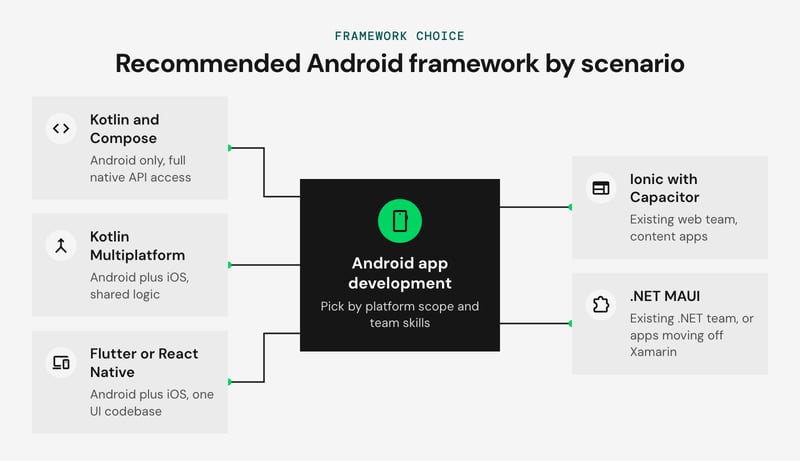
Teams that pick before settling platform scope and team skills often face a UI rewrite or a plugin backlog later.
The pick by scenario:
- Android only: Kotlin, Jetpack Compose and Jetpack architecture components.
- Android plus iOS, shared logic: Kotlin Multiplatform, adding Compose Multiplatform if the UI is shared too.
- Android plus iOS, one UI codebase: Flutter for custom UI, or React Native New Architecture for JavaScript and TypeScript teams.
- Existing web team: Ionic with Capacitor.
- Existing .NET team: .NET MAUI.
We recommend starting with Kotlin and Compose when Android is the priority, because new platform APIs and Google Play target API changes reach it first. Netguru builds native Android apps and cross-platform mobile products with Kotlin, Flutter and React Native for enterprise and startup clients.
What does 'Android framework' mean?
'Android framework' means two different things: the platform's application framework layer that every app runs on, and the toolkits teams use to build apps on top of it. Keeping them apart makes the toolkit comparison later in this article easier to read.
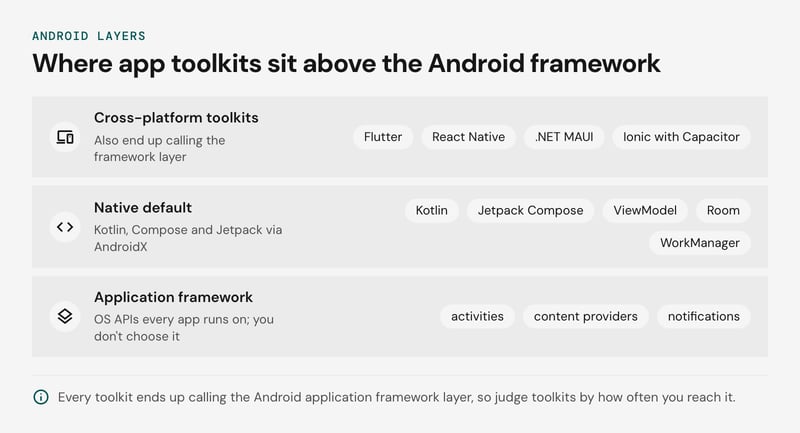
The Android application framework layer is the set of OS APIs for activities, views, content providers, notifications and the package and resource managers. You don't choose it. It updates with each OS release, so Google Play's target API level requirement applies to every app, whatever toolkit produced it.
The build-time choice sits above that layer. Kotlin, Jetpack Compose and the Android Jetpack architecture components (ViewModel, Room, Navigation, WorkManager) form the native default. Jetpack libraries ship through AndroidX, separately from OS releases.
Flutter, React Native, .NET MAUI and Ionic with Capacitor all end up calling the framework layer too. Our decision rule: judge each toolkit by how often your requirements reach down to that layer.
- Mostly UI and network calls: a cross-platform toolkit can cover most of the app. Keep one Kotlin-capable engineer for plugin gaps.
- Heavy background work, custom permission flows or OS-specific integrations: expect to write native code in any toolkit. If that code is a large share of the app, native is the simpler pick.
- Any toolkit: before committing, check how quickly it and its plugins support each new target API level.
Is Kotlin with Jetpack Compose the native default?
Yes: Kotlin with Jetpack Compose is the native default for new Android apps, backed by Android Jetpack architecture components such as ViewModel, Room, Navigation and WorkManager. Production examples of Android apps written in Kotlin show how widely this default is already adopted.
Google's Kotlin and its Compose recommendation settle the starting point for a new build. The open questions are where Android Views (XML layouts) still show up and what breaks when a Compose app meets them. Teams scoping a new app with an Android development partner should plan for both.
The following table lists the usual interop points:
| Area | Why Views remain | Handling |
|---|---|---|
| Maps | The Maps SDK is built around MapView | Use Google's Maps Compose wrapper and test lifecycle handling |
| Ads | Ad SDK banner and native ad views are often View-based | Wrap in AndroidView and check sizing inside scrolling lists |
| WebView | No first-party composable | Wrap WebView in AndroidView and restore its state yourself |
| Legacy custom views | Years of custom drawing code | Host with AndroidView now, migrate screen by screen |
Recomposition is the second failure area. In our judgment, three pitfalls cause most avoidable jank:
- Passing unstable types, such as a plain List, into composables that then recompose needlessly. Recent Compose compiler releases soften this with strong skipping mode, so check the compiler reports before refactoring.
- Reading fast-changing state such as scroll offset in the composition body. A lambda-based read limits the work to layout or draw.
- Allocating objects in composition without remember.
Diagnose with Layout Inspector's recomposition counts and the Compose performance guidance before changing code.
The networking, image loading and dependency injection libraries around this stack are covered in our Android libraries guide. If the language question is still open on your team, Kotlin or Java for Android covers it.
Do Android Views and XML still matter?
Android Views and XML layouts still matter wherever an existing app runs on them, and Jetpack Compose does not require a rewrite to coexist. The two toolkits share a screen through documented interoperability APIs: ComposeView hosts Compose inside a View hierarchy, and the AndroidView composable hosts a View inside Compose.
We recommend migrating screen by screen when a screen is being rebuilt anyway, and leaving Views alone where the screen is stable and untouched. A redesign, a new feature on an old screen, or a rework of state handling is a good trigger. A settings screen nobody has changed in two years is not.
Fragment-based navigation also keeps Views in play for new work, because Compose screens can slot into existing Fragments one at a time. Our piece on what's new in Fragments covers the Fragment APIs involved.
A mixed hierarchy means two theming systems to keep in sync, so agree on shared design tokens before the second migrated screen. Google's migration strategy recommends building new screens in Compose and replacing existing features incrementally.
Which framework is best for Android beginners?
Beginners with no prior stack should start with Kotlin and Jetpack Compose. Developers coming from the web can start with React Native or Flutter instead, and keep their existing skills.
Kotlin with Jetpack Compose gives a first-time Android developer one language, one UI toolkit, and one set of official docs, including Google's Android Basics with Compose course. Cross-platform frameworks still return to this layer when a native module or Gradle build breaks, so the knowledge carries over.
The starting point by background:
- No prior stack: Kotlin and Compose. If Java is on your radar, Kotlin or Java for Android covers that choice.
- JavaScript or TypeScript: React Native, which keeps you in a language and component model you already use.
- Web or mixed background, open to a new language: Flutter. Dart is the entry cost, and in our judgement it is modest for anyone who already writes TypeScript, Java, or C#.
The exception is a product that must ship on iOS and Android from day one. In that case, pick the cross-platform framework your first hire already knows. Flutter vs React Native compares the two in depth.
When does Kotlin Multiplatform with Compose Multiplatform make sense?
Kotlin Multiplatform fits teams that already write Kotlin for Android and want one codebase for business logic. Compose Multiplatform extends that sharing to the UI layer. The two are separate decisions, and most teams should make the first before the second. If you want expert help setting this up, a dedicated Kotlin Multiplatform development company can guide the shared-logic architecture from the start.
We recommend starting with shared logic. Share the UI as well only when screens are close to identical across platforms, for example brand-led design systems or internal tools. Keep SwiftUI for iOS when the app has to follow platform conventions closely.
The table shows where the line usually falls:
| Layer | Shared in common Kotlin | Stays platform-specific |
|---|---|---|
| Networking | Ktor client, serialization, retry logic | Certificate pinning setup, connectivity monitoring |
| Persistence | Room (KMP support) or SQLDelight, repositories | Secure key storage (Keystore, Keychain) |
| Domain | Use cases, validation, state holders | Nothing |
| Device features | Interface declared in common code | Push, biometrics, background work, camera |
| UI | Compose Multiplatform screens | SwiftUI screens, native widgets |
Use expect/actual for small platform declarations, such as a clock or a file path. For larger surfaces like biometrics, we prefer a plain interface in common code with one implementation injected per platform, which keeps tests simple.
Kotlin Multiplatform is a weaker fit for teams with no Kotlin experience, since they take on a new language and Xcode integration at once. JavaScript-heavy teams usually get further with React Native. Compose Multiplatform for iOS is stable according to kotlinlang.org, but check that your required platform behaviors work before committing to shared UI.
For head-to-head trade-offs, see Kotlin Multiplatform vs Flutter and React Native vs Kotlin Multiplatform. For real-world Kotlin Multiplatform examples from mobile projects, see Netguru's walkthrough of shared-code apps.
Is Flutter a good fit for Android apps?
Flutter is a good fit for Android apps when one custom UI must ship on both Android and iOS from a single Dart codebase. It is a weaker fit for Android-only products and for apps built around platform APIs.
Flutter draws every pixel with its own renderer, the Impeller rendering engine, without wrapping native views. Per Flutter's Impeller documentation, Impeller has been the default on Android API 29+ since Flutter 3.27, with an automatic fallback to the legacy OpenGL renderer on older devices or devices without Vulkan support. Screens look and animate the same across devices and OS versions, which suits branded, animation-heavy interfaces.
The cost sits at the platform boundary. Anything outside the widget tree, such as WorkManager jobs, home-screen widgets or Bluetooth stacks, goes through a pub.dev plugin or a platform channel you write in Kotlin. New Android features typically arrive in Jetpack first, so Flutter teams wait for plugin support or write the bridge themselves.
The team-cost side, by area (our judgement, not measured data):
| Cost area | What to expect |
|---|---|
| Hiring | The Dart talent pool is smaller than Kotlin's. Kotlin developers read Dart quickly, but widget-tree and state management conventions take longer to learn. |
| Version churn | Flutter, Dart and plugin versions move independently, so budget recurring upgrade work and plugin audits. |
| Android-only teams | Flutter's savings come from sharing code with iOS. With one platform, Compose with Jetpack components is usually cheaper to staff and maintain. |
We recommend Flutter when iOS parity and a distinctive UI justify the extra bridge code, and Compose in every other case. The Jetpack Compose versus Flutter comparison covers the head-to-head, and our Flutter app development service page shows how we scope these builds.
Is React Native still relevant in 2026?
Yes, React Native is still relevant in 2026: the New Architecture is now the only runtime, and it replaced the asynchronous bridge behind the framework's worst performance problems.
The old bridge serialized every JavaScript-to-native call as a batched JSON message, and every call was asynchronous. Native modules initialized at startup whether or not a screen used them. Layout could not be read synchronously, which caused visible flicker in gesture-driven and measured UI.
The New Architecture became the default in React Native 0.76, and since release 0.82 it is the only architecture: the legacy opt-out flags are ignored. The Hermes JavaScript engine now holds direct JSI references to C++ host objects. The Fabric renderer handles synchronous layout, and TurboModules load lazily against typed Codegen specs written in TypeScript.
The upgrade touches native code more than JavaScript:
- Custom native modules: rewrite them as TurboModules with a TypeScript spec. The Kotlin class then implements the abstract class Codegen generates.
- Custom native views: port them to Fabric components with generated view manager interfaces.
- Third-party libraries: an unmaintained library still on the bridge is the usual blocker. The interop layer covers many legacy modules, but not code that reaches into UIManager internals.
We recommend auditing every native dependency against the React Native Directory before scheduling the upgrade, and replacing or forking dead libraries first. Android-only products that depend heavily on platform APIs are still better served by Kotlin and Jetpack Compose.
For the full trade-offs against Flutter, see Flutter vs React Native. If your team already writes TypeScript, our React Native development service covers the build and the migration.
Where do .NET MAUI and Ionic with Capacitor fit?
Use .NET MAUI when your team already ships C# and .NET, and Ionic with Capacitor when it ships web apps. Both reach Android, and each has a ceiling you should test before committing.
.NET MAUI is the route for teams leaving Xamarin. Per Microsoft's support policy, Xamarin end of support came on May 1, 2024, so Xamarin.Android and Xamarin.Forms apps get no further updates, while Google Play's target API requirements keep advancing.
View-model and business logic usually carry over with little change. Custom renderers do not: MAUI replaces them with handlers, so they must be rewritten. Third-party Xamarin libraries without a MAUI release are likely to be the main schedule risk, so audit them first.
MAUI's ceiling is UI. It maps to native controls, so heavily branded or animated interfaces mean per-platform handler work. We recommend it for line-of-business apps where reusing .NET skills outweighs UI distinctiveness.
Ionic with Capacitor packages a web app inside the Android System WebView and exposes native APIs through plugins. Its ceiling is the WebView. JavaScript runs on one main thread, so long lists, large bundles, and heavy animation degrade first on low-RAM devices. The OS can also kill the WebView process in the background, which forces a slow cold start on return.
WebView updates through Google Play, so rendering behavior also varies with the version installed on each device. Before committing, profile the app on your lowest-spec target device using Chrome DevTools remote debugging (Capacitor's Android docs cover the setup). If the main scrolling list drops frames there, choose a native-rendering option instead. Ionic fits content apps, forms, and internal tools well.
How do the Android app development frameworks compare?
Kotlin with Jetpack Compose gives the most direct Android access and the shortest lag behind new platform releases, while every cross-platform option trades some of that for shared code. The table adds native access and upgrade burden, the two columns most comparisons skip.
| Framework | Language | UI | Shared code | Android native access | Upgrade burden | Best for |
|---|---|---|---|---|---|---|
| Kotlin + Jetpack Compose | Kotlin | Compose, native | None | Direct, including all Jetpack libraries | Lowest lag: bump targetSdk and the Compose BOM | Android-first, long-lived products |
| Android Views / XML (legacy) | Kotlin or Java | XML layouts | None | Direct | Low, but new Jetpack UI work targets Compose | Maintaining existing screens; migrate via interop |
| Kotlin Multiplatform + Compose Multiplatform | Kotlin | Compose, shared or native per platform | Logic, optionally UI | Direct via expect/actual | Kotlin, Compose Multiplatform and AGP versions must stay aligned | Kotlin teams adding iOS |
| Flutter | Dart | Impeller-rendered widgets | Logic and UI | Platform channels, FFI | Flutter SDK, Gradle template and plugin updates | Branded UI from one codebase |
| React Native (New Architecture) | TypeScript/JavaScript | Fabric, native views | Logic and most UI | JSI, TurboModules | Each RN release touches native Gradle code and libraries | React and JavaScript teams |
| .NET MAUI | C# | XAML, native controls via handlers | Logic and UI | Android bindings, handlers | Follows the annual .NET release cadence | C#/.NET shops, Xamarin migrations |
| Ionic + Capacitor | JavaScript/TypeScript | Web UI in a WebView | Whole web app | Capacitor plugins, custom Kotlin plugins | Capacitor majors and plugin updates | Existing web apps going to the store |
Every row inherits the same Play deadline. Google Play requires new apps and updates to target an API level within one year of the latest major Android release, which since August 31, 2026 means Android 16 (API 36). Native stacks absorb the bump fastest, and cross-platform stacks wait for the framework or its plugins.
Runner-up by scenario, where the first pick fails:
- Android-only product: Compose first, Kotlin Multiplatform second if iOS arrives later.
- Kotlin team adding iOS: Kotlin Multiplatform first, Flutter second.
- Design-heavy greenfield app: Flutter first, React Native second.
- React team: React Native first, Capacitor second for content-heavy apps.
- C#/.NET shop: .NET MAUI first, Flutter second.
Netguru builds across several of these rows: native Android, Flutter and React Native. Pick by team skills and upgrade tolerance first, since the table shows all seven can ship.
Which Android frameworks are retired or legacy?
Xamarin reached end of support on May 1, 2024, and most WebView-wrapper frameworks that once anchored Android hybrid builds are now discontinued, deprecated, or niche. Microsoft's Xamarin support policy confirms the date: no further servicing, including for new Android API levels.
The table lists each framework's status and its usual replacement:
| Framework | Status | Replacement |
|---|---|---|
| Xamarin (Android, Forms) | End of support, May 1, 2024 | .NET MAUI |
| PhoneGap | Discontinued by Adobe in 2020 | Ionic with Capacitor |
| Apache Cordova | Still released, but its plugin model is legacy | Ionic with Capacitor |
| jQuery Mobile | Deprecated, no active development | Ionic with Capacitor |
| Framework7 | Maintained, but a WebView-only UI toolkit | Ionic with Capacitor, or Jetpack Compose for native UI |
| Onsen UI | WebView UI components, sparse releases | Ionic with Capacitor |
| Sencha Ext JS | Commercial web framework for data-intensive enterprise apps; reaches Android only through a WebView wrapper | Keep for existing Ext JS web apps; wrap with Capacitor |
Check each repository's release history before committing, since "maintained" can mean a single patch a year.
Every row except Xamarin renders inside an Android WebView. Capacitor keeps that model but replaces the aging Cordova plugin layer. Teams with a large existing Ext JS codebase can package it in a WebView shell, and new Android work belongs on the current options in the comparison above.
Frequently asked questions
What is cross-platform in app development?
What types of Android frameworks are there?
Can I run Java apps on Android?
Is Kotlin or Java better for Android?
Choose your Android framework with confidence
Team skills and release constraints decide the Android framework: Kotlin with Jetpack Compose for native depth, Flutter for a shared rendering layer, or React Native on the New Architecture for a JavaScript-heavy team.
If you want a second opinion before committing, our Android team can review your requirements against these options and your roadmap, and give you an estimate for the build.


