
How to Build a Commerce Chatbot That Works

Contents
Commerce chatbots have come a long way from answering basic FAQs. Buyers now expect product answers, policy info, and real-time help — all in natural language. But delivering that experience reliably is still a technical challenge.
Large language models unlock new possibilities, but they need structure. Without orchestration, grounding, and retrieval, even the best model can produce vague, or untrustworthy answers. For commerce use cases, that’s not an option.
That’s why this article outlines a reference modular architecture for building production-capable commerce chatbots with LLMs — designed for teams that need flexibility, testability, and clear control over how the system works.
Before diving into the architecture, teams often face a critical decision: whether to build, buy, or adapt their chatbot solution.
Before diving into the architecture, teams often face a critical decision: whether to build, buy, or adapt their chatbot solution—and choosing the right architecture depends on your specific business requirements.
We’ll cover how to:
- Structure a retrieval-augmented generation (RAG) pipeline tailored for commerce
- Choose vector databases, models, and orchestration tools
- Handle structured data, comparisons, and source-aware answers in the UX
- Deploy the system with containerized infrastructure and CI/CD
The result: a Python-native chatbot stack that’s cloud-agnostic, pluggable, and reusable — optimized for real-world commerce use cases like product discovery, spec comparisons, and CMS-integrated support.
What Is a Commerce Chatbot?
A commerce chatbot isn’t just a chat UI layered on top of a product database. When built properly, it’s a dynamic interface between natural language and your business data — structured or not — capable of returning accurate, traceable answers in real time.
Generic LLMs can hold a conversation, but commerce introduces constraints: product specs need precision, policies require consistency, and hallucinated answers can damage trust or compliance. These use cases demand more control than most plug-and-play tools provide.
Where can chatbot deliver value?
The most common high-impact use cases fall into four categories:
- Product discovery: Help users find the right product based on goals, specifications, or constraints — even if they don’t know exactly what to search for.
- Support and policy answers: Deliver accurate, source-based responses about returns, shipping, warranties, or terms — pulled directly from documentation.
- Product comparisons: Handle multi-variable questions by comparing specs, features, or prices to support decision-making.
- Lead capture and qualification: Collect key intent signals and pass qualified leads to sales — with full conversation context.
Each of these use cases relies on the same technical foundation: retrieving relevant data, grounding answers in verifiable context, and managing conversation flow. That’s what your chatbot architecture must be designed to support — and scale.
Chatbot System Technologies Overview
Building a commerce AI chatbot means integrating multiple components — from data retrieval to orchestration to the frontend — in a way that’s reliable, maintainable, and context-aware.
Building a commerce AI chatbot means integrating multiple components — from data retrieval to orchestration to the frontend — in a way that's reliable, maintainable, and context-aware, with personalization at scale being a critical factor for ecommerce success.
Building a commerce AI chatbot means integrating multiple components — from data retrieval to orchestration to the frontend — in a way that's reliable, maintainable, and context-aware; our insurance chatbot implementation demonstrates this approach in a regulated domain.
Building a commerce AI chatbot means integrating multiple components — from data retrieval to orchestration to the frontend — in a way that's reliable, maintainable, and context-aware. For a practical reference implementation, see how our open-source AI shopping assistant handles product catalog integration and real-time search.
This section outlines a modular architecture that teams can adapt based on their own needs. Each layer offers implementation options depending on infrastructure, scale, model access, and the complexity of the use case.

Information retrieval system (vector database)
This layer enables semantic search — returning relevant content from your internal knowledge base. Most modern implementations rely on vector-based search, and often combine it with keyword or metadata filtering for better precision and fallback behavior.
What to choose:
- pgvector – Adds vector search to PostgreSQL. Lightweight and well-suited for teams already using Postgres.
- Pinecone – A managed, scalable vector database with fast performance and an easy API. Minimal setup, but vendor-bound.
- Weaviate – Open-source with hybrid search and filtering capabilities. Useful for more complex retrieval logic.
- Qdrant, Milvus, Chroma – Self-hosted alternatives with varying levels of maturity, ecosystem support, and performance characteristics.
How to decide:
Start with managed services like Pinecone for fast setup and scaling. Use pgvector for tight PostgreSQL integration. Choose self-hosted solutions like Weaviate or Qdrant when you need full control or want to avoid external dependencies.
Generative model (LLM)
The LLM generates responses based on retrieved data, user input, and system prompts.. It should be pluggable to support flexibility across projects — including hosted APIs and open-source models.
What to choose:
- OpenAI (GPT) – Well-documented and high-performing. Best suited for general use cases where data can leave your environment.
- Anthropic (Claude) – Strong at long-context reasoning and maintaining alignment in multi-turn conversations.
- Mistral, Mixtral, LLaMA – Open-source models that can be deployed privately or fine-tuned for domain-specific accuracy.
How to decide:
OpenAI or Claude are commonly used for fast iteration and stable production deployments. For use cases with strict data privacy or cost constraints, open-source models offer a viable path — with more setup and tuning effort.
Application database
This stores user profiles, session data, feedback, and logs — separate from the vector database, which only handles embeddings and content chunks.
What to choose:
- PostgreSQL – The standard choice. Mature, well-supported, and compatible with vector extensions.
- MySQL or SQLite – Alternatives for simpler setups or embedded use cases.
How to decide:
PostgreSQL is typically the default. Use MySQL or SQLite only in resource-constrained or lightweight environments.
Orchestrator (Backend API Layer)
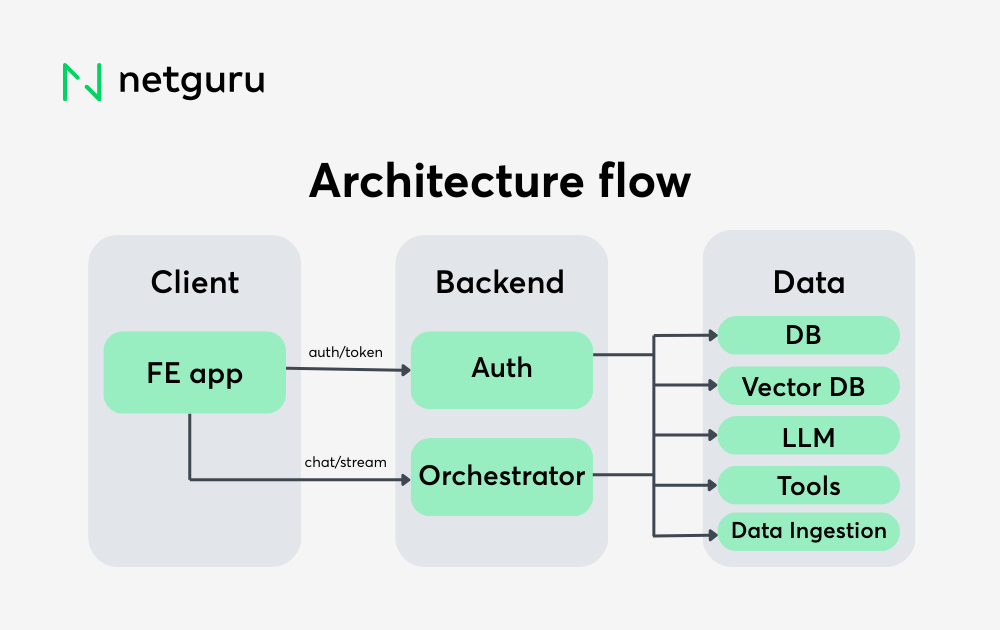
The orchestrator manages logic between the frontend, LLM, retrieval system, and tools. It handles prompt construction, chat history, tool execution, and response streaming.
What to choose:
- FastAPI – A modern Python framework with async support, automatic documentation, and type-safe data handling.
- LangChain or LangGraph – Agent frameworks for building multi-step workflows, managing state, and routing tool calls.
How to decide:
Use FastAPI as the base for any Python-native backend. Introduce LangChain or LangGraph when you need dynamic tool selection, agent reasoning, or more complex multi-turn logic.
Frontend interface
The user interface should support natural language input, real-time streaming, and display of sources or citations — all while staying lightweight and responsive.
What to choose:
- React – The most popular choice, with rich ecosystem support for building custom interfaces.
- Next.js or Vue – Good alternatives depending on your team’s frontend experience.
- Prebuilt templates – Useful for MVPs or as a starting point before custom development.
How to decide:
Go with React unless your team already favors another framework. Focus on user experience features like fast rendering, input flexibility, and mobile responsiveness. Server-Sent Events (SSE) support is also important for streaming responses.
Preparing the Data: Ingestion, Chunking, and Indexing
Even with a strong model and fast infrastructure, an AI chatbot is only as good as the data it retrieves. Commerce chatbots rely on product specs, policies, documentation, and structured exports — and if this data isn’t ingested and indexed properly, the system will surface incomplete or incorrect answers.
This section outlines how to transform diverse data sources into a retrieval-optimized format for accurate, grounded responses.
Data ingestion
Commerce projects typically draw from a mix of structured and unstructured sources. Common input types include:
- Markdown, HTML, plain text
- PDFs and Word documents
- Website crawls (via sitemap or scraper)
- Structured exports (e.g., CMS APIs, spreadsheets)
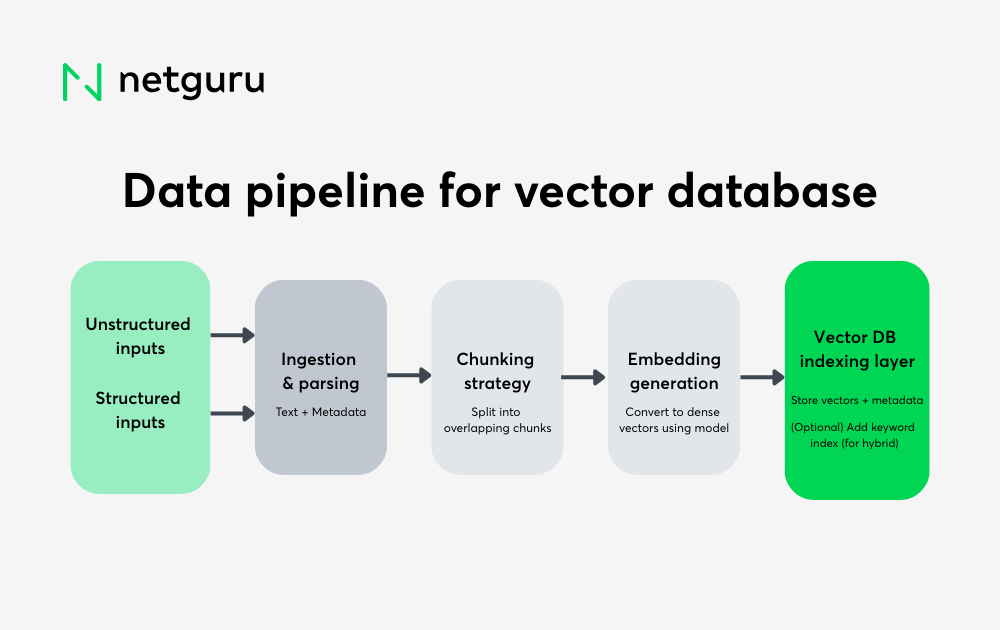
The ingestion process parses, cleans, and normalizes these into a consistent intermediate format. Metadata such as source path, document type, tags, or language can be added at this stage — enabling filtered queries or scoped retrieval later.
Chunking strategy
Instead of indexing full documents, content is split into smaller units — called chunks — that balance semantic completeness with prompt size constraints.
- Too small, and the model lacks context.
- Too large, and results may exceed token limits or include irrelevant sections.
Many implementations use a recursive character splitter or sliding window approach, often with overlapping tokens to preserve flow between chunks.
Example:
A 2,000-word product manual might become 10–12 chunks of ~300 tokens each, tagged with metadata like:
{
"source": "product-manual.pdf",
"section": "Installation",
"language": "en"
}
Diagram: Typical data processing pipeline for preparing unstructured and structured content for vector-based retrieval in a commerce chatbot.
 Embedding and vectorization
Each chunk is then converted into a dense vector representation using an embedding model. This allows semantic similarity search — finding conceptually related content, even if it doesn’t use the same wording.
Common embedding models:
text-embedding-ada-002(OpenAI)
Cohere Embed- Open-source models via Hugging Face or
sentence-transformers
Embeddings are deterministic and can be cached for efficient updates or re-indexing.
Indexing in a vector database
Once vectorized, chunks are stored in the chosen vector database — either managed or self-hosted — alongside their metadata.
Typical options:
- Managed: Pinecone, Qdrant Cloud
- Self-hosted: pgvector, Weaviate, Milvus
The database enables fast semantic retrieval and can support filters like:
{"product": "Model X", "language": "en", "source": "CMS"}
This is essential for narrowing answers to specific categories, SKUs, or languages.
Hybrid search (often recommended)
While vector search works well for semantic matching, hybrid search — combining vectors with keyword scoring — often improves accuracy in commercial contexts.
Use it when:
- Product names or SKUs need exact matching
- Technical terms shouldn’t be paraphrased
- Short or vague queries risk false positives
Some databases (like Weaviate or Azure AI Search) support hybrid search natively. Others can be extended with custom BM25 scoring logic.
Agent graph flow: Think, act, respond
To manage tool usage and decision-making cleanly, we recommend structuring the agent logic as a small execution graph — using tools like LangGraph.
A simple and effective flow looks like this:
This creates a predictable “think, act, respond” pattern:
- Router: Evaluates the user’s message and decides whether tools (like a vector search or product lookup) are needed.
- Tool Executor: If tools were selected, it runs them and gathers their outputs.
- Generate Answer: Uses the retrieved data, tool outputs, and conversation history to generate a grounded response via LLM.
This avoids over-complicating the flow with loops or recursive reasoning. In many commerce use cases, a single round of tool calls is enough — and this linear structure is easier to test, debug, and monitor in production.
AI Chatbot Application Workflow: From Prompt to Response
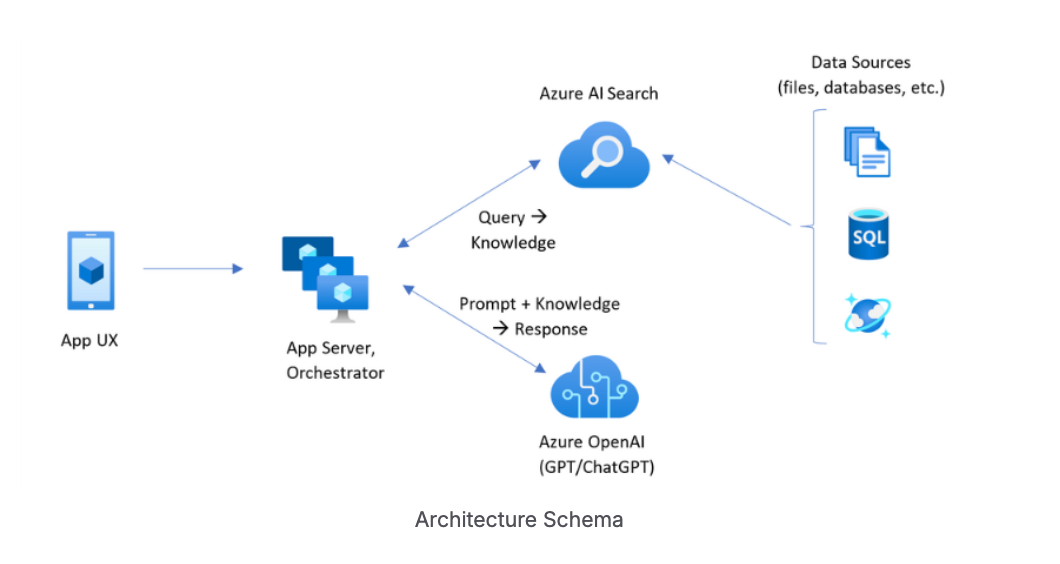
Once your data is indexed and accessible, the next step is coordinating how a user’s question moves through the system to produce a grounded, real-time answer. This orchestration layer connects key components — embedding model, vector search, language model, and frontend — into a coordinated workflow.
RAG workflow overview
A typical retrieval-augmented generation flow: the orchestrator queries a vector index (e.g., Azure AI Search) for relevant context, then passes that along with the user’s prompt to an LLM (e.g., Azure OpenAI) to generate a grounded response. This reduces hallucinations and keeps answers aligned with your business data.
Below is a typical end-to-end flow for a user query in a production chatbot setup.
1. User submits a message
The user types a question into the chat interface. This input is sent to the backend orchestrator via a REST API endpoint (commonly POST /v1/chat/stream), along with metadata such as a conversation ID or user token.
{
"query": "What’s the shelf life of the hyaluronic acid serum once opened?",
"conversation_id": "abc123"
}
2. Orchestrator receives and prepares the request
The orchestrator (e.g., a FastAPI service) manages the backend logic and coordination. It commonly performs:
- Authentication (e.g., via JWT token)
- Session handling (linking messages to a conversation)
- Logging (user query, metadata, timestamps)
It also decides how to process the prompt:
- If it’s a basic greeting, it may skip retrieval entirely.
- If it needs external data, it moves to the retrieval step.
- For tool-based queries (e.g., inventory lookups), it may trigger a function or API call.
3. Query is embedded and sent to the vector database
If the prompt requires context (like specs or policies), it’s converted into a vector using the selected embedding model — such as OpenAI’s text-embedding-ada-002 or a local transformer model.
The orchestrator queries the vector database using:
- The query vector
- Optional metadata filters (e.g.,
{"language": "en"}or{"source": "docs"})
The database returns a ranked list of relevant text chunks based on semantic similarity. If hybrid search is enabled, keyword matching (e.g., BM25) can be combined with vector scores to improve accuracy.
4. Context is assembled for the LLM
The orchestrator then assembles the final prompt for the LLM by selecting the most relevant results — typically limited by a token budget.
This context may include:
- The top N chunks from vector search
- The original user message
- Prior messages from the same session (for multi-turn memory)
- Metadata like source titles or document types
This is often referred to as a retrieval-augmented prompt.
5. The LLM generates a response
The completed prompt is passed to the configured LLM (e.g., GPT-4, Claude, or an OSS model). The model generates a response that is:
- Grounded in the retrieved data
- Conversational and user-friendly
- Aligned with system constraints (e.g., don’t hallucinate facts)
Many implementations also enable inline citations or footnotes to increase trust.
6. Response is streamed to the frontend
To reduce perceived latency and improve UX, the response is streamed to the user as it’s being generated — using Server-Sent Events (SSE) or WebSockets.
The frontend receives a stream of partial messages in JSON format and renders them incrementally.
7. Logging and feedback (Optional)
After completion, the system logs:
- Final response
- Retrieval sources used
- Query latency and system performance
- User feedback (e.g., thumbs up/down, helpful/not helpful)
This data is stored in the application database and can be used to:
- Improve chunk quality or embedding strategy
- Tune prompt templates
- Identify common failures or edge cases
Backend Implementation: The Orchestrator
At the center of this reference commerce chatbot architecture is an orchestrator — a backend service responsible for managing user queries, coordinating retrieval and reasoning steps, and delivering streamed responses to the frontend.
One widely adopted approach is to build this layer using FastAPI, a modern, async-ready Python web framework. It’s particularly well-suited to LLM-based systems, where most operations are I/O-bound (e.g., calling external APIs, querying vector databases, or accessing session history).
Why FastAPI is a strong fit
FastAPI supports:
- Asynchronous execution: Ideal for concurrent calls to vector databases, LLMs, and external APIs.
- Data validation and typing: Through Pydantic, request and response formats are well-defined and self-validating.
- Automatic documentation: OpenAPI integration means your endpoints are self-documented and testable via Swagger UI.
For systems involving tool execution, streaming responses, or multi-turn chat history, FastAPI provides a practical and scalable base for Python-native chatbot backends.
Core responsibilities of the orchestrator
The backend service typically handles:
- User authentication (e.g., via JWT)
- Session tracking and chat history management
- Query vectorization and context retrieval
- Prompt assembly with optional tool outputs
- Sending the final prompt to the selected LLM
- Streaming the model response to the frontend (via SSE)
Keeping this logic modular makes it easier to extend or customize for different use cases or clients.
AI Agents and AI tools: Coordinating reasoning and execution
For simple queries, a chatbot can pass the prompt straight to the model. But in commerce scenarios, user questions often require more than just generation — they call for retrieval, lookup, comparison, or even multi-step synthesis. That’s where AI agents and tools come in.
Instead of a monolithic prompt-response loop, this approach breaks the process into structured steps. The system can “decide” what needs to be done before generating a final answer.
Structuring the logic with agents
An agent is a logic controller that interprets the user’s intent, chooses what actions to take (if any), executes those actions, and then passes all the gathered context to an LLM for response generation.
Libraries like LangGraph or LangChain support this kind of architecture by enabling graph-based execution — where nodes represent logic steps and edges define the flow.
A commonly used and effective structure includes three agents:
- Router — analyzes the user query and determines the necessary steps (e.g., search, CMS lookup, or direct response).
- Tool Executor — runs the operations selected by the router.
- Answer Generator — assembles the inputs and calls the LLM to generate a final answer.
This setup keeps the logic modular and extensible — well-suited for evolving commerce requirements.
Tools: Connecting to external data
In this setup, tools are callable functions or APIs that extend what the model can do. They provide grounding by fetching data the model doesn’t “know” on its own. Typical tools for commerce chatbots include:
- Vector Search Tool
Pulls relevant chunks from your indexed document store based on semantic similarity. - Product CMS Lookup
Queries structured data like product specs, availability, or pricing from an internal API. - Web Search (Optional)
Useful for fetching current data, such as competitor comparisons or public pricing.
Each tool should have a clearly defined input and output, like:
def product_lookup(product_name: str) -> dict:
# Call to CMS API returning structured product data
These tools are registered with the agent framework and can be invoked conditionally, depending on what the query requires.
Recommended execution flow
A clean starting point is the “Think – Act – Respond” model, using a linear execution graph:
.png?width=1000&height=630&name=Execution%20flow%20(1).png)
- The router decides what operations are needed.
- The executor runs those operations and collects data.
- The generator uses that data — along with the user prompt and any chat history — to produce a grounded response.
More advanced flows (e.g., loops, retries, follow-ups) can be added as needed, but this structure covers the majority of commerce chatbot use cases.
Why use agents?
- Separation of concerns: Keeps retrieval, tool use, and response generation independent and traceable.
- Reusability: Tools and logic can be reused across different bots or client projects.
- Observability: Each step can be logged, debugged, or evaluated on its own.
- Better control: Reduces overreliance on the LLM and helps prevent hallucinated or unsupported answers.
When your chatbot needs to combine structured product data with retrieved documents and user intent — agentic reasoning provides a reliable, modular foundation.
Real-time chatbot UX: Streaming chat interface for customer experience
A production-ready commerce chatbot is more than a backend pipeline — its value depends on how well the frontend handles real-time interactions, trust signals, and usability in multi-turn conversations.
The goal isn’t just to display responses, but to support a fluent and reliable experience: streaming tokens as they arrive, rendering citations clearly, preserving chat history, and enabling structured feedback.
A common choice for implementation is a React-based frontend, communicating with the backend via standard REST endpoints and Server-Sent Events (SSE).
Core frontend responsibilities
The UI should support:
- Streaming responses: Show the model’s output incrementally, improving perceived performance.
- Source display: Let users inspect where answers came from, whether internal docs or product data.
- Conversation context: Maintain history across turns so follow-up questions are meaningful.
- Feedback capture: Collect input (e.g., thumbs up/down, rating, or flagging) to monitor quality.
- Authentication handling: Attach JWTs or session tokens to each API call securely.
Infrastructure and Deployment Chatbot Best Practices
Once the chatbot architecture is built, the next step is making it reliable to run — in development, staging, and production. A well-structured infrastructure setup makes the system reproducible, portable, and easier to maintain across environments or client deployments.
Each core service — including the orchestrator, frontend, vector database (if self-hosted), and support tools — should be containerized using Docker. This ensures consistency across machines and teams. A typical setup includes individual Dockerfiles for each service and a docker-compose.yml file for local development and integration testing. Configuration values, secrets, and credentials should be externalized using .env files or a centralized secrets manager.
For cloud deployment, use an Infrastructure-as-Code (IaC) tool like Terraform to provision and manage resources in a repeatable way. A basic cloud setup might include compute (e.g., Azure Kubernetes Service, AWS ECS), object storage (e.g., S3 or Azure Blob for document files and embedding caches), a load balancer or API gateway, and secrets management (e.g., AWS Secrets Manager or Azure Key Vault).
If the system is intended to run across multiple clients or environments, it's important to avoid hardcoded dependencies. Components like the vector database or LLM provider should be pluggable — defined via environment variables or configuration files, not fixed in code. This makes the stack easier to adapt without modifying core logic.
A CI/CD pipeline should automate build, test, and deploy steps. For example:
- Build Docker images for each component
- Run unit/integration tests
- Push images to a container registry
- Trigger deployment to the target environment
GitHub Actions, GitLab CI, or Azure Pipelines can all support this flow. For Kubernetes deployments, Helm help manage configuration differences between environments (e.g., dev, staging, production) without duplicating manifests.
Once in production, monitoring and observability matter. On the chatbot side, tracking user interactions, prompt performance, and feedback can help surface issues or improve future iterations. Tools like Langfuse, custom dashboards, or a simple logging database can be used for this.
Frontend monitoring tools like Sentry or PostHog can help track client-side errors, failed API calls, or user behavior trends.
With this setup in place, the chatbot becomes easier to deploy, scale, and operate — while maintaining the flexibility to adapt across teams, infrastructure providers, or client-specific constraints.
Trade-offs and Technical Decisions in Chatbot Creation
No chatbot architecture is one-size-fits-all. Even with a modular stack in place, key technical decisions will shape performance, maintainability, and extensibility. This section outlines common trade-offs and how to approach them in a commerce chatbot context.
Vector database: Managed vs. self-hosted
Managed solutions like Pinecone or Weaviate Cloud simplify scaling and infrastructure management but come with vendor lock-in and pricing considerations. Self-hosted options like pgvector or Milvus give you full control and lower cost but require more setup and monitoring. If deployment needs to remain cloud-agnostic or run on client infrastructure, pgvector is a solid choice — especially if you’re already using PostgreSQL.
|
Feature |
Chroma |
Pinecone |
Weaviate |
Faiss |
Qdrant |
Milvus |
PGVector |
|
Open-source |
✅ |
❎ |
✅ |
✅ |
✅ |
✅ |
✅ |
|
Primary Use Case |
LLM Apps Development |
Managed Vector DB for ML |
Scalable Vector Storage and Search |
High-Speed Similarity Search and Clustering |
Vector Similarity Search |
High-Performance AI Search |
Adding Vector Search to PostgreSQL |
|
Integration |
LangChain, LlamaIndex |
LangChain |
OpenAI, Cohere, HuggingFace |
Python/NumPy, GPU Execution |
OpenAPI v3, various clients |
TensorFlow, PyTorch, HuggingFace |
Built into PostgreSQL ecosystem |
|
Scalability |
From local to clusters |
Highly scalable |
Scales to billions |
Large sets in RAM |
Cloud-native horizontal scaling |
Scales to billions of vectors |
Depends on PostgreSQL setup |
|
Search Speed |
Fast similarity search |
Low-latency |
Millisecond responses |
Fast, supports GPU |
HNSW for rapid search |
Optimized for low-latency |
Approximate Nearest Neighbor |
|
Data Privacy |
Multi-user, isolated |
Fully managed |
Emphasizes security |
Research-focused |
Payload filtering and isolation |
Multi-tenant architecture |
Inherits PostgreSQL’s security |
|
Language |
Python, JavaScript |
Python |
Python, Java, Go |
C++, Python |
Rust |
C++, Python, Go |
SQL (PostgreSQL extension) |
LLM providers: Closed vs. open source
Closed models (e.g., OpenAI, Anthropic) offer strong performance and fast setup, but they limit observability and require sending data to external APIs. Open-source models (e.g., Mistral, LLaMA) can be fine-tuned, deployed privately, and audited — at the cost of compute complexity and sometimes weaker output quality. For early-stage projects, closed APIs are often faster to integrate; for regulated environments or long-term maintainability, open-source is increasingly viable.
Hybrid search: When to combine keyword and vector matching
Pure vector search works well for semantically broad queries. But in commerce, users often reference exact terms — model numbers, SKUs, technical phrases — where keyword relevance still matters. Hybrid search (combining vector similarity and keyword scoring) improves retrieval precision and is worth implementing if your data includes product specs or legal policies.
Some vector databases support hybrid search natively (e.g., Weaviate, Azure Cognitive Search). In other setups, you can simulate it by combining BM25 results with vector results in the orchestrator logic.
Orchestration complexity: Flat vs. graph-based agents
For simple chatbots, a flat, sequential flow (retrieve → generate) is often enough. But as you add features like external tool calls, follow-up reasoning, or conditional logic, a graph-based agent flow becomes more maintainable.
LangGraph offers a clean way to define agent steps and transitions, especially when you want to control when and how tools are used. The trade-off is added complexity during development and debugging, so it’s best introduced once simpler routing logic starts to break down.
Streaming: SSE vs. WebSockets
Server-Sent Events (SSE) are easy to implement and sufficient for most chat interfaces. WebSockets offer more flexibility (e.g., bidirectional messaging, custom protocols) but require more infrastructure and client-side complexity. Unless your chatbot needs real-time sync or multi-user sessions, SSE is usually the better starting point.
Chatbot Development Common Pitfalls and Lessons Learned
Even with the right architecture and tools in place, certain issues tend to surface when moving from prototype to production — especially in LLM-based commerce systems where accuracy and user trust matter. Below are common AI implementation failure points and how to avoid them.
Chunking content poorly
The way you split documents into chunks affects everything downstream — especially retrieval quality. If chunks are too short, important context gets lost. If too long, token budgets are exceeded and irrelevant details may be included in answers.
- Avoid: Arbitrary character limits or fixed-size splits across all content types.
- Do: Use semantic chunking (by heading, paragraph, or semantic breaks), and add overlaps between chunks to preserve context.
Letting prompts grow unbounded
As conversations progress, the orchestrator may include more and more context: previous messages, retrieved documents, metadata. This can silently push prompts toward model token limits, degrading performance or causing cutoffs.
- Avoid: Injecting the entire conversation history or full documents into every request.
- Do: Prioritize relevance, apply pruning strategies, and set clear token budgets per prompt section.
Over-relying on the LLM
LLMs can generate fluent answers, but they’re not deterministic systems. For use cases involving compliance, specs, or pricing, relying on generation alone introduces risk.
- Avoid: Letting the LLM “fill in gaps” when structured data is unavailable.
- Do: Ground all critical outputs in retrieved context or real-time tool calls. If data is missing, make that clear to the user.
No observability into behavior
Without visibility into what the model saw — including retrieved content, tools used, and final prompts — debugging becomes guesswork. This slows iteration and makes errors harder to catch.
- Avoid: Treating prompts and completions as opaque strings.
- Do: Log inputs, outputs, tool activity, and metadata per session. This enables better monitoring, debugging, and improvement.
Missing the human feedback loop
Users are often the first to notice irrelevance, confusion, or hallucinated answers. Without a simple way to collect and review this feedback, improvement stalls.
- Avoid: Assuming metrics like latency or model success rate reflect answer quality.
- Do: Add lightweight feedback mechanisms (thumbs up/down, flags, ratings) and store responses for review and tuning.
Final Thoughts: Accurate Answers in the Chatbot System
A well-structured commerce chatbot is not just a single feature — it’s part of the infrastructure. Once the initial system is stable and in use, the focus shifts from building to evolving: how to scale use cases, improve performance, and extend functionality without adding unnecessary complexity.
Add more tools, not bigger prompts
As use cases expand, resist the temptation to make prompts longer or harder to manage. Instead, introduce modular tools — like structured lookups, internal API integrations, or database queries — and let the agent decide when to use them. This keeps reasoning explainable and prevents prompt bloat, while making behavior easier to trace and debug.
Layer in personalization and context memory
For more tailored experiences, user-specific context (such as prior purchases, saved preferences, or repeat queries) can be introduced through scoped retrieval or metadata filters. This doesn’t require changing the core pipeline — just adjusting what data is passed into retrieval or used to influence tool execution.
Evaluate and tune over time
Open-source models allow for fine-tuning, but even with API-based models, you can improve performance through prompt evaluation and structured testing. Log failures, collect edge cases, and test changes in staging environments before rolling them out. Use versioning to manage LLM configurations, prompts, and orchestration logic.
Plan for multi-language use
Many commerce platforms operate across regions. To support multilingual users, use multilingual embedding models during indexing, and select LLMs capable of understanding and generating responses in target languages. Adding a language tag to document metadata allows for filtered retrieval without complicating the prompt.
Expand beyond chat
Once the backend is modular and API-driven, the same pipeline can support more than a chat interface. Voice assistants, internal search bars, knowledge base tools, and even embedded assistants in sales software can use the same architecture — grounded in retrieval, powered by models, and enriched with tools.
FAQ How to make a commerce chatbot
How do I build a commerce chatbot from scratch?
To build a commerce chatbot from scratch, you’ll need a modular architecture with these core components: a vector database for retrieval (e.g., pgvector or Pinecone), a language model (like GPT-4 or Mistral), an orchestrator backend (FastAPI), and a frontend chat interface (React). The key is to ground answers in your business data using tools and retrieval pipelines, not just prompts.
What is the best vector database for chatbot development?
For most teams, pgvector is a solid choice if you're already using PostgreSQL. For managed scaling, Pinecone and Weaviate offer good APIs and hybrid search. The “best” option depends on your infrastructure preferences, data volume, and need for features like metadata filtering or hybrid scoring.
Can I use open-source LLMs in a production chatbot?
Yes. Open-source models like Mistral, Mixtral, or LLaMA 3 can be deployed privately and fine-tuned for your use case. They offer more control and data privacy than closed APIs but require more setup and compute resources. They’re especially viable for regulated industries or when data must stay on-premise.
How do I make chatbot responses more accurate?
Accuracy comes from grounding — not just model quality. Use well-chunked documents, a solid retrieval layer, and tool-based lookups for structured data. Don’t rely on the model to guess. Always send the right context with the query and log outputs for evaluation and debugging.
What are common mistakes when developing a commerce chatbot?
Common AI implementation mistakes include poor chunking of documents, overloading prompts without token control, skipping retrieval logic, and lacking observability into what the model sees. Also, missing user feedback loops limits long-term improvement. Avoid these by structuring logs, enforcing token budgets, and grounding all critical answers in data.


