
AI chatbots for customer service: Types, costs and ROI (2026)


Contents
Choosing an AI chatbot for customer service comes down to three variables: which tickets you want resolved without a human, how the vendor bills for a resolution, and whether your helpdesk-native agent can reach the systems that hold the answer. Tools differ most in write access to order, refund and account APIs, and in how they count a resolved conversation.
A chatbot is the wrong investment when ticket volume is low or the knowledge base is unstructured. The right pick depends on volume, stack and risk tolerance.
AI chatbots for customer service: The short answer
An AI agent that reads your knowledge base and calls order and refund APIs fits teams with high volumes of repetitive tickets. A rule-based chatbot only suits a few scripted flows. Under per-resolution pricing, the automated resolution rate largely sets your bill.
We recommend starting with a helpdesk-native agent such as Intercom Fin or Zendesk AI Agents when your tickets already live there, because handoff history and permissions come built in.
Netguru designs and builds custom support agents that integrate with helpdesks, order systems, and messaging channels. Go custom only when write actions or data rules outgrow the vendor. Route legal questions, billing disputes, and upset customers to humans.
What is an AI chatbot for customer service?
An AI chatbot for customer service uses large language models to answer support questions in natural language. An AI agent goes further by calling APIs to act on those questions.
For retail teams, where support questions often involve orders, returns, and stock availability, our retail software development work shows how these agents fit into the wider operation.
| Type | What it does | Pick it when |
|---|---|---|
| Rule-based chatbot | Follows scripted decision trees and button flows | Flows are fixed and few, such as store hours or a shipping-status lookup |
| LLM chatbot | Answers from your knowledge base using retrieval augmented generation | Customers need answers only, with no account changes |
| AI agent | Answers, then calls refund, cancellation or account APIs | The bot must change state in a backend system |
Our suggested decision rule is to work through these questions in order and stop at the first "yes":
- Must the bot change data in a backend system, such as issuing a refund or cancelling an order? Choose an AI agent.
- Do customers ask questions whose answers live in policies, product pages or help articles, often worded in unpredictable ways? Choose an LLM chatbot.
- Are the flows fixed and few, with predictable inputs? Choose a rule-based chatbot.
If your ticket mix spans several of these, route each ticket category to the least capable type that covers it. A common pattern is an LLM chatbot for general questions, with agent actions enabled for one low-risk task first.
An agent that can issue refunds also needs escalation triggers to a human and audit logs of every action it takes. If you cannot yet build those, stay at the LLM chatbot tier. For wider terms, see AI in customer service.
How do AI chatbots work?
An AI chatbot passes each customer message to a large language model, which drafts a reply from retrieved knowledge base content and calls your APIs when the customer needs something done. How these components fit together, from the retrieval layer to the API connections, is a question of AI chatbot system architecture, and the right design depends on your integration needs.
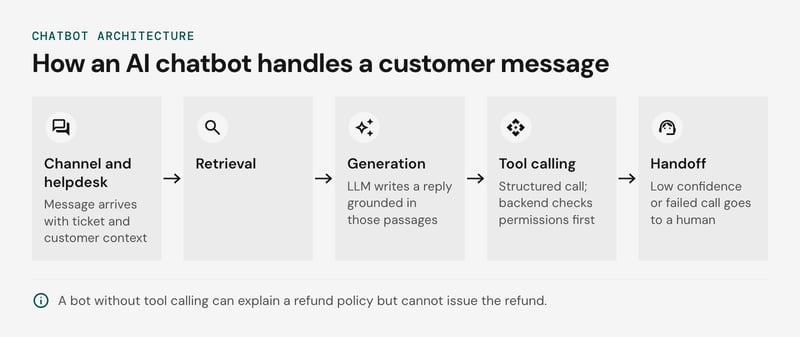
The request path, left to right:
- Channel and helpdesk integration: the message arrives from chat, email or in-app, with ticket and customer context attached.
- Retrieval: retrieval augmented generation embeds the question and pulls the closest knowledge base passages.
- Generation: the large language model writes a reply grounded in those passages.
- Tool calling: for refunds, order lookups or plan changes, the model emits a structured call, and your backend checks permissions before executing it.
- Handoff: low retrieval confidence or a failed tool call routes the conversation to a human with the transcript.
Two failure modes sit in this path. Retrieval returns whatever the index holds, so a stale pricing article or an unstructured PDF produces a confident wrong answer. We recommend re-indexing on every article edit, chunking by heading, and giving each article an owner. At chatbot volume, one outdated article is repeated in every conversation that retrieves it.
A read-only bot can explain a refund policy but cannot issue the refund. Without tool calling, those conversations end in handoff, so containment can look healthy while resolution stays flat.
Which AI chatbot fits which team?
Choose an AI chatbot for customer service by the helpdesk you already run, whether it must change data in other systems, and your monthly ticket volume. The helpdesk-native agent usually wins on the first criterion. If your systems are complex or your APIs are poorly documented, an AI consultancy company can help you scope the integration before you commit to a vendor.
The table below shows each tool's best fit and whether it can write to backend systems (refund, cancel, edit an address) or only answers from a knowledge base. The write-action column reflects our reading of vendor documentation. Confirm it in a proof of concept against your own APIs.
| Tool | Best for | Write actions |
|---|---|---|
| Intercom Fin | Teams on Intercom, or on another helpdesk, that want strong retrieval answers | Yes, through custom actions and data connectors |
| Zendesk AI Agents | Zendesk shops with several channels and an existing macro library | Yes, through integrations and API actions |
| Tidio Lyro | Small teams and Shopify stores with light ticket volume | Mostly read-only, with limited actions via Tidio flows |
| Gorgias AI Agent | Shopify merchants running support in Gorgias | Yes, for store actions such as order edits and cancellations |
| HubSpot Customer Agent | CRM-led teams whose answers depend on contact records | Mostly read-only, with limited actions |
| Freshdesk Freddy AI | Freshworks customers on mid-market budgets | Partial, through workflows and integrations |
| Ada | High-volume, multichannel support with complex backend flows | Yes, through API integrations |
Three rules narrow the list:
- Helpdesk first. An agent inside your current helpdesk inherits ticket history, routing and handoff with no sync layer to maintain. Switching helpdesks to get a better bot rarely pays back.
- Write actions second. If most contacts are "where is my order", a read-only agent can resolve them. If they are refunds or plan changes, choose a tool with action support and scope its permissions tightly.
- Volume third. Per-resolution pricing favors spiky or modest volume. At sustained high volume, model it against a per-seat or flat-fee alternative.
We recommend a custom build only when no native agent can reach your backend actions, or when data residency or PII rules rule out a vendor-hosted model. Otherwise the build and evaluation-set maintenance cost exceeds a subscription.
No chatbot is warranted when volume is low (our rough threshold is a few hundred tickets a month, an illustrative figure, not a benchmark). The same goes for when policies change weekly or the knowledge base is stale.
Unmaintained content also carries legal cost: in 2024 a Canadian tribunal ordered Air Canada to pay $650.88 in damages after its chatbot gave a customer wrong bereavement fare information (more on that case below).
AI chatbots for Shopify customer service
Gorgias AI Agent and Tidio Lyro both connect to Shopify through helpdesk integration, but they differ on whether the bot can change an order or only describe it.
Test four order workflows in a sandbox store before you buy. Each one separates an agent that writes to Shopify from a bot that reads it.
| Workflow | Answer-only bot | Agent with Shopify write actions |
|---|---|---|
| Order status and tracking | Looks up the order and quotes the carrier link | Same, plus proactive alerts by SMS or email |
| Address edit | Hands off to a human | Updates the address while the order is unfulfilled |
| Cancellation | Hands off to a human | Cancels unfulfilled orders under your rules |
| Refund or return | Quotes the policy | Issues the refund or opens the return within a set limit |
Gorgias documents order actions inside AI Agent. Lyro is best documented for knowledge-base answers and order lookups. Both vendors ship changes often, so confirm current action support in their docs and on your plan.
Our recommendation: if Shopify order requests dominate your queue and you run Gorgias, start with its AI Agent. Cap refund amounts and escalate to a human on any failed action. Stores with subscriptions or a third-party warehouse usually outgrow both, and that is where a custom commerce chatbot pays off.
How do the leading AI chatbots compare?
Intercom Fin and Zendesk AI Agents both use per-resolution pricing, Tidio Lyro bills by conversation volume, and a custom build bills for engineering plus model usage. The write-action column and billing unit decide total cost more than the feature lists do.
The options side by side, with rows reflecting each vendor's public documentation (check current pages before shortlisting):
| Option | Channels | Helpdesk fit | Write-action API | Billing unit | Starting price | Typical team |
|---|---|---|---|---|---|---|
| Intercom Fin | Chat, email, social, voice | Native to Intercom; can sit on top of other helpdesks | Data connectors and actions to call your APIs | Per resolution | $0.99 per resolution | Mid-size to enterprise support teams |
| Zendesk AI Agents | Messaging, email, voice | Native to Zendesk | Action flows and integrations | Per automated resolution | From $1.50 per resolution | Teams already on Zendesk |
| Tidio Lyro | Website chat, social messengers, email | Tidio inbox; Shopify connector | Limited to supported integrations | Per conversation tier | From $32.50 a month for 50 Lyro conversations | Small teams, e-commerce |
| Netguru custom build | Any channel you wire up | Any helpdesk through its API | Tool calling against any internal API | Engineering time plus LLM usage | Scoped per project | Teams with non-standard systems of record |
Prices are the vendors' list prices as of October 2026: Intercom charges $0.99 when a customer confirms the issue is resolved, stops asking for help, or Fin completes a workflow; Zendesk starts at $1.50 per resolution; Tidio starts Lyro at $32.50 a month.
We recommend a helpdesk-native agent when your tickets already live in Intercom or Zendesk and the write actions you need are standard, such as refunds or address changes. Consider a custom build when actions touch internal systems the vendor has no connector for, or when per-resolution fees would outgrow a fixed engineering budget.
Before signing, ask each vendor how it defines a resolution. A conversation with no follow-up within a set window may count as resolved and be billed, so the vendor's definition of automated resolution rate rarely matches yours.
How much do AI chatbots for customer service cost?
At Intercom's $0.99 per-resolution price, an AI chatbot for customer service costs about $2,300 per 1,000 resolutions once knowledge base upkeep, integration work, and QA review are counted. The vendor fee is under half of that.
Billing units set the shape of the invoice. Per-seat pricing charges for human agents, per-conversation pricing charges for every chat including the ones the bot fails, and per-resolution pricing charges only for conversations counted as resolved.
Intercom Fin and Zendesk AI Agents both use per-resolution pricing, so the model below uses a per-resolution fee.
The following table shows the worked example. Every input is our assumption, not a benchmark: 10,000 conversations a month and a 40% automated resolution rate, which gives 4,000 resolutions a month.
| Cost line | Assumption | Per 1,000 resolutions |
|---|---|---|
| Vendor fee | $0.99 per resolution (Intercom list price) | $990 |
| Knowledge base upkeep | 0.25 FTE content owner at $90,000 loaded per year ($1,875 a month) | $469 |
| Integration work | $30,000 one-time for read and write actions (order lookup, refunds), amortized over 12 months | $625 |
| QA review | 10% of resolutions sampled, 3 minutes each, $40 per hour loaded | $200 |
| Total | about $2,284 |
The fixed lines scale with volume, so the automated resolution rate moves the total more than the vendor's unit price does. At a 20% rate (2,000 resolutions a month), the same upkeep and integration budgets cost $938 and $1,250 per 1,000 resolutions. The total rises to about $3,378.
Per-conversation billing hides the same effect. A conversation price divided by the resolution rate gives your real cost per resolution, so a price that looks cheap at 40% resolution costs 2.5 times its list figure per resolved case.
We recommend running this model with your own ticket volume and a measured resolution rate from a pilot on a held-out evaluation set. Vendors define "resolution" differently, so read each definition before you compare prices. For a custom build, replace the vendor fee with model usage and retrieval infrastructure, and add the engineering team's ongoing maintenance as a fifth line.
Which tickets should an AI chatbot resolve and which go to humans?
An AI chatbot should resolve tickets whose answer sits in approved content or a read-only lookup, and hand off anything that moves money, carries legal exposure, or signals distress. The routing table below is our recommended default. The refund figure is an illustrative threshold, not a benchmark, so set yours from your average order value and fraud exposure.
| Ticket type | Route | Reason |
|---|---|---|
| Order status, opening hours, policy FAQ | Bot resolves | Answer comes from RAG over approved content or a read-only API call |
| Address change, subscription pause | Bot resolves after authentication | Tool call is reversible and logged |
| Refund under an illustrative $50 | Bot resolves | Capped, logged, auditable |
| Refund above $50, goodwill exceptions | Human approves | Money leaves the business |
| Complaints, legal threats, bereavement or medical cases | Human from the first message | Wrong answers carry liability |
The bereavement row is there for a reason: the Air Canada case was about bereavement fares. A bot that can only quote policy and cannot grant exceptions limits that exposure.
Here is how three hypothetical tickets would route under the table, using the illustrative $50 cap:
- A $32 refund on a delivered item: the bot authenticates the customer, issues the refund, and logs the action.
- A $140 refund request citing a late delivery: the bot drafts a reply with the order history and policy, and an agent approves or amends it.
- A message that mentions a family death while asking to change a flight: it goes to a person from the first message.
Human handoff and escalation triggers should fire on any of these:
- Sentiment analysis scores two consecutive customer messages as negative.
- The customer asks for a person once. Honor it immediately.
- Retrieval returns no source passage above your confidence threshold.
- The same intent fails twice.
- The message matches a protected category: chargeback, legal threat, safety issue, or a data deletion request involving PII.
Pass the transcript, detected intent, and retrieved sources to the agent so the customer never repeats themselves. When the queue is long, notify the customer on their preferred channel (messaging app, SMS, or email).
Narrow scope pays off where volume is spiky. During its Grand Finale, the GOCC Communication Center receives thousands of queries from people wanting to support the initiative, many arriving through Messenger. In the Great Orchestra of Christmas Charity (GOCC) project, the chatbot processed 80% of all Messenger queries.
The middle tier is a bot that drafts and a human who approves. For refunds above your threshold, that pattern keeps most of the speed gain and the human sign-off.
We define automated resolution rate as tickets closed without human touch and not reopened within seven days. Track it per ticket type from the table, since a blended number hides whether the refund and complaint lanes are leaking.
What features should a customer service chatbot have before you buy?
A customer service chatbot should pass five tests before you sign: helpdesk integration, human handoff and escalation triggers, evaluation-set support, PII redaction, and multilingual coverage. Run each in a pilot on your own tickets, and track CSAT on bot-handled conversations separately from human-handled ones.
The checks below show what to run and what a failure looks like:
| Feature | Test in the pilot | Fail signal |
|---|---|---|
| Helpdesk integration | Create, update and tag a ticket through the native connector. Confirm the bot reads your knowledge base and macros without a manual export. | Transcripts arrive as one unstructured note. Custom fields are unmapped. |
| Handoff and escalation triggers | Force a handoff on negative sentiment, two failed answers and a refund request. Check the agent sees the full history, customer identity and retrieved sources. | The customer has to repeat the problem. |
| Evaluation-set support | Replay an illustrative 200-300 past tickets with known outcomes after every prompt or model change. | Only an aggregate dashboard, no replay. |
| PII redaction | Send card numbers, emails and addresses. Inspect logs, stored transcripts and the payload sent to the LLM provider. | Raw values appear in any of the three. |
| Multilingual | Run the evaluation set in your three largest non-English languages. | Accuracy drops, or handoff routes to agents who don't speak the language. |
Analytics should report automated resolution rate and handoff reasons by category, so you can see which content gaps cause escalations. If you plan proactive notifications such as order or outage alerts, confirm they can go out by messaging platform, SMS or email, depending on each customer's preferred channel.
We recommend treating evaluation-set support as a veto. Without it, you cannot verify a vendor's resolution claims or catch regressions after updates.
Should you buy a chatbot or build a custom agent?
Buy a helpdesk-native AI agent first when your answers live in a knowledge base, and build a custom agent when order, billing, or policy systems decide the resolution.
Native agents such as Intercom Fin and Zendesk AI Agents ship retrieval augmented generation over your help center, plus helpdesk integration for ticket history, routing, and human handoff. An AI agent of this kind handles free-form questions that a rule-based chatbot's decision tree cannot.
Per-resolution pricing ties their cost to volume.
The trade-offs side by side:
| Factor | Helpdesk-native agent | Custom agent |
|---|---|---|
| Time to pilot | Days to weeks | Months (our estimate) |
| Resolution depends on | Knowledge-base articles and vendor connectors | Tool calls into order, billing, and policy systems |
| Cost shape | Per-resolution or per-seat vendor pricing | Inference plus engineering and maintenance |
| Evaluation control | Vendor dashboards | Your own evaluation sets and logs |
| Main risk | Stalls when the answer needs a live system lookup | Build and upkeep cost |
The split follows the top ticket categories. If "where is my order" or "why was I charged twice" needs a write action or a business rule, a knowledge-base agent can only describe the policy. Claims status and policy changes in insurance are a typical case, covered in our AI chatbot for insurance work.
We recommend starting native, measuring automated resolution rate on your own tickets, and building only for the categories where the native agent stalls on missing system access. A custom agent can then sit behind the same helpdesk handoff, so the two coexist.
The trade-off shifts with volume and regulation. At high ticket volume, per-resolution fees can exceed the cost of an engineering team, so model the break-even with your own numbers. Strict data-residency or PII constraints can also rule out a vendor's hosted models.

How do you roll out an AI chatbot in 90 days?
A 90-day AI chatbot rollout runs in three phases, each closed by a gate on automated resolution rate and escalation quality. Scope widens only when the gate passes.
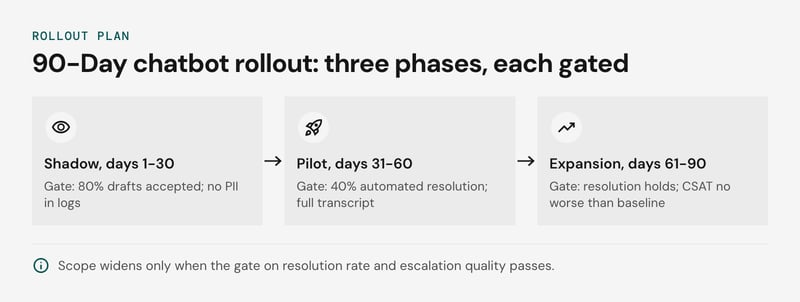
The gates side by side (all thresholds are illustrative targets, not benchmarks):
| Phase | Days | Scope | Gate to widen |
|---|---|---|---|
| Shadow | 1-30 | Helpdesk integration, knowledge base cleanup, evaluation set built from past tickets. The agent drafts and humans send. | 80% of drafts accepted on the evaluation set; no PII in logs |
| Pilot | 31-60 | Live on 10-20% of traffic, one or two intents | Automated resolution rate of 40% on in-scope intents; every escalation carries the full transcript |
| Expansion | 61-90 | More intents and channels; tool calling for order or billing lookups | Resolution holds as volume grows; CSAT no worse than the human baseline |
Set your real thresholds from the day-30 baseline. Count a conversation as resolved only when the customer doesn't return on the same issue within a set window, such as seven days.
A failed gate means holding scope and fixing retrieval content or escalation triggers, not adding intents. A product-selection assistant over a retail catalog is a good first pilot because the intent is narrow and checkable.
For the wider support setup, see chatbot customer support.
Which metrics prove chatbot ROI?
Four metrics prove chatbot ROI: automated resolution rate, CSAT on bot-handled conversations, escalation quality, and cost per resolution. Containment rate alone proves nothing, because it can rise while customers leave unhelped.
The table shows how each metric gets inflated and the check that exposes it:
| Metric | How it gets inflated | Check |
|---|---|---|
| Containment rate | Abandoned chats count as contained | Flag conversations with no customer reply after the bot's last message |
| Automated resolution rate | Silence is counted as success | Require a confirmation, or no re-contact on the same issue within 7 days |
| CSAT | Only satisfied customers answer the survey | Report bot-only and escalated conversations separately, with response rates |
| Cost per resolution | Ambiguous resolutions are billed | Audit a sample against the vendor's definition |
Per-resolution pricing makes the last row a budget issue. Intercom counts a resolution when a customer confirms it, stops asking for help, or Fin completes a workflow, so the vendor decides what qualifies. Zendesk AI Agents has its own billing unit, so compare definitions before comparing prices.
We recommend a monthly audit of 100 billed resolutions (an illustrative sample size) against your evaluation set. Count the ones a human reviewer would call unresolved.
Compute cost per resolution as total bot spend (fees, tooling, knowledge base upkeep) divided by audited resolutions, then compare it with your human cost per ticket. First response time is a weak ROI signal, since a bot answers instantly whether or not the answer helps.
What goes wrong with AI customer service chatbots?
AI customer service chatbots fail in four ways: a stale knowledge base, hallucinated policy, handoffs that drop context, and loops with no exit. Each has an early sign you can monitor. Most of these failures can be reduced by choosing the right techniques to improve a chatbot with AI and machine learning.
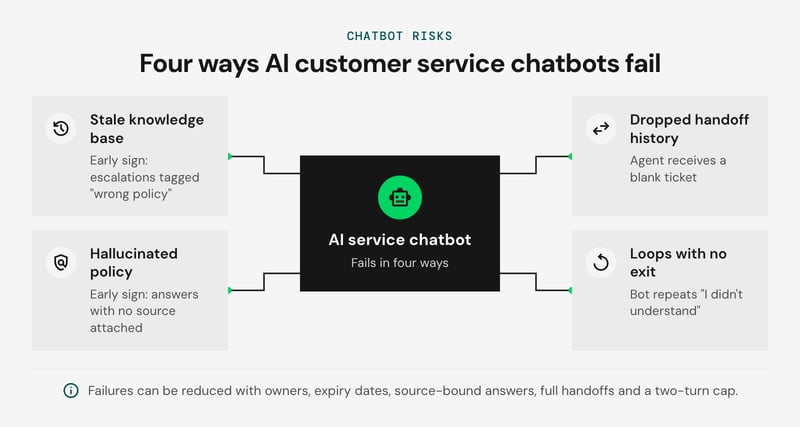
- Stale knowledge base: retrieval augmented generation answers only as well as the documents it retrieves. If a refund rule changes in the helpdesk but the old article stays indexed, the bot quotes the old rule with full confidence. Early sign: escalations tagged "wrong policy". Give every indexed article an owner and an expiry date.
- Hallucinated policy: when retrieval returns nothing relevant, a large language model fills the gap. Restrict answers to retrieved passages, make declining the default, and test with evaluation questions that have no answer in the knowledge base. Early sign: answers with no source attached.
- Dropped handoff history: human handoff and escalation triggers, such as two failed turns, negative sentiment, or a refund or legal keyword, are worthless if the agent receives a blank ticket. Pass the transcript, retrieved sources and customer ID into the ticket.
- Loops with no exit: a bot that repeats "I didn't understand" traps the customer. Cap failed turns at two, then route to a person, and keep a visible "talk to a human" option throughout.
In Moffatt v. Air Canada (2024 BCCRT 149), a British Columbia tribunal held the airline liable for wrong bereavement-fare advice from its chatbot and rejected the argument that the bot was a separate entity. Treat every policy answer as a published company statement.
Disclosure is a second duty. Article 50 of the EU AI Act requires that people be told they are interacting with an AI system unless that is obvious. We recommend labeling the bot in its first message. Obligations vary by jurisdiction and timeline, so have counsel review your deployment.

Can AI chatbots cover 24/7 support across channels?
Yes, for the work the bot is allowed to finish without a person. Everything else is queued with full context for the morning shift. A three-test rule, which is our own judgement call to tune against your risk tolerance, sets that line.
The bot completes a request overnight only if all three tests pass:
- Grounded: the answer comes from a retrieved help article or a system lookup, and confidence is above your threshold.
- Reversible or capped: the action can be undone in the morning, or sits under a set limit.
- Low-risk identity: it changes no security settings and discloses no personal data beyond what the customer has already verified.
Some triggers queue a request regardless of the tests: complaints, legal threats, and any customer who asks twice for a person.
| Request | Deciding test | Overnight outcome |
|---|---|---|
| Order status | Passes all three | Bot completes |
| Resend invoice | Reversible, verified | Bot completes |
| Refund under an example limit of $50 | Capped | Bot completes |
| Refund above that limit | Fails cap | Queue |
| Email or password change | Fails identity | Queue |
| Low-confidence answer | Fails grounding | Queue |
Platforms such as Ada run one agent across web chat, WhatsApp and email, so keep this policy in one layer shared by every channel. For ARC Europe, Netguru built a WhatsApp chatbot for post-incident roadside assistance that guides customers to a taxi, hotel or replacement vehicle in two to four questions, across several European markets and languages. Queued items should open a ticket with the transcript and tell the customer when a person will reply.
WhatsApp allows free-form replies only within a 24-hour window after the customer's last message (WhatsApp for Business Policy, 2026), so the morning follow-up may need an approved template.
FAQ: AI chatbots for customer service
Which AI chatbot is best for customer service?
How are AI chatbots used in customer service?
What are the best chatbots for customer support?
Which companies are using AI chatbots for customer service?
Can I use ChatGPT for customer service?
Get a chatbot plan that fits your stack
A useful chatbot plan starts with your helpdesk integration and the automated resolution rate you need to reach, then picks the build path that fits both.
Chatguru is an open-source, white-label platform that uses retrieval-augmented generation to ground answers in your own policies and product catalog. It sits between rigid SaaS agents and a months-long custom build, launches in weeks, and runs self-hosted in Docker, so customer data stays on your infrastructure.
If you need models tailored to your own ticket data, the platform can be extended with custom models. To scope a plan against your stack, see our chatbot development services or book a Chatguru demo with Krystian Bergmann, our AI Consulting Lead.


