
iOS app development team: Roles, size and how to staff it


Contents
An iOS app development team is a small cross-functional group that owns a product from first design to App Store release and every update after it. Its shape depends on three things: whether the app needs its own backend, how fast scope is changing, and how much of the release process you can afford to leave with one person.
The sections below cover who to hire, how many people to start with, which staffing model fits, and how the mix changes at each stage of the product.
What does a typical iOS app development team look like?
A typical iOS app development team for a first release is one to three Swift and SwiftUI developers, a product designer, a QA engineer and a product owner.
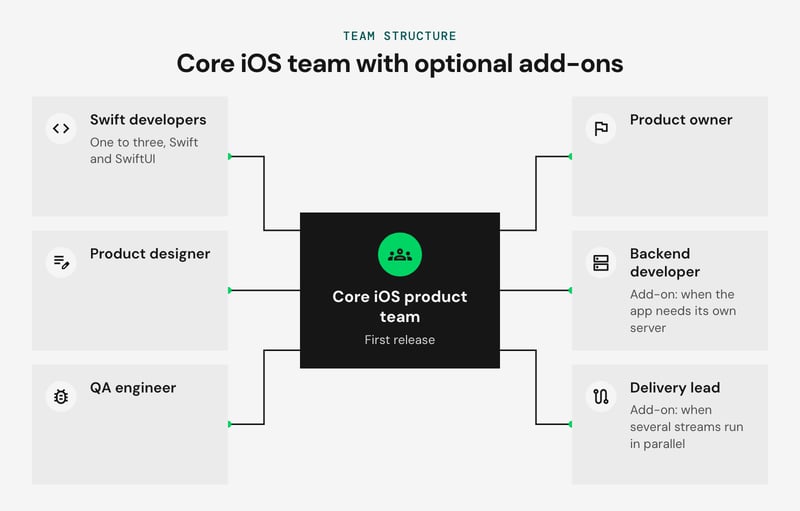
An iOS development team adds a backend developer when the app needs its own server, and a delivery lead once several streams run in parallel.
We recommend a dedicated product squad when the app has its own backend and ships every two weeks, because one team then owns signing, review and quality together. Netguru builds native iOS apps with teams shaped this way, as well as cross-platform mobile products.
An internal tool with a few screens can run on one developer and a part-time designer.
iOS app development team roles and what each one owns
An iOS app development team works when every Apple-specific obligation has one named owner: App Store Review Guidelines compliance, the privacy manifest, App Tracking Transparency prompts, accessibility, and TestFlight releases.
Unowned items tend to fall between product and engineering, and they surface as a rejection in App Store Connect days before a launch. We recommend writing the owner next to each item in the team charter. The split below assumes a full squad.
| Role | Owns on an iOS project |
|---|---|
| Product owner | Scope and backlog priority. Monetization strategy (pricing, subscriptions, in-app purchase) and its fit with the app's purpose and user expectations. The decision to collect data that triggers an App Tracking Transparency prompt, and the prompt's purpose wording. |
| Lead iOS developer | Architecture, Xcode project and signing, and the privacy manifest, including required-reason API declarations and third-party SDK audits. Final submission. |
| iOS developers | Features, unit tests, VoiceOver labels and Dynamic Type support in code. |
| Product designer | Conformance with Apple's Human Interface Guidelines, layouts that survive the largest Dynamic Type sizes, contrast, and VoiceOver reading order. |
| QA engineer | TestFlight groups, regression across devices and OS versions, and a VoiceOver and maximum-text-size pass before every release. |
| Backend developer | APIs, push, and account deletion, which the review guidelines require for apps that offer account creation. Data retention that matches what the privacy declarations say. |
| Delivery lead | Release train, rejection triage, and who holds which App Store Connect access. |
The product owner's monetization duty is the one most often left implicit. Pricing models and subscription flows have to fit what the app does and pass review, so the person who sets the roadmap has to own them.
The privacy items need a pair of owners. The lead developer decides what the code and SDKs do, and the product owner decides what the app is allowed to collect. If those two disagree, the manifest and the App Store privacy answers will not match the build.
On a two-person MVP the lead developer carries the manifest and submission, and the designer takes the accessibility checks. A shared Android codebase or cross-platform stack shifts some of this, and the mobile app development team guide covers that split.
How big should an iOS team be at each stage?
iOS team size follows the stage: four to six people for an MVP, seven to ten at growth, and multiple product squads of four to six each at scale. These are our recommended starting ranges, a judgment call and not a published benchmark.
The stages side by side:
| Stage | Roles | Typical headcount | What changes |
|---|---|---|---|
| Prototype / MVP | Product owner, 1-2 iOS developers (Swift, SwiftUI), product designer, backend developer if the app needs a server, part-time QA | 4-6 | One senior developer also owns TestFlight builds, App Store Connect setup and the privacy manifest. Xcode Cloud is configured before the second feature ships. |
| Growth | Product owner, 3-5 iOS developers, designer, backend developers, dedicated QA engineer, delivery lead | 7-10 | Code ownership splits by feature. Reviews rotate, regression testing is automated, and releases move to a fixed cadence. |
| Scale | Several product squads, each with its own product owner, iOS developers, QA and designer, plus shared design-system, platform and release roles | 12+ | Shared Swift packages and a design system replace copied code. Someone owns CI capacity and Xcode Cloud workflows across squads. |
A product squad owns one feature area end to end, from iOS code to backend and QA. We recommend splitting into squads when two groups of developers regularly block each other in the same modules, which usually shows up as merge conflicts and queued reviews. Splitting earlier adds coordination overhead the product doesn't yet need.
Two developers is the practical floor for a consumer MVP on a regular release schedule, because one person cannot review their own Swift code or cover a release when someone is out. A narrow internal app can start with one. A third developer pays off once the backlog includes background work, offline sync or push notifications alongside UI.
The ranges shift with the product. A regulated app in health or fintech needs QA and security review from the first sprint, so start closer to six than four. An app that is mostly a thin client over an existing API can skip the backend developer and start with three people.
When is native Swift worth a dedicated iOS team?
Native Swift is worth a dedicated iOS team when the product depends on platform-specific APIs, hits performance limits a shared codebase can't clear, or has to ship on iOS first.
Choose a dedicated Swift team when at least one of these holds:
- Platform APIs sit at the core of the product. Widgets, Live Activities, HealthKit, background processing and camera pipelines change with iOS releases, and a cross-platform bridge can lag behind them.
- Performance is a feature. Gesture-heavy interfaces, long media-rich lists and real-time audio or video need direct control over rendering and threading. Swift concurrency, with actors and structured tasks, gives that control without hand-rolled queues.
- iOS leads the release schedule. A native team tracking Xcode betas can adopt new OS features at launch, while a shared team often waits for framework support.
The SwiftUI and UIKit mix changes who you hire. New screens start in SwiftUI, but apps with a few years of history still carry UIKit for custom navigation, rich text editing and complex collection layouts.
Plan for at least one senior developer who reads both frameworks fluently and has migrated code from GCD to Swift concurrency. SwiftUI-only candidates widen the hiring pool, but they need that senior reviewing interop code and legacy screens.
If the app is mostly forms, lists and API-backed content, and Android must launch the same day, a shared mobile team is cheaper to staff. You still need one native iOS engineer for signing, App Store Connect configuration and platform-specific review issues. The Android side of that decision is covered in our Android app development team guide.
How to hire iOS developers: In-house, freelance, agency or squad
Hire iOS developers in-house for a long-lived core product, and use freelancers, an agency, staff augmentation or a product squad when scope, speed or specialist coverage is the constraint.
The trade-offs side by side:
| Model | Fits | Ownership | Onboarding |
|---|---|---|---|
| In-house | Long-lived product with a steady roadmap | Full; knowledge stays with the company | Slowest to start: recruiting plus ramp-up |
| Freelancers | Unclear-scope MVP, audits, one-off features | Set by contract; context leaves with the person | Fast, but you supply management and QA |
| Agency | Fixed-scope build needing design, development and QA at once | Code is yours by contract; context sits with the vendor | Fast; the vendor runs delivery |
| Staff augmentation | Gaps in an existing team, such as an accessibility or Swift concurrency specialist | You manage; knowledge partly stays with you | Quick if your Xcode CI and review process are documented |
| Dedicated product squad | Long-lived product without hiring capacity | Shared; the squad owns outcomes inside your process | Several weeks to embed, then stable |
Our view: for an unclear-scope MVP, start with an agency team or a small product squad, because you are buying learning speed. For a product you will run for years, build an in-house core of two or three iOS engineers and add capacity around it. Freelancers suit bounded work with a named owner on your side.
A product squad works best when it adopts your engineering culture instead of importing its own. For a food and grocery delivery app handling up to nine million orders a month, a Netguru squad covering backend, iOS and Android development, and UX and UI design worked inside the client's own engineering and reporting culture, as one of more than ten cross-functional teams.
The squad raised unit test coverage to 85% on both platforms, up from 63% on iOS and 28% on Android in 2021, and was the first team in the organization to fully automate UI tests on its key paths.
Sourcing channels are the usual ones: job boards and LinkedIn outreach for permanent hires, freelance platforms for short engagements.
How to vet an iOS development partner
Vet an iOS development partner on Apple-specific evidence: App Store release history, privacy manifest handling, automated test coverage, and who holds App Store Connect access. Portfolios and team bios say little about any of these.
Ask for each item in one call and score it pass or fail:
| Criterion | Ask for | Pass | Fail |
|---|---|---|---|
| App Store release history | Live app links, version history, and one review rejection they resolved | Names the guideline cited and the change that cleared it | Cannot recall a rejection, or blames the reviewer |
| Privacy manifest | A walkthrough of a PrivacyInfo.xcprivacy file from a shipped app | Explains required-reason API declarations and how third-party SDK manifests are checked | Treats privacy as a late checklist item |
| Test automation | A CI run showing XCTest unit tests and XCUITest flows on key paths | Failing tests block the merge and the TestFlight build | Manual QA only, or tests that exist but do not run in CI |
| TestFlight and App Store Connect access | Their proposed account setup | You own the Apple Developer account, partner staff hold scoped roles, and each sprint's build reaches internal testers through TestFlight | Builds ship from the partner's account, or you receive an IPA only at handover |
Treat account ownership as non-negotiable. An app published under a vendor's account has to be transferred later, which adds avoidable risk to a contract exit. The same applies to code: the repository sits in your organization from day one, with documented build steps and a named engineer who can take over.
Who owns App Store release on an iOS team?
One named release owner, usually the lead iOS developer, owns App Store release, and a second person must be able to sign, upload, and submit when the first is out.
A workable split: the product owner decides what ships and writes the review notes. The release owner manages provisioning profiles and signing certificates, TestFlight builds, and submission. An executive at your company holds the Account Holder role in App Store Connect. Access follows Apple's role permissions, so give contractors the narrowest role that lets them upload builds.
Where a one-person release path breaks:
| Failure | Why it stalls release | Early sign |
|---|---|---|
| One developer holds signing and access | Distribution certificates, profiles, and admin rights leave with that person, and membership renewal needs the Account Holder | Nobody else has ever uploaded a build to TestFlight |
| Privacy manifest or required-reason API gaps | Your code and third-party SDKs use APIs that need declared reasons; gaps surface at upload or review, after features are frozen | No one has checked SDK manifests before the release candidate |
| Rejection with no triage owner | Resolution Center messages go to one inbox and sit unanswered | Review notes and demo credentials live in one person's head |
The usual rejection causes sit in the App Store Review Guidelines: crashes and incomplete builds (section 2.1), privacy disclosures that don't match app behavior, and missing account deletion (section 5.1.1). Reviewers also reject builds when the demo account in the review notes doesn't work.
We recommend a release checklist run against a TestFlight build before every submission. It covers the privacy manifest, the SDK manifests, the review notes, and a working demo login. The release owner runs it, and the backup runs it once a quarter so the handover is proven.
How does an iOS team work day to day?
An iOS team works in two-week sprints on a release train: every pull request builds and tests in Xcode Cloud, a release branch is cut on a fixed day, and the build reaches TestFlight testers before App Store submission.
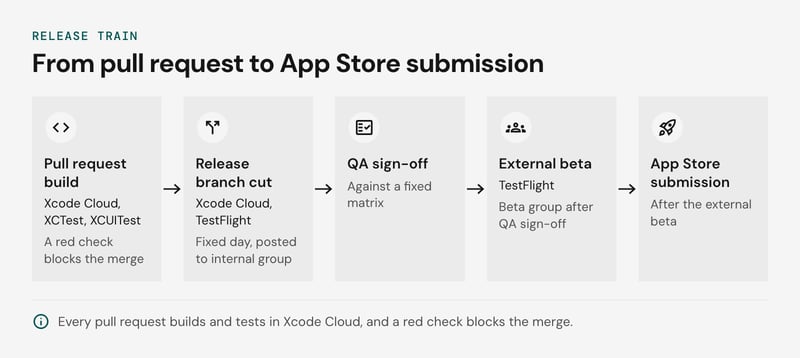
Code review needs one reviewer who did not write the change. Xcode Cloud then runs the build, XCTest unit tests, and XCUITest flows on key paths such as sign-in and purchase. A red check blocks the merge. Xcode Cloud also archives the release branch and posts it to an internal TestFlight group without manual uploads.
QA signs off against a fixed matrix before the build goes to an external beta group:
| Axis | What to cover |
|---|---|
| Device | Smallest supported iPhone, a current Pro Max, an iPad if you ship one |
| iOS version | Oldest supported release and the latest, plus the next major beta in Xcode |
| VoiceOver | Main flows completed without looking at the screen |
| Dynamic Type | Largest accessibility sizes, checked for truncated or overlapping text |
The wider lifecycle around these sprints is in our mobile app development process guide.
Three metrics show whether the team is working:
| Metric | Healthy trend | Warning sign |
|---|---|---|
| Crash-free sessions | Stable or rising after each release | A dip that persists past the first patch |
| Release frequency | One release per sprint, on schedule | Skipped trains, or hotfixes replacing planned releases |
| Rejection rate | Rare, with each cause fixed once | The same guideline cited twice |
We suggest reviewing all three at each sprint retrospective.
What drives the cost of an iOS app development team?
The cost of an iOS app development team is driven mostly by headcount, seniority, backend scope, and duration, with region and engagement model adjusting the rate on top.
Apple's fixed fee is small: Apple Developer Program membership costs $99 per year. Nearly all spend is people, whether you hire freelancers or a product squad.
The drivers, and how much control you have over each:
| Driver | How it moves cost | Controllable? |
|---|---|---|
| Team size | Every added iOS developer adds a full rate. A second developer buys parallel work, and a single feature still takes about as long. | Yes, by cutting first-release scope |
| Seniority | Senior engineers cost more per month, but they make the SwiftUI versus UIKit, concurrency, and architecture calls that otherwise return as rework. | Yes |
| Backend scope | An app with its own API, authentication, and push infrastructure adds a backend developer and often DevOps. | Partly, through managed backend services |
| Region and time zone | Region sets the rate. Limited overlap with the product owner slows review cycles. | Yes, at hiring |
| Engagement model | Freelancers, an agency, staff augmentation, and a product squad differ in overhead and flexibility. | Yes |
| Duration | Apple's yearly SDK and Xcode requirements create upgrade work even when no features ship. | Low |
A worked example with stated assumptions
We do not quote market rates here, because published ranges rarely name a source. Instead, use this formula with your own vendor quotes: monthly cost = sum of (people × allocation × monthly rate), plus the Apple fee.
Assume an illustrative blended rate of $10,000 per person-month, which is a placeholder and not a benchmark. A six-month MVP with two iOS developers and one backend developer then costs 3 × 6 × $10,000 = $180,000.
Three things follow from that arithmetic:
- Adding a QA engineer at full allocation adds $60,000 over the same six months.
- Swapping custom backend work for a managed backend service could remove the backend line, which is $60,000 at this assumed rate.
- Keeping one iOS developer at 25% allocation after launch costs $2,500 per month, or $30,000 per year.
Our view is that duration gets underbudgeted most often. Plan a standing maintenance allocation for the app's lifetime, and do not treat the team as disbandable at launch.
Choosing an engagement model
A product squad costs more per month than two or three freelancers. It carries design, QA, and backend together, which cuts handoffs and coordination. We recommend it when the roadmap runs past two quarters or when the app needs several disciplines working in step.
For a short-lived MVP with a fixed scope and an in-house product owner, a small freelance group is usually cheaper. Our guide to a dedicated software team covers how that model is set up.
Before comparing quotes, give each vendor the same written scope, the same assumed duration, and a request to itemize post-launch maintenance. Quotes built on different assumptions cannot be compared line by line.
Common iOS team-building mistakes
The most common iOS team-building mistakes are hiring in the wrong order, treating QA and design as part-time work, and letting one developer own every release.
- Wrong first hire. Starting with a second developer or a backend engineer before a product owner and a designer means the first Swift sprints build against guesses. We recommend a product owner and designer first, then one senior iOS developer who sets up the Xcode project structure and CI.
- No QA until late. Without a dedicated QA engineer running TestFlight builds on real devices, crash spikes and rejections tend to surface after submission in App Store Connect, where each fix costs another review cycle. Put a VoiceOver pass and a check against the App Store Review Guidelines in the test plan before the first submission.
- Part-time designer. A designer split across projects tends to leave empty states, Dynamic Type behavior, and VoiceOver labels unspecified. Developers then improvise, and the gaps show up as Human Interface Guidelines deviations in review feedback.
- Solo developer. One person holding the signing certificates, the App Store Connect access, and the only knowledge of the release steps is a single point of failure, since a week of absence stalls a hotfix. Give two people App Store Connect roles and keep the release checklist in the repository.
FAQ: iOS app development team questions
How many developers do you need to build an iOS app?
Should I hire an in-house iOS team or an agency?
Do I need a backend developer for an iOS app?
How long does it take to staff an iOS development team?
Should I build native iOS or cross-platform?
Which iOS team to build at each stage
The right iOS app development team depends on stage: at MVP, one or two Swift developers with a product owner, a designer, and a QA engineer can reach a TestFlight build and a first release. At growth, add two iOS developers, a backend developer if the app needs its own server, and a delivery lead.
At scale, split into several squads and give one platform engineer ownership of CI and release trains. Our iOS app development services cover all three stages, and if you are sizing the first one, you can get an estimate for your project.


