
Mobile app backend: Options, architecture and how to build one

Contents
A mobile app backend can be built as custom code, rented as a mobile backend as a service, or assembled from serverless functions, and the order you build it in matters as much as the route.
We recommend choosing by team skills and time to first release, then building auth, API contract and versioning before features. The right route changes once compliance, integrations or cost at volume dominate.
Mobile app backend: The short answer and the three routes
A mobile app backend is the server-side system that stores data, authenticates users, exposes APIs, sends push notifications, and runs the business logic a device should not. Mobile app backend development follows one of three routes, and many products combine them:
- Custom backend: your team builds and runs the API, database, and auth, and controls the data model and cost curve.
- Mobile backend as a service (MBaaS): Firebase or Supabase supply auth, database, storage, and push from day one.
- Serverless functions: cloud functions run individual endpoints and jobs with no servers to manage.
Netguru designs, builds and scales mobile products and the API and backend platforms behind them. We recommend an MBaaS for a first release when the team is mostly mobile engineers and the data model is simple, because it removes the plumbing.
Move to custom code or serverless functions when access rules, integrations, or billing become hard to reason about.
What does a mobile app backend do?
A mobile app backend provides core services that power user interactions and data management.
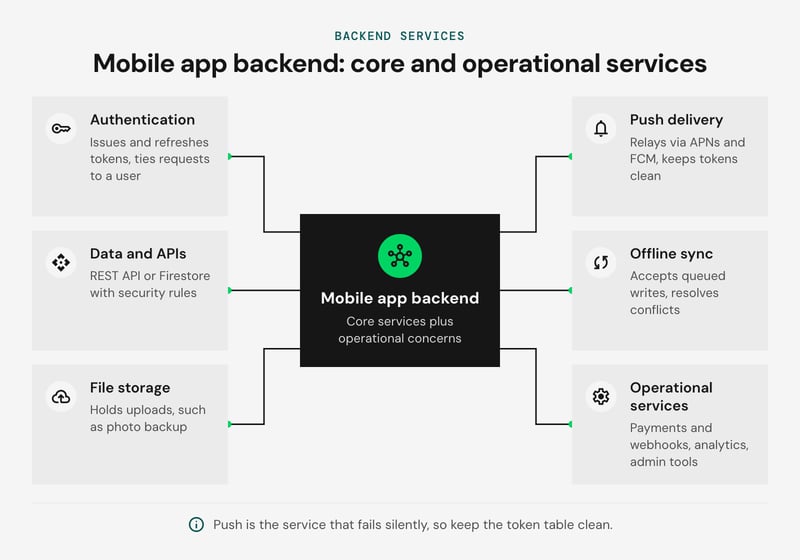
- Authentication: issues and refreshes tokens and ties every request to a user.
- Data and APIs: exposes the data model through a REST API, or through Firestore with security rules enforcing per-user access.
- File storage: holds uploads such as photos and documents, and serves them through signed, expiring URLs.
- Push delivery: relays messages through APNs and FCM and keeps the token table clean.
- Offline sync: accepts queued writes from reconnecting clients and resolves conflicts.
Beyond core functionality, a backend also handles operational concerns that support business and product goals.
- Payments and webhooks: verifies purchases and handles provider callbacks idempotently.
- Analytics: collects client events for product and release decisions.
- Admin tools: support views, moderation, and feature flags.
Push is the service that fails silently. Device tokens go stale after a reinstall, a restore to a new phone, or expiry. Apple's documentation says APNs answers a dead token with a 410 status, reason Unregistered, plus a timestamp. Stop sending until the device registers a newer token (Apple).
FCM's HTTP v1 API returns UNREGISTERED for the same case. Firebase's token guidance recommends storing a timestamp with each token and refreshing it periodically.
We recommend three rules. Upsert the token on every app launch, delete it on any invalid-token response, and never retry it. A useful warning sign is a delivery rate that drops while send volume stays flat.
Custom, mobile backend as a service or serverless: Which fits?
Use a mobile backend as a service (MBaaS) like Firebase or Supabase for the first release, and add serverless functions for custom logic. Move to a custom backend only when the signals below appear. A managed platform gets an MVP in front of users quickly, and that feedback is worth more than an architecture you cannot yet justify.
The three paths compared on the factors that change the decision:
| Factor | MBaaS (Firebase, Supabase, AWS Amplify) | Serverless functions | Custom backend |
|---|---|---|---|
| Time to first release | Shortest: auth, database, storage and push come preconfigured | Short for isolated endpoints, longer for a full API | Longest: you build and operate everything |
| Control | Limited to the platform's data model and extension points | High over logic, low over runtime | Full |
| Lock-in | Highest with Firestore's document model and security rules; lower with Supabase, which is Postgres | Moderate: handlers port, triggers and IAM do not | Lowest |
| Scaling | Managed by the provider | Managed, with cold starts and timeouts to design around | Yours to engineer |
| Cost drivers | Request volume, egress, storage | Invocations, execution time, egress | Team time, infrastructure, compliance work |
| Team skills | Client developers can ship alone | Backend-literate developers, often Node.js | Dedicated backend and DevOps engineers |
AWS Amplify sits between the first two columns. It provisions AWS services such as Cognito, AppSync and Lambda inside your own AWS account, which gives more control than Firebase at the price of more setup.
We recommend planning the exit before the launch. These signals suggest it is time to add a custom service or replace the platform:
- Request or egress charges grow faster than the revenue they support.
- The data model needs multi-document transactions or joins that the platform handles poorly.
- Compliance demands data residency, audit logging or network isolation the provider cannot supply.
- Serverless functions multiply into a web of triggers that nobody can trace end to end.
Migrate one capability at a time, starting with the one that hurts, and keep the platform's auth and storage until they become the bottleneck. A backend-for-frontend layer lets you swap what sits behind it without shipping a new app version. For provider-level detail, see the head-to-head on Supabase vs Firebase.
When does a custom backend make sense?
A custom backend makes sense when your business rules, integrations or compliance requirements outgrow what access rules and serverless functions can express. Firestore security rules and Supabase row-level security decide who can read or write a record. They do not coordinate multi-step workflows across systems.
Our view is that these are the triggers worth acting on:
- Cross-entity business rules. Pricing, allocation or approval flows that need transactions across several records become hard to test as a chain of functions.
- Integration depth. ERP, payment or partner systems that need queues, retries and idempotency keys you control end to end.
- Compliance. Data residency, audit trails or network isolation that you cannot confirm the platform provides.
- Cost shape. Per-operation billing that outgrows the cost of running your own services at steady load. Check this against the provider's current pricing page, not a guess.
Leaving a BaaS does not require a rewrite. We recommend placing a backend-for-frontend layer in front of the app first: a Node.js service exposing a versioned REST API that initially proxies the managed platform. Then move one domain at a time behind it, using a phased release so older installed app versions keep working. Authentication can stay with the managed provider until last.
The same logic applies at multi-market scale, where one platform serves many local brands and each needs its own onboarding and rules. Delivery Hero runs local delivery in around 70 countries through brands such as foodpanda, talabat and HungerStation.
For that platform, Netguru engineers built backend services behind its shared platform in Go, Python and Java, from partner self-onboarding, which lets local brands bring partners on themselves, to the core service APIs used across markets, plus reliability work on high-traffic components.
The same engagement covered native iOS and Android work on the consumer apps, with more than 150 Netguru specialists contributing since 2019 and over 30 at peak.
How to build a backend for a mobile app
To build a backend for a mobile app, work in this order: data model, auth, API contract, versioning policy, push, observability, then staged release. Each step constrains the next, so reordering them creates rework.
- Data model. Define entities, ownership and tenancy first. On Supabase, write row-level security policies in the same migration as the tables.
- Auth. Use OAuth 2.0 with PKCE through the system browser, with refresh token rotation. Decide session lifetime and revocation before any endpoint ships.
- API contract. Write the OpenAPI spec before the handlers. Specify cursor pagination and require idempotency keys on every write that moves money or creates records. A thin backend-for-frontend layer in Node.js can shape payloads per screen, while serverless functions handle webhooks and scheduled jobs.
- Versioning policy. Old app versions stay installed, so publish a minimum supported version and a deprecation window. Ship an endpoint the app calls at launch to read that policy.
- Push. Store APNs and FCM tokens per device, prune dead tokens, and design flows that still work when a notification never arrives.
- Observability. Tag every request with app version and a request ID. Alert on error rate per version, because a regression in one release hides inside the aggregate.
- Staged release. Pair the stores' phased release or staged rollout with feature flags and expand-then-contract migrations, so the backend serves old and new clients together.
Our recommendation is to defer GraphQL, offline conflict resolution, multi-region deployment and custom analytics pipelines until a real usage pattern demands them. Each is easier to add to a clean contract than to retrofit into a rushed one. If you want a second pair of eyes on the sequence, our mobile development team can review it against your roadmap.
REST or GraphQL for mobile clients?
We recommend a REST API plus a backend-for-frontend layer for most mobile clients, and GraphQL when many app versions need different shapes of the same data.
The trade-offs side by side:
| Factor | REST API | GraphQL | REST API + BFF layer |
|---|---|---|---|
| Payload size | Fixed per endpoint, so fields go unused unless you add sparse fieldsets | Client names the fields it needs | Server trims each response to one screen |
| Round trips | One per resource, so a home screen can need several | One query | One call per screen |
| HTTP caching | Standard Cache-Control and ETag on GET, at the CDN and in the client | Queries usually go as POST to one endpoint, so caching needs persisted queries or a normalized client cache | Per-screen GET endpoints cache like any REST resource |
| Extra cost | Over-fetching on slow networks | Query depth and complexity limits, resolver N+1 problems | One more service to version and run |
Round trips hurt most on cellular connections, where each request pays connection latency again. A BFF layer fixes this by aggregating calls to downstream services on the server, dropping unused fields and returning one payload per screen. A Node.js BFF is a common choice because the mobile team can own it.
GraphQL removes the need for per-screen endpoints but moves the cost to the server. Unbounded queries map to unrestricted resource consumption in the OWASP API Security Top 10, so enforce depth, complexity and rate limits from day one. Our GraphQL vs REST comparison covers the query-level mechanics.
This recommendation changes with team shape. With a single client and one backend team, skip the BFF and shape endpoints directly, following the conventions in our API design best practices.
Why do mobile APIs need versioning?
Mobile APIs need versioning because users update on their own schedule, so older builds keep calling the REST API contract they shipped with long after you release a new one. Web clients update on refresh; native clients do not.
Three breaking changes cause most of the damage:
- Removed or renamed fields: strict JSON decoders in older builds crash or show empty screens.
- Changed types or enums: a new enum value or a string that becomes an object fails parsing.
- Changed defaults: a new sort order or page size silently reshuffles lists.
The early sign is a crash or decode-error rate that rises only for older app versions. To see it, have every client send its app version in a header and tag logs and dashboards with it.
We recommend this decision rule:
- Additive-only inside a version. New optional fields and new endpoints are allowed, and clients must ignore unknown fields.
- Breaking change means a new version. Run both side by side. A backend-for-frontend layer can translate per version, so core services keep one contract.
- Deprecation window from your own data. Size it from the share of traffic still on the old version, and announce it in the response and the release notes.
A minimum supported version is a server-side setting compared against the app-version header. When a build falls below it, the API returns a dedicated response, for example 426 Upgrade Required with a machine-readable body, and the app shows a blocking update screen. Reserve this for security fixes or contracts you can no longer maintain.
Cursor-based pagination and server-enforced payload caps belong in the same contract. An opaque cursor survives retries on a flaky connection without duplicating or skipping rows, as offset pagination does when data changes between requests. Treat the maximum page size as part of the contract, and run contract tests against every supported app version before each release.
How should native apps authenticate?
Native apps should authenticate with OAuth 2.0 with PKCE in the system browser, following RFC 8252 (OAuth 2.0 for Native Apps), and keep tokens in the iOS Keychain or Android Keystore. Most of the trouble starts after login, in the refresh path.
RFC 8252 directs native apps to use an external user agent. In practice that means ASWebAuthenticationSession on iOS and Custom Tabs on Android. An embedded web view exposes the credential form to the host app. PKCE (RFC 7636) replaces the client secret, which a public client cannot hold.
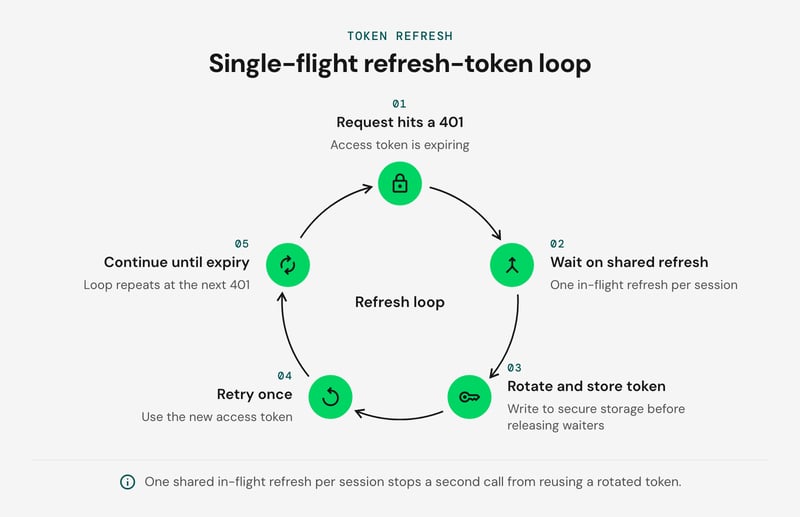
Refresh token rotation adds a failure mode that rarely shows up in testing. Two requests fire while the access token is expiring, and both get a 401. Each calls the refresh endpoint with the same refresh token. The first call rotates it.
The second presents a token that was already used, so the server's reuse detection treats it as theft, revokes the whole token family and logs the user out.
The fix is a single-flight refresh on the client:
- Keep one shared in-flight refresh (a mutex or a shared promise) per session.
- Let every request that hits a 401 wait on that refresh, then retry once with the new access token.
- Write the rotated refresh token to secure storage before releasing the waiters.
- Use a cross-process lock if a notification extension or widget shares the Keychain access group.
On the server, we recommend a short grace window for the previous refresh token. A rotated token whose response was lost to a network drop then does not count as reuse.
Biometrics work well as a local authentication layer. Gate the stored credential with a Keychain access control or a Keystore key that requires user authentication. A fingerprint or face scan exposes the token on the device and does not prove identity to the server. Users still pick their passwords at the identity provider, so enforce MFA or passkeys there.
How do you secure a mobile app backend?
Securing a mobile app backend splits into two checklists: the mobile team follows OWASP MASVS on the device, and the backend team follows the OWASP API Security Top 10 on the server.
The server cannot trust anything the app enforces, because a modified client skips its own checks. Whatever the app hides, the API must still refuse.
The ownership split, control by control:
| Control | Owner | Reference | Typical failure |
|---|---|---|---|
| Token storage in Keychain or Keystore, TLS and pinning decisions | Mobile team | MASVS storage and network groups | Refresh token kept in plain app preferences |
| Object-level authorization on every resource ID | Backend team | API1: Broken Object Level Authorization | GET /orders/1042 returns another user's order to any logged-in caller |
| Firestore security rules or Supabase row-level security | Backend team (data model owner) | API8: Security Misconfiguration | Open test-mode rules left in production, or a table with RLS disabled |
| Rate limits and payload caps | Backend or platform team | API4: Unrestricted Resource Consumption | Unthrottled list endpoint scraped or abused |
| Password policy, MFA, session revocation | Backend team enforces, mobile team surfaces | API2: Broken Authentication | Weak passwords accepted, stolen tokens never revoked |
| Permission prompts and user guidance | Mobile team and product | MASVS privacy group | Permissions requested at launch with no context |
Broken object-level authorization is the most common API flaw to design out. Check ownership on the server for every ID in every request, never only at login.
On a backend as a service, authorization moves into configuration. The Supabase row-level security policies or Firestore rules you write are the only gate between the client SDK and your data, since the app talks to the database directly. We recommend naming one owner for those rules and testing them in CI.
User behavior is the remaining gap. Enforce a password policy server-side, and have the app explain why each permission is requested, at the moment the feature needs it.
How do you scale and run a mobile backend?
Scaling a mobile backend comes down to four habits: make retries safe, move slow work onto queues, cache read paths, and ship backward-compatible changes ahead of every app release.
Mobile networks drop requests mid-flight, so clients retry. A retried POST on a REST API can charge a customer twice unless the server recognizes the repeat.
Idempotency keys for payments. The app generates one UUID per user intent, such as a single tap on "Pay", and sends it in an Idempotency-Key header on every retry.
The server stores the key and the response in the same transaction as the charge, then replays the stored response on a repeat.
Keep keys longer than the client's longest retry window, and deduplicate payment webhooks on event ID, since providers deliver them more than once.
Keep notifications out of the request path by queuing push delivery. The API publishes an event, and workers batch the calls to APNs and FCM.
Use collapse identifiers for updates that supersede each other, set an expiry so stale messages drop, and prune device tokens the services report as invalid. According to the Firebase Cloud Messaging documentation, FCM stores an undelivered message for up to four weeks by default, and the time to live can be set from 0 to 28 days.
Serverless functions suit these consumers well, as long as you cap their concurrency so a spike doesn't exhaust the database connection pool.
Cached read paths. Feeds, catalogs and remote config dominate mobile traffic. Cache them at the edge or in Redis with short TTLs, and support ETags so an unchanged resource returns a 304 with no body.
Backward-compatible deploys. Phased releases leave old app versions installed for weeks, so the server must serve all of them. A backend change is safe when it adds fields without removing or repurposing existing ones (expand, then contract), and it stays that way until per-version telemetry shows the old client has dropped below your threshold. Return an explicit upgrade-required response for versions you retire.
Tag every metric with app version and OS. A phased rollout can then halt at a small percentage when one version's error rate or latency diverges. The client-side half of this is covered in our guide to mobile app architecture.
Mobile app backend FAQ
Is Firebase free?
Is Supabase free?
Do all mobile apps need a backend?
Can we move from a BaaS to a custom backend later?
Where is a mobile app backend hosted?
Plan your mobile backend
Planning a mobile backend starts with a choice between custom code, a mobile backend as a service (MBaaS) and serverless functions, then follows the build order above: data model, auth, API contract, versioning, push, observability and staged release.
Expected user load, offline requirements and team skills shape the build-or-buy call most. If you have those and a rough scope, send us a short project brief and we will help you pick the route and plan the first release.


