
Application migration: Strategy, process and cutover guide


Contents
Application migration moves a working application to a new environment, such as a cloud provider, another data center or a SaaS product. Across a portfolio, each application gets one of seven treatments, from retire to refactor, and that choice sets the effort, the risk and how reversible the move is.
The harder work comes after that choice: sequencing apps by dependency cluster, keeping data consistent while two systems run, and defining a rollback that still works once the new system has accepted writes. The right path depends on each app's criticality, coupling and licensing, not on a single preferred strategy.
What does "application migration" mean?
Application migration moves a working application, with its runtime, configuration, integrations, and data, to a new environment or platform, and decides per application how much of it to change.
It differs from data migration, which moves records only, and from cloud migration, which covers the whole infrastructure estate. An application can move between data centers or onto a SaaS product without touching a public cloud. Where a move to the public cloud is on the table, cloud strategy consulting helps decide which applications belong there and which should stay put.
An application portfolio assessment makes that per-application decision. It assigns each system one of the 7 Rs migration strategies: retire, retain, rehost, relocate, replatform, refactor, or repurchase.
We recommend finishing the assessment before choosing any tool, because the strategy sets each application's effort, risk, and cutover design. Our application modernization services start from the same assessment. Applications you retire or retain skip migration entirely.
What are the 7 Rs of application migration?
The 7 Rs of application migration are retire, retain, rehost, relocate, repurchase, replatform, and refactor, the strategies AWS Prescriptive Guidance uses to decide how much of each application changes in transit.
Each strategy makes a specific change and carries its own benefit and cost. The table runs from least to most change:
| Strategy | Concrete change | Main benefit | Main challenge |
|---|---|---|---|
| Retire | Decommission or archive the application; nothing moves | Removes cost and migration effort | Confirming that no hidden users or downstream jobs depend on it |
| Retain | Leave it in the source environment and revisit later | No migration risk now | You keep running two environments |
| Rehost | Move servers as they are (lift and shift). AWS Application Migration Service (AWS MGN) replicates source servers to AWS, with no code changes | Fastest path to a fixed exit date | Existing inefficiencies move with the workload |
| Relocate | Move to the cloud version of the same platform at hypervisor level, such as VMware Cloud on AWS, with no new hardware, rewrite, or operational change | Tooling and skills carry over | Tied to one vendor's platform |
| Repurchase | Replace the application with a SaaS product and migrate its data | No application to maintain | Data mapping, retraining, and loss of custom behavior |
| Replatform | Make a few cloud optimizations without touching core architecture, such as moving a self-managed database to Amazon RDS | Lower operational load without a rewrite | Each swapped component needs its own testing |
| Refactor | Re-architect toward cloud-native services, often incrementally with the strangler fig pattern, which routes traffic to new components piece by piece | Scalability and faster releases | Highest cost, longest timeline, and the most delivery risk |
Relocate differs from rehost because the platform stays the same and only its location changes. VM images, networking constructs, and runbooks carry over, so operations teams keep working as they do today.
How do you choose a strategy for each application?
Evaluate each application against its own requirements. A single portfolio-wide default hides the cases where it fails. Work through the questions in this order and stop at the first match:
- Retire if the application has no active users or another system duplicates its function.
- Retain if compliance limits, recent hardware spend, or an unmoved dependency blocks the move. Set a review date.
- Relocate if a large VMware estate must move fast with unchanged operations.
- Repurchase if the function is a commodity such as CRM, HR, or ticketing.
- Rehost if the data center exit date is fixed and there is little appetite for code change.
- Replatform if you want lower operational load without a rewrite.
- Refactor if scalability or release speed is a business requirement the current design cannot meet.
Our recommendation is rehost or replatform for most applications. Refactor only where a business case pays for the added cost and risk.
If you are weighing a rebuild for a specific application, our guide to rebuilding legacy web apps covers the trade-offs.
How do the 7 Rs compare on effort, risk and reversibility?
The 7 Rs differ most in effort, risk and how easily you can reverse them. Rehost with AWS Application Migration Service (AWS MGN) fits most of a portfolio facing a fixed exit date. Replatform fits workloads with an obvious managed equivalent. Refactor is for the few applications whose architecture is the problem.
The table below rates each R on effort, risk and reversibility. These ratings are our judgement, not a published benchmark, and they shift with team experience and test coverage.
| Strategy | Effort | Risk | Reversibility | Avoid when |
|---|---|---|---|---|
| Retire | Low | Low | Reversible until data is purged | Nobody can confirm who still uses it. Archive data first. |
| Retain | None now | Low now, rising with age | Fully reversible | A support-end date or compliance deadline forces the move |
| Rehost | Low | Low-medium | High before cutover, since the source stays intact | Licensing is per-core or per-host, or the VM is oversized |
| Relocate | Low | Low | High | The target must use cloud-native services |
| Repurchase | Medium | Medium | Low once data is converted | Customizations are a competitive differentiator |
| Replatform | Medium | Medium | Medium | The app needs features the managed service lacks |
| Refactor | High | High | Low | No automated tests, or the deadline is fixed |
Rehost carries every inefficiency across. AWS MGN replicates servers at block level and is a rehost tool only, so an oversized VM or a per-core license arrives on the other side unchanged.
Replatform breaks on unsupported features. Typical cases are OS-level access, custom database extensions, or an engine version the managed service no longer offers. Check these in the dependency map before committing to a managed database.
Legacy monolith and mainframe notes
For a monolith that needs refactoring, we recommend the strangler fig pattern: route one capability at a time to a new service and retire the old code path as each one proves stable. A big-bang rewrite gives up the rollback option. For the trade-offs, see refactoring vs rewriting.
Mainframe workloads rarely suit rehost on commodity VMs. The realistic options are emulation-based replatforming or automated refactoring of COBOL, and AWS Mainframe Modernization supports both. Where batch jobs and data formats are poorly documented, retain the mainframe and wrap it with APIs first.
How do you assess the application portfolio?
Application portfolio assessment scores every application on five weighted criteria, then maps the total to one of the 7 Rs. AWS Application Discovery Service and Azure Migrate supply the raw inputs: server configuration, utilization, and network dependencies.
We score each criterion from 1 to 5, where 5 means easy to move as-is. The weights below are an illustrative starting point, not a benchmark.
| Criterion | Weight (illustrative) | Score 1 | Score 5 |
|---|---|---|---|
| Business impact | 25% | Revenue-bearing, no downtime window | Internal tool, tolerates days of downtime |
| Dependencies | 25% | Undocumented, tightly coupled | Standalone or fully mapped |
| Technical readiness | 20% | Unsupported OS, hardware-bound | Supported OS and runtime |
| Compliance | 15% | Residency or audit rules the target cannot meet | No special constraints |
| Licensing | 15% | Hardware-tied or cloud-restricted | Portable |
Technical readiness comes from the technical audit, which checks software and hardware configurations against the target environment: OS versions, runtimes, drivers, and attached devices.
Map the weighted total to an R:
- Retire first: applications with negligible usage in the discovery data skip scoring.
- 4.0 and above: rehost, or relocate for VMware estates.
- 3.0-3.9: replatform where a managed equivalent exists, otherwise rehost.
- Below 3.0: refactor when the business value justifies it, and repurchase when the function is commodity and licensing scores 1-2.
- Retain: any application scoring 1 on compliance or technical readiness, since no target currently fits it.
Raise the compliance weight in regulated sectors. For a portfolio under a few dozen applications, a spreadsheet is enough.
How do you map dependencies and plan migration waves?
Dependency mapping decides migration waves: applications that share a database, a network path, or a scheduled job move together or get bridged.
AWS Application Discovery Service records TCP connections per server through its Discovery Agent, and Azure Migrate offers dependency analysis along similar lines. Both only see traffic inside their observation window. Treat the output as a first layer, then add what stakeholders and end-users tell you about contractual integrations and required configuration.
The following table lists what traffic data misses and where to look:
| Hidden dependency | Why discovery misses it | How to find it |
|---|---|---|
| Hardcoded IPs | They live in config, not in observed traffic | Search repos, config stores, and firewall rules for IP literals |
| Cron jobs and batch runs | They fire monthly or quarterly, outside the window | Inventory crontabs and schedulers; observe through a month-end close |
| Certificates | Pinning and expiry leave no traffic signal | Export a certificate inventory; check pinned hostnames |
| Service accounts | They are identity links, not network links | Audit directory and IAM logon events per account |
| Shared databases | Many applications connect to one host | Group applications by connection string and treat each group as one unit |
For wave 1, we recommend an application with low coupling and moderate business value: no shared database, few upstream callers, and an owner who can sign off quickly. A trivial application teaches you nothing about the landing zone, and a revenue-essential one makes the first mistake expensive.
Later waves can follow the dependency graph, with leaf applications first and each shared-database cluster as a single wave once the pattern is proven.
Which app migration tool should you use?
No single tool covers an application migration end to end: discovery, server rehosting, and database movement each need a different one, and the table shows where each stops.
| Tool | Job | Covers | Stops at |
|---|---|---|---|
| AWS Application Discovery Service | Discovery | Server inventory, utilization, running processes, and network connections, collected by agent or agentless collector | Migrates nothing and does not choose an R for you |
| Azure Migrate | Discovery, assessment, migration | Server, database, and web app assessment with dependency analysis, plus server replication | Azure targets only |
| AWS Application Migration Service | Rehost | Continuous block-level replication of source servers to AWS, test launches, and cutover | Rehost only: no discovery, no re-architecture, no database engine change |
| AWS Database Migration Service | Data | Full load plus CDC between homogeneous or heterogeneous engines | Does not move application servers or rewrite code; schema conversion is a separate step and complex stored procedures need manual work |
For a rehost to AWS, we recommend Discovery Service for inventory, AWS MGN for servers, and AWS DMS only where the database changes engine or must leave the server. For an Azure target, Azure Migrate can carry discovery through cutover for lift-and-shift.
Google Cloud offers comparable tools in Migrate to Virtual Machines and Database Migration Service. Netguru's DevOps consulting team migrated the infrastructure of Nodus Medical, a Zurich startup whose voice-controlled assistant is used in surgery, to AWS.
Replatform and refactor work is outside what any of these tools does. They move servers and data, while code changes and traffic shifting (blue-green, strangler fig) stay with your team.
Which cutover pattern should you use?
Pick the cutover pattern by how much data inconsistency you can tolerate and how fast you must be able to roll back: blue-green deployment, parallel run cutover, or the strangler fig pattern. The trade-offs side by side:
| Pattern | Best fit | Data consistency risk | Rollback |
|---|---|---|---|
| Big bang | Small apps with an acceptable maintenance window | Low: one final sync, then one switch | Slow once the target has accepted writes |
| Phased (by wave) | Portfolios of independent apps | Change data capture (CDC) lag while both systems are live | Per wave, if reverse replication exists |
| Parallel run | Billing, ledgers, reporting where output must match | Both systems process the same inputs; divergence is what you are testing for | Immediate, the old system stays authoritative |
| Blue-green | Rehost and replatform with replicable data | Schema must work for both versions; replication lag at the switch | Route traffic back to the old environment |
| Strangler fig | Incremental refactors of a monolith | Data ownership splits route by route | Route back at the facade |
In any pattern with two live databases, CDC replication runs behind the source. Cutover therefore needs a fixed sequence: freeze writes on the source, wait for lag to reach zero, verify row counts and checksums, then switch traffic. Under heavy write load, lag sets the length of the freeze window, and DNS TTL (lowered days ahead) only governs how fast clients follow.
After the switch, keep replication running in reverse. Without it, a rollback discards every write the new system accepted.
The strangler fig pattern puts a facade, usually a reverse proxy or API gateway, in front of the legacy system and moves routes behind it one at a time. Every request crosses that facade, so it adds latency and becomes a single point of failure.
Run it stateless across multiple instances and keep routing rules in versioned config. Decide table ownership per route before moving it, because two systems writing the same table is the failure mode to avoid.
Parallel run has a hard limit: both systems must not trigger external side effects twice. Suppress or stub outbound emails, payment calls, and webhooks on the shadow side, or the test itself causes incidents.
Our recommendations by scenario:
- Rehost or replatform: blue-green, with the database replicated and a reverse path kept for the rollback window.
- Refactor of a monolith: strangler fig, with a parallel run limited to calculation-heavy modules where output correctness is auditable.
- Small, low-traffic apps: big bang inside an agreed window.
For the infrastructure side of near-zero downtime, see our guide to zero-downtime cloud migration.
How do you test before cutover?
Test before cutover with functional checks, a load test against a performance baseline, data reconciliation on CDC-replicated data, and failure drills that prove your RTO and RPO.
- Functional acceptance. Build test cases from the requirements stakeholders and end users gave you. Run them against the target with production-shaped data.
- Performance baseline. Capture latency and throughput on the source first. Then load-test the target at expected volume and compare it with that baseline.
- Reconciliation. While change data capture (CDC) streams to the target, compare row counts and checksums per table, plus business totals such as daily order value. In a parallel run cutover, replay the same inputs through both systems and diff the outputs.
- Failure drills. Stop the CDC pipeline, fail the target, and execute the rollback plan with a timer running. Replication lag at the moment of failure is your measured RPO, and time to restore service is your measured RTO. Compare both with the targets you committed to.
How do you plan a rollback?
A workable rollback plan survives the first write on the target: it needs reverse data sync, a fixed rollback window, and go/no-go criteria agreed before cutover. Reverting traffic is the easy half. Recovering the writes made after cutover is where plans fail.
- Lower the DNS TTL ahead of cutover. Drop it to a short value (60 seconds is an illustrative choice) at least one full old-TTL period before the switch, so resolvers have picked it up. Restore it after the window closes. Some clients and runtimes ignore TTL, so put feature flags or load balancer weights in front of DNS as the primary switch.
- Run reverse sync from day one. Once the target accepts writes, the source goes stale. Stream changes back with reverse CDC or dual writes, and rehearse the revert end to end. Reverse-sync lag is your effective RPO for rollback. Use expand/contract schema changes so the source can still read what the target writes.
- Set the rollback window by business cycle. Keep the source running until the target has survived one full cycle of its heaviest workload, such as a month-end close. For many systems that means two to four weeks (our judgement, not a benchmark). Then move the source to read-only mode before decommissioning, so its data stays available and nothing breaks for stragglers.
- Write go/no-go criteria as thresholds. Name an owner with authority to call it.
The criteria we recommend checking at cutover and daily through the window:
| Criterion | Threshold to set |
|---|---|
| Error rate and p95 latency | Within the agreed margin of the pre-migration baseline |
| Data reconciliation | Zero mismatches on core tables |
| Reverse-sync lag | Inside your RPO |
| Rollback rehearsal | Completed within your RTO |
This approach assumes the datastore supports change streaming in both directions. Some managed or proprietary databases do not. In that case, shorten the window, gate exposure with feature flags so only a small share of users writes to the target at first, and plan to fix forward.
What happens after cutover?
After cutover, hold a stabilization window with the rollback plan still live, then set baselines, tune costs, and decommission the source, in that order.
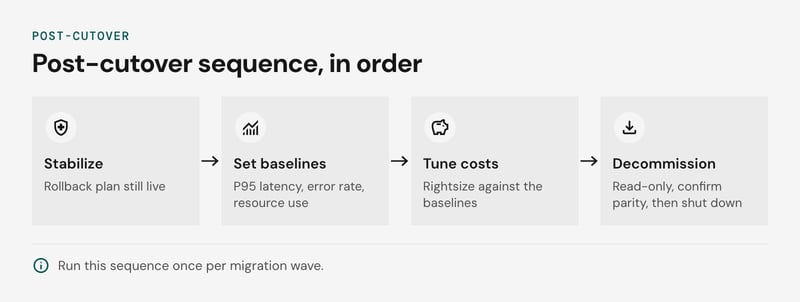
- Stabilize. Keep reverse data sync running until the rollback window agreed before cutover closes. Compare error rates, latency, and queue depth with the pre-migration numbers.
- Set baselines. Record p95 latency, error rate, and resource use from the first stable weeks. These become the reference for alert thresholds and capacity planning.
- Tune costs. Rightsize instances and storage tiers against the baselines, then review commitment purchases. Rightsizing on launch-week traffic locks in the wrong size. Cloud migration cost covers the cost drivers in detail.
- Decommission. Switch the old application to read-only, confirm data parity with the target, archive what retention rules require, and only then shut it down. Read-only mode preserves the data and surfaces any consumer still writing to the old system. AWS Prescriptive Guidance treats this as the Retire path.
Run this sequence once per migration wave. Leave shared databases and services running until the last dependent wave has moved.
Why do application migrations stall?
Application migrations stall when dependency mapping misses something, a license blocks the target, a shared database can't be split, or scope grows mid-wave. Each has a detectable early sign, and the first three can be caught during the application portfolio assessment.
| Failure mode | Early warning sign | Mitigation |
|---|---|---|
| Hidden dependencies | A cutover rehearsal fails on calls to hosts, cron jobs, or hardcoded IPs missing from the inventory | Build dependency mapping from network flow logs and connection data, and treat the CMDB as a starting hypothesis |
| Licensing | A vendor license is tied to hardware IDs or core counts, or the contract is silent on the target environment | Review contracts during assessment and get written vendor confirmation. If terms don't transfer, a replatform onto a managed service or a repurchase may be cheaper than negotiating |
| Unsplittable shared database | Two applications write to one schema, yet the wave plan moves only one of them | Move the applications sharing the schema in the same wave, or replicate with CDC and split ownership after cutover |
| Scope creep | "While we're in there" tickets appear in a rehost wave | Fix one strategy per application, gate any change of strategy through the wave owner, and park improvements in a post-migration backlog |
People problems stall migrations as often as technical ones. Engage stakeholders before the strategy is fixed, so it matches business objectives and the business accepts the transition. Plan training early too, so the staff who will run the applications after the move are certified on the target platform before cutover.
Application migration checklist
An application migration checklist works best as five phases, each ending in a go/no-go gate that a named owner signs off before the next phase starts.
1. Assess
- Finish the application portfolio assessment: owner, data volume, licenses, and runtime dependencies per app.
- Run dependency mapping against live traffic as well as architecture diagrams.
- Assign one of the 7 Rs to each app.
Gate: every in-scope app has an owner, an assigned R, and a mapped dependency list.
2. Plan
- Group apps into migration waves, with low-risk, low-dependency apps first.
- Write a rollback plan per wave: trigger conditions, the reverse data-sync path, and the point after which rollback is no longer possible.
- Tell stakeholders what changes, when, what they must do, and which new procedures apply.
Gate: the rollback plan is reviewed and the business owner has approved the cutover window.
3. Build
- Stand up the landing zone, network, IAM, and CI/CD for the target.
- Rehost with a tool such as AWS MGN, or build the replatformed target. Start CDC replication early.
- Stress test the target to confirm it handles the expected load and data processing.
- Train the team on the target platform's cloud modules before cutover.
Gate: the load test meets agreed thresholds and one rollback rehearsal has succeeded.
4. Cut over
- Lower DNS TTL before the window.
- Pick the pattern per app: blue-green deployment, parallel run cutover, or big bang.
- Freeze writes, reconcile data, then shift traffic.
Gate: smoke tests and reconciliation pass. A failure triggers the rollback plan, with no improvised fixes.
5. Run
- Put the source application in read-only mode, which preserves its data and exposes consumers the mapping missed.
- Right-size resources, review cost, and update runbooks.
Gate: decommission the source only after the agreed retention window closes without incident.
Frequently asked questions
What is application data migration?
What is application migration to cloud?
What is AWS Application Migration Service?
Which strategy re-architects an app for cloud-native features?
What does legacy application migration cost?
Conclusion: Choose per app, cut over reversibly
Choose one of the 7 Rs migration strategies per application, and cut over only with a rollback plan you have already rehearsed. Retire and retain the apps that do not need to move. Rehost, replatform, or refactor the rest according to dependencies and business value.
A usable rollback plan names a trigger, a data path back (reverse replication or a parallel run), and a DNS TTL lowered before cutover. We recommend rehearsing it in the last pre-production wave.
A second review of the wave plan and rollback criteria costs less than finding gaps mid-cutover. To get your plan reviewed, talk to our team.


