
Is your ecommerce platform holding back growth? 7 signs it's time to switch


Contents
When the board asks for a replatform, the first question is whether the platform is the cause at all. Think of a warehouse: messy shelving, too few staff and badly sequenced pick routes are clutter problems, fixable by reorganising and certain to follow you into any new building.
Doors too narrow for the forklift are floor-plan problems, and they return however well you organise. A platform is holding growth back only when the constraint survives good implementation practice. Which one you have depends on evidence from your own store.
Is your ecommerce platform the bottleneck? The short answer
Replatform only when you have a platform constraint, meaning a limit that returns despite good implementation; an implementation constraint goes away once you fix code, configuration or infrastructure. Slow checkout and expensive releases look identical from the boardroom either way.
We recommend running the switch-off test before any migration decision, because a new platform carries your clutter with it. Netguru designs, audits and rebuilds ecommerce architectures, and a store audit settles which kind of problem you have.
Platform problem or bad implementation? The classification rule
A platform constraint survives good implementation practice, while an implementation constraint disappears once you fix code, configuration or infrastructure. Classify every symptom with one rule:
If a change to code, configuration or infrastructure removes the constraint, it is an implementation constraint. If it returns despite good practice, or working around it means fighting or overriding the core, it is a platform constraint.
The rule applied to each sign:
| Sign | Implementation constraint if | Platform constraint if |
|---|---|---|
| 1. Bottleneck | It disappears with custom modules and extensions switched off | Cart, checkout or catalog indexing still miss targets at real traffic or SKU count |
| 2. Core overrides | The requirement fits a supported extension point | Only a core override delivers it, and upgrades break it |
| 3. Support and upgrade path | You are behind on an upgrade the vendor still supports | The vendor has ended support, or partners and extensions have stopped shipping |
| 4. Architecture or licence ceiling | The limit is a sizing, caching or query setting | The limit is the licence tier ceiling or a coupled monolith frontend |
| 5. Cost of change | Technical debt in your own modules drives it | The platform's structure makes every change expensive |
| 6. Diminishing returns | Custom subsystems can be consolidated or retired | Tuning is exhausted at the platform's own limits |
| 7. Next two years | The roadmap fits the current architecture | The roadmap needs capability the platform cannot host |
Technical debt in your own modules raises the cost of change, but it travels with the codebase to any new platform. Mixed results are common, so classify each constraint separately.
What a badly built store looks like: Rule these out first
A badly built store shows the same symptoms as a platform limit, and migrating carries the faults along: extension sprawl, missing caches, unprofiled queries, compounding promotion rules and synchronous ERP calls. If the audit shows the platform itself is the limit, an ecommerce microservices architecture can break a coupled monolith into independently deployable services instead of carrying the same bottlenecks forward.
Each fault leaves an early sign in profiling or traces:
| Build fault | Looks like a platform limit | Early sign |
|---|---|---|
| Unbounded extension and plugin dependency | Slow cart, painful upgrades | Several modules hook the same event; disabling one drops p95 latency at peak |
| Cache configuration gaps (no full-page cache, no CDN, low hit ratio) | "The platform can't take our peaks" | Origin serves catalog pages and static assets that should come from the edge |
| Unindexed or N+1 queries | Slow category and search pages | Database query profiling shows query count growing with items per page |
| Promotion rules compounding in price recalculation | Slow cart and checkout | Cart time grows with the number of active rules; totals are recalculated on every line change |
| Synchronous ERP calls inside the request | Checkout timeouts | Traces show stock or price lookups to the ERP mid-checkout, so an ERP slowdown becomes a checkout outage |
| No CI and no performance gate | Regressions after every release | Manual deploys; no load test before release |
Run the switch-off test against this list before anything else. If disabling custom modules restores cart and checkout targets at your real traffic, the constraint is yours to fix.
Whatever remains after these faults are fixed is a candidate platform constraint, and only that residue belongs in a migration case.
Sign 1: Does the bottleneck survive the switch-off test?
The switch-off test disables your custom modules and extensions, then checks whether the bottleneck survives; if it does, you are looking at a platform constraint. In warehouse terms, you clear out your own racking and see whether the doors still jam.
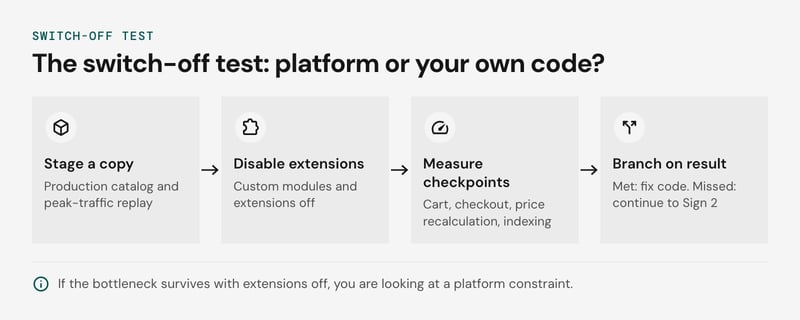
Run it on a staging copy with the production catalog and a peak-traffic replay. Set each target before you start, so the result cannot be argued afterwards. The four checkpoints:
| Checkpoint | Measure with extensions off | A miss that persists points to |
|---|---|---|
| Cart | p95 add-to-cart and cart-update latency at peak concurrency | Core cart or session handling |
| Checkout | p95 latency and error rate from first step to payment authorization | Core order pipeline |
| Price recalculation | Time to reprice after a promotion or price-list change, at full SKU count | Core pricing engine |
| Catalog indexing | Full reindex duration, and delay before a partial update reaches the storefront | Core indexer design |
If the targets are met on the bare platform, the fault sits in your code, configuration or infrastructure. A clutter problem like this would move with you to any new platform. If the targets are still missed, continue to Sign 2.
The test has blind spots. Some modules cannot be disabled because the business depends on them, such as a promotion engine, so a pass proves the core is fast but not that it supports your requirements. Synthetic traffic also skips live ERP and payment calls.
A failed indexing run can still be undersized infrastructure, so scale resources before you read a fail as final.
Sign 2: Do you meet requirements only by overriding the core?
Meeting requirements only through core overrides signals a platform constraint when no extension point exists, and an implementation constraint when a native mechanism was never configured.
Core overrides break at the next major upgrade. Patched classes and templates diverge from the vendor's changes, merge conflicts pile up, and upgrade estimates start to exceed feature estimates. Teams then defer. A deferred upgrade path ends at end-of-support, where security patches stop and extension vendors drop compatibility.
Early signs are an upgrade freeze and a release that needs a full regression pass because nobody can list what was overridden.
Before counting a requirement as a gap, check the native mechanism first:
| Requirement | Check first (native) | Genuine gap when |
|---|---|---|
| Multi-currency | Currency and price-list configuration | Rounding or pricing rules expose no hook |
| Multi-warehouse | Inventory sources and allocation rules | Allocation logic can't be extended without editing core |
| B2B | Company accounts, negotiated price lists | Approval workflows need changes to the core order flow |
| Per-country tax | Tax rules and rate tables | The tax engine can't be swapped or called externally |
Audit each override against this table. Where an override reproduces a configurable mechanism, delete it and configure the native one. Where the vendor offers no extension point and the override must stay, you have a platform constraint, and its upgrade cost recurs every release.
Sign 3: Is support or the upgrade path disappearing?
Disappearing support or a closing upgrade path is a platform constraint only when no fix at the stack level restores it. Everything else on this list is usually implementation debt that looks like vendor risk.
Vendor end-of-support is the clean platform case. Once the vendor stops shipping security patches for your major version and offers no supported successor on your architecture, good engineering cannot change that. Magento 1 is the precedent. Mechanics of leaving are in the Magento to VTEX migration guide.
The trade-offs, signal by signal:
| Signal | Platform constraint when | Implementation constraint when |
|---|---|---|
| Upgrade path and end-of-support | No patches for your major version, no supported successor on your architecture | A supported version exists, but core overrides block the upgrade (Sign 2) |
| Extension and plugin dependency | Key extensions are abandoned and the platform has no native feature or extension point to replace them | You can swap them for a native feature or a small custom module |
| Key-person risk | Few engineers in your market know the engine at all | Knowledge sits with one employee or agency, and documentation, tests and pairing would spread it |
Key-person risk is the easiest of the three to misfile. One maintainer is a staffing gap. It becomes a platform signal only when you cannot hire a second engineer at market rates.
A small community alone is not grounds to migrate. A lightly supported engine can still run well, but it can also fail you, so run the switch-off test before deciding.
Sign 4: Have you hit a hard architecture or licence ceiling?
A hard architecture or licence ceiling exists only when tuning cannot move the number. If cache configuration, query changes or a plan change shifts the metric, the constraint sits in the implementation.
Apply that test to each candidate limit:
| Candidate limit | Tuning that must fail first | Counts as a ceiling when |
|---|---|---|
| API, variant, store or query limits | Request batching, response caching, a leaner variant model | The documented cap sits below current or planned volume after batching |
| No horizontal scaling | Cache configuration, read replicas, off-peak catalog indexing | p95 latency at peak still misses target and the platform offers no way to add capacity to the bottleneck tier |
| Coupled monolith frontend blocking Core Web Vitals | Image and script budgets, full-page caching, removing third-party tags | Templates render through the core and still miss thresholds with extensions disabled |
| Licence tier ceilings | Renegotiating the tier, dropping unused modules | The next tier's price is unjustified by margin at your SKU count and order volume, and no other tier fits |
Licence tier ceilings need a margin calculation more than an engineering test. A tier jump that revenue pays for is a price. It becomes a ceiling when the jump consumes the margin the growth was meant to create.
Run the switch-off test before this check. A limit you only reach because of custom modules is a build problem, and migrating it carries the problem to the next platform. A limit that survives with extensions disabled and tuning exhausted is a platform constraint, and it goes into the cost ledger in the next step.
Sign 5: Is the cost of change out of proportion?
Cost of change is out of proportion when a small change still takes weeks after the code behind it has been cleaned up. Before that clean-up, the same symptom has two possible causes: technical debt in your own code, or a structure the platform imposes.
A bounded clean-up experiment separates them:
- Pick one painful area, such as catalog indexing or a checkout extension.
- Record a baseline: lead time for a typical change, regressions per release, and how long catalog indexing takes after an attribute or price update.
- Refactor that area only. Remove dead custom code, add automated tests, and move core overrides onto supported extension points.
- Ship the same class of change over several releases and compare against the baseline.
If lead time and regressions fall, the cost was technical debt, and the constraint sits in the implementation. If they stay flat, each change still touches shared platform code or fights the upgrade path. That points to a structural cost and to the platform.
Two caveats apply. One area and a few releases is a small sample, so read the result as direction, not proof. And a team without test coverage should write tests first, or the regression count will measure missing tests instead of platform behavior.
Sign 6: Are optimisation returns shrinking?
Optimisation returns are shrinking when each tuning round recovers less p95 latency at peak than the previous one, and the gap to your peak target stays open.
Log the gain per round against that target. Round one closes a large share of the gap, round two closes less, round three barely registers. A curve that flattens after the cheap fixes (query tuning, cache rules, index schedules) points to a platform constraint. A curve that stalls because nobody has profiled the slow path is still an implementation problem.
The second failure mode is custom subsystem sprawl. When search, product feeds and listing ranking each become a separate service with its own deployment, data copy and on-call rota, the team is building a second platform beside the first. Catalog indexing is the usual early sign: a custom pipeline pushes products to the search service, and every price or attribute change waits on it.
Classify sprawl by its origin. If the subsystems exist because the platform cannot expose the data or hooks you need, it is a platform constraint, and the cost of change will keep rising with each one. If they exist because nobody evaluated native or extension options, it is implementation, and consolidating them costs less than a migration. Run the switch-off test on them first.
Sign 7: Does the platform have a model for your next two years?
A platform has a model for your next two years when it adds markets and a B2B channel through configuration, with no copied instance per market. If the B2B channel is the sticking point, a comparison of the leading B2B commerce suites shows how far each one gets you through configuration alone.
The classification rule applies here too. If the plan needs a lifted licence tier ceiling or a core override, the constraint is the platform. If configuration covers the plan and your build does not, it is the implementation.
Take a hypothetical plan with assumed timing: market two at month 6, B2B accounts with negotiated price lists at month 10, market three at month 14. The two paths compare as follows:
| Stage | Configuration on one instance | Copied instance per market |
|---|---|---|
| Market two | New catalog view, currency and tax rules | Two platforms to patch |
| B2B launch | Account roles and price lists on the same codebase | B2B logic added to each copy |
| Market three | Another configuration set | Three platforms to patch |
On the copied path, every security patch, upgrade and checkout fix is applied once per instance, and the copies drift apart. That drift is custom subsystem sprawl, and the cost of change per feature rises with each copy.
Check the platform's documented limits on storefronts, locales and B2B features against the plan. A store audit runs that check against your code and contract tier.
Would the top-10 cost items disappear on a new platform?
Last year's ten largest cost items disappear on a new platform only when a platform constraint causes them; the rest follow you to the next platform.
Pull the ten largest items from the last twelve months of engineering, infrastructure, licence and vendor spend. For each one, ask whether it would exist on the target platform if the same team built the same store with good practice. The trailing-cost method in our replatforming guide covers how to assemble the ledger.
The table shows how typical items sort:
| Cost item | Exists on the target platform? | Classification |
|---|---|---|
| Regression fixes after each upgrade, caused by core overrides | No, if the target covers the requirement through configuration or extensions | Platform constraint |
| Licence tier uplift to get a feature | No, if the target does not gate that feature | Platform constraint |
| Hotfixes for untested custom checkout code | Yes, the code gets rebuilt the same way | Implementation constraint |
| Manual releases and QA without CI/CD | Yes | Process |
| Contractor hours spent decoding undocumented modules | Yes, as technical debt in the new build | Implementation constraint |
If most items vanish, the cost of change is structural and the ledger is a clean argument for migration. If most follow you, fix the code and process first.
A clean result still does not settle the decision. It only shows which costs travel, and the stay-versus-migrate comparison has to price what migration itself adds.
Stay or migrate: What does a 2-3 year comparison show?
A stay-or-migrate comparison works when you price three options over the same 2-3 year horizon: stay and optimise, migrate, and a migrate nothing baseline. The baseline is the one teams skip, and it is the one that makes the other two honest.
Price the migrate nothing baseline first. It holds the current run cost, the trend in cost of change per release, and the roadmap items the platform blocks.
Add the exposure from the upgrade path and end-of-support: extensions that stop receiving updates, and a core version that will stop receiving patches inside the horizon.
If the numbers favour moving, our legacy ecommerce modernization guide covers planning the move around roadmap and risk.
Price stay and optimise as targeted fixes to the items the switch-off test classed as implementation. Price migration as build, parallel run and risk. Migration wins only when the baseline cost, plus the revenue it blocks, exceeds both alternatives.
The trade-offs by situation:
| Situation | Current platform is often enough when | Migration is needed when |
|---|---|---|
| New markets | Currencies, tax rules and languages are configuration work on the current store | Storefronts or catalogs for new markets need core overrides, or the licence tier ceiling blocks them |
| Peaks | Failures at peak trace to caching, catalog indexing or undersized infrastructure | p95 latency at peak still misses target with custom modules switched off, at your real SKU count |
| Stability | Releases are routine and a supported upgrade path exists | Support ends inside the horizon with no upgrade path, or each release breaks customisations |
Migration does not fix bad processes. A team without automated tests, CI/CD or clear ownership of the catalog and checkout code will rebuild the same cost of change on the new platform.
The baseline wins more often than migration budgets assume, especially for smaller stores. Members of our team saw it repeatedly at their previous companies, before Netguru: stores that asked for rescue from an unreliable IT vendor often stopped needing a migration once the worst fifth of their problems was fixed.
For a small team, a new platform's cost and months of preparation can hurt more than the old engine.
The baseline only holds if the inputs are measured, which is the first job of an audit.
What does a Netguru store audit cover and return?
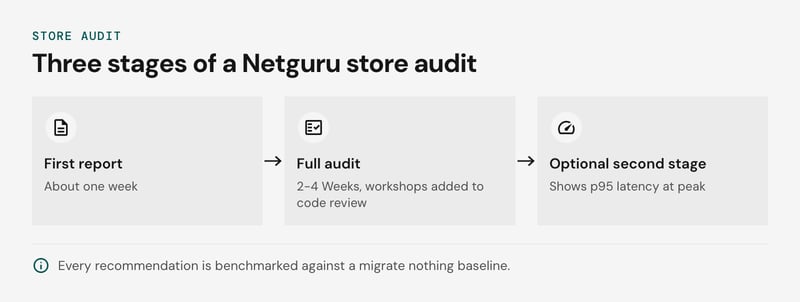
A Netguru store audit assesses your repository and deployment configuration across more than twenty dimensions and returns a first decision-ready report about a week after you grant repository access.
The dimensions include architecture, code quality, security, performance, infrastructure, integrations, the payment path, GDPR compliance and accessibility, summarized on a health card. Within them, the auditors look for core overrides, catalog indexing behavior and a coupled monolith frontend. Those three areas are where a platform constraint and an implementation constraint look identical from the outside.
Each high-priority finding is independently confirmed three times. It carries a severity, a confidence level, a code location and a proposed fix. Your team can pick up a finding as a ticket, and you can see whether the fix sits inside the implementation or points at the platform.
The report gives the board and the technical team the same evidence:
- An executive summary and business risk register, each risk with its likelihood, impact, exposure and priority, written for decisions, not code.
- Recommendations prioritised by business impact against effort, with cost estimates.
- A migration assessment: what to reuse, what to rewrite, the risky areas and a proposed phasing.
- A coverage matrix showing what was examined in full, in part, or left for the second stage.
- A roadmap of quick wins for the coming weeks and a longer-term plan, presented to management and the technical team.
The work runs in three stages:
- First report (about one week): repository and deployment review, with the highest-severity findings.
- Full audit (2-4 weeks): business and IT workshops added to the code review. Duration depends on scope, system scale and the number of applications.
- Optional second stage: load tests, database query profiling and a penetration test. They produce p95 latency at peak and show which queries and endpoints fail first.
The recommendation is always benchmarked against a migrate nothing baseline. A migration proposal therefore has to beat the cost of leaving the store as it is, and a "fix the implementation" verdict has to beat it too.
Conclusion: Check the floor plan before you move
A new warehouse fixes narrow doors, not messy shelves. Migrate only when a store audit confirms a platform constraint. An implementation constraint, such as slow catalog indexing, stacked core overrides or untested custom modules, follows your code and habits to any new platform.
The audit separates the two and benchmarks the result against a migrate-nothing option, so the board gets a recommendation it can fund or decline. If a platform constraint remains, VTEX is one target worth evaluating, and the VTEX platform guide covers fit. If none remains, you keep the platform and fix the build.
To get that answer for your own store, request a store audit.


