
Mobile app architecture: Layers, patterns and how to choose

Contents
Mobile app architecture comes down to three decisions: how many layers the code needs, which presentation pattern the team can sustain, and which layer owns the data. Android's and Flutter's official guides, and most iOS teams, converge on the same answer: a UI layer, a data layer, an optional domain layer, and state flowing one way.
The right pattern then depends on app lifespan, team size, offline needs, platform count and release cadence.
What is mobile app architecture?
Mobile application architecture is how an app's code is divided into layers and modules, each with one job and defined rules for talking to the others.
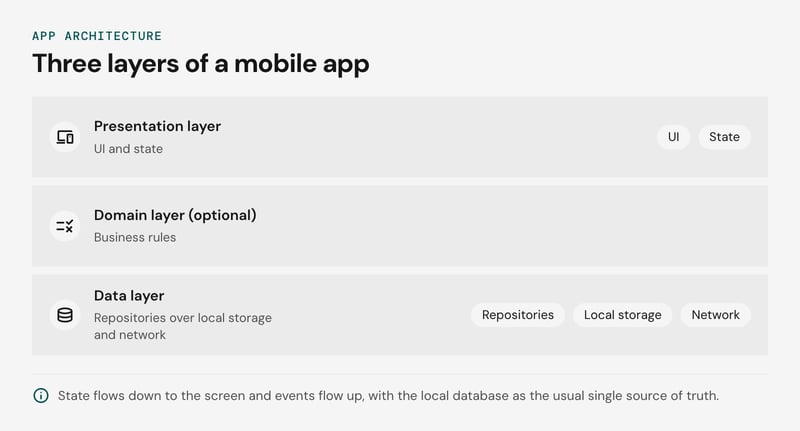
Most modern apps use three: a presentation layer for UI and state, an optional domain layer for business rules, and a data layer with repositories over local storage and the network.
State flows down to the screen and events flow up, a pattern called unidirectional data flow. Each piece of data has a single source of truth, usually the local database. Without those rules, business logic drifts into views, and every API change touches every screen.
Netguru designs, builds and scales native and cross-platform mobile products for enterprise and product teams. We recommend the three-layer split for any app that will outlive its first release, because it keeps backend changes out of the UI.
A short-lived prototype can skip the domain layer, and a small team may find extra layers cost more than they isolate.
What belongs in the presentation, domain and data layers?
The presentation layer holds UI and screen state, the domain layer holds business rules as use cases, and the data layer holds repositories and the data sources behind them. Dependencies point one way: UI to domain to data.
| Layer | Belongs here | Stays out |
|---|---|---|
| Presentation | Composables, SwiftUI views or Flutter widgets, plus a ViewModel that exposes screen state and takes user events | Network calls, validation rules, SQL |
| Domain | Use cases, entities, business rules such as limits and eligibility | Android, UIKit or Flutter framework imports |
| Data | Repository, local database (Room on Android, Core Data on iOS), remote API client, mappers | Screen state, navigation |
Android's architecture guide treats the domain layer as optional. Add it when two or more screens share a rule or a ViewModel starts accumulating logic. Strict Clean Architecture goes further and has the domain layer own the repository interface, so the data layer depends on it (see Robert C. Martin's dependency rule).
One feature traced end to end: Saving an item to favorites
Assume an Android app where free accounts can keep 50 favorites. The class names are illustrative.
- Tap. The screen calls
onFavoriteClicked(itemId)on its ViewModel. The presentation layer contains no rule and no I/O. - ViewModel. It launches in viewModelScope and calls ToggleFavoriteUseCase.
- Use case. It checks the 50-favorite limit. If the check passes, it asks the repository to toggle the item. If it fails, it returns a typed error that the ViewModel maps to a message.
- Repository. It writes the change to Room first and flags the row as pending sync. Room is the single source of truth, so the write succeeds offline.
- Back to the screen. The DAO exposes favorites as a Flow. Room emits the new list, the ViewModel's StateFlow updates, and the UI redraws the filled heart. No code patches the UI by hand.
- Network. A background job, such as WorkManager, sends pending rows to the API. On success it clears the flag. On a conflict it overwrites the local row, and the same Flow emits again.
The SwiftUI version has the same shape, with an observable view model and Core Data or SwiftData as the store. Flutter's app architecture guide describes the same split with a view model and repository per feature.
The repository pattern is what makes this change cheap. It gives the use case mapped domain models, and the REST client, a GraphQL endpoint or the local store can be replaced without touching the use case or the ViewModel.
The edit stays inside the data layer. That boundary is the main reason to pay for the extra layer on a long-lived app, and our mobile development team draws it before the first feature ships.
Core principles: State down, events up
Unidirectional data flow means state moves down from one owner to the UI, and events move up from the UI to that owner. Android's architecture guide describes this pattern with the ViewModel as the screen's state holder.
The decision rule: when two components can write the same data, designate one owner and expose read-only state to everything else.
- Screen state: the ViewModel owns it. It keeps a MutableStateFlow private and exposes a StateFlow. Composables, SwiftUI views, and Flutter widgets render that state and send events such as "retry tapped" back up as function calls.
- Persisted data: the repository owns it, with Room or Core Data as the store. The ViewModel observes the repository and never edits a second copy.
A single source of truth gives each piece of data exactly one writer. Every other component reads a stream of that data and requests changes through events. When two writers share one value, stale screens and sync conflicts tend to follow.
The rule has a limit. Ephemeral UI state, such as scroll position, focus, or a running animation, can stay inside the composable or widget that uses it. Hoist it to the ViewModel only when a second component needs to read or change it.
How do Android, iOS and Flutter recommend structuring apps?
Android, iOS and Flutter each recommend a UI layer, a data layer and an optional domain layer, but they differ in how prescriptive they are. Android and Flutter publish layered guides. Apple documents data-flow primitives for SwiftUI and leaves the layering to you.
The official guidance side by side:
| Android | iOS | Flutter | |
|---|---|---|---|
| UI toolkit | Jetpack Compose (or Views) | SwiftUI (or UIKit) | Flutter widgets |
| State holder | ViewModel exposing observable state | @State, @Binding and @Observable model classes | View model, typically a ChangeNotifier |
| Data flow | Unidirectional: state down, events up | State flows down, actions flow up through bindings and model methods | Unidirectional between view and view model |
| Domain layer | Optional, use cases | Not defined by Apple; added by teams | Optional |
| Data layer | Repositories over data sources | No prescribed repository; teams add one | Repositories over services |
| Local storage | Room | Core Data or SwiftData | SQLite packages such as sqflite or Drift |
| Official stance | Prescriptive layered guide | Describes data flow; names no pattern | Prescriptive, MVVM-style guide |
The Android architecture guide treats the repository as the single source of truth, with Room behind it and a ViewModel feeding Jetpack Compose. The Flutter app architecture guide maps almost one-to-one onto it: views, view models, repositories and services.
What iOS teams add on top of Apple's guidance
Apple's model data documentation explains how SwiftUI views observe and bind to data. It does not name MVVM or any other pattern, so each team picks one. Three choices come up most often:
- MVVM: a view model holds presentation state and calls a repository protocol you define. It lines up with SwiftUI's observation tools and with the Android and Flutter structure. Our MVC vs MVVM on iOS comparison shows what that looks like in code.
- Clean Swift: each screen gets a view, an interactor, a presenter, a worker and a router, with data moving in a one-way cycle. The Clean Swift pattern gives strict boundaries at the cost of more files per screen.
- Clean Architecture in SwiftUI: views, business logic and data access sit in separate layers, as described in our Clean Architecture in SwiftUI guide.
Our suggested rule: start with MVVM when SwiftUI's observation covers your state needs and features are mostly independent. Move to Clean Swift or Clean Architecture when several features share business rules, or when you need to test that logic without importing UI types.
Whichever you choose, the repository boundary is yours to draw. A common approach is a protocol that the view model depends on, with one implementation wrapping Core Data or SwiftData and the network client.
Flutter state management
Flutter's guide does not require a state management package. BLoC is a community option that fits the same layering when a team wants explicit event-to-state streams, and the BLoC walkthrough covers the trade-offs.
No platform's guidance wins outright. Our recommendation is to start from the structure your toolkit's state primitives already point to, and add a domain layer only when two or more features share business rules. On iOS, that means deciding for yourself where the repository boundary sits, because the documentation will not do it for you.
MVC, MVVM, MVI, Clean Architecture or VIPER: Which fits?
MVVM is the default fit for most mobile teams, MVI suits state-heavy screens, and Clean Architecture or VIPER pay off only when a large team needs hard module boundaries.
The five patterns sit at two levels. MVC, MVP, MVVM and MVI are presentation-layer variants that decide how a screen turns state into UI. Clean Architecture and VIPER structure the whole app, so you can run MVVM inside a Clean Architecture module. The software architecture patterns guide covers the wider catalog beyond mobile.
The comparison below uses our own rule-of-thumb team sizes, not benchmarks:
| Pattern | What it is | Fits | Team size | Cost of change |
|---|---|---|---|---|
| MVC | A controller takes input and updates the model and view | Prototypes, simple screens | 1-3 | Low at first, rises as controllers grow |
| MVVM | A ViewModel exposes observable UI state that the view renders | Most Jetpack Compose, SwiftUI and Flutter apps | 2-15 | Low to moderate |
| MVI | User intents reduce into one immutable state, with one-way flow | Forms, real-time and other state-heavy screens | 3-15 | Moderate: more code per screen, easy to trace |
| Clean Architecture | Layers whose dependencies point inward to the domain layer | Long-lived apps with real business rules | 8+ | Low for rules, high upfront |
| VIPER | Five roles per module: View, Interactor, Presenter, Entity, Router | Large UIKit codebases with many teams | 10+ | Isolated per module, high boilerplate |
When to avoid each pattern:
- MVC: once view controllers hold networking and business logic, they cannot be unit-tested without a UI host.
- MVVM: when a screen has many interacting events, state scatters across several observable properties and nobody can say which one changed last.
- MVI: on static, read-mostly screens, where a reducer and intent types for a settings page cost more than they return.
- Clean Architecture: in apps that are mostly CRUD over an API, where use cases only forward calls to a repository and add files without isolating any rules. Android's guide treats the domain layer as optional for this reason.
- VIPER: on small teams or short-lived products.
VIPER adds a Presenter, Interactor and Router per screen, roughly five types before any feature code. For a team under about five developers that boilerplate outweighs the isolation it buys. SwiftUI's declarative data flow also overlaps with much of the Presenter's job. Clean Swift, an iOS take on Clean Architecture built around a View-Interactor-Presenter loop, carries the same overhead.
Whichever pattern you pick, put a repository between the domain layer and the data sources.
Native, cross-platform or hybrid: How the choice changes the architecture
The platform approach decides how much of the presentation layer you write once: native duplicates it per platform, cross-platform frameworks such as Flutter share it, and hybrid apps move it into a WebView. The layers underneath stay the same in all three.
The approaches side by side:
| Approach | Shared across platforms | Platform-specific code | Fits when |
|---|---|---|---|
| Native (Jetpack Compose, SwiftUI) | Backend contracts, sometimes domain rules | The whole client, per platform | Heavy device APIs, platform-specific UX, long app lifespan |
| Cross-platform (Flutter) | UI, state management, domain and data layers | Thin adapters for device APIs | One team, two stores, shared release cadence |
| Hybrid (WebView) | Screens and business flows, rendered as web | Native shell: navigation, auth, push, storage | Existing web screens worth reusing |
A decision rule we recommend: share everything that does not call a device API, and put each device API behind an interface that dependency injection supplies per platform. In Flutter, that boundary is a repository or service backed by a platform channel.
For a WebView, the boundary is stricter. The native shell owns navigation, authentication tokens, and offline storage, and the web content reaches them only through a narrow, versioned bridge. If web screens read tokens or write local state directly, the single source of truth splits in two.
This rule has limits. Apps built around camera pipelines, background processing, or tight OS integration spend most of their code behind that boundary, and native usually costs less than maintaining adapters. We suggest settling the boundary before the framework when planning enterprise mobile app development.
The hybrid and cross-platform options combine well. Flutter can host WebViews for stable screens while new flows are built natively in Dart, so the shared code shrinks only where the web screens are retired.
Example: Cross-platform with reused web screens
METRO BRAZIL, an e-commerce platform selling Brazilian products in the Middle East and the GCC, had native apps that were hard to maintain and costly to keep updated on both platforms, and their UI differed from the web store.
Netguru rebuilt the app as one Flutter codebase for iOS and Android, designed navigation from scratch, and used WebViews to reuse the existing e-commerce screens with a native feel, in several languages and currencies. The app integrates with Shopify and uses Firebase for tracking and remote configuration, which lets the team push targeted updates and run A/B tests while the app is live.
In the first three months after launch, daily active users grew 70%, customer satisfaction rose 50%, and international and GCC orders grew 40%. Those results belong to the whole product, not to the architecture alone, but the setup follows the table above: a shared Flutter client, WebViews where web screens were worth reusing, and hosted services behind them.
What does a mobile app architecture diagram show?
A mobile app architecture diagram shows the layers inside the client, the backend it calls, and the third-party services around it, with one labeled arrow for every direction data travels.
The example below follows an order-history screen, and each arrow reads source to destination.
- User to presentation layer: taps and input events enter the screen (Jetpack Compose, SwiftUI or Flutter widgets) and go to the ViewModel.
- Presentation layer to domain layer: the ViewModel calls a use case. Observable state flows back up to the screen, which keeps data flow one-way.
- Domain layer to repository: the use case requests data, and the repository returns domain models.
- Repository to Room: fresh network results are written to the local database. Room (Core Data on iOS) streams reads back to the repository as the single source of truth.
- Repository to backend API: requests go out over HTTPS, and responses come back as DTOs that the repository maps to domain models. Draw the trust boundary on this arrow.
- Client to analytics SDK: events flow out only, and nothing returns to the app.
- Push provider to client: a message arrives on the device and triggers a repository sync. It does not write to the screen directly.
- Presentation layer to payment provider: card details go from the provider's SDK to the provider, and a token returns. Only the token travels on to your backend.
The repository earns its box because it is the only component that sees both Room and the network client.
This diagram describes one feature's runtime data flow. For a small app, drop the domain box and let the ViewModel call the repository directly. Module dependency diagrams are a separate drawing, and their arrows point inward.
How does offline-first mobile app architecture work?
Offline-first architecture makes the local database the single source of truth: the UI reads only from it, and a repository pattern layer hides the network behind a sync process that writes into that store.
On Android, a Room DAO exposes queries as Flow, and the ViewModel collects the repository's stream. On iOS, Core Data feeds SwiftUI through @FetchRequest or an observable model. Screens don't query the network, so a dropped connection changes nothing the user sees.
Writes follow the same path in reverse. The repository saves the change locally, flags it as pending, and appends an entry to a write queue.
We recommend an outbox table in the same database, written in the same transaction as the change, so the two can't diverge. A background worker drains the queue: WorkManager on Android, BGTaskScheduler on iOS.
Each request carries an idempotency key, so a retry doesn't create a duplicate order.
The conflict strategy decides what happens when queued writes meet server state that moved on:
| Strategy | How it works | Fits | Failure mode |
|---|---|---|---|
| Last-write-wins | The server keeps the write with the latest timestamp | Single-user data such as settings and drafts | Discards the earlier edit silently; device clock skew can pick the wrong winner |
| Field-level merge | Each write carries its changed fields and a base version; the server merges non-overlapping fields | Shared records such as orders, profiles and tasks | Needs an explicit rule when both sides changed the same field |
Assume a user edits a delivery address on a train while a colleague changes the same order's phone number on the web. After reconnect, the queued write replays as a whole-record upload under last-write-wins. The stale copy overwrites the phone number, the next sync pulls the overwritten record back, and nobody sees an error. The early sign is a record that reverts after sync.
We recommend sending a base version with every queued write and having the server answer stale ones with HTTP 409. The repository can then merge the fields or ask the user, and the local store stays consistent with the server.
When should a mobile app be modularized?
A mobile app should be modularized when build time, team ownership boundaries or feature ownership create friction you can point to, and not earlier. One team shipping one app is usually better served by a single module with clear package boundaries.
Three triggers justify the split:
- Build time: incremental builds or CI runs make developers wait on code they did not touch. Gradle modules on Android and Swift packages on iOS let the build system skip unchanged code.
- Team boundaries: two or more teams edit the same files and block each other's merges. A module with a named owner and a public interface removes the collision.
- Feature ownership: a feature needs its own release cadence, is reused in a second app, or ships through on-demand delivery.
Every module adds build configuration, a public API to maintain and a new place for dependency cycles. For a small team that cost usually exceeds the benefit, so we recommend splitting out the one feature that fires a trigger first and leaving the rest together.
When you do split, follow the dependency rule from Robert C. Martin's Clean Architecture: source dependencies point inward. The domain layer module holds entities and use cases with no UI or storage imports. Presentation and data modules depend on it, never on each other.
Dependency injection keeps that rule enforceable by supplying the repository implementation to the use case at runtime. Hilt covers Android, Swinject covers iOS (plain initializer injection with SwiftUI's @Environment works for smaller apps), and provider covers Flutter, as used in the examples at docs.flutter.dev/app-architecture.
How to choose a mobile app architecture
Choose a mobile app architecture from five inputs: app lifespan, team size, offline needs, platform count and release cadence, starting from MVVM with a repository-backed data layer as the default.
The table below maps common combinations to a pattern and layer setup. The thresholds are our rule of thumb, not benchmarks.
| Situation | Pattern | Layer setup |
|---|---|---|
| Prototype or campaign app, under a year of life, 1-3 developers, online only | MVVM | UI, ViewModel and one repository. No domain layer. |
| Long-lived product, 4-10 developers, one platform, weekly releases | MVVM | Presentation, domain layer with use cases, data layer. |
| Field or logistics app that must work offline | MVVM | Local database (Room on Android, Core Data on iOS) as the single source of truth, with a sync job behind the repository. |
| Screens with many interacting states, such as an editor or live feed | MVI | One immutable state object per screen, unidirectional data flow. |
| iOS and Android from one team | Flutter with MVVM-style views and view models | UI, logic and data layers per docs.flutter.dev/app-architecture. Domain layer only for complex rules. |
| 10+ developers, several teams, 5+ year lifespan | Clean Architecture | Domain layer with no framework imports, dependencies pointing inward, then feature modules. |
When factors conflict, lifespan and team size should win. A three-person team building a regulated app meant to live for years still benefits from a domain layer, because the cost of untangling rules from screens grows with every release.
Offline needs change the data layer, not the UI pattern. The repository reads from local storage and the UI observes it, so MVVM and MVI both work.
Release cadence mostly affects testing. Weekly releases favor ViewModels and use cases that run in plain unit tests, with no emulator in the loop.
This table does not fit every app. Full Clean Architecture, with a mapper at every boundary, adds boilerplate that a CRUD app with one backend never repays. MVI's reducer discipline can slow a small team that has simple screens.
Common mobile app architecture mistakes
The most common mobile app architecture mistakes are business logic in views, no repository layer, and modularizing too early. Each one has a recognizable symptom and a fix that costs less than the rewrite it prevents.
Business logic in views. The symptom is a screen that can only be tested on a device or emulator, plus the same pricing or validation rule living in two screens with slightly different results.
The fix is to move rules out of the composable, SwiftUI view or widget and into a ViewModel, or into a use case if the app has a domain layer.
The presentation layer then renders state and forwards events, and each rule gets a plain unit test.
No repository layer. The symptom is network DTOs and Room entities or Core Data objects showing up inside ViewModels, so renaming one backend field touches dozens of files. The fix is to put a repository in front of every data source.
The repository pattern maps raw data to the models your business logic uses, so a source can be replaced without changing its callers. Stabilizing the API contract early also cuts churn, which our mobile app backend guide covers.
Premature modularization. The symptom is a small team spending sprints on module graphs, build configuration and public interfaces for features that still change weekly, while a simple change crosses four modules. Our recommendation is to start with one module and enforce layer boundaries through package structure. Split along feature seams once separate teams need independent builds or ownership.
FAQ
What are the layers of mobile app architecture?
What is the best architecture for Android apps?
MVVM vs MVI: Which should I use?
Do I need a domain layer?
What is the best architecture for a Flutter app?
Conclusion: Start simple, add layers when pain appears
Start with MVVM, put a repository in front of a single source of truth, and add layers only when a specific pain shows up. A ViewModel plus one repository per data type covers most apps through their first releases.
Two triggers tell you when to add structure:
- Two screens duplicate the same business rule: add a domain layer.
- Build times or merge conflicts slow your releases: split into modules.
In our view, extra layers before those points cost more than they return. Keeping the dependency direction clean from day one is cheap and hard to retrofit.
If you are unsure whether your app has reached either point, send us a short project brief and our mobile team can review its structure with you.


