
What is a headless CMS? Definition, architecture and fit

Contents
A headless CMS stores and manages content in a backend and delivers it through an API, leaving every page, screen or interface to a separate frontend. It suits teams that publish to more than one channel or want full control of a JavaScript frontend.
It adds real operating work for teams with a single marketing site and one editor group. Whether it fits depends on channel count, editor needs and who will own the frontend and the publish pipeline.
What is a headless CMS?
A headless CMS, also called an API-first or API-driven CMS, is a content repository that stores structured content and delivers it through REST or GraphQL APIs to any frontend. The CMS owns content types, entries, and editing; a frontend framework such as Next.js or Nuxt owns rendering.
Headless fits teams that publish to several channels or need full frontend control; a single marketing site whose editors rely on built-in layouts and preview usually suits a traditional CMS.
We recommend headless when developers own the frontend, because content modeled around meaning can feed every channel. Netguru's headless CMS development work covers content modeling and Next.js frontends for product teams.
How does a headless CMS deliver content?
A headless CMS delivers content by exposing entries from its content repository through REST or GraphQL APIs. A frontend framework such as Next.js or Nuxt fetches those entries at build time or request time and renders them. Editors never touch the rendering layer.
The request flow, from editor screen to visitor:
- An editor publishes an entry. The CMS validates it against its content model, meaning the content type's fields, references and validation rules.
- The CMS saves the entry in its content repository and fires a webhook to the frontend host.
- The webhook triggers a rebuild or, in Next.js, on-demand revalidation under ISR, which regenerates only the affected pages.
- The framework calls the CMS delivery API, usually served from the vendor's CDN, and receives JSON shaped by the content model.
- The framework renders HTML and pushes it to the CDN edge. Mobile apps and other channels call the same API directly.
Drafts follow a parallel path: a separate preview API feeds a preview environment, so editors see unpublished changes before release.
Content modeling decides how pleasant the API is to consume. Well-separated content types with explicit references produce predictable JSON, whichever protocol you choose. The protocol choice is where teams split.
The two options side by side:
| Factor | REST | GraphQL |
|---|---|---|
| Over-fetching | Each endpoint returns a fixed shape unless the vendor supports field selection or include depth parameters. Nested references often need extra calls. | The client names the fields it wants, and nested references resolve in one request, as the GraphQL specification describes. |
| HTTP and CDN caching | GET requests to stable URLs cache at the CDN and browser with no extra work. | Queries commonly go as POST to a single endpoint. CDN caching usually needs persisted queries or GET support, so check your vendor. |
| Query complexity | Cost per call is predictable. | Queries with many nested levels can be expensive, so vendors cap them. Contentful's GraphQL API enforces complexity limits. |
| Tooling | Any HTTP client, curl, OpenAPI tooling. | Typed schema, introspection, an in-browser explorer and code generation for typed clients. |
We recommend GraphQL when pages assemble many referenced entries, such as landing pages built from nested content blocks, or when several clients need different shapes of the same entry. REST suits simpler content types and teams that want CDN caching without extra setup.
The caching gap narrows with SSG or ISR, because the CMS is queried at build or revalidation time and visitors hit cached HTML. It matters most for client-side fetching and for apps that call the API per request.
Platform support differs: Strapi, Contentful and Sanity each expose REST, GraphQL or their own query language in different ways, so confirm the one you need in the vendor docs.
What happens between clicking publish and the page updating?
After an editor clicks publish, the CMS fires a webhook, the frontend framework rebuilds or revalidates the affected pages, and the CDN serves the new HTML. Each step adds latency, and each one gives you a lever.
- Webhook. The CMS sends an HTTP POST to a URL you configure, carrying the entry ID and content type. Many platforms retry failed deliveries, so make the handler idempotent and verify the request signature.
- Rebuild or revalidate. A full static site generation (SSG) rebuild regenerates every page, so publish latency grows with site size. Incremental static regeneration in Next.js lets the webhook trigger on-demand revalidation with revalidatePath or revalidateTag, regenerating only pages that use the changed entry, as the Next.js ISR documentation describes. Nuxt offers comparable route rules on supported hosts.
- CDN invalidation. Edge nodes can keep serving the cached page until it is purged or its TTL expires. Purging by cache tag, where your CDN supports it, closes that gap. Without it, the first visitors after publishing may still see the old version.
We recommend on-demand revalidation once a full rebuild takes longer than editors will wait. A small marketing site can live with rebuild-on-publish.
Editors need a separate path for drafts. A preview environment should bypass the cache and read unpublished entries directly, so they don't wait for this pipeline to check a typo.
Whichever path you pick, the output must be pre-rendered. Developers need SSR or SSG so search engines receive the full HTML content, because a client-side-only app can hand crawlers an empty shell.
Headless vs traditional CMS: What changes?
A headless CMS separates content storage from presentation, while a traditional (monolithic) CMS bundles the editor, database, templates, and rendering into one application.
The split emerged because the monolith assumed one website. Mobile apps, then storefronts, kiosks, and email, needed the same content in different shapes. JavaScript frameworks such as Next.js and Nuxt then gave frontend teams their own rendering layer. Structured content, delivered as JSON through an API, let one entry feed all of them.
The comparison below includes the hybrid pattern, where WordPress keeps the editor and exposes content through the WordPress REST API.
| Dimension | Traditional (monolithic) | Headless | Hybrid (WordPress + REST API) |
|---|---|---|---|
| Rendering | Server-side themes inside the CMS | Frontend framework renders with SSG, ISR, or SSR | Separate frontend consumes /wp-json endpoints |
| Plugins | Features and optimization arrive as plugins | Features live in frontend code or external services | Admin plugins stay; markup-producing plugins don't reach the frontend |
| Ownership | One stack, one team | CMS vendor or host plus a frontend team that owns build, preview, and hosting | Both stacks to maintain |
| Speed | Caching plugins help, but the ceiling is below pre-rendered pages | Pre-rendered pages served from a CDN | Matches headless once pages are pre-rendered |
| Security | Admin and public site share one attack surface | Public site can be static; you secure API tokens and webhooks | WordPress admin still needs patching |
Plugin upkeep is where monoliths cost the most at scale. Every plugin adds an update stream to track and a compatibility risk to test, and optimization plugins can tighten load times but can't match what a static site generator produces.
Headless moves that work elsewhere. The CMS ships no frontend, so your team must supply SSR or SSG to give crawlers full HTML, and it also covers hosting, security, and maintenance. Our view is that this trade pays off with multiple channels or a dedicated frontend team, and rarely does for a single brochure site.
Headless vs decoupled vs hybrid CMS: What is the difference?
Headless, decoupled, and hybrid CMS platforms differ in two respects: whether a bundled frontend exists, and whether the API is the primary or secondary interface. Two questions sort any product:
- Does the CMS ship a rendering layer (themes, templates, a page builder)?
- Was the API designed first, or added after the rendering layer?
The three types side by side:
| Type | Bundled frontend | API role | Typical example |
|---|---|---|---|
| Headless (API-first CMS) | None | Only delivery interface | Contentful, Strapi, Sanity, Storyblok |
| Decoupled CMS | Yes, but separable | Primary path to the separate frontend | Vendors vary in how they use the term |
| Hybrid | Yes, fully usable | Secondary, added alongside templates | WordPress with the REST API |
A traditional CMS that exposes REST is not headless. The WordPress REST API publishes content as JSON endpoints, but themes still render the site and the editor still assumes them. WordPress used this way is a hybrid. You can discard the theme and run Next.js in front, though the content model and preview flow were never designed for it.
The practical test is to remove the bundled frontend and see what breaks. In a headless CMS, nothing in the editor breaks, but you now own the preview environment, routing, and cache invalidation. In a decoupled or hybrid system, editors keep built-in preview, and your team keeps the option to serve most pages from the CMS.
We recommend hybrid when one website dominates and a second channel is a possibility. Choose headless when several frontends, such as a storefront, an app, and campaign landing pages, consume one content repository.
What does a headless CMS change for editors?
A headless CMS changes an editor's day in three ways: preview needs a separate environment, layout control moves into developer-built components, and content has to be modeled for reuse. Each one fails in a predictable way when the team skips the work behind it.
The three failure modes, side by side:
| Change | What breaks | Early sign |
|---|---|---|
| Live preview | The CMS has no frontend to render a draft. Preview works only after developers build a preview environment in the frontend framework (Next.js, Nuxt) that fetches unpublished entries. | Editors publish to production to see how a page looks. |
| Layout control | The page builder is gone. Spacing, column order and component variants live in code, so editors can arrange only what developers exposed. | Layout tweaks land in the developer backlog. |
| Content modeling | Content types modeled on page layouts ("landing page with hero and three columns") tie each entry to one template and block reuse. | The same copy is pasted into separate entries for web and app. |
The fix starts with content modeling. Model structured content as discrete types, such as a testimonial or a product spec, and reference them from pages. A reusable type edited once updates every channel that consumes it.
For layout, we recommend exposing a bounded set of components, such as modular blocks or a component zone, so editors can compose pages without code. For preview, budget the environment as part of the initial build.
In Next.js, Draft Mode lets editors preview unpublished CMS content by bypassing cached and pre-rendered pages, while other visitors still see the cached versions.
Once modeled, the payoff is concrete. Developers can build a custom frontend for a promotional campaign while the content stays centralized, so one edit reaches every channel.
The trade-off is real for small marketing sites where editors rearrange layouts daily. In that case, a traditional or hybrid CMS keeps the page builder and avoids the preview build entirely.
What do developers get from a headless CMS?
A headless CMS gives developers full control of the frontend: an API-first CMS serves content over REST and GraphQL APIs, and Next.js, Nuxt or any other frontend framework renders it.
The cost is that the team now builds and runs everything the CMS used to do between the database and the browser. Teams weighing that extra frontend ownership often bring in MACH and headless consulting to scope the architecture before committing.
GraphQL lets a query request only the fields a component needs, which removes most over-fetching. The same entries can feed a custom campaign landing page and a mobile app, with content staying centralized.
The trade, side by side:
| You gain | You now own |
|---|---|
| Any frontend framework, any deploy target | Rendering strategy (SSG, SSR or ISR) per route |
| One content API for every channel | Schema and API contract changes across consumers |
| Layout built from your own components | Preview environment and draft-mode wiring |
| Content and code release separately | Webhook-driven rebuilds or on-demand revalidation |
SEO moves onto your plate too. Search engines need full HTML, so developers must use server-side rendering or static site generation, because a client-rendered shell fetching JSON leaves crawlers with an empty page.
Publishing is the other pipeline to design. A common pattern is a CMS webhook calling on-demand revalidation in Next.js, so an edit updates one route without a full rebuild. That webhook, its retries and the cache behind it become your code to monitor.
We recommend a headless CMS when two or more channels share content, or when the frontend is already a custom application. For a single marketing site with a small team, the preview and revalidation work usually costs more than the freedom returns.
What is a headless CMS used for?
A headless CMS stores structured content and serves it through REST or GraphQL APIs to any frontend, including websites, apps and storefronts. Teams that run it this way are using Content as a Service (CaaS). The content modeling done up front sets how reusable each entry is.
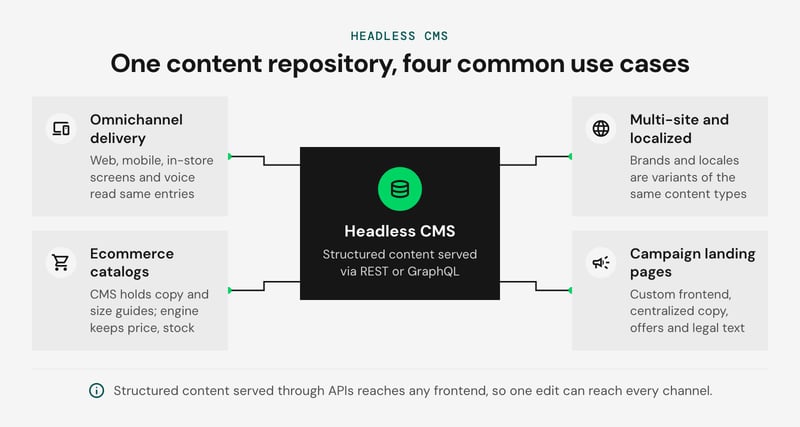
The common use cases:
- Omnichannel delivery. The web app, mobile app, in-store screens and voice interfaces read the same entries, and each channel queries only the fields it renders. If editors start writing channel-specific text into a generic body field, the model is too coarse.
- Ecommerce catalogs. Descriptions, editorial copy and size guides live in the CMS as structured content, while the commerce engine keeps price and stock. A Next.js or Nuxt storefront merges both at build or request time.
- Multi-site and localized content. Brands and locales are variants of the same content types, so translators edit one entry per locale and no page is duplicated.
- Campaign landing pages. Each promotion gets its own custom frontend, while its copy, offers and legal text stay centralized. One edit then reaches every channel that shows them. Your own frontend renders the page, so use SSR or SSG to send search engines full HTML.
Decision rule: When the extra work pays off
Our rule of thumb is to treat a second channel or a second locale as the trigger. With one website in one language, a traditional CMS usually costs less to run. Once the same entries feed two destinations, the modeling and frontend work start to pay back.
Two conditions refine the rule:
- Frontend capacity. The trigger only holds if developers can build and maintain each frontend. Without them, a second channel adds cost with nothing to show for it.
- Campaign cadence. If a single-site team ships custom landing pages often, custom frontends on centralized content can justify headless before a second channel exists. This is our interpretation, so test it against your release calendar.
Headless CMS examples and types: SaaS, open source or custom
Headless CMS platforms come in three types: SaaS products such as Contentful, Storyblok, and Sanity, self-hosted open source such as Strapi, and custom builds. All three serve content through REST or GraphQL APIs. They differ in who patches, scales, backs up, and upgrades the system.
If you are weighing a self-hosted headless option such as Strapi against a traditional platform, this Strapi vs WordPress breakdown shows how the two differ in practice.
The comparison below is by operational ownership:
| SaaS (Contentful, Storyblok, Sanity) | Self-hosted open source (Strapi) | Custom build | |
|---|---|---|---|
| Patching | Vendor | Your team applies releases and dependency fixes | Your team, for every layer |
| Scaling | Vendor runs the API and CDN; plan limits apply | You size the database, app servers, cache, and CDN | You design and size everything |
| Backups | Vendor, with retention that varies by plan | You run database dumps and media storage backups | You build and test them |
| Upgrades | Vendor ships API changes and deprecation notices | You run major-version migrations | You own the schema and the admin UI |
| Main cost driver | Users, API calls, content volume | Hosting, security, maintenance, engineer time | Initial build plus ongoing engineering |
Sanity sits between the first two columns. Sanity hosts the content storage, but the editing interface, Sanity Studio, is code your team deploys and maintains. Storyblok is SaaS too, and its visual editor lets editors preview pages while they work.
Entry-level paid plans vary widely. In November 2026, Prismic started at $10 per month per repository (billed annually), Sanity at $15 per seat per month, Storyblok at $99 per month, Hygraph at $199 per month, and Contentful at $300 per month for its Lite plan. Each has a free tier, and enterprise plans are quoted individually. Pricing depends on seats, API calls, and content volume, so check current plans before budgeting.
Self-hosted open source avoids per-seat and per-call pricing, but you still pay for hosting, security, and maintenance. It also needs in-house technical expertise, because there is typically no vendor-run support. Strapi's open-source code allows full customization of content types and API behavior, which suits teams with backend capacity, as our guide to what Strapi is used for shows.
We recommend SaaS for most teams that want editors productive quickly, and self-hosted open source when data residency or custom backend logic rules SaaS out. A custom build only pays off when no existing product fits the content model. Our Strapi vs Sanity comparison goes deeper on that pair.
When should you not go headless? Is headless the future?
Stay with a traditional (monolithic) CMS when you run one marketing site, one editor team, and no second channel. An API-first CMS adds a frontend to build, host, and maintain, and that cost pays back only when content has to reach more than one destination.
A traditional CMS is the better call when most of these conditions hold:
- The website is the only destination for content, with no app, kiosk, or storefront on the roadmap.
- Editors build and rearrange pages themselves and expect in-context preview. In a headless setup, a preview environment is an engineering task.
- No one on the team can own a Next.js or Nuxt codebase, its deployment, and its caching.
- Plugins already cover forms, SEO, and checkout.
Headless also moves SEO work to developers. They must use server-side rendering (SSR) or static site generation (SSG) so search engines receive full HTML. With Next.js, incremental static regeneration and on-demand revalidation keep static pages fresh without a full rebuild.
The answer flips when campaigns need custom frontends over centrally managed content. Without single-purpose plugins or hard-coded static pages, that architecture also scales more easily. Caching plugins can speed up a traditional CMS, but they still can't match a modern static site generator.
Headless is one architecture among several, and a hybrid is a legitimate middle path: keep WordPress for editing and expose content through its REST API to a separate frontend. We have no current source that forecasts headless market share, so we won't predict it. For the full list of drawbacks, see headless CMS pros and cons.
How do you choose a headless CMS?
Choose a headless CMS by weighting six criteria (editor UX, API type, hosting model, localization, pricing model, and integrations) against your team and channel mix. Do the content modeling first: a draft of content types and relations shows which criteria will be stressed.
If you are planning for scale across several teams, our guide to enterprise headless CMS content modeling shows how to structure content types so they stay reusable.
The criteria side by side:
| Criterion | What to test | Weight it up when |
|---|---|---|
| Editor UX | Live preview, roles, workflows. Storyblok's Visual Editor edits pages in context. | Non-technical editors publish daily |
| API type | REST and GraphQL APIs. GraphQL lets a Next.js or Nuxt frontend request only the fields it needs, which limits over-fetching. | Several clients need different payloads |
| Hosting model | SaaS or self-hosted (Strapi). Self-hosting means you own security, upgrades, and maintenance. | Data residency rules apply |
| Localization | Field-level or entry-level locales, fallback behavior | Many regions share one content model |
| Pricing model | What is metered: seats, API calls, content volume | Traffic is spiky or editor count is high |
| Integrations | Webhooks that trigger rebuilds or ISR revalidation, plus search, commerce, and DAM connectors | The existing stack is fixed |
Use this decision rule to turn the table into a shortlist:
- Apply hard gates first. If data residency or compliance rules apply, drop every option that cannot meet them, which usually decides SaaS versus self-hosted.
- Weight the remaining criteria from 1 to 3 using the profiles below.
- Score each shortlisted CMS from 0 to 5 per criterion in a proof of concept built on your draft content model, then multiply by the weights.
- If two totals are close, pick the one that needs less glue code.
Example weights (illustrative, adjust to your context):
| Team and channel mix | Weight 3 | Weight 1 |
|---|---|---|
| Small team, one site, daily editorial publishing | Editor UX, pricing model | API type, hosting model |
| Three or more channels (web, app, kiosk) | API type, integrations | Editor UX, localization |
| Many regions on one content model | Localization, editor UX | Pricing model |
| Fixed commerce, search, or DAM stack | Integrations | Localization |
Criteria not listed default to 2. The split reflects our reasoning: with one site, editor friction and cost show up weekly, while with several channels, API shape and connectors decide how much glue code you write and maintain.
FAQ
What is the difference between CMS and headless CMS?
What is headless CMS in simple terms?
Can you give me an example of a headless CMS?
What are the disadvantages of using a headless CMS?
Which headless CMS is best?
Who should use a headless CMS?
Does a headless CMS have a visual editor?

Plan a headless CMS build with Netguru
Our headless CMS development services cover the core of a headless CMS build: content modeling, choosing an API-first CMS that suits your editors, selecting a frontend framework such as Next.js or Nuxt, and planning content types, REST or GraphQL delivery, preview environments, and webhook-triggered rebuilds.
If the build centers on a storefront, headless commerce development adds the commerce platform and its PIM, DAM, and ERP integrations to the same architecture. Tell us what you are building and we will help you scope it.


