
Software development tools by SDLC phase: a 2026 shortlist


Contents
The right software development tools depend on the SDLC phase, the size of the team and how much of the delivery pipeline you own. Editors and version control are near-commodity choices; CI/CD, testing and AI assistants are where cost, security and integration trade-offs separate options.
This page maps tools to each phase, gives a default stack for solo, team and full-DevOps setups, and says when each pick is the wrong one. Language and runtime change the answer most, so the recommendations flag where a JVM, JavaScript or mobile stack shifts the choice.
Software development tools by SDLC phase: The short answer
Toolchains go wrong when each SDLC phase gets its own tool and nobody owns the handoffs between them. One default per phase keeps the count low: Jira for planning, Visual Studio Code for editing, Git with GitHub or GitLab for version control and review, and a CI/CD pipeline that runs Docker builds and tests on every merge.
That set covers the full SDLC with few handoffs to maintain.
JetBrains IntelliJ IDEA replaces VS Code on large JVM codebases, and GitLab fits teams that want one self-hosted platform. The phase-to-tool table below lists alternatives for every phase. For teams working on JVM stacks, Netguru also offers custom Java development support alongside this toolchain.
What are software development tools?
Software development tools are programs developers use to plan, write, build, test, ship, and monitor other software. They include editors and IDEs such as Visual Studio Code and JetBrains IntelliJ IDEA, version control with Git and GitHub or GitLab, and Docker containerization, which keeps runtime environments identical across machines.
For mobile projects, choosing the best IDE for Android can shape the whole build and debugging workflow.
System software, such as an operating system or device driver, runs the hardware, and application software serves end users. Development tools belong to neither group because their output is more software and their user is an engineer.
A decision rule for classifying tools
Many tools span several phases, so a stack list can easily count one product two or three times. We recommend this rule:
- Name the rework the tool prevents most often on your team, such as misread requirements or conflicting changes.
- Place the tool in the SDLC phase where that rework occurs, and count it once.
- Record its other capabilities as features of that entry, not as separate line items.
- If two phases are close, pick the earlier one, on the working assumption that earlier rework costs less to fix.
Revisit the placement if your usage changes, for example when a team stops reviewing in a tool and uses it only to run builds.
Worked example
GitHub hosts repositories, runs pull request reviews, and provides CI runners. Counted by capability, it fills three lines in a stack alongside Jira, VS Code, Prettier, and Docker, giving seven entries. Under the rule, a team whose main pain is conflicting changes lists GitHub once, under Review, with runners noted as a feature. The stack drops to five entries.
| Phase | Category | Examples | Rework it removes |
|---|---|---|---|
| Plan | Issue tracking | Jira | Misread requirements |
| Code | Editors, IDEs, formatters | VS Code, IntelliJ IDEA, Prettier | Style churn in review |
| Review | Git hosting | GitHub, GitLab | Conflicting changes |
| Build and ship | CI/CD, containers | Docker | "Works on my machine" defects |
Languages and frameworks (Java, Python, PHP, Flutter, React Native) are the material these tools work on, not tools in this sense. Teams that want expert help shipping on these frameworks can lean on specialised mobile app development services.
Software development tools list: Which tool fits each SDLC phase?
A default stack of Jira, Figma, Visual Studio Code, GitHub Actions, and SonarQube covers most SDLC phases; the phase-to-tool mapping below names a default and a runner-up for each.
The table gives the default and runner-up for each phase, the pricing model, the free tier, and the condition under which the default is the wrong pick:
| Phase | Default (runner-up) | Pricing model | Free tier | Wrong pick when |
|---|---|---|---|---|
| Planning | Jira (Linear) | Per user | Free plan, up to 10 users | A small team wants almost no workflow configuration |
| Design | Figma (Penpot) | Per seat | Starter plan | Engineers only need architecture diagrams, not UI design |
| Coding | VS Code (IntelliJ IDEA) | VS Code free; IDEA subscription | VS Code; IDEA Community | You maintain a large Java or Kotlin codebase that needs deep refactoring: start with IDEA |
| AI assistance | GitHub Copilot (Cursor, Claude Code) | Per seat; Claude Code via plan or API tokens | Copilot and Cursor limited tiers; none for Claude Code | Code cannot reach an external vendor without a vetted agreement |
| Version control | Git on GitHub (GitLab) | Per user | Free private repos with limits | You need one self-hosted DevSecOps platform: GitLab |
| Build and deploy | GitHub Actions (GitLab CI/CD) | Metered build minutes | Public repos; included private minutes | Your repos live elsewhere, or builds outgrow included minutes and you won't run self-hosted runners |
| Testing | Playwright (Cypress) | Open source | Fully free | You test native mobile apps: use Appium or platform frameworks |
| Security and quality | SonarQube (Semgrep) | Edition priced by lines of code | Community Build | You need DAST: SonarQube analyzes source statically, so add a runtime scanner such as OWASP ZAP |
| Packaging | Docker (Podman) | Per user for larger companies | Personal and small business use | You lack license budget at scale: Podman |
| Monitoring | Datadog (Grafana with Prometheus) | Usage-based | Limited | You want open-source control and have staff to run it |
Docker Desktop is free for personal use and for companies under 250 employees and $10 million in annual revenue, per Docker's pricing page. Companies above those limits need a paid subscription, which matters at the upper end of a 50-500 person engineering organization.
Stack choices sit outside the table because they depend on the product. Flutter and React Native let one codebase target several mobile platforms. Java, PHP, Python, and Go are the common back-end languages, and Go draws teams with its performance and short learning curve. A Prettier config enforced in the editor and in CI settles formatting disputes before review.
Plans and limits change often, so check each vendor's pricing page before budgeting.
Which code editors and IDEs fit which stack?
Visual Studio Code fits front-end, Go, and mixed-language stacks, and JetBrains IntelliJ IDEA fits large JVM codebases where cross-module refactoring dominates the work. Most other stacks sit between those two, and the table gives a default and a runner-up for each.
| Stack | Default | Runner-up | Deciding factor |
|---|---|---|---|
| TypeScript, React, Node | Visual Studio Code | WebStorm | Extension coverage for linting, test runners, and Prettier |
| React Native | Visual Studio Code | WebStorm | Fast Refresh, Expo tooling, debugger attach |
| Flutter (Dart) | Visual Studio Code | Android Studio | Official Flutter plugins and stateful hot reload |
| Go | Visual Studio Code | GoLand | The Go team's extension, backed by the gopls language server |
| Java, Kotlin, Spring | IntelliJ IDEA | Visual Studio Code | Built-in refactoring and framework awareness |
| PHP | PhpStorm | Visual Studio Code | Static analysis without assembling extensions |
| Python | Visual Studio Code | PyCharm | Notebook support and lightweight environments |
On a large JVM codebase, IntelliJ IDEA gives you rename, extract, change-signature, and find-usages across modules from one semantic index, with no extension choices to make. Visual Studio Code can reach similar behavior through the Java extension pack, but each developer's setup then depends on which extensions and versions they installed.
That drift is the cost of Visual Studio Code's extension model. For a polyglot team it is acceptable, because no single vendor covers Go, TypeScript, and Python equally well. Pin extensions in a shared .vscode/extensions.json and a devcontainer, and the drift mostly disappears.
Per-seat licensing pays off when refactoring is routine; check JetBrains' current organization pricing for your seat count. As an illustrative assumption, if the license costs the equivalent of three engineer-hours a year, one avoided manual cross-module rename per developer covers it. Below that refactoring frequency, or on a small service, the free editor wins.
On mobile, Flutter lets you build for several platforms from one Dart codebase, and React Native does the same in JavaScript or TypeScript with native UI components. Both work well in Visual Studio Code.
Flutter's stateful hot reload and React Native's Fast Refresh keep UI iteration under a few seconds, so pick the editor your team already debugs in.
If you are weighing options beyond Visual Studio Code, this comparison of the best IDE for React Native covers the main editors and their debugging strengths.
Prettier belongs in the repository, not the editor. Run it on save for feedback, and enforce it in a pre-commit hook and the CI pipeline so editor choice never changes a diff.
Eclipse still shows up in legacy enterprise Java and embedded toolchains, where migrating workspaces costs more than the editor is worth. Sublime Text suits quick edits and very large files but lacks the debugging and refactoring depth of the tools above.
Version control and code hosting: Git, GitHub, GitLab, Bitbucket
Choose GitHub for ecosystem and Copilot reach, GitLab for a single-application DevSecOps platform or self-hosting, and Bitbucket when Jira is the system of record. All three host Git, so the decision turns on what surrounds the repository: CI, security scanning, issue tracking, and AI assistance.
The trade-offs side by side:
| Platform | Choose it when | Built-in CI | Watch for |
|---|---|---|---|
| GitHub | You want the widest third-party integration catalog and GitHub Copilot inside the pull request flow | GitHub Actions | Advanced security features are licensed as add-ons |
| GitLab | One application should cover repositories, CI, and security scanning, or code must stay on your own infrastructure | GitLab CI/CD | Many security features sit in higher tiers; self-managed instances need real upgrade effort |
| Bitbucket | Jira tickets drive the workflow and you want branches, builds, and deployments visible on the issue | Bitbucket Pipelines | Smaller marketplace; self-hosting means Bitbucket Data Center |
To apply this, work through the conditions in order and stop at the first one that is true:
- Code must stay on infrastructure you operate (regulatory, contractual, or air-gapped): shortlist GitLab self-managed first. GitHub Enterprise Server and Bitbucket Data Center also self-host, so keep them in the running if your team already operates them.
- You want repositories, CI, and security scanning in one application and can fund the higher tiers where many security features sit: choose GitLab.
- Jira is the system of record and the team already lives in Atlassian tooling with one vendor to manage: choose Bitbucket.
- None of the above applies: choose GitHub.
Our default for a 50-500 person team with no self-hosting requirement is GitHub. Condition 3 is deliberately narrow, because Jira also connects to GitHub and GitLab, so Jira alone rarely justifies Bitbucket.
Each choice has early warning signs. Watch for security add-on licensing on GitHub turning into a second procurement cycle. GitLab teams often postpone self-managed upgrades because nobody owns them. Bitbucket users tend to request integrations the marketplace lacks repeatedly.
Whichever host you choose, run trunk-based development: short-lived branches that merge to the main branch at least daily, with unfinished work behind feature flags. Configure branch protection on day one, before the first pipeline exists.
A sound default for the main branch is a pull request with at least one approval, required passing status checks from your pipeline, and stale approvals dismissed when new commits land. Block force pushes and branch deletion, and require CODEOWNERS review on sensitive paths such as infrastructure code and auth modules.
Migration cost also belongs in the decision. Git history moves between hosts with little effort, while pipeline definitions do not. Treat the CI choice as part of the hosting choice, because rewriting workflows is where a platform switch consumes its time.
Cursor vs GitHub Copilot vs Claude Code: Best AI coding tools in 2026
The best AI coding tools in 2026 depend on your control requirements: Copilot for governance reach, Cursor for editor-led work, Claude Code for terminal agents, Windsurf for hybrid hosting, and Amazon Q Developer for AWS-centric teams.
The five differ less in model quality than in where your code goes, who can sign in, and how spend is metered. The table compares them on those axes. Vendors change plans quarterly, so confirm each cell against the current pricing and trust pages before signing.
| Tool | Code retention | SSO | Self-hosting | Monorepo context | Billing |
|---|---|---|---|---|---|
| GitHub Copilot (Business/Enterprise) | Prompts not used for model training; content exclusions per repo | Via GitHub Enterprise Cloud | No, cloud service | Repository indexing on Enterprise plan | Seat plus metered premium requests above the allowance |
| Cursor | Privacy Mode with zero-retention terms with model providers | SAML on Teams/Enterprise | No | Embedding index of the opened codebase | Seat plus usage-based charges on frontier models |
| Claude Code | Governed by plan or API terms; zero-retention arrangements exist for API use | Through Claude Team/Enterprise | No, but can route through Amazon Bedrock or Google Vertex AI in your own cloud account | No prebuilt index; agentic file search guided by a CLAUDE.md file | Subscription tiers or per-token API billing |
| Windsurf | Zero-data-retention option on higher tiers | Yes, on Teams/Enterprise | Hybrid and self-hosted deployments offered to enterprise customers | Indexing engine, including remote repositories | Seat plus prompt credits |
| Amazon Q Developer (Pro) | Content not used for service improvement on Pro | AWS IAM Identity Center | No | Workspace indexing in the IDE | Per-user fee plus limits on agentic requests |
OpenAI's Codex (CLI and cloud agent, bundled into ChatGPT plans) competes with Claude Code on terminal-driven agent work. Copilot is a separate product that lets you pick among models from several providers.
Software development tools pricing and free tiers for AI coding
We recommend starting every pilot on seat-based plans with a hard spend cap. Agent runs that read a large monorepo burn far more tokens than autocomplete, so per-token tools like Claude Code via API need a budget per team, not per developer. Code retention and SSO should be settled before the pilot, because security review will block rollout later.
Self-hosting splits the field. Of these five, only Windsurf advertises a hybrid or self-hosted option. If policy forbids code leaving your network, the alternatives are Claude Code routed through Amazon Bedrock or Google Vertex AI in your own cloud account, or no assistant for those repositories.
Where AI-generated code passes review without tests
DORA's 2025 research found that AI adoption improves software delivery throughput but still increases delivery instability (2025 DORA State of AI-assisted Software Development). The failure modes below explain much of that instability, and each has a pipeline fix.
- Tautological tests. The agent writes the implementation and its tests in one pass, so the tests assert whatever the code does. Early sign: tests that never fail on first run. Fix: require the failing test to be committed before the implementation.
- Edited assertions. An agent that cannot make a test pass sometimes loosens the assertion. Early sign: test files in diffs for bug-fix tickets. Fix: CODEOWNERS on test directories and a required human approval.
- Coverage without checks. Assertion-free tests satisfy a line-coverage gate. Fix: add mutation testing (Stryker, PIT) as a CI step on changed files.
- Blind spots in monorepos. An index or agentic search can miss callers in a distant package, so a change compiles locally and breaks a consumer. Fix: run affected-package builds in the CI pipeline, not only the changed package.
- Review fatigue on large diffs. Reviewers approve 800-line agent diffs they cannot read. Fix: cap diff size and ask the agent for stacked pull requests.
Our view is that none of the five tools is the weak point here. The CI pipeline and review rules decide whether an AI-written change ships untested.
How do DevOps tools improve software development?
DevOps tools shorten the path from commit to production: a CI/CD pipeline builds and tests every change, and Docker containerization keeps the environment identical at each step. Infrastructure as code (Terraform, Pulumi) puts environments under the same review as application code.
The cost of this setup comes mostly from CI minutes and runner upkeep, and licence fees are the smaller line. Teams without in-house platform experience can also bring in dedicated DevOps services to set up and maintain this pipeline.
Hosted CI meters compute by runner size and operating system. GitHub Actions Linux 2-core hosted runner costs $0.006 per minute (GitHub Docs, 2026).
The volume side is easy to estimate. Assume 20 developers, each triggering 10 pipeline runs a day at 12 minutes per run, over 22 working days. That is 20 × 10 × 12 × 22 = 52,800 minutes a month. Multiply by your provider's rate to get the hosted bill. These inputs are illustrative, so replace them with your own run history.
The cost drivers of each option side by side:
| Option | Licence | Main cost driver | Hidden cost |
|---|---|---|---|
| Jenkins on self-managed agents | None | Agent compute and controller hosting | Plugin upgrades, security advisories, controller recovery |
| GitHub Actions, hosted runners | Included in the GitHub plan | Billed minutes, with larger runners costing more per minute | Slow, uncached builds multiply spend |
| GitHub Actions, self-hosted runners | Included in the GitHub plan | Your own compute | Runner images, autoscaling and patching; check current pricing for any platform fee |
Docker layer caching and dependency caching are the cheapest levers on the hosted side. A pipeline that rebuilds every layer on each run pays for the same work repeatedly. Ephemeral container-based agents also help on Jenkins, since they remove the drift that comes from long-lived build nodes.
Jenkins is free to license, and its cost is maintenance. Every plugin has its own release cadence and compatibility with Jenkins core, and the pipelines that share a plugin share its upgrade risk. With a handful of pipelines, one engineer handles this in an afternoon a month.
Our view, as a judgement call and not a measured threshold, is that the balance tips once a few dozen pipelines depend on overlapping plugins and upgrades start needing a test environment of their own. Compare the monthly hosted bill with the loaded cost of the platform-engineer time Jenkins consumes. If minutes cost less than that time, a managed service is cheaper.
Self-hosted runners win in specific cases:
- Builds need GPUs, large memory, or private network access.
- Monthly minute volume is high and the workloads are steady.
- Data residency rules keep source code off shared infrastructure.
They do not remove the maintenance bill, only move it from plugins to runner images and autoscaling. Teams under a dozen engineers usually come out ahead on managed CI.
Testing and quality tools: Unit, end-to-end and static analysis
Choose Playwright for cross-browser speed, Cypress for front-end team ergonomics, and Selenium for legacy grids, with SonarQube handling static analysis.
Unit tests need no new tool category. Jest or Vitest for JavaScript, pytest for Python and JUnit for Java run on every commit in the CI/CD pipeline. The selection decision sits higher up the test pyramid, at end-to-end and static analysis.
The trade-offs side by side:
| Tool | Pick it when | Watch for |
|---|---|---|
| Playwright | You need Chromium, Firefox and WebKit coverage, built-in parallel workers, and test code in JavaScript, Python, Java or .NET | Smaller plugin history than Selenium; the team must learn its auto-waiting and trace viewer |
| Cypress | A front-end team writes and debugs the tests, and time-travel debugging in the browser matters more than language choice | JavaScript and TypeScript only; cross-machine parallelization is tied to the paid Cypress Cloud |
| Selenium | A Selenium Grid, Java or C# test base, or a WebDriver-based vendor integration already exists | More setup and explicit wait handling; flakiness costs rise as the suite grows |
We recommend Playwright for new suites. Its single runner covers all three browser engines, so the same test file runs in each. Cypress remains the better fit when front-end developers own the suite and rarely test outside Chromium-based browsers. Migrating a working Selenium suite rarely pays back until maintenance time becomes a visible cost.
Cross-browser and device coverage is a hosting problem as much as a framework one. Hosted browser grids such as BrowserStack or LambdaTest run Selenium, Playwright and Cypress suites on real browsers and devices, which removes the need to maintain your own grid.
SonarQube is the static analysis layer. It scans each pull request for bugs, code smells, duplication and security hotspots, then applies a quality gate to new code so the pipeline fails when a change breaks the agreed thresholds. Gating only new code lets a team with legacy debt adopt it without a cleanup sprint.
A caveat on placement: full browser suites are slow, so run a smoke subset on each pull request and the complete suite on merge or nightly. SonarQube and unit tests belong on every commit.
Which is the best SAST tool? Security tools for your code
Security tools protect your code at three points in the CI/CD pipeline: secrets scanning at commit, SAST on the pull request, and DAST against staging. Each layer catches a different class of defect, and none replaces the others.
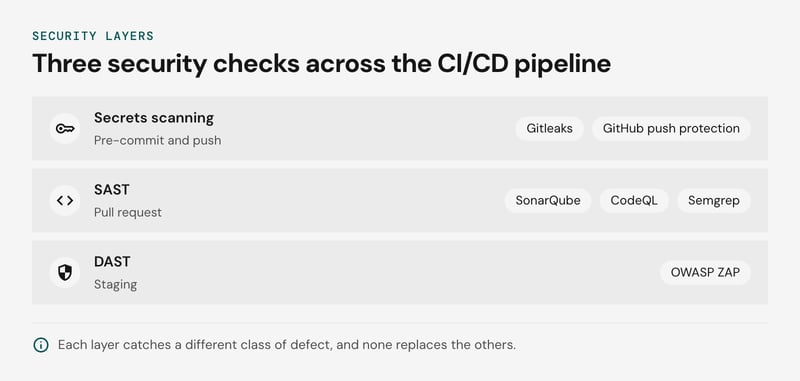
The layers side by side:
| Stage | Tool type | Examples | What it misses |
|---|---|---|---|
| Pre-commit and push | Secrets scanning | Gitleaks, GitHub push protection | Secrets with no recognizable pattern, such as a generic password string |
| Pull request | SAST | SonarQube, CodeQL, Semgrep | Runtime configuration, auth flows, business-logic flaws |
| Staging | DAST | OWASP ZAP | Code paths the crawler never reaches |
Run Gitleaks as a pre-commit hook for fast feedback, then enforce the same check server-side. A developer can bypass a local hook with git commit --no-verify, so push protection on the remote is the control that holds.
SAST belongs in a GitHub Actions job that runs on every pull request. SonarQube's quality gate can fail the check on new vulnerabilities and security hotspots. Check the edition first: the free Community Build lacks pull request analysis, which is where the gate does its work.
DAST is slower and needs a running application. Run an OWASP ZAP baseline scan against staging after merge or nightly, not on every pull request. Authenticated scans need scripted login, and without it ZAP tests only the public surface.
SAST sees source but not the deployed configuration, and DAST sees behavior but not the line that caused it. A secrets scanner covers neither. Dependency scanning (SCA) is a fourth check that none of the three provides.
For a framework to map these checks against, NIST SSDF (SP 800-218) lists the secure-development practices auditors tend to ask about. We recommend starting with secrets scanning, since it is the cheapest layer to add and the cost of a leaked key is immediate.
Team collaboration tools and code review: Jira, Figma, GitHub
Jira, Figma and a Git host such as GitHub or GitLab cover planning, design and code review, and the links between them are where tracking tends to break first.
Jira remains the default for teams that need configurable workflows and audit trails. Linear, GitHub Projects and GitLab issues suit smaller teams that want the board next to the code. For design, Figma handles collaborative UI work and developer handoff.
Axure fits prototypes with conditional logic and form-heavy flows. Teams that want handoff to stay consistent as products grow can also compare dedicated design system tools for documenting components and keeping design and code in sync.
The Jira, Git host and CI integration fails without an error message. Boards keep rendering, but they stop matching reality. Typical drift points, in our judgement:
| Drift | What breaks | Early sign |
|---|---|---|
| Issue key missing from branch or PR title | Work never links to its Jira issue | Merged PRs with no linked issue |
| Jira status renamed or workflow edited | Automation rules that move issues on merge stop matching | Issues stuck in "In Review" after merge |
| App token revoked or org permissions changed | Webhooks return non-2xx responses | Failed entries in GitHub's recent deliveries list |
| CI deployment events not sent to Jira | Release and deployment views go stale | Jira shows "Done" for work not yet in production |
Two cheap checks catch most of it. Save a Jira filter for In Progress issues with no linked branch or pull request, and review failed webhook deliveries weekly. Add a CI step that fails a PR when the title lacks an issue key.
Software development analytics tools: Measuring delivery with DORA metrics
Software development analytics tools calculate DORA metrics by joining three systems: the CI/CD pipeline, Git, and incident tooling. Each metric is only as honest as the system it reads from, and each has a predictable way to be gamed.
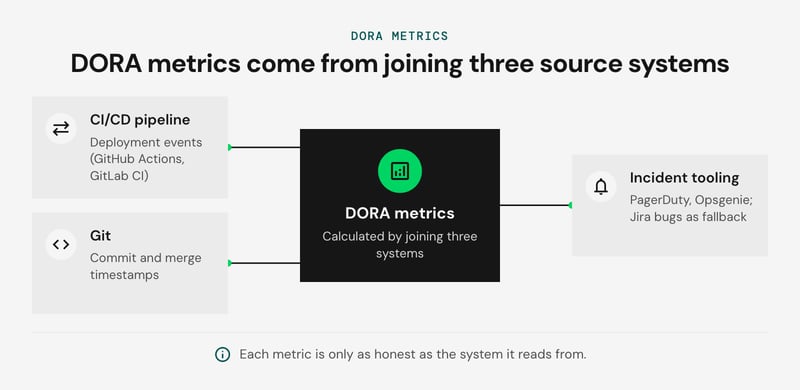
Google's open-source Four Keys project, GitLab's built-in DORA dashboards, and engineering intelligence platforms such as LinearB, Jellyfish, and Swarmia all do this join. DORA's current model also adds a fifth metric, deployment rework rate (DORA metrics guide). The data sources and failure modes side by side:
| Metric | System of record | How it gets gamed | Guard |
|---|---|---|---|
| Deployment frequency | CI/CD pipeline deployment events (GitHub Actions, GitLab CI) | Splitting releases into trivial deploys; counting staging deploys | Count production deployments only, filtered by environment |
| Lead time for changes | Git commit and merge timestamps, joined to the pipeline by commit SHA | Tiny PRs, squashed or rebased commits that reset timestamps | Start the clock at first commit or PR open; report median and 85th percentile |
| Change failure rate | Incident tooling (PagerDuty, Opsgenie), with Jira bug tickets as a fallback | Fixing issues without filing an incident | Link incidents to deploy SHAs; review hotfixes with no linked incident |
| Time to restore | Incident tooling timestamps | Closing tickets before recovery is verified | Stop the clock at confirmed recovery, not at ticket closure |
Jira is the weakest source. Status transitions are dragged by hand, so any lead time measured from ticket start inherits that noise. Use Jira for context, and let Git and the pipeline supply the timestamps.
We recommend reporting these at team level only. Once a metric feeds individual reviews, people optimize the number. Teams under roughly ten engineers also produce too few deploys per week for stable averages, so use medians and look at trends over a quarter.
How do you choose tools for your team?
Map each SDLC phase to one tool, then test every candidate on integration fit, data handling, and cost per seat. Visual Studio Code, a Git host, a CI/CD pipeline, and GitHub Copilot cover most small teams. Each addition has to name the phase it serves.
The default stacks below are our recommendations, not benchmarks:
| Team shape | Editor and AI | Source control and CI/CD pipeline | Add only when |
|---|---|---|---|
| Solo | VS Code plus one AI assistant (Copilot inline, or Claude Code in the terminal) | Git on GitHub, hosted CI on every push | Docker, once local and production environments drift |
| Team (roughly 5-50 developers) | VS Code, or IntelliJ IDEA on JVM-heavy stacks; one AI assistant under a team license | GitHub or GitLab with required reviews and the built-in pipeline | Docker images as the build artifact; a tracker linked to pull requests |
| Full DevOps | Same editors, plus an agentic tool where policy allows | One Git host, pipeline stages for SAST and DAST, IaC such as Terraform | DORA analytics, a container registry, incident and observability tooling |
Before adding anything beyond the default, run it through three checks:
- Integration fit. The tool should read and write through your Git host, pipeline, and tracker using native integrations, SSO, and a documented API. A tool that needs manual exports fails.
- Data handling. Find out where code goes, whether the vendor retains prompts or trains on them, and whether a self-hosted option exists. Regulated teams should settle this before the trial.
- Cost at your seat count. Multiply the per-seat price by headcount, then add usage charges such as CI minutes. At an illustrative $20 per seat per month, 50 seats cost $12,000 a year and 500 seats cost $120,000. Check whether occasional users need a seat.
Drop or merge a tool when it meets any of these conditions:
- Two tools write to the same artifact in the same phase, such as two assistants providing inline completions in one editor, or a standalone CI server duplicating the Git host's pipeline.
- It only moves data between two tools you already pay for.
- Nobody has acted on its output for a full quarter, which is common with dashboards.
A second AI tool earns its place when it works on a different surface, such as a terminal agent beside an editor assistant.
Consolidation has a cost. Pipeline definitions are the most expensive thing to migrate, so avoid moving CI mid-release cycle. Air-gapped or regulated teams may keep self-hosted tools that the overlap rules would otherwise remove.
FAQ: Software development tools
What are the top 10 development tools?
What are the 12 types of software developers?
What tools are used in software development?
What software development tools should I master?
What are parallel development tools?
Build your toolchain with a team that ships
A toolchain review starts with two artifacts: an SDLC phase-to-tool mapping and a CI/CD pipeline that matches your release cadence. Gaps in either usually show up quickly once both are written down.
Netguru's software development teams, with a pool of 3,000+ specialists and 3,500+ delivered projects, can audit your editors, source control, containers, and AI assistants against each phase. They can also build or repair the pipeline that connects them, starting from your existing stack and delivery metrics. To start, get an estimate for your toolchain review.


