
Frontend vs backend: what is the difference?


Contents
Frontend is the code that runs in the user's browser and shapes what they see and click. Backend is the server, database and business logic that process requests and store data.
Front-end and back-end, with hyphens, mean the same thing. Below: a side-by-side comparison, a real login traced through both sides, and how APIs connect them. For help building either side, see our web development services.
What is the difference between frontend and backend?
Frontend code runs in the user's browser and renders the interface; backend code runs on a server and owns data, business rules and security. The two sides meet in the request-response cycle of a client-server architecture: the browser sends a request, and server-side logic replies with JSON.
Most friction between the sides starts at that boundary. Validation gets duplicated (client for UX, server for trust), and a CORS error gets filed as a backend bug.
Netguru builds web products end to end through web development and frontend development, from React and TypeScript interfaces to Node.js and Java backends and the APIs that connect them. We recommend assigning ownership at the API contract, because each side can then be built and tested without waiting for the other.
A quick check you can run today: open the browser's Network tab, trigger one action, and read the request. A failed status code or malformed JSON points to the backend; a correct response that renders wrong points to the frontend.
The split blurs in small teams and in frameworks like Next.js, where Server Components render on both sides. The two roles side by side:
| Frontend | Backend | |
|---|---|---|
| Runs where | User's browser or device | Server or cloud runtime |
| Owns | Interface, interaction, accessibility, client state | Data, authentication, business rules, APIs |
| Typical languages | JavaScript, TypeScript, HTML, CSS | JavaScript or TypeScript on Node.js, Python, Java, SQL |
| Fails as | Double-submitted forms, stale UI after a failed optimistic update, inaccessible controls | Wrong 401/403 handling, N+1 queries that slow a fast UI, contract drift when a field is renamed |
What is web development?
Web development is the work of building websites and web applications: everything you reach through a browser such as Chrome, Safari or Firefox. It splits into two main areas, frontend and backend, plus full stack work that covers both. The sections below take each in turn.
Frontend development
Frontend is the field focused on building interfaces for web pages and applications. An interface is the collection of elements on the page that the user can see and interact with: buttons, lists, links, tables, sliders, inputs, forms, and many more.
Frontend developers are not web or graphic designers. Designers decide how a page or application looks and behaves; frontend developers turn those designs into working software, making sure the interface is both functional and visually consistent.
Frontend tools
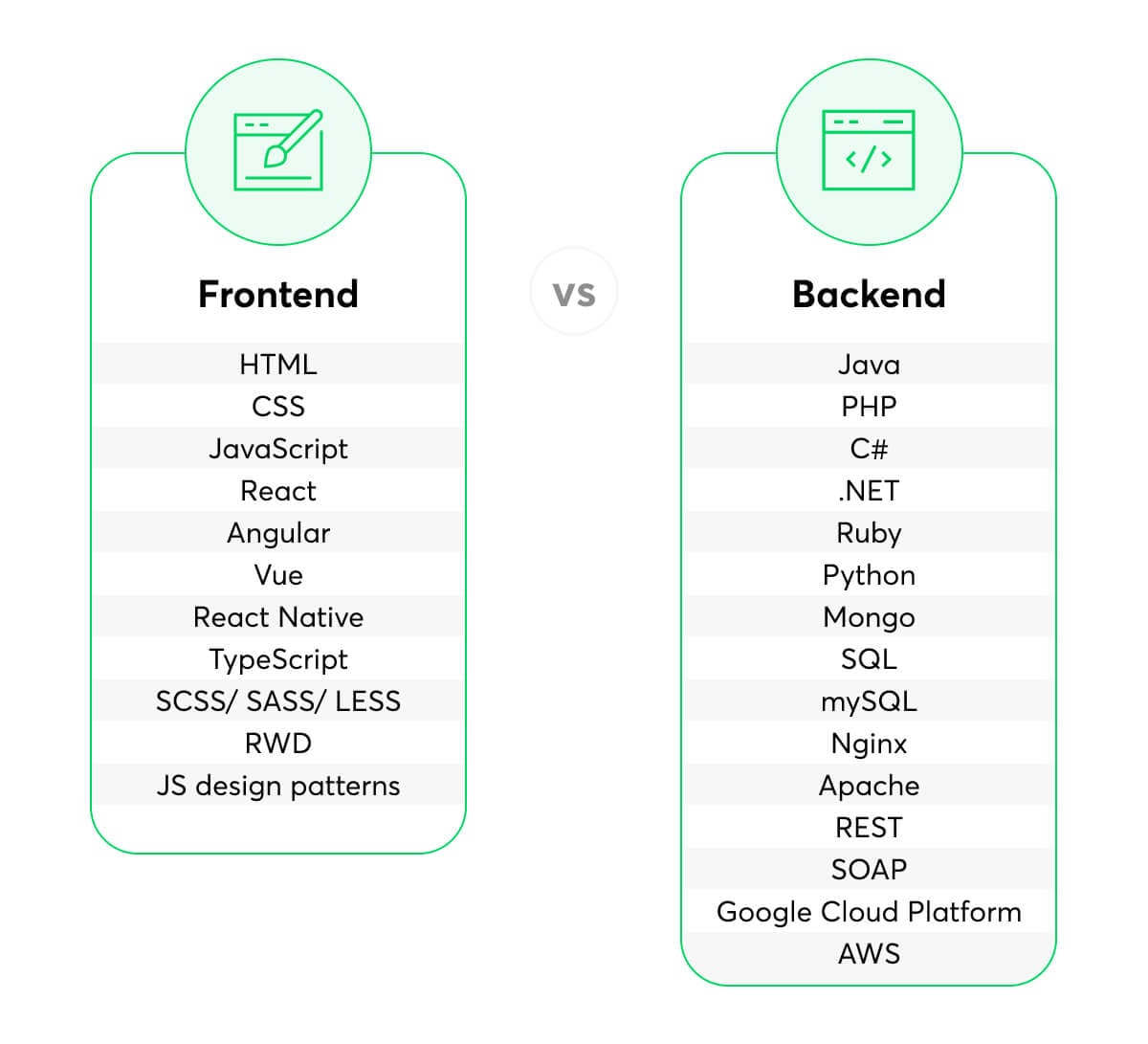
The frontend is built on three core technologies: HTML, CSS, and JavaScript.
- HTML (HyperText Markup Language) gives every web project its structure, the skeleton of the page.
- CSS (Cascading Style Sheets) styles the HTML and makes the layout responsive across screen sizes.
- JavaScript makes pages interactive. It changes the page contents in response to what the user does, from removing an item from a list to running animations or a whole single-page application.
Those three are the foundation every frontend developer needs. Job descriptions usually ask for more, typically some of the following:
- React, Angular or Vue (JavaScript frameworks)
- React Native for mobile apps
- TypeScript
- Git, which every developer working in a team needs
- SCSS, Sass or Less (CSS preprocessors)
- Responsive web design
- JavaScript design patterns
The tool list keeps changing, which is one of the harder parts of frontend jobs. Nobody learns all of it; a good frontend developer picks the right tool for the problem and learns it quickly when it is needed.

Responsibilities of a frontend developer
The scope varies between companies, but a frontend developer typically:
- Builds the structure (HTML) and styles (CSS) from the designers' files.
- Works with UX designers on the user experience.
- Develops the interface logic in JavaScript or a framework such as React or Angular.
- Codes animations and transitions.
- Integrates the interface with the backend APIs, together with backend developers.
- Applies accessibility standards so that people with disabilities can use the application.
- Writes unit, integration, and end-to-end tests.
- Improves the performance of the application.
- Works with the client or business side to understand processes and requirements.
Backend development
The backend is everything the user does not see. Backend code runs on the server, not in the browser, so its results never appear on the interface directly, yet users trigger it with almost every click.
When you log in to a social media platform, the backend checks whether you exist in the database as a registered user. When you filter an online shop by price, type and size, the backend runs that query and sends the matching products back to the screen. The frontend and backend work as one system, and neither is useful without the other.
Backend tools
The tools depend on the project and its needs. Common examples:
- Languages and frameworks: Java, C# and .NET, Python, PHP, Ruby, and JavaScript or TypeScript on Node.js
- Databases: PostgreSQL, MySQL, MongoDB
- Web servers: Nginx, Apache
- APIs: REST, GraphQL, SOAP
- Cloud services: AWS, Google Cloud, Azure
Responsibilities of a backend developer
It depends on the company and the project, but a backend developer usually handles:
- Implementing business logic on the server side of the application
- Creating the APIs the frontend uses to send requests and read, create, update, and delete records in the database
- Validating data coming from users and handling requests such as form submissions
- Designing and managing the database
- Securing the application on the server side
- Writing tests, troubleshooting, and debugging
- Managing hosting environments
- Working with the frontend team on integrations and with the business side on requirements
Databases
We recommend PostgreSQL as the default database and a NoSQL store only when a specific condition forces the move. Data shape and consistency needs decide it:
| Condition | PostgreSQL fits when | A NoSQL store fits when |
|---|---|---|
| Data shape | Related entities (orders, line items, customers) are queried with joins | Records are self-contained documents or key lookups with one known access pattern |
| Consistency | Several rows must commit together or not at all | Eventual consistency is acceptable |
| Schema | Fields are stable and enforced with constraints and foreign keys | Fields vary per record and change often |
| Write volume | One primary node carries the load | Sustained writes need horizontal partitioning from day one |
Varying fields alone rarely justify a second database, because PostgreSQL's jsonb type stores semi-structured data next to relational columns. Redis for sessions or caching complements PostgreSQL and does not replace it.
The rule breaks down for teams already running DynamoDB or MongoDB with well-understood access patterns. Migrating a working store for tidiness costs more than it returns.
Server-side logic
Server-side logic enforces the rules the browser cannot be trusted with: input validation, authorization, price calculation, and transactions. Frontend validation improves the form experience, but anyone can send requests straight to the API, so the server repeats every check. The OWASP Top 10 lists injection and broken access control among the most common failures at this layer.
Framework choice follows the team's existing skills. Django suits Python teams that want a built-in ORM and admin panel, Node.js lets a TypeScript team share types with the frontend, and Spring suits large Java codebases. For a comparison of the Java options, see our guide to Java backend frameworks.
What happens when a user logs in? A frontend and backend example
When a user logs in, the frontend sends credentials as JSON, and the backend checks them against PostgreSQL and replies with a session cookie. The browser and the server only share HTTP, so each side validates independently. The trace below uses a React form and a Node.js API.
- In the frontend, the React form collects the email and password, runs a quick format check, disables the submit button, and calls fetch.
- The browser sends the request to the backend over HTTPS.
- The backend validates the payload shape, then queries PostgreSQL with a parameterized statement (
SELECT id, name, role, password_hash FROM users WHERE email = $1). Parameters are what keep the query safe from SQL injection. - The backend compares the password against the stored hash (argon2 or bcrypt), creates a session, and responds.
- Back in the frontend, the browser stores the cookie without exposing it to JavaScript. The UI reads the JSON, updates its state, and routes to the dashboard.
The request sent in step 2:
POST /api/login HTTP/1.1
Host: app.example.com
Content-Type: application/json

{"email": "ada@example.com", "password": "correct-horse-battery"}
The response returned in step 4:
HTTP/1.1 200 OK
Content-Type: application/json
Set-Cookie: session=9f2c...; HttpOnly; Secure; SameSite=Lax; Path=/

{"user": {"id": 42, "name": "Ada", "role": "editor"}}
We recommend an HttpOnly session cookie over a JWT in localStorage for first-party web apps, because script-based theft via XSS cannot read the cookie. A JWT fits better when several services or mobile clients verify the token.
What fails where
Each failure surfaces in a different place, and the status code or console message tells you which side owns the fix.
| Symptom | Where it fails | Cause | Fix belongs to |
|---|---|---|---|
| 401 Unauthorized | Backend, step 4 | Unknown email or hash mismatch. RFC 9110 defines 401 as missing or invalid authentication credentials | Frontend shows a generic error. Backend should not reveal which field was wrong |
| 422 Unprocessable Content | Backend, step 3 | Well-formed JSON that fails validation, such as a malformed email | Frontend maps field errors from the response body to the form |
| CORS error in the console | Browser, before the response is readable | The API origin differs from the page origin and omits Access-Control-Allow-Origin or Access-Control-Allow-Credentials. See MDN on CORS | Backend configures allowed origins. The browser enforces them |
| Double submit | Both sides | A double click sends two POSTs and creates two sessions | Frontend disables the button while pending. Backend uses idempotency keys or rate limits |
CORS is the one that misleads people. The request may reach the server and succeed, yet the browser refuses to hand the response to your code, so the Network tab shows a result the console contradicts.
The same request-response cycle underlies every feature in a client-server application, so the shape of the JSON is worth agreeing on early in the web development process, before either side builds against it.
How do APIs connect frontend and backend?
A REST API or GraphQL endpoint connects the frontend to the backend by exchanging JSON over HTTP, and a shared contract keeps both sides in sync. The contract covers field names, field types, and which status codes mean what.
A REST API maps resources to URLs and HTTP methods and signals outcomes with standard status codes: a successful POST /orders returns 201 Created, and a failed validation returns 422 with a list of field errors.
The frontend branches on that contract. A 401 sends the user to the login screen, a 422 maps validation errors onto form fields, and a 5xx triggers a retry or an error banner. If the backend returns 200 with an error buried in the body, every client has to guess.
Choosing between REST and GraphQL
The choice depends on how many kinds of clients you serve and how differently they query the same data. The rule we recommend:
| Situation | Choice | Main cost |
|---|---|---|
| One web client, resource-shaped data, HTTP caching matters | REST API | Extra endpoints as screens multiply |
| Web plus mobile apps, each needing different slices of nested data | GraphQL | Harder caching, query-cost limits, N+1 queries against PostgreSQL |
| Several clients, small backend team | REST behind a backend for frontend | One more service to run |
REST is the default. GraphQL pays off when over-fetching on mobile or endpoint sprawl is a measured problem. Many GraphQL servers return HTTP 200 with an errors array, so status-code-based monitoring needs adjusting. When one frontend needs data stitched from several services, a backend-for-frontend layer keeps that aggregation off the browser.
Catching contract drift with generated types
Drift happens when the backend renames total to totalAmount and the frontend keeps reading total. Hand-written TypeScript interfaces will not notice, because they describe what the frontend assumes and not what the server sends.
Generate the types from the contract:
- Publish an OpenAPI document from the backend, or use the GraphQL schema.
- Generate TypeScript types in CI with a tool such as openapi-typescript or GraphQL Code Generator.
- Fail the frontend build when the generated types change in a way that breaks existing code.
Generated types are checked at compile time only. If the frontend and backend deploy independently, a stale client can still receive a payload the types do not describe. Validate responses at runtime with a schema library such as Zod on high-risk paths, such as payments and authentication.
Which languages and frameworks does each side use in 2026?
Frontend work in 2026 centers on TypeScript and React, backend work on Python, Java, or Node.js with PostgreSQL, and a handful of tools run on both sides of the line.
The table below sorts the tools named most often by where their code executes:
| Tool | Side | What it does |
|---|---|---|
| React, Vue, Angular | Frontend | Component frameworks that render the interface in the browser |
| TypeScript | Both | Typed JavaScript, used in browser code and server code |
| Node.js | Backend | Runtime that executes JavaScript or TypeScript on the server |
| Next.js | Both | React framework with Server Components and route handlers |
| Django, Spring | Backend | Python and Java frameworks for business rules, auth, and data access |
| PostgreSQL | Backend | Relational database queried by server-side logic |
| REST, GraphQL | Contract | The JSON-over-HTTP interface between the two sides |
TypeScript and Node.js are why the line blurs. A team that writes TypeScript end to end can share types between the form and the endpoint that validates it, so a renamed field breaks the build and never reaches production.
Next.js goes further. Server Components and route handlers sit in the frontend repository but execute on the server, where they can query PostgreSQL directly. The deciding test is where code runs: server code holds secrets and enforces authorization, and browser code does neither. Teams weighing Next.js against a standalone Node server can compare Express.js vs Next.js before committing to either.
We recommend a standalone backend in Django or Spring once a mobile app or a third-party integration needs the same API, because route handlers inside a Next.js app serve one client well and several poorly. For a single web product, Next.js alone is a reasonable start.
For a longer list of options on the browser side, see our overview of frontend languages.
What is full stack development and when do teams need it?
Full stack development means one engineer or team owns both the frontend and the backend of a feature. A common setup is TypeScript with React in the browser and Node.js on the server, so one language covers the whole request path.
In practice, a full stack developer has a stronger side and working competence in the other. Nobody knows every tool on both sides; what matters is closing a knowledge gap quickly when a task needs it.
Responsibilities of a full stack developer
The responsibilities are the same as above; the difference is that one person covers the whole path.
Take a contact form that emails the data users submit. Usually the frontend developer builds the form and sends the data to the backend, while the backend developer builds the API that receives it and sends the email. A full stack developer does both, along with the database migration the endpoint needs.
Full stack engineers or specialists?
We recommend choosing between full stack engineers and specialists by team size and product stage. The thresholds below are our judgement, not benchmarks:
| Team and stage | Staffing we recommend | Reason |
|---|---|---|
| Under about 8 engineers, MVP or early product | Full stack engineers only | Every feature crosses the API boundary, and handoffs between two people cost more than the depth they add |
| About 8-25 engineers, product in steady growth | Full stack core plus one or two specialists | Frontend performance and accessibility, or database tuning and infrastructure, start to need dedicated owners |
| 25+ engineers, several squads | Specialist teams with full stack feature owners | A shared API contract (OpenAPI or a GraphQL schema) lets teams work in parallel without blocking each other |
These thresholds shift with the product. A two-person startup building a payments engine needs a backend specialist on day one. A design-system-heavy product may need a frontend specialist before it reaches eight engineers. Regulated environments change the split too, because security review often needs a named backend owner regardless of headcount.
If you are staffing a cross-functional squad, our full stack development services page describes how we work.
Which is right for me: frontend or backend?
Only you can answer that, and both paths take sustained work. Start with what you enjoy: if you care about visual detail and how people use an interface, try the frontend; if you are more interested in data, databases and how servers process requests, try the backend.
The cheapest test is to build something. Spend a few weeks with HTML, CSS and JavaScript, and if it does not hold your interest, move to a backend language and a database. Free tutorials and documentation cover both sides, so you can try each before you commit.
Frequently asked questions
Front end vs back end: Which is easier?
What is front end vs back end programming?
What is the difference between a front end developer and a back end developer?
Summing up
Frontend programming is strictly connected with the browser and user interface (everything you see when you open the web page or web application).
On the other hand, the backend's world is located on the server side, and it deals with all of those things that are happening “under the hood.”
It’s really important to understand the difference but at the same time, equally important is the fact that both of these areas work together to provide truly meaningful and beautiful applications.


