
15 Useful Tips for a Successful Mobile Application in 2026


Contents
With more than 3.5 million apps competing for attention in the Google Play Store alone, building a successful mobile app demands more than good design — it requires a validated idea, rigorous scoping, the right monetization model, and a retention strategy baked in from day one. This guide gives you the concrete steps and decision frameworks to move from concept to a product that achieves product-market fit, retains users past Day 30, and generates sustainable revenue.
The critical role of app design cannot be overstated, as it significantly influences a mobile application’s success by enhancing user interface and user experience, which are pivotal in retaining users and ensuring security.
However, as business owners very well recognize, the competition for user attention is quite harsh. While there are over 3.5 million mobile apps in the Google Play Store and 1.6 million applications in the Apple App Store, the average global user has 93 apps on their phone, using 41 apps per month.
Inevitably, there’s a considerable number of apps out there barely used by enough users. There’s an oversupply of software, while user attention is limited. To stand out from the crowd, businesses must make a serious effort to build products well-fitted to market needs.
To help businesses and organizations achieve this, this guide offers some tips in creating a mobile application. When working with a partner that delivers mobile app development services, I encourage you to bring up each and every point. This article will benefit entrepreneurs, executives, and decision-makers who want to translate their product vision into a successful custom mobile app.
How to make a successful app?
To create an app that stands out, it’s crucial to smartly integrate three aspects: the market, the user, and the product itself. This process involves bringing together insights from each area to ensure the app delivers value, usability, and performance to its users.
So, what makes an app a successful one? We can divide the qualities of a successful mobile app into two main categories: consumer-centric and business-centric.
Consumer-centric qualities
These are the key qualities of a consumer-centric mobile app:
- The product design is not only visually appealing, but also highly tailored towards user needs.
- Where the user interface (UI) and user experience (UX) is self-explanatory. There’s no need for documentation or lengthy explanations. The app itself leads the user.
- Covers key expectations and needs based on how people use a specific service
- Stable, reliable workflow
- Provides sufficient level of data protection
- Offers quick access to customer support
- Built with digital accessibility, wherein customers are able to use the app independently, regardless of their ability or circumstance.
Business-centric qualities
These are the key qualities of a business-centric mobile app:
- The app and feature updates can be readily shipped provided business conditions are met
- Facilitates user growth and retention
- Offers quick, hassle-free payments (if the app requires a payment feature)
- Protects against data breaches
- Cost effective in maintenance and future development
Of course, these qualities are easier said than done. Before going into my list of key considerations in building an app, I want to showcase what I mean by a successful mobile app.
What does a successful app actually look like? Defining your success metrics upfront
We've shipped over 400 mobile products across iOS and Android at Netguru: fintech, fitness, e-commerce, and beyond. The single most consistent failure pattern we see isn't poor engineering. It's teams that start scoping features before they've defined what success looks like. By the time they look at the numbers post-launch, they're measuring the wrong things.
Product-market fit isn't a feeling. It's a signal visible in your Day-1/Day-7/Day-30 retention cohorts. According to Adjust's Mobile App Trends 2024 report, average Day-1 retention across all app categories sits around 25%, Day-7 drops to roughly 10%, and Day-30 falls below 5% for most categories. If your app holds Day-30 retention above 10%, you have evidence of product-market fit, not a hypothesis.
Before your development partner writes a line of code, agree on these six KPIs:
|
Metric |
What it measures |
Benchmark to beat |
|
Day-1 retention |
First impression stickiness |
>25% |
|
Day-30 retention |
Product-market fit signal |
>10% |
|
Crash-free session rate |
Perceived quality floor |
>99.5% |
|
ARPU (by category) |
Monetization health |
Varies, Hypercasual games ARPU $0.86; Party games $4.90; Match games $2.99; Merge 3 $14.83 (Mobile Casual Benchmarks Report 2025) |
|
Freemium conversion rate |
Paywall effectiveness |
2-5% industry norm |
|
Day-7 retention |
Habit formation window |
>12% |
User retention mechanics deserve special attention because they're the hardest to retrofit. In our work with early-stage apps, we've watched teams treat retention as a growth problem to solve after launch, adding push notifications, re-engagement campaigns, discounts. Those tactics move Day-7 numbers by one or two points at best. The apps that hold above Day-30 benchmarks almost always designed their core loop around Nir Eyal's Hook Model from day one: trigger, action, variable reward, investment. That loop isn't a feature you add; it's an architectural decision.
Freemium conversion rate is the metric investors ask about first in monetization-dependent apps. A 2-5% conversion from free to paid is the accepted benchmark, but the apps we've seen cross 4% consistently had paywall placement validated during prototype testing — not A/B tested post-launch when the cost of iteration is far higher.
Set these numbers before MoSCoW prioritization starts. Every feature debate becomes cleaner when the team can ask: does this move Day-30 retention or freemium conversion rate? If the answer is no, it belongs in the 'Won't Have' column.
15 tips in mobile app development for a successful app
If you want to build a mobile application that will meet your company’s criteria for success, consider following these 15 useful tips.
For those without coding skills, considering an app builder like Appy Pie or GoodBarber can be a wise technology choice, offering a cost-effective and time-saving option for app development.
Including the option of working with an app development company can provide comprehensive development services, catering to different types of businesses and organizations with resources and guides for various use cases.
It’s important to target different app stores, such as Google Play Store and Apple App Store, for broader user reach, taking into account the requirements, costs, and regulations for publishing on these platforms.
1. Identify your audience
First things first. You need to know who you want to use your app.
This will help you to check the business potential of your app idea against the market need. This exercise will also help you strategize how to communicate with your target users (i.e. marketing message), and where to communicate (i.e. channels).
How to do it?
- Search for stats and insights
- Check for trends
- Conduct qualitative and quantitative research
- Collect user feedback based on the prototype version of your mobile app.
Check every source of knowledge available. You can collect all demographic data (e.g. sex, age, gender, location), and gather information about your users’ behaviors and motivations (pains and gains). Then discuss with your team, co-founders, mentors, industry experts, and others who can provide valuable insights on your product idea.
Narrow down your target audience. The larger the group, the higher the upside for your product; at the same time the higher the odds that there’s something wrong with your app idea. It’s easier to target a specific innovation towards a niche audience.
Skip this step and you're not building an app — you're placing a bet. The most common reason mobile apps fail to reach product-market fit isn't a technical problem; it's that the team never precisely defined who they were building for. Audience definition is the foundation every downstream decision rests on: feature prioritization via MoSCoW, monetization model selection, and even App Store Optimization metadata all change depending on who your user actually is.
We use a three-step framework across client engagements to sharpen audience definition before a single line of code is written.
Step 1: Pain-point segmentation
Start with the problem, not the demographic. List every friction point your app idea addresses, then ask: who feels this pain most acutely, and how often? A fitness app targeting "people who want to get fit" is too broad to build anything useful around. Narrow it to "gym-going professionals aged 28–40 who cancel memberships after 6 weeks because they can't track progressive overload" — and you have a testable hypothesis. Frequency and intensity of the pain predict willingness to engage and, eventually, willingness to pay.
Step 2: Competitive landscape analysis to find underserved segments
A competitive landscape analysis surfaces gaps the market has missed. Download the top five apps in your category. Read every 2-star and 3-star review — not the 1-stars (often noise) and not the 5-stars (fans). The 2–3 star reviews are users who wanted to stay but couldn't. Those complaints are your product brief. In one fintech app development engagement, this review-mining step revealed that 40% of complaints in the dominant competitor centered on a single onboarding friction point — a gap the client's minimum viable product directly addressed from day one.
Step 3: Proto-persona validation via 5-user interviews
Five interviews won't give you statistical significance, but they will tell you whether your pain-point hypothesis is directionally correct. Think of it as a falsification test, not a confirmation exercise. Ask participants to walk you through the last time they experienced the problem your app solves. Listen for the workarounds they've already built. If three of five users describe the same workaround, you've found a real behavior pattern — and a design target.
Document each interview as a proto-persona: one named, fictional individual with a specific job, a specific frustration, and a specific goal. "Marcus, 34, operations manager, manually exports CRM data to a spreadsheet every Monday because his mobile app doesn't surface the right metrics" is actionable. "Busy professional who needs efficiency" is not.
A worked example
A health-tech client came to us targeting "people managing chronic conditions." Step 1 segmentation narrowed this to caregivers of elderly parents tracking medication schedules — a group with daily, high-stakes pain. Step 2 competitive landscape analysis found that every existing app was designed for the patient, not the caregiver. Step 3 interviews with five caregivers confirmed they were using a mix of phone reminders and paper logs because no app surface matched their mental model. That clarity shaped the entire development roadmap and cut scope debate by roughly half.
According to data.ai's State of Mobile 2024 report, the average mobile app loses more than 70% of its Day-1 users within a week — a retention cliff that almost always traces back to a mismatch between the app's core loop and what the target audience actually needed. Precise audience definition is the earliest point in development where you can block that outcome.
Investors, development partners, agencies, and freelancers will all ask who your user is in the first conversation. A proto-persona backed by five real interviews is a stronger answer than any demographic spreadsheet.
2. Offer genuine value to customers
An app delivers value when it solves a specific problem recognized by a target group of potential users. Even the simplest form of entertainment, like the Candy Crush game, provides an outlet for stress and alleviates the boredom of the commute or standing in queues.
The application should bring an important benefit to users so they are motivated enough to download and use it. Unique value may be related to the price of a given service, the speed of information transfer, the way the application works, or providing access to features or services unavailable from another channel.
A perfect app combines in a smart way:
- Consumer needs
- Business objectives
- Technological solutions
A good product has to be either fun or useful. Redundancy is good in nature. It’s always better if your app solves more than one problem. The most successful ones do. Some people need comfortable, beautiful, and inspiring accommodation in places all around the world, while others want to rent their flat to foreigners with cash to spare.
3. Define the app’s business model
Some companies choose to monetize their apps by using various advertising-based business models. Some choose to charge users upon download, some rely on in-app purchases, and others rely on subscription-based fees.
Every mobile app business model has its advantages and drawbacks. To choose the one that fits your needs, it’s good to start with analyzing industry practices and what your competitors are doing. If it works with them, it might work with you. Or it could be an opportunity to disrupt your industry.
Note that not every successful mobile app has to generate profits. There are categories of apps, such as apps for enterprise use, that deliver value other than direct revenue. For example, some companies or organizations create apps to manage workflows or optimize business processes.
4. Define the scope of features
It’s likely that you have spent some time thinking about your product idea. You’ve already visualized the wonderful things it can do, all the features might elevate its profile. Social sharing, notifications, payments, integrations — they all seem indispensable.
It may well be the case that they are all useful features, but it may be better if you forget about them for now. Each one of them could hinder the development of your core feature. If you focus on the wrong end of the mobile app development process, you could either lose time or quality.
You might even end up overlooking the core of your product idea. Think once again about the ultimate raison d’etre of your app. Boil it down to one sentence. And then focus on it. The rest will follow.
An abundance of features may seem like a good idea, but it’s usually not. It only works for the consultancies that want to pump up the value of the contract. What users need is the simplest way to solve their problems.
Once you decide the core feature of your app, try to bring it to the fore in the clearest way. Each additional option, each personalization, each integration will make it more difficult for your users to understand the value you intend to provide. These bells and whistles also entail additional cost.
Not only is the development of more complex products more expensive, but you’ll also have to invest more time and money into customer support in the early stages.
Less is more. This is one of the key imperatives in the early stages of product development.
5. Choose the right technologies and development approach
How a mobile app is built is as impactful on its success as the way it works. If you want to build a successful application, you need to choose the right technologies following your development approach. There are three main options you can choose from.
Option 1: Platform-specific native app
Native apps are coded for a specific mobile platform — iOS or Android. The programming language used to write these apps is suited only for the operating systems of these platforms. A native app can leverage your device’s hardware and functionality to a large extent, which elevates the user experience.
Option 2: Cross-platform app
Cross-platform development is the process of building apps that can be deployed across several platforms, such as iOS and Android, based on a shared codebase. Development teams need to use cross-platform software development kits (SDKs), such as React Native and Flutter, to code them.
While you do lose some of the native advantages, this is still the most cost-effective approach if you’re on a limited budget but still want an app designed, optimized, and styled for more multiple platforms.
Option 3: Build with Kotlin Multiplatform Mobile (KMM)
Whether you’re building an app natively or through a cross-platform approach, consider Kotlin Multiplatform Mobile, a software development kit (SDK) that simplifies application development by enabling development teams to write shared business logic for both iOS and Android.
Based on our experience, Android and iOS apps built through KMM can share up to 70% of the Kotlin code. This reduces the development effort required, which can speed up delivery and decrease project cost.
While Kotlin Multiplatform doesn’t support the sharing of UI logic in developing both iOS and Android apps, this also allows developers to maximize native UI/UX capabilities for either platform. In effect, because the UI is coded separately for each platform, the interface and user experience will feel native.
Similarly, it enables mobile apps to maximize the use of the device’s hardware capabilities, such as the camera, GPS, Bluetooth, and movement detection, among others. For applications that heavily rely on these hardware features, such as augmented reality (AR) and IoT apps, Kotlin Multiplatform Mobile can be an optimal solution.
Further, it allows optionality in code sharing. This means that you can choose to have a shared codebase only for the features or modules you want to. In fact, you can use KMM even if you intend to only be present on one platform (e.g. Android) whether or not you’re considering if you want to build on another platform (e.g. iOS) later on.
Kotlin Multiplatform isn’t necessarily a direct alternative to Flutter or React Native. Rather, it supports a native development approach by avoiding having to write similar code twice across different platforms. It offers the best out of native and cross-platform development approaches.
6. Design a simple and intuitive UX/UI
Design is one of the key ingredients to an app’s success. This is true for both B2C and B2B apps. People want to use mobile apps with a simple yet intuitive UX and UI.
For example, a simple UI doesn’t obstruct information the user views in the app. A snappy UI makes the app feel seamless and easy to use from the moment a new user navigates it for the first time.
A well-designed UX and UI has been proven to translate into business results.
A well-thought-out registration process leads to better user acquisition and higher download numbers. The same goes with well-designed onboarding. When it’s simple and understandable, then users will stick with your app and probably recommend it to new users. If you rely on in-app purchases, make it clear what the user will get from buying virtual goods, which will help skyrocket your app’s conversion rate.
UX/UI decisions made during your minimum viable product phase have a longer tail than most engineering teams expect. Poor onboarding doesn't just hurt activation — it suppresses your Day-7 retention cohort before your growth team even has a chance to intervene. Three principles, applied consistently, prevent most of the friction we see in early-stage app development.
1. Progressive disclosure: show less, earlier
Every feature you surface on first open is a cognitive tax. Progressive disclosure means hiding advanced controls behind a user action — a tap, a setting, a completed task — rather than presenting the full capability set at once. Think of it as a permission structure: the app earns the right to show complexity by first proving its core value. Developers who skip this step tend to look at their Day-1 retention data and assume a product problem; often it's a presentation problem.
2. Thumb-zone mapping: design for how people actually hold phones
The natural thumb arc on a 6-inch display puts the top-left and top-right corners in the "hard reach" zone. Primary CTAs, navigation triggers, and confirmation buttons belong in the bottom 40% of the screen. This sounds obvious — in our app development work, we still catch primary actions placed in dead zones on roughly one in three initial wireframes. The fix takes an hour in Figma; ignoring it costs you conversion rate across every mobile session.
3. Onboarding flow: three screens to first value
The benchmark we use internally: a user must reach their first meaningful value moment within three screens or fewer. Every additional screen before that moment reduces onboarding completion. Lower onboarding completion directly compresses Day-7 retention — users who don't complete onboarding rarely return after day one.
Before / after example:
|
Stage |
Before |
After |
|
Screen 1 |
Brand splash + 4 permission requests |
Single permission request with one-line rationale |
|
Screen 2 |
6-field registration form |
Email + password only; social auth offered |
|
Screen 3 |
Feature tour carousel (5 slides) |
One task that produces visible output |
|
Screen 4 |
Dashboard (empty state) |
— (removed; user already has context) |
The "after" version reaches first value on screen 3. The "before" version doesn't reach it at all — the user lands on an empty dashboard with no clear next action.
For apps using an in-app purchase revenue model, the onboarding sequence is also where you establish the value frame that makes a paywall feel earned rather than blocked. Users who understand what the app does before they hit a purchase prompt convert at meaningfully higher rates than users who encounter friction early and disengage.
A well-structured UX/UI review belongs in your MoSCoW prioritization pass — not as a polish phase after development, but as a must-have input to your delivery spec. The cost to fix a navigation architecture in production is an order of magnitude higher than catching it in a prototype. Investors and development partners who have seen failed apps consistently point to post-launch UX rework as one of the most avoidable line items in the maintenance cost model.
7. Build a development team
The quality of your product significantly springs from the capabilities and effort of your mobile app development team.
An individual app developer can complete some projects, but you can also outsource the work to a development team. Further, consider engaging a full stack consultancy partner that will not only provide your business with the technical expertise but also support your market success.
Make sure that your development partner has a wide spectrum of skills, that they communicate effectively with you, and, above all, understand the scope of work you’ve given them.
8. Ensure your team is on the same page
Creative thinking and effective project execution are difficult to pair.
During a scoping session, your initial project concept could be scaled down when confronted with technology options available to your resources, and you should be ready to compromise. That is why you should always anchor your core features to the problems you want to solve and the profile of your target users.
Make sure each member of the software development team you’re working with understands the product, how it’s supposed to work, and how it’s supposed to be useful for users.
Mobile app developers are passionate about the technology they work with, and they are a great source of ideas when you really involve them in the creative process. They are motivated by finding new, creative, and efficient ways to apply their tools. You need to engage them in your vision and maximize their knowledge and skills.
9. Maintain high performance
Good is not good enough if you want your app to be successful. 53% of apps are uninstalled within 30 days from being downloaded. Simply, people get rid of apps they don’t need or want, which they decide on within a month.
One of the key factors here is the user’s experience of bugs and glitches. In a US-based survey among 1,000 users, 88% said that they would abandon an app if they encountered bugs or glitches.
Roughly 51% of them (of the 88%) said they would probably stop using the app entirely if they experienced at least one bug daily. Then, 32% of all respondents said they’ll likely abandon the app the moment they encounter a glitch.
Remember that users will hold you accountable for any problem that may come up while using your app, and not necessarily the phone manufacturer or the telco that provides the internet.
10. Ensure your app is safe
Mobile apps that don’t take security and privacy seriously pose a real threat to users. It is on our devices that we store and transfer sensitive data such as payments, banking information, access keys, medical records, personal data, etc.
There are standard practices to address security issues. However, data protection is not an easy process, especially when you have to identify specific threats and build safeguards against them.
To begin, here are some basic standard security practices that you’ll want your development team to cover:
- Proper encryption of sensitive personal data, such as the local database, cache, or API communication
- Cryptographic key management and user session authorization (tokens)
- Token validation by assigning one to each device separately and with different expiration times of sessions
- Proper implementation of safe communication standards (e.g certificate pinning in the case of HTTPs)
- General OWASP-recommended checks that you can find in a mobile security review
11. Prepare a go-to-market strategy
Many mobile apps fail because what they offer doesn’t match what consumers need. This happens when companies neglect conducting market and competitor research, a well-defined product strategy, and a marketing plan to promote the product. Emphasizing these elements will come up again when it’s to ship the product to market.
When the development phase is nearing completion, businesses need to focus their strategy towards a go-to-market plan, which articulates the product’s unique value proposition and the approach to gain market share.
A go-to-market strategy is uniquely focused on product distribution. This plan needs to refocus on the following:
- Segmenting the target audiences
- Formulating a marketing and sales plan for each customer segment
- Creating the messaging for the product as a solution to specific pain points and market needs
- Defining the mediums or channels where you’ll be marketing the mobile app to acquire users
- Conceptualizing the product launch
For instance, as early as product conceptualization, you may want to consider starting with a well-done mobile-first website before developing a mobile application. This will allow you to test market appetite and learn more about your users before investing additional resources to develop a mobile app.
App Store Optimization, beta infrastructure, and launch-week PR are not post-development afterthoughts — they need to be running eight weeks before your first public release. Apps that treat go-to-market as a final checklist item consistently underperform on Day-1 retention, regardless of product quality.
Here is the launch timeline we use across mobile app development engagements:
|
Week |
Activity |
|
T-8 |
Internal alpha build; instrument Firebase Crashlytics, define crash-free session rate target (≥99.5%) |
|
T-6 |
TestFlight beta (iOS) + Google Play Console internal track (Android); recruit 50–200 representative users |
|
T-5 |
ASO keyword research: map primary, secondary, and long-tail terms against competitor metadata |
|
T-4 |
Screenshot and preview video A/B testing via Google Play Experiments or third-party ASO tools |
|
T-3 |
Close critical crash reports from beta cohort; re-instrument any flows with session drop-offs > 15% |
|
T-2 |
Ratings strategy live: define the in-app prompt trigger (first positive action, not first launch) |
|
T-1 |
Press embargo lifts; app review submission; influencer and partner content scheduled |
|
T+0 |
Public launch; monitor Day-1 retention cohort in real time |
|
T+2 |
Post-launch retrospective: crash-free rate, store conversion rate, Day-7 retention vs. benchmark |
Pre-launch beta: TestFlight and crash reporting
TestFlight handles iOS beta distribution cleanly — up to 10,000 external testers without a full App Store submission. The real value is not feedback volume but signal quality: a focused cohort of 100 representative users catches more critical paths than 1,000 passive installs. Pair TestFlight (or the Google Play Console open/closed track on Android) with Firebase Crashlytics from day one. Crashlytics gives you real-time crash-free session rates broken down by OS version and device — critical given Android's fragmentation across API levels. We set a hard gate of 99.5% crash-free sessions before any public release. One development partner engagement in fintech missed this gate at T-1 and shipped at 97.8%; the resulting one-star rating surge in the first 48 hours cost four weeks of recovery work.
App Store Optimization
ASO is the mobile equivalent of organic SEO, and most teams under-invest in it. Three areas drive the most store conversion lift:
- Metadata: App title and subtitle carry the heaviest keyword weight on both Google Play and the App Store. Think of these 30 characters as your highest-value ad copy — do not waste them on your brand name alone.
- Screenshots and preview video: Visual assets drive 40–60% of a store listing's conversion rate. Run A/B tests using Google Play Experiments before launch, not after.
- Ratings velocity: The first 100 ratings define your initial ranking signal. Use an in-app prompt triggered by a positive action — completed onboarding, first successful transaction — not on cold open. Agencies and freelancers who skip this step routinely see review scores lag by two to three weeks post-launch, when the algorithm is most sensitive.
Launch-week PR checklist
A mobile app launch without earned media coverage gets buried. The minimum viable PR effort:
- Embargo pitch to three to five relevant vertical publications, timed to lift on launch day.
- Product Hunt listing scheduled for a Tuesday or Wednesday (highest daily active vote traffic).
- App idea and value proposition framed for investors and partners in a one-page brief — useful for both press outreach and future fundraising conversations.
- Developer-authored content (blog post, technical write-up) seeded to newsletters your target audience reads.
According to AppsFlyer's 2024 Mobile App Trends report, apps that combine ASO optimization with a structured beta period see Day-7 retention rates roughly 20% higher than apps launched without either practice — a gap that compounds into meaningfully lower user acquisition costs over the first 90 days.
The go-to-market phase is also when your post-launch maintenance cost model starts forming. Monitoring crash-free rates, store review sentiment, and early retention cohorts from T+0 gives you the data to triage what to fix in your first patch release — rather than guessing four weeks later when churn has already set in.
12. Plan a marketing strategy
We’re overloaded with information and content that surrounds us. It’s harder than ever to capture consumer attention and deliver a message that resonates with them. That’s why you need to develop a marketing strategy that carries a compelling message delivered through the right channels.
Sometimes, getting your message across takes more time than developing the product. Some businesses promote their apps before they hit the app stores. Remember that introducing your product doesn’t just entail a single burst of marketing. Your marketing strategy needs to be a sustained approach. To begin with, divide your marketing plan into three campaign phases: pre-launch, launch, and post-launch.
The success of any digital product depends not only on technology. It also relies on high-quality and persuasive content. If you need assistance in creating compelling text presentations, you may use PapersOwl. This platform may help you present ideas in a professional and engaging way. Thus, the information will be presented to the reader in the most favorable light.
13. Make regular updates
Building an app in the right way and marketing it properly are two parts of a three-part matrix of a successful mobile app. The last, but not least, part of the matrix is maintaining and enhancing the app after its release. If you’re building an app, you probably want it to stay on the market, right? So don’t forget about introducing constant improvements. Pay attention to the overall quality, performance, and security.
Aside from fixing bugs and addressing technical issues, develop new relevant features and keep your app up to date. For example, continuously review the complexity of the user acquisition process (i.e. onboarding, registration forms, etc.). New technologies and approaches always emerge that make user sign ups more convenient. Users need to see that you continuously care about their experience.
Further, remember that Apple and Google constantly update their operating systems. Keeping your app coherent with recent OS changes is key. Sometimes it may mean pivoting some features or changing assumptions about your app.
14. Upgrade based on feedback
If you want to be sure that the updates you introduce to your app are relevant for users, base your decision on data. You need to know how your product is used. Analyze that information and react to it as early as you can.
Define clear KPIs that measure the success of your app. Measure as much as you can, but prioritize the KPIs you set. For example, implement a mechanism for providing more context about bugs for easy reproduction and fixes. Consider implementing a feedback form or a prompt asking users what they think.
Outlined below are some analytics platforms for mobile apps you may find useful. Nevertheless, consult with your technology team which one fits your priorities best.
15. Work on user retention
User retention rate is a key metric you should follow. It’s the total number of unique users that use an app within a specific time period of time.
The average retention rate globally across 31 mobile app categories is 25.3% on Day 1 before crashing to 5.7% by Day 30. So make sure you’re doing everything you can to keep your users engaged. But before that, collect and analyze this metric.
As this datapoint indicates, user retention rates inevitably drop no matter how engaging an app is. However, there are proven mechanisms to generate enough engagement to a level that meets your business goals. For example, you can use push notifications to remind users who downloaded the app but haven;t used it enough recently.
Onboarding, in-app messaging, and remarketing are other ways to sustain user retention. Nevertheless, always think about finding effective ways to get users back to your app.
However, remember to offer real value. If you don’t deliver any genuine value to users, they won’t use your app regardless of your engagement strategies.
Four examples of successful mobile apps
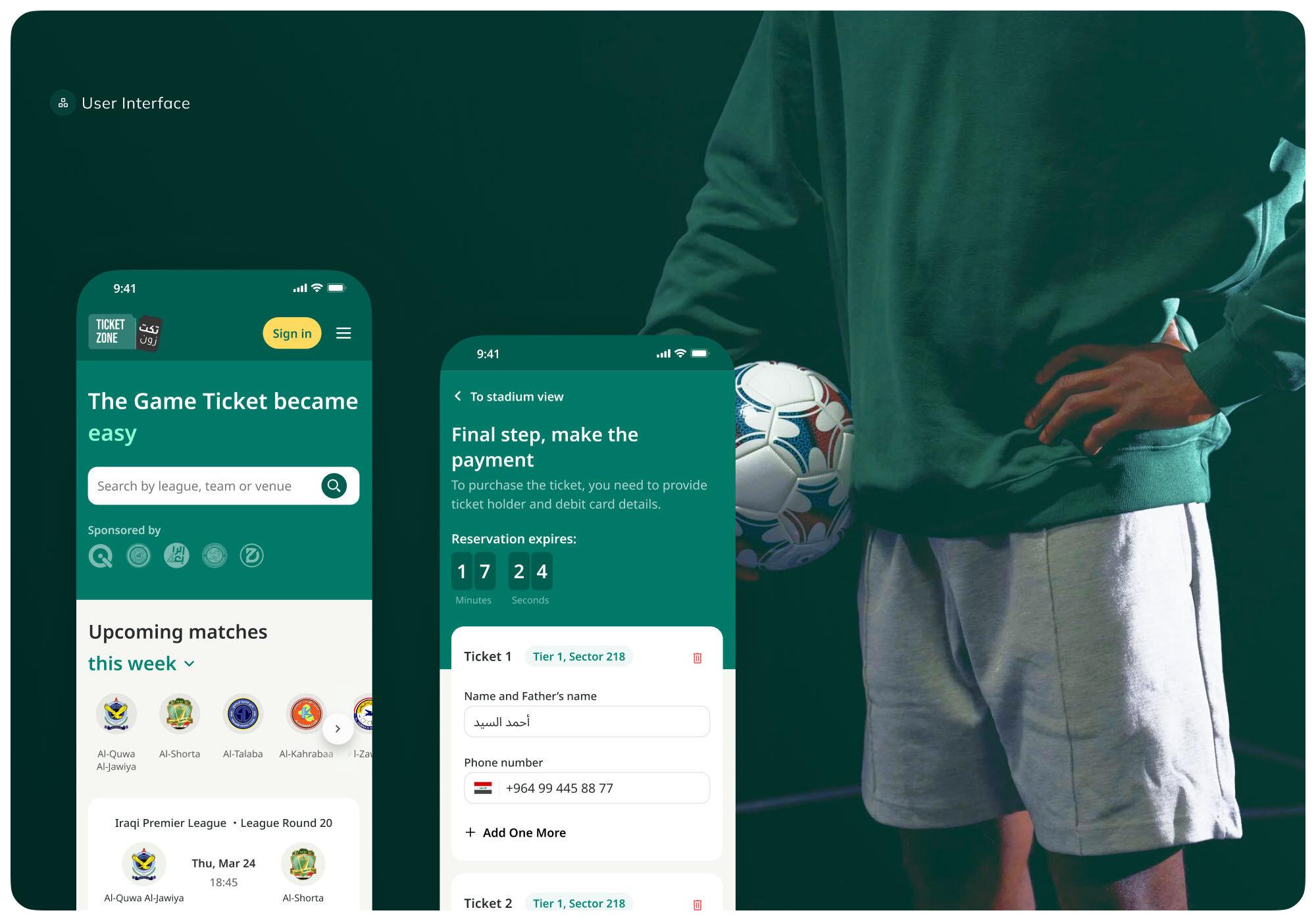
Ticket Zone, a mobile and web app for secure football ticketing
Ticket Zone is a cross-platform solution for the Iraqi Premier League that enables secure ticket sales and stadium entry via mobile QR codes. Netguru delivered iOS, Android, and web apps integrated with third-party services like seats.io and a payment gateway. Designed for high traffic during matches, the app was built and tested under tight deadlines to ensure a smooth fan experience.
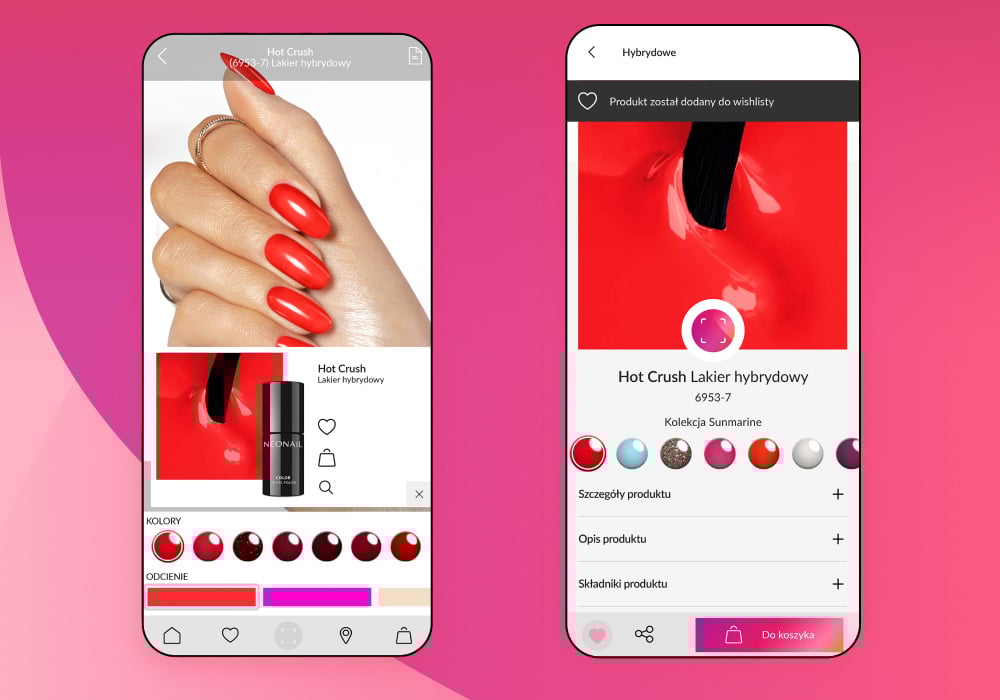
NEONAIL, a beauty mobile app with a Virtual Try-On feature
NEONAIL’s augmented reality app lets users preview nail products in real time using AR. Netguru developed a PoC, collected and labeled training data, and fine-tuned computer vision models for accurate nail detection. The result is a seamless, cross-platform virtual try-on experience that simplifies purchasing decisions in the beauty industry.
FairMoney, a mobile app for Africa’s number one neobank
FairMoney is Nigeria’s top mobile neobank, with over 1M users. Netguru optimized the app’s core features — lending, banking, and KYC — to support rapid growth and compliance. Improvements in performance and scalability, combined with a 30% reduction in time-to-market, helped FairMoney expand across African regions.

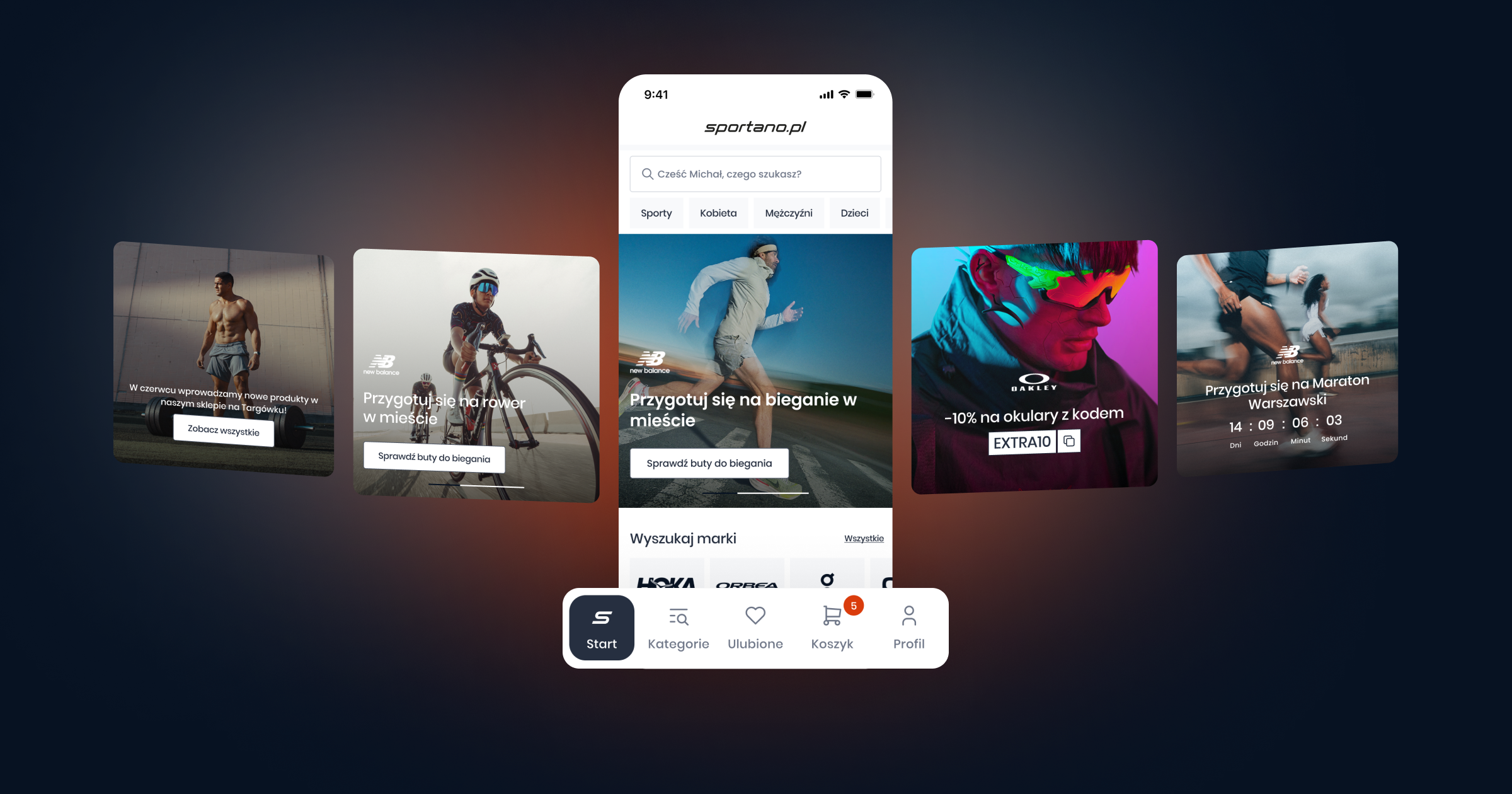
Sportano – Sports E-commerce App
Sportano partnered with Netguru to l aunch a high-performance mobile app for iOS and Android, enabling users to browse, filter, and purchase sports gear with ease. Built with React Native, the app delivers a consistent cross-platform experience and integrates seamlessly with the client's e-commerce backend to support fast, secure checkouts and personalized product views.
FAQ: How do I make a successful app for my category?
How do I make a successful dating app?
A successful dating app earns user trust first and matches second: safety features, photo verification, and transparent moderation are the foundation, not the matching algorithm. Tinder's early growth came from seeding specific college campuses to create density before going wide; cold-starting without that density kills engagement. Think of trust mechanics as your product-market fit prerequisite: without them, no algorithm retains users.
How do I make a successful fitness app?
Fitness apps succeed through habit loops: streak mechanics, milestone badges, and Day-7/Day-30 retention prompts that pull users back before the novelty fades. Apps like Duolingo (adjacent category, same mechanics) demonstrate that a simple daily streak can sustain active users per month at rates most entertainment apps never reach. Build your in-app engagement calendar before launch, not after your Day-1 retention curve drops off a cliff.
How do I make a successful social media app?
Social media app development lives or dies on solving the cold-start problem: a network with fewer than a critical mass of active users delivers no value, so early content seeding or creator incentives are mandatory. Discord solved this by targeting existing gaming communities with ready-made audiences rather than building from zero. If your go-to-market plan doesn't answer "where do the first 1,000 engaged users come from?", your development partner should block launch until it does.
How do I make a successful travel app?
Travel apps must work offline — users are most active in airports, on trains, and in destinations with poor connectivity, so offline mode isn't a nice-to-have feature but a core delivery requirement. Trip context (currency, local time, booking status) surfaced at the right moment drives the engagement that turns a one-trip install into a repeat-use app. MoSCoW prioritization should put offline data sync in the "Must" column from sprint one.
How do I create a successful app and make money?
The in-app purchase revenue model and freemium conversion rate together determine whether your monetization works: industry freemium conversion benchmarks sit at roughly 2–5% of free users, so your free tier must attract enough volume to make that ratio viable While freemium dominates today's market (over 95% of apps are free), paid apps generate immediate revenue and often create higher perceived value (Netguru research, How to Build a Profitable Mobile App Monetization Strategy? A Step-by-Step Guide). Subscriptions outperform one-time purchases for ARPU in most non-game categories. Model your break-even at 2% conversion before committing to a free-tier feature scope.
How do I make a successful mobile game?
Mobile games depend on the in-app purchase revenue model paired with live ops — limited-time events, seasonal content drops, and battle passes that give engaged users a reason to spend repeatedly rather than once. A game that launches without a live ops calendar typically sees ARPU collapse within 90 days as the initial content is exhausted. Think of post-launch maintenance cost as a standing team expense, not a project tail, and build that into your investor pitch from day one.
Deliver your vision with the right partner
Building a successful app is not just an opportunity for a restricted clique of savvy engineers anymore. As a matter of fact, a lot of designers, entrepreneurs, marketers, and other non-engineers take the lead in the conceptualization and delivery of mobile apps.
If you have a promising idea but don’t have software development skills (or access to an in-house development team), you can easily find a mobile app development partner that you can work with. This means that you don’t necessarily have to be technology-focused when conceptualizing your app-based business.
If you’ve put in the time and effort to identify problem areas, research them, understand your customers, verify product-market fit, and other product and business considerations, then the conversations about technology options can come at a later time.
Nevertheless, whether you’re already at this point in your product development journey or still ideating about your game changing mobile app, you can already benefit from engaging a full-service consultancy that can walk you through the product development process.
They can provide a full range of mobile app development services from conceptualization, research, and prototyping, all the way to implementation, launch, and maintenance. Whether you’re from a startup, a local business, or a multinational enterprise, the right partner will possess the technical competencies, infrastructure, and industry-specific expertise to deliver your vision.
If you’re nurturing an app idea, consider how the right development partner can empower you to create your own app, guiding you through every step from market research to launch and beyond.


