
Design System Components: Bridging Designer-Developer Workflows


Contents
Design system components are essential tools that create a shared language between designers and developers, dramatically improving collaboration and product consistency across digital experiences.
Key Takeaways
- Design systems reduce development time by up to 50% - Teams using comprehensive systems, such as Silk, save 3-6 days during MVP sprints through the use of reusable components and standardized patterns.
- Establish a single source of truth with shared libraries - Centralized component repositories eliminate inconsistencies and reduce handoff errors by ensuring both teams work from identical resources.
- Focus on core elements: design tokens, components, and patterns - Build your system around color/typography tokens, reusable UI elements, and interaction states for maximum scalability.
- Choose adapt over create for faster implementation - Most teams benefit from customizing existing systems rather than building from scratch, balancing efficiency with brand requirements.
- Treat design systems as living products, not one-time projects - Successful systems require ongoing maintenance, clear governance, and regular updates to remain valuable and relevant.
When implemented effectively, design systems transform chaotic workflows into streamlined processes, enabling teams to focus on innovation rather than recreating basic elements. The key is starting with proven foundations and evolving them based on real user feedback and changing product needs.
The modern digital world contains billions of websites and millions of applications. Design system components have emerged as vital tools that create cohesive user experiences. Products often suffer from inconsistent interfaces that feel disconnected and leave users confused and frustrated. Design systems offer a solution by providing a single source of components, patterns, and styles that bring together previously disjointed experiences.
Design system UI libraries form the foundation of any successful design system. Most systems feature two key versions: image-based UI kits for designers and code component libraries for developers. This approach bridges the gap between design and development teams. Companies that use design systems have seen remarkable changes in their product development lifecycle. They achieve faster time-to-market and deliver more cohesive user experiences.
Design system components prove valuable because they reduce time spent recreating elements and patterns while building products at scale. Note that effective design systems require strong foundations through three core components: principles, styling infrastructure built on design tokens, and simple elements. They should also support reuse by adopting only the most common pieces.This piece will show you how design system components connect designer-developer workflows. You'll learn about the key elements of a strong design system component library and discover practical ways to implement these systems in your projects.
What is a Design System and Why It Matters
Design systems have grown from basic style guides into crucial frameworks that drive modern digital experiences. Teams now take a radically different approach to building consistent interfaces at scale.
Definition of a Design System in UI/UX Context
A design system is a complete set of standards that helps manage design at scale through reusable components and patterns. Teams can design, build, and maintain consistent digital customer experiences with this structured framework. Unlike regular documentation, a design system works as a living product that needs constant updates and progress.A solid design system has:
- Design principles that guide decision-making and reinforce usability goals.
- Reusable UI components like buttons, forms, and navigation patterns.
- Design tokens that abstract visual decisions (color, typography, spacing).
- Usage guidelines explaining when and why to use specific components.
- Code references that arrange design intent with implementation.
- Governance models defining ownership and contribution processes.
Design systems let teams replicate designs quickly by utilizing premade UI components and elements. Figma's 2019 experiment showed designers with a system finished their tasks 34% faster than those without one.
How Design Systems Bridge Design and Development
Design systems create a shared language between designers and developers that cuts down miscommunication and saves time. Cross-functional teams use this unified language with terms, phrases, and naming conventions to streamline design decisions.To cite an instance, teams won't debate a dropdown menu's functionality or appearance since that term refers to a specific element within the design system. Both designers and developers know exactly what they're discussing.
Design systems also close the implementation gap through technical specifications, code snippets, and detailed documentation that turn design intent into reality. Developers can now convert components into functional, user-friendly code faster because the design system offers production-ready patterns organized by functionality.
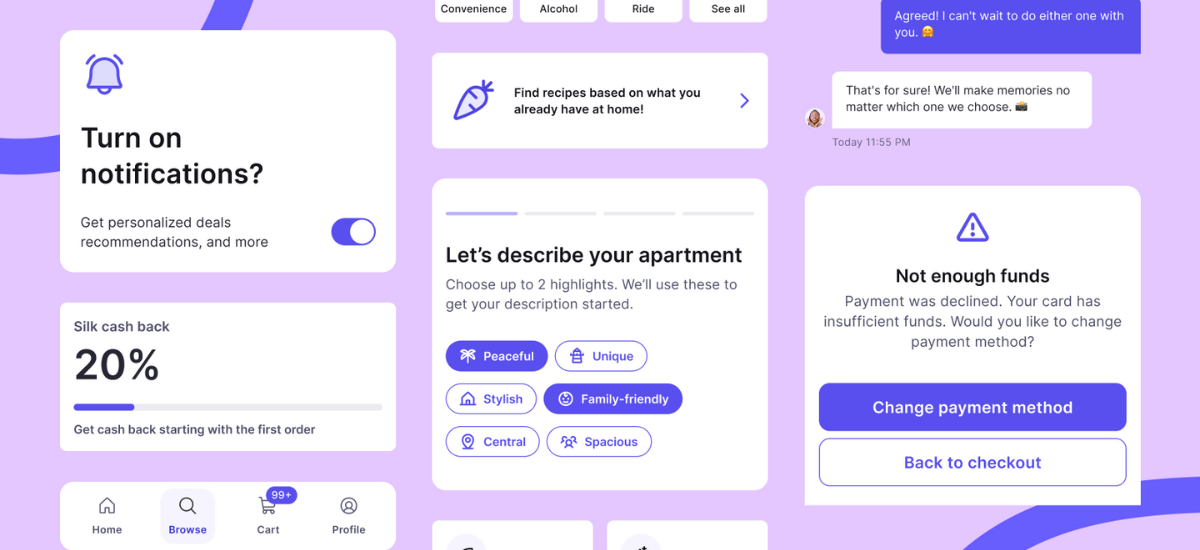
The Silk design system shows this bridge perfectly. Built to help teams design and launch commerce products faster, Silk cuts setup and prototyping time by 50% and saves 3-6 days during MVP sprints. Teams maintain consistency across mobile and web experiences without rebuilding UI foundations for every project, thanks to ready-made foundations and reusable components with clear documentation.
Common Misconceptions About Design Systems
Design systems have proven their worth, yet some misconceptions remain. Many think design systems work only for large enterprises. The truth is, organizations of any size benefit from their efficiency and consistency, though implementations vary in scale and complexity.People often believe design systems limit creativity. The opposite is true - they free designers from routine tasks so they can tackle unique challenges. Designers spend more time on innovation because reusable components handle the routine elements.
Some see design systems as a one-time project. Successful design systems actually grow and adapt as product needs change. They need regular updates to stay useful and relevant.Many see design systems as just a designer's tool. These systems help entire organizations. From developers and content creators to product managers. They provide one source of truth that speeds up development and reduces duplicate work.
Teams can create cohesive, efficient, and expandable digital experiences by understanding design systems and knowing how to use them effectively.
Core Components of a Design System UI Library
A design system's strength comes from its core components. These building blocks ensure consistency in digital products. They create an infrastructure that connects design and development teams through a shared language.
Design Tokens: Color, Typography, Spacing
Design tokens are the smallest elements of a design system. These named entities store visual design attributes and act as a single source of truth for design decisions. Teams reference these tokens instead of hard-coding values directly into code, and updates happen centrally.Color tokens use a structured approach. They start with global tokens (like $purple-100) that define the palette. Alias tokens suggest their intended purpose (such as $color-icon-success).
Typography tokens come in two categories: heading and text. Each category offers various sizes with defined font-size, font-weight, and line-height values. Spacing tokens creates consistent spacing between layout elements. They usually build around a base unit of 4px to scale properly across devices.
Component Library vs Pattern Library
Component libraries and pattern libraries play different roles in a design system UI framework, though people often mix them up. A component library stores reusable UI elements that designers and developers can easily access. You'll find specific UI components with unique names, usage descriptions, customization options, state variations, and code snippets.
These components work as standalone elements or combine into larger patterns. A pattern library features UI-element groups and layouts. Design system experts say that "a pattern is a global solution to a common design problem, such that you could use the solution many times and never quite use it the same way twice". Pattern libraries contain content structures, layouts, and templates built from component library elements.
Reusable UI Elements: Buttons, Inputs, Cards
Reusable elements are the lifeblood of modern UI development. They give teams a central collection to maintain consistency and save time. These include:
- Buttons: Standard styles (primary, secondary, disabled) and states (hover, active, focused)
- Input fields: Text areas, checkboxes, radio buttons, and dropdowns that appear throughout interfaces
- Cards: UI components that group related information with headlines, descriptions, and optional images or buttons
Cards work well in many settings. Product catalogs, content sites, dashboards, and shared tools benefit from cards' ability to mix different information types.
Interaction States and Accessibility Guidelines
Interaction states show users the status of components visually. Each state should look similar yet stand out from other states and the surrounding layout.
Key interaction states include:
- Enabled/Disabled: Shows if users can interact with a component.
- Hover: Responds to cursor movement over an element.
- Focus: Shows selected elements during keyboard or voice input.
- Pressed/Active: Gives feedback during user interaction.
- Selected: Appears after user selection.
Focus states help keyboard users navigate through interfaces. These states need high visibility, usually through outlines rather than just color changes.Teams can build better design systems by understanding these core components. This knowledge helps turn design ideas into working code.
Improving Designer-Developer Collaboration Through Components
Designers and developers face major challenges when they work together on digital products. A well-laid-out design system with its component library can substantially reduce these barriers.
Single Source of Truth with Shared Libraries
Shared libraries create a central repository where team members can access design assets like components, styles, and variables. This approach gives both designers and developers similar resources to work with. Teams working in isolation often face inconsistencies, but this method eliminates such issues.
Research shows that poor communication affects the productivity of almost half the workforce. Of course, teams that adopt a design system as their single source of truth face fewer communication hurdles. The standardized UI elements in shared libraries create a common vocabulary that helps designers and developers understand each other better.
Companies using shared component libraries report a 34% boost in design efficiency. To cite an instance, the Silk design system cut setup and prototyping time by half. This saved 3-6 days during MVP sprints by offering ready-made foundations and reusable components.
Version Control and Documentation Best Practices
Version control helps track, document, and communicate changes properly. Developers need version control to work together on the same project. The same applies to designers - without version control, multiple designers working on a component will create inconsistencies.Best practices for version control include:
- Using clear naming conventions for files and versions.
- Documenting changes between versions with commit messages.
- Maintaining a detailed changelog for updates and bug fixes.
- Ensuring backward compatibility whenever possible.
Quality documentation plays a crucial role. Beyond simple specifications, complete documentation should show usage examples, prop definitions, and edge case handling. This clarity helps reduce implementation errors substantially.
Reducing Handoff Errors with Component-Driven Design
Component-driven design has transformed the handoff process between designers and developers. Research shows 62% of development teams spend too much time redoing designs due to communication gaps.
Component-based approaches make the process simpler through consistency, reusability, and faster execution. Teams report up to 70% faster development cycles with these systems compared to older methods. Airbnb's shared component library reduced handoff time by 35%.
The solution to handoff problems lies in continuous collaboration rather than one-time tasks. Designers and developers who work together throughout development catch and solve problems early. This leads to better outcomes and faster delivery.
Adopting and Scaling a Design System in Teams
Design system implementation needs smart decisions about adoption methods, clear team roles, and maintenance plans. These elements determine if your system runs successfully or becomes outdated.
Choosing Between Adopting, Adapting, or Creating
Teams have three main options when implementing a design system: adopt, adapt, or create. Nielsen Norman Group suggests each option has specific benefits based on what organizations need.
Teams can adopt existing design systems without changes. This works best for small teams with limited resources who want quick efficiency gains. The adapt approach lets teams customize existing systems to match their brand needs. It balances efficiency with uniqueness. Building from scratch gives maximum customization but needs more time and resources.
Most teams find the adaptive approach works best. The Silk design system showed a 50% reduction in setup time and saved 3-6 days during MVP sprints. Adapted systems boost efficiency without enterprise-level complexity.
Team Roles: Designers, Developers, and Content Writers
A design system's success depends on clear ownership and contribution models. The first step is to pick the right team structure - centralized, decentralized, or hybrid.
Centralized teams keep full control but might lose touch with product needs. Decentralized models keep components in line with real-life requirements but need more coordination. Hybrid structures combine a core team with embedded contributors. This approach works best for growing organizations.Content strategists should join the team to add content standards, among other visual components. Their guidelines ensure consistency beyond visuals, making the system more detailed and useful.
Maintaining and Evolving the System Over Time
Design systems need ongoing care - they're never truly finished. The best systems become useless without proper maintenance.Clear governance rules should state who can make changes and how updates get approved. Teams should use semantic versioning (MAJOR.MINOR.PATCH) to show change effects and keep detailed changelogs of updates.Regular audits help find outdated components that don't match current standards. These checks help keep the system relevant and effective.The system's maintainers need direct feedback channels with users. This cycle of updates and feedback turns maintenance into continuous improvement. Your design system will grow based on actual needs.
Case Study: Silk Design System for Commerce UI
Netguru's Silk stands out as a purpose-built design system that helps teams create consistent commerce interfaces. This free toolkit solves a major challenge - teams can ship consistent UI without rebuilding foundations for every project.
Silk bridges the gap between simple UI kits and complex enterprise systems, making it perfect for single-brand commerce products like e-commerce platforms, marketplaces, and B2B tools. The system works as a nearly headless UI kit that supports rapid prototyping, wireframing, and style guides while serving as a ready-to-use design system.
Ready-Made Components for Shopping Flows
We designed Silk for commerce experiences with detailed components for product lists, checkout flows, and account areas. The system has 33 pre-built, fully customizable components that ensure consistency throughout projects and support rapid prototyping.
Efficiency Gains: 50% Setup Time Reduction
Teams using Silk see impressive productivity gains - a 50% reduction in setup and prototyping time saves 3–6 days during MVP development. A client's rebranding experience shows how Silk enabled core redesigns in just 2 days, with the complete rebranding process taking about 3 working days.
Open-Source Figma Files and Customization Options
Silk has open-source Figma files for mobile and responsive web, with integrated icons and in-file documentation. The system proves its flexibility as over 80% of users adapt Silk's components to match their branding needs without compromising design integrity.
Accessibility and Brand Adaptability Built-In
Note that accessibility lives within Silk's components and color palettes—teams don't need to treat it as an extra step. Design tokens, variables, and flexible foundations make color, typography, spacing, and layout adaptations straightforward while maintaining system consistency.
Conclusion
Design systems have, without doubt, changed how teams cooperate and build digital products. This piece explores how design system components act as vital bridges between designers and developers. They create a shared language that makes workflows smoother and improves productivity.
Teams that adopt detailed design systems like Silk see remarkable gains in efficiency. Our case study showed Silk reduces setup and prototyping time by 50%, which saves teams 3-6 days during MVP sprints. Well-laid-out component libraries speed things up by eliminating duplicate work and standardizing implementation in platforms of all types.
Design tokens, reusable UI components, and pattern libraries form the backbone that helps design systems work. These elements maintain visual consistency while teams solve unique problems instead of recreating standard elements. On top of that, shared libraries create a single source of truth that cuts down handoff errors and miscommunication substantially. A design system's success depends on thoughtful implementation strategies. Teams should decide whether to adopt, adapt, or create systems based on their needs. They must also set clear roles and governance processes to keep the system useful over time.
Silk shows how purpose-built design systems don't deal very well with specific industry challenges. Built for commerce interfaces, Silk provides ready-made components for shopping flows while meeting accessibility standards and brand adaptability. Its practical approach bridges the gap between simple UI kits and complex enterprise systems.
Whatever approach teams pick, the evidence shows that design systems bring substantial benefits. They do more than save time - they create cohesive user experiences, reduce technical debt, and let teams invent rather than reinvent. As digital products become more complex, design systems will remain vital tools. They help create consistent, available, and scalable user interfaces that strike a chord with users.


