
Design System Patterns: Essential Building Blocks for Scalable UI


Contents
Design system patterns often become the missing piece in failed UI implementations.
Most clients attempt design systems three or four times because their earlier versions "just didn't take". We've found that there was more to successful design systems than components, they need well-crafted patterns that solve real user problems.
Design system UI patterns function as reusable combinations of components that address common user problems. These patterns bridge the gap between simple elements and complete interfaces, unlike individual components. The combination of design system components and patterns ensures consistency, efficiency, and ease of use across products.
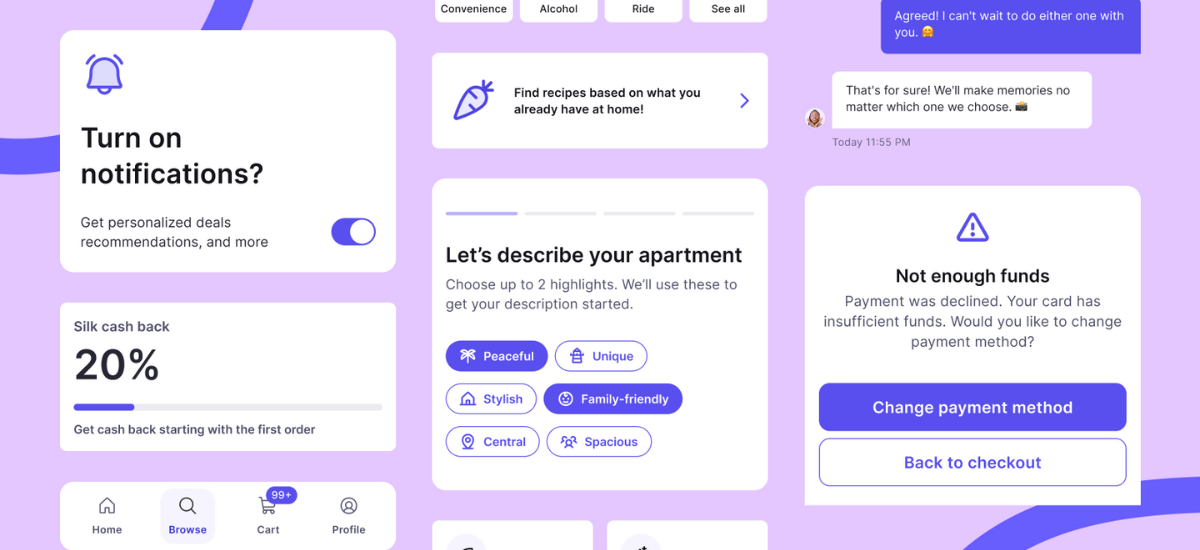
Simple elements like buttons to complex structures such as navigation bars provide standardized solutions that teams frequently need. The Silk design system patterns showcase this through predefined flows for commerce scenarios, including product lists, checkout processes, and responsive layouts.
This piece will help you understand everything in building adaptable design systems. You'll learn what patterns are and how they differ from components. A deep dive into UI pattern types leads to practical examples for your projects. The guide concludes with pattern building and adoption strategies, because successful adoption begins when design systems incorporate solutions that teams already use.
What Are Design System Patterns
Design system patterns work as reusable solutions to common design problems in user interfaces. These patterns serve as blueprints that create consistent, functional experiences across digital products.
Definition and Core Purpose
Design system patterns offer standardized approaches to solve recurring design challenges. Designers can work more efficiently with these proven solutions by building on past successes instead of starting from scratch. Unlike individual UI elements, these patterns work as global solutions that adapt to different contexts. On top of that, patterns come in many forms—from page chunks like login modules to complete flows such as shopping cart sequences.
Design system patterns aim to build consistency while staying flexible. They act like recipes—blueprints that create inclusive experiences. Users find these interfaces predictable and easy to direct because patterns reduce cognitive load.
How Patterns Differ from Components
People often use these terms interchangeably, but patterns and components play distinct roles in design systems:
- Components work as individual building blocks—unfinished objects named as nouns that fit multiple contexts.
- Patterns use components strategically to tackle specific use cases.
- Specificity is different—components belong to one design system with specific layout, color, and behaviors, while patterns work across contexts.
Here's a helpful difference: components show what a design works with set constraints, while patterns show how a design should work under ideal conditions. More than that, patterns guide teams through tradeoffs that pop up during implementation.
Why Patterns Matter for Scalable UI
Teams can change features faster and spot underperforming elements easily with patterns. Well-defined guardrails let even junior engineers work with minimal guidance. These patterns build the foundation for truly scalable interfaces.
Patterns create a common language among UI engineers, designers, and product stakeholders. Teams communicate better and line up around consistent solutions with this shared vocabulary.
The Silk design system patterns show this in action—it has predefined flows for commerce scenarios like product listings, checkout processes, and responsive layouts. Design systems help teams deliver coherent experiences, regardless of the number of designers working on the product.
Types of Design System UI Patterns
Design systems organize UI patterns into distinct categories that address user needs and interactions. These pattern types are the foundations for creating cohesive user experiences in digital products.
Navigation Patterns
Navigation patterns help users move through different sections of an application or website. Sites with extensive content often use horizontal bars at the top. Feature-rich applications benefit from vertical navigation, while sites with nested hierarchies use breadcrumb trails. Users can find hamburger menus in the top-left corner.
These menus show content lists with a click and work great on mobile interfaces. Mobile devices also benefit from bottom navigation bars. They give users quick access to key features from an ergonomic spot. Good navigation patterns show users where they are and how to move between sections.
Form and Input Patterns
Form patterns create standards for how users enter information through interfaces. These patterns include registration forms, contact forms, checkout processes, and survey interactions. Good form design reduces cart abandonment rates. Studies show 18% of users have abandoned carts because checkout forms were too long or complex.
The best form patterns use single-column layouts that work better than multi-column designs. They show helper text right away instead of hiding it behind tooltips. Clear input validation helps users spot errors quickly. Calendar interfaces work better than text fields for picking dates. They remove format confusion and reduce mistakes.
Data Display Patterns
Data display patterns make complex information easy to understand. Tables use alternating row colors with sortable columns and filtering options. Dashboards arrange multiple data visualizations in logical layouts. They highlight important metrics through stat components.
Charts, graphs, and progress indicators turn numbers into visual stories. These patterns help users spot relationships between data points. Users can identify trends and make smart decisions based on complex information.
Feedback and Status Patterns
Feedback patterns tell users what's happening in the system right away. Loading indicators, validation messages, success confirmations, and error notifications keep users informed. Important messages stand out more than minor alerts in good feedback patterns. Users feel confident because the system acknowledges their actions and guides them when problems occur.
Designers create better feedback by testing with real users early. This approach leads to decisions based on actual data rather than guesswork.As with Silk design system's predefined patterns for commerce scenarios, these UI pattern categories offer standard solutions. They keep interfaces consistent and meet the needs of users in a variety of situations.

Design System Patterns Examples
Design system patterns show how theoretical concepts work in ground applications. Ground examples light up the best practices we need to create flexible, user-friendly experiences.
Login and Authentication Patterns
The best login patterns create a balance between security and usability through clear layouts and consistent styling. Authentication flows must verify credentials and build trust. This makes the difference between converting users and losing them due to friction.
Studies show 88% of users won't return after a bad UX encounter. Successful implementations offer multiple authentication methods (email/password, social login, passkeys) while keeping visual consistency throughout the experience.
Multi-Step Form Patterns
Multi-step forms make lengthy processes more manageable and improve completion rates. These patterns work best when they show only 5 fields per step (the optimal number for conversion). Clear progress indicators and save-and-resume functionality create paths to successful completion even for complex tasks.
Empty State Patterns
Empty states turn blank containers into opportunities. Well-designed empty states serve three key purposes: they communicate system status, help users find features, and provide direct pathways to key actions. Empty states that stay empty create confusion and reduce user confidence.
Search and Filter Patterns
Filter patterns help users narrow down objects in datasets based on specific parameters. A properly implemented filter system lets users:
- Apply filters one parameter at a time.
- See which filters are currently active.
- Clear all filters with a single action.
The system prevents users from making unintentional actions and provides clear ways to refine results.
Card Layout Patterns
Cards group related information into digestible units that look like physical cards. These containers show a summary and link to additional details, which creates high-information-scent entry points. Cards work especially well when organizing different items on dashboards or social platforms where content types vary.
Silk design system patterns have predefined solutions for commerce scenarios like checkout flows and product listings, just like these examples.
Building and Implementing Patterns
A strong collection of design system patterns starts with watching how users interact with your interfaces.
Identifying Common Usage Patterns
You can spot successful patterns by seeing design problems that keep coming up in your products. Look at your existing interfaces to find solutions that show up in different parts of your product. Watch how users work with similar interfaces in related products. These recurring solutions often become candidates for standardization as design system UI patterns, as with how the Silk design system patterns have predefined flows for commerce scenarios such as checkout processes.
Creating Pattern Documentation
Pattern documentation needs to be well-laid-out. Pattern documentation files should use Markdown with YAML front matter that has title, tags, states, and order properties. Each pattern document needs context through clear descriptions, usage guidelines, and practical examples. The detailed design system documentation should have specifications, real-life examples, interactive prototypes showing states, and code snippets.
Pattern Adoption Strategy
The best design system patterns won't work without proper adoption strategies. Amber's team at Delivery Hero created a three-component adoption approach:
- Gamify: Create tiered adoption levels and visualize progress.
- Socialize: Involve teams through naming competitions and feedback sessions.
- Celebrate: Acknowledge milestones and progress toward adoption goals.
Teams should know they can ask questions about implementing patterns anytime, so ongoing support remains critical.
Conclusion
Design system patterns are the foundations of successful UI implementations in digital products. This piece explores how these patterns work as reusable solutions to common design challenges and bridge the gap between individual components and complete interfaces. Components work as individual building blocks, while patterns combine these elements strategically to address specific use cases.
Essential frameworks emerge from four main pattern categories. Navigation patterns guide users through interfaces. Form patterns standardize information input. Data display patterns organize complex information, and feedback patterns communicate system status. Login flows, multi-step forms, empty states, search filters, and card layouts show how these patterns turn into practical solutions.
Teams that want to build flexible interfaces should identify recurring design problems, create complete pattern documentation, and develop thoughtful adoption strategies. Silk design system patterns show this approach through predefined solutions for commerce scenarios. These include product listings, checkout processes, and responsive layouts—patterns that solve actual user problems instead of theoretical concepts.
The success of design systems depends on how well patterns are implemented. Design systems work best when patterns reflect solutions teams already use and establish a shared language between designers, developers, and stakeholders. Your design system's patterns should solve actual problems, stay consistent, and adapt to different contexts. This balance creates interfaces that grow effectively while delivering cohesive, user-friendly experiences across your digital ecosystem.


