
How to Create Design System Documentation: A Step-by-Step Guide


Contents
Did you know that shipping a product to market is nearly impossible without a proper design system documentation?
Your design system documentation is the foundation that keeps your team in sync. Good documentation helps teams grasp design principles and make consistent decisions. Your team members can get up to speed quickly while designers and developers communicate better.
Design system documentation goes beyond a simple set of guidelines. The written guidance explains the correct usage of system components, styles, and patterns. This system ensures design and development consistency in projects across teams. The process aids the adoption and implementation of a design system to streamline UI design efforts.
Learn how to build complete documentation that works, whether you lead a startup or a long-standing enterprise. We'll cover everything from understanding your audience to scaling your system. You'll learn to create design system documentation that your team will actually use.
Step 1: Understand the Purpose and Audience
You need to understand who will use your design system and why they need it before you create components or write documentation. This crucial first step determines if your documentation becomes a valuable resource or gathers dust in your company's knowledge base.
Define who will use the documentation
Your design system documentation's success depends on knowing your audience. Your team needs this documentation. Not you.
Different groups interact with your system in unique ways:
- Designers need visual examples, component variants, design token implementation guidance, and the reasoning behind design decisions.
- Developers require technical specifications, code snippets, integration guides, and implementation details.
- Product Managers look for high-level overviews, component selection guidance, and roadmap information.
Saurabh Soni, Head of Design at Razorpay, found that there was a communication gap rather than quality problems in design systems.
"Before we rolled out our design system, it was easy for teams to miss small nuances like different button states, or how an error within a text field should be handled."
This happens because "designers and developers speak a little bit of a different language."
Clarify the goals of your design system
Your design system needs clear problem-solving goals before component creation begins. Teams often face challenges like platform inconsistencies, time-consuming manual updates, or gaps between design and development teams.These questions need answers:
- Why do we want a design system?
- What specific problems will it solve?
- How will we know if it's successfully solving those problems?
Note that design systems range from simple component collections for small teams to complete systems for enterprise organizations. The right system fits your specific situation and grows with your needs.
Amy Hupe, a design systems consultant, points out that good documentation does more than list components:
"Usage guidance is where the value lies. It's where we tell people not just what to use but how, and why. It's where we can communicate purpose and intent".
Make documentation work with team workflows
Documentation must fit your team's daily routines naturally. Teams open the best documentation during design reviews, code reviews, and sprint planning, not just onboarding. Successful systems like GOV.UK, Shopify Polaris, and IBM Carbon show this practical approach consistently.
Documentation needs a solid maintenance plan. Research from Figma, Netguru, UXPin, and Knapsack shows that teams stop using documentation when it becomes outdated, fragmented, or disconnected from product work. Documentation updates should be part of existing workflows:
- Designers updating guidance during design reviews.
- Engineers adjusting rules when components evolve.
- Documentation changes landing alongside the work that required them.
The Silk design system shows this audience-focused approach perfectly. Built for commerce and marketplace products, Silk gives different resources based on user needs: foundations and tokens for designers, writing guidelines for content creators, and contribution guidelines for team expansion. Teams can design and ship commerce and marketplace products faster, without rebuilding UI foundations for every project.
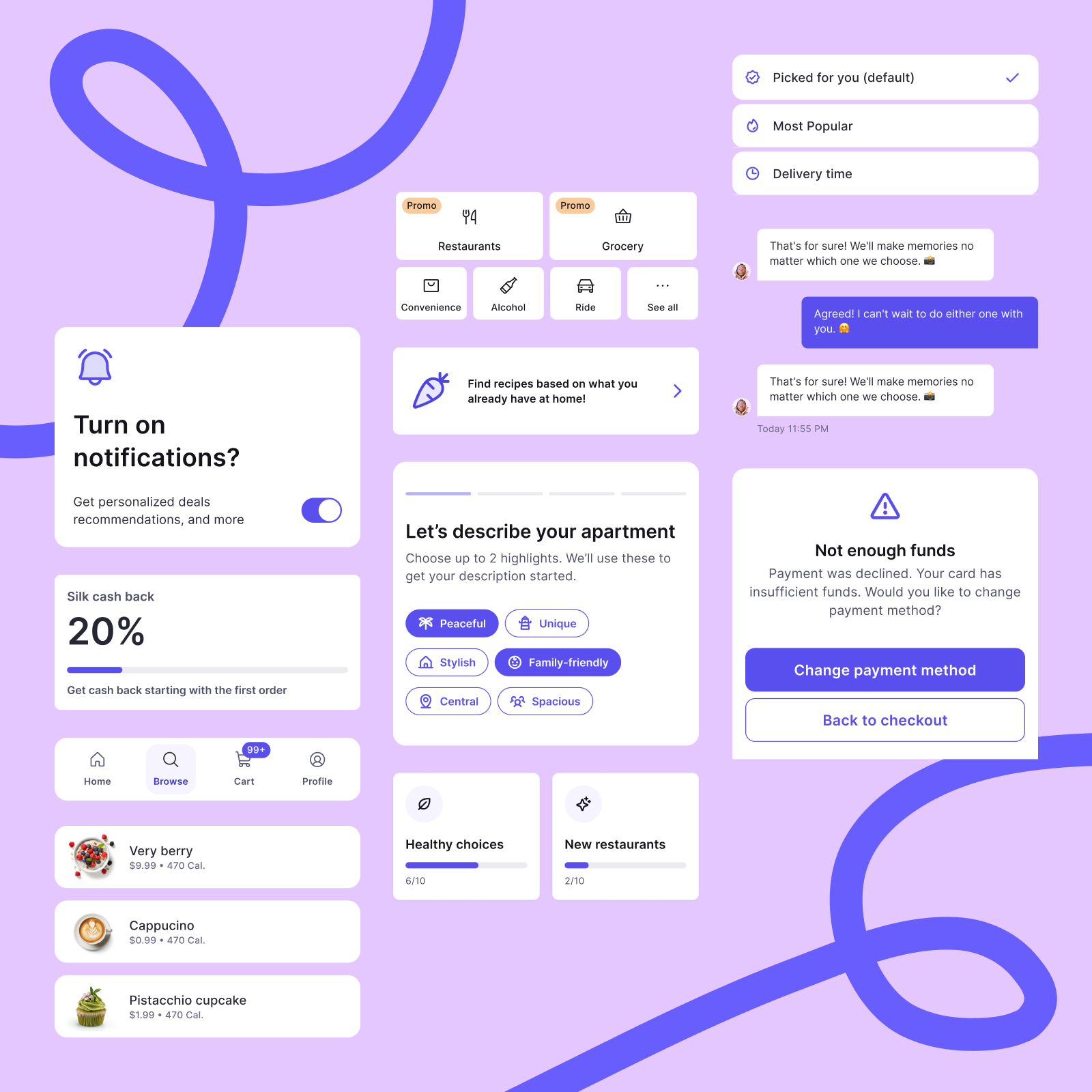
Understanding your audience and goals helps create documentation that teams actually use. This turns your design system from a simple component library into a trusted guide for daily product decisions.
Step 2: Plan the Structure of Your Documentation
Your team's ability to find what they need depends on how you structure your design system documentation. A clear structure helps teams navigate content easily, while poor organization leads to confusion.
Choose between task-based and structural formats
Design system documentation usually follows two main patterns that serve different purposes.
Task-based documentation shows how the system works in real-life scenarios. This approach puts content around specific user goals and workflows. Teams that use the system daily find this format helpful. Task-specific documentation has:
- User stories that start with user needs,
- Screen flow diagrams that show navigation between screens,
- Use cases with objective narratives,
- Page-level documentation that describes functions and purposes,
- Scenario narratives that show how to complete specific tasks.
Structural documentation looks at the system's architecture, its contents, and relationships between pieces. This approach gives a detailed view that helps understand the system as a whole:
- Object models that show structural system views,
- Architecture maps that show the general site/app structure,
- Standardized components documentation,
- System vocabulary that lists specific terminology,
- Navigational frameworks that describe menu items and controls.
Many successful design systems blend both approaches. They use structural documentation to define the system and task-based documentation to guide implementation.
Map out key sections like components, patterns, and tokens
Whatever format you pick, your design system documentation should have the essential sections below.
Design Principles and Guidelines: These capture your brand's essence and guide every design decision. You should add design philosophy, typography, color palette, and spacing rules to keep all visual elements consistent.
Components Library: This core section has reusable UI components like buttons, forms, navigation bars, and cards. Each component needs:
- Visual examples that show different states
- Usage guidelines that explain when and how to use it
- Anatomy breakdowns of component parts
- Code snippets ready to use
Foundations and Tokens: Document your system's building blocks:
- Color with usage guidelines
- Typography that specifies hierarchy and practices
- Spacing and layout systems
- Motion principles
Patterns and Flows: Guide teams on putting components together for common scenarios like product listings, checkout flows, and responsive layouts.
Accessibility Guidelines: Make accessibility requirements clear. Cover WCAG compliance, screen reader behavior, keyboard navigation, and color contrast requirements.
Decide on navigation and content hierarchy
Finding information matters as much as the information itself. Here are some approaches for better navigation:
-
Start with a simple proof-of-concept: Draw your documentation structure first. Get feedback and adjust as needed. You can't plan everything, so keep improving.
-
Keep navigation shallow and user-friendly: Your documentation should work like a tool, not read like a textbook. Use clear labels and group content by use case instead of topic.
-
Create predictable patterns: A logical structure helps designers and developers find what they need. Group content into categories like principles, components, patterns, and guidelines based on what users look for most.
-
Add search and filtering capabilities: Tools that let users search and filter content quickly help them find what they need from any starting point.
The Silk design system shows this well-laid-out approach perfectly. Its documentation has clear, purpose-driven sections: foundations and tokens, core components, patterns and flows, open-source Figma files, writing guidelines, and contribution guidelines.
Commerce and marketplace teams can "design and ship products faster—without rebuilding UI foundations for every project."Structure isn't one-size-fits-all. Shape your documentation around your team's size, workflow, and product needs. The right structure feels natural to your audience while covering everything about your design system.
Step 3: Document the Foundations and Components
Your design system needs solid documentation of its foundations and components. Good documentation turns abstract design concepts into practical guidelines that teams can use consistently in their projects.
Create a style guide with colors, typography, and spacing
A complete style guide is the lifeblood of your design system documentation. You should start by documenting these three key elements: color palettes, typography guidelines, and spacing systems.
Color palettes need primary and secondary collections with available color combinations that meet contrast requirements. Document hex values and show where to use them for backgrounds, text, and UI elements.
Typography guidelines should specify font families, sizes, weights, and line heights. They must also show which HTML elements to use (e.g., "subheadings should be H2 elements"). On top of that, it should explain how typography changes across different screen sizes to stay readable.
Spacing systems often get overlooked, but they are essential to create consistent layouts. Your documentation should show spacing values for margins, padding, and grid spacing with examples of proper implementation.
Document reusable components with usage rules
Component documentation is the practical heart of your design system. Each component needs:
- Visual examples that show different states and variants
- Clear guidelines about when and how to use it
- Design specs with anatomy breakdowns
- Code snippets for developers
The documentation works best when it's split into categories like editorial (copy guidelines, tone, word length), UI design (colors, layout, iconography), and UX design (states, interactions, behavior). This helps team members find what they need quickly.
Include accessibility and responsive design guidelines
Your accessibility documentation should meet WCAG 2.2 AA standards at a minimum. Show how components follow four key principles: perceivability, operability, understandability, and robustness. You need to explain how components work with screen readers, keyboard navigation, and color contrast.
The responsive design section should show how layouts adapt across devices using fluid grids and breakpoints. You also need to cover responsive typography approaches, minimum touch targets (44×44px), and image scaling techniques.
Silk as a design system documentation example
The Silk design system shows great documentation for commerce and marketplace products. Netguru created this open design system to help teams "design and ship commerce and marketplace products faster, without rebuilding UI foundations for every project".
Silk's documentation has well-laid-out foundations and tokens with color, typography, and spacing variables. It also provides reusable components and patterns for common commerce experiences, all designed to be accessible (WCAG 2.2 AA compliant).
Step 4: Build and Share Using the Right Tools
The right tools for your design system documentation create a bridge between conception and implementation. Your documentation's success depends on your content and how you create, manage, and share information.
Select design system documentation tools like Figma, Storybook, or Supernova
Your team's workflow needs different tools to serve various documentation needs. The right combination is vital for success:
Figma serves as both a design and documentation tool. Teams can keep their design files with documentation using Figma's commenting features, embedded links, and presentation mode. Small teams like Habitz find it practical to store documentation directly in Figma, with dedicated pages for foundations, components, and patterns.
Storybook shines at documenting UI components in code. Developers can build, view, and test components in isolation in this front-end environment. Storybook's Docs addon creates component examples, API documentation, and usage guidelines from your stories automatically. Many prominent companies like Shopify, IBM, and GitHub use Storybook for their design systems.
Supernova connects your design system documentation with tokens, themes, and components to bridge design and development. You can edit content without coding skills in a familiar editor, show Figma frames as images, and version your documentation for major updates. You also get up-to-the-minute data analysis to track your documentation's usage.
Create reusable templates for consistency
Reusable documentation templates save time and keep your design system consistent. Each component should have:
- Visual examples showing different states,
- Usage guidelines explaining implementation,
- Design specifications with anatomy breakdowns,
- Code snippets for developers.
Templates standardize information presentation, which makes your documentation more scannable and predictable. Your teams will quickly find what they need without searching through different formats.
Easy access and version control matter
Version control will give you an effective design system. Your documentation can become outdated or inconsistent without it. A solid version control process needs:
- Syncing to the latest design system version.
- Making and testing changes.
- Submitting changes with descriptions.
- Having owners review and accept changes.
This approach gives everyone access to the latest documentation and stops conflicting designs. Teams waste time with inconsistencies and lost work without version control. UXPin Merge's version control systems let teams manage library versions for each project and switch between versions easily.
Your documentation should be easy to find. Public publishing or private access with SSO login helps teams quickly reference your documentation, which boosts adoption and usage.
Step 5: Maintain, Improve, and Scale
A design system needs maintenance just as much as its creation. Teams lose trust in neglected documentation systems that become outdated, so adoption rates drop throughout your organization.
Collect feedback from designers and developers
Your team needs multiple channels to gather documentation feedback. Dedicated Slack channels, feedback tools like Trello or Jira, and regular review sessions work best. Simple surveys can reveal gaps or outdated content and give applicable information to help you improve.
Assign ownership and distribute responsibility
Design systems thrive with clear ownership. Documentation champions or a core team should oversee updates and check accuracy. To cite an instance, Razorpay assigns three designers and five engineers from their team of 70 designers and 100 developers to manage their design system. Their core team holds regular office hours and focus groups to boost community participation.
Update documentation regularly to reflect changes
Documentation works best as a living product that grows with your components. Teams should add documentation updates to sprint ceremonies and processes. Yes, it is essential that well-laid-out teams make documentation updates mandatory when they complete new components. This ensures design and code stay in sync.
Use analytics to track adoption and usage
Your design system's effect needs both quantitative and qualitative metrics. Figma's Design System Analytics helps you learn about component usage patterns. eBay uses component status APIs to monitor implementation on different platforms. These analytics reveal ways to improve and support continued investment.
Conclusion
Design system documentation turns abstract design concepts into practical guidelines that keep teams in sync. This piece walks through five key steps to create documentation your team will actually use instead of letting it collect digital dust.
Your documentation will give teams exactly what they need when you understand your audience first. Designers, developers, and product managers need information specific to their roles. A clear structure with intuitive navigation helps users find critical information quickly.
Documentation of your foundations and components serves as your system's backbone. Teams find it hard to keep products consistent without clear guidelines on colors, typography, spacing, and component usage.
Tool selection substantially affects how teams access and implement your system. Figma, Storybook, and Supernova bridge the gap between design and development. These tools make your documentation practical rather than theoretical.
Regular updates, clear ownership, and feedback loops keep your documentation relevant as products evolve. Teams lose trust in neglected design systems, which reduces adoption across organizations.
Silk design system shows these principles in action. It helps commerce and marketplace teams ship products faster without rebuilding foundations for every project. Its approach to foundations, components, patterns, and guidelines shows how good documentation strengthens teams to create consistent experiences while cutting long-term design debt.
Note that your design system documentation works as a living bridge between principles and implementation. Good documentation becomes the single source of truth that lines up teams, optimizes work, and delivers better user experiences. Start small, use feedback to improve, and watch your documentation become a great way to get value for your entire organization.


