
How to Run a Design System Audit: A Step-by-Step Guide for UX Teams


Contents
Design system audit is a great tool for brands seeking to maintain consistency and efficiency across their digital products.
Teams can learn a great deal about areas needing improvement by assessing existing UI components, pattern libraries, and design policies. These detailed evaluations ensure your design system aligns perfectly with your brand's ethos, user expectations, and technical requirements.
A full design audit spots inconsistencies and identifies channels that don't meet quality standards. It also helps streamline processes for future improvements. Design audits are the foundations of effective design systems, and teams will reference them for all future decisions. Design system accessibility audits and component audits can improve user experience while supporting business goals.
Explore this step-by-step process to conduct a complete design system audit. You'll find a practical design audit template and a detailed design system audit checklist that will revolutionize your UX team's approach to consistency and efficiency.
Key Takeaways
Design system audits are strategic necessities that transform how UX teams approach consistency, efficiency, and scalability across digital products.
-
Set SMART objectives before starting: Define specific, measurable goals that align with business priorities to ensure your audit delivers actionable value beyond identifying problems.
-
Follow the 6-step process: Inventory components, categorize elements, identify inconsistencies, evaluate visual consistency, conduct accessibility audits, and review documentation thoroughly.
-
Use structured checklists for consistency: Focus on high-use components like buttons, forms, and typography while examining design tokens as foundational elements that impact entire systems.
-
Collaborate across teams from day one: Engage designers, developers, and product owners early to create shared ownership and ensure technical feasibility meets user needs.
-
Implement iterative feedback loops: Make testing and feedback ongoing rituals rather than one-time events to keep your design system evolving with changing requirements.
Teams using well-audited design systems like Silk achieve 50% faster prototyping and save 3-6 days per project. These audits aren't just theoretical exercises but practical investments that drive measurable improvements in design efficiency, brand consistency, and cross-functional collaboration.
What is a Design System Audit and Why It Matters
A design system audit gives you a full picture of your product's design elements. It helps ensure everything stays consistent, usable, and quick across digital platforms. These audits differ from regular interface reviews. They give you a systematic look at how healthy, quick, and scalable your entire design ecosystem is.
Definition of a design system audit
You need to understand what an audit means before building a successful design system. A design system audit helps you review existing UI components, pattern libraries, and design policies. This shows you what needs to get better. Your team should look at all design elements - from the smallest atoms in atomic design systems to the complex organisms they create.
The audit team looks at everything from user interface design to backend functionality. This ensures your product looks good and works well for users. The quickest way involves going through UI elements one by one and grouping them by type and function. This approach gives you a detailed view instead of just scratching the surface.A full audit lays the groundwork for future design choices. Teams can figure out if they need small tweaks or a complete system overhaul through this review.
How audits support UX, dev, and brand alignment
Design system audits help connect user experience, development speed, and brand consistency. Research shows that brands with consistent design see 33% higher customer loyalty. Regular system checks can cut down mistakes by up to 25%. This creates simplified processes for design and development teams.
The benefits go beyond looks. Design audits spot and fix issues that might bug users. They also check how well your design system performs technically. Load times and responsiveness play vital roles in smooth user experiences.Development teams learn if components work correctly or need fixes. Think about a payroll product using two different button styles for one action - this small mix-up can lead to delays or mistakes. The audit might show that the system needs updates if engineers often change dropdown styles or make one-off layouts.
So these reviews encourage teams to work better together. Designers might make different choices over time when documentation isn't clear. Audits help create a shared language between design and development teams. This leads to better priorities and teamwork.
When to consider running an audit
You'll see signs that tell you it's time to review your design system. User complaints about usability, looks, or function clearly show your design system needs a fresh look.
Other signs include:
- Dropping metrics: Less user engagement, shorter site visits, higher bounce rates, or fewer clicks often point to design problems.
- The brand looks different across platforms, which confuses users and weakens brand identity.
- Development teams struggle to add new features because of system limits.
- Not meeting accessibility standards or legal rules.
- Old branding that doesn't match the company's growth.
- Slow website performance is affecting user experience.
On top of that, growing companies should review their systems regularly. Experts say this matters most when large corporations run many projects with big design teams. These reviews let you look at different parts of the design process and make sure all designers follow the same rules. A design system audit starts the process of updating an existing design system. It shows you what you need to stay consistent, make users happy, and meet business goals.
Setting Clear Goals and Scope for the Audit
Success in design system audits starts with setting clear parameters. Your audit's effectiveness depends on thoughtful planning that lines up with both current needs and future vision.
Defining audit objectives using SMART criteria
A design system audit needs well-expressed objectives. The SMART framework helps create goals that are:
- Specific: Define exactly what aspects of the design system require assessment.
- Measurable: Set concrete metrics to gauge success.
- Achievable: Create realistic objectives based on available resources.
- Realistic: Address actual business challenges.
- Time-based: Set a clear timeline to completion.
This approach prevents the audit from growing beyond its scope. As one expert notes, "Planning is a crucial part of any process as comprehensive as a design audit... Clarification of goals helps in conducting an effective design audit and also increases collaboration by bringing all the designers on the same page".
SMART criteria transform general goals like "improve our design system" into specific tasks. These could be "identify all button inconsistencies across product platforms within two weeks" or "assess accessibility compliance of all form components by the end of the quarter."
Choosing between a full system and a component-level audit
Deciding on the right scope becomes essential. Should you look at the entire design system or focus on specific parts?Full system audits look at every element in your design ecosystem. They give detailed insights but need more resources. This works best when:
- Organizations undergo major rebranding.
- Products show systemic inconsistency problems.
- Teams need baseline measurements before big updates.
Component-level audits focus on specific elements like navigation, forms, or typography. These targeted reviews give quick results with fewer resources. Document 101 explains this difference: "Before you touch anything, you need to define objectives and scope... determine the scope of the audit – will it cover the entire design system or focus on specific components like UI elements, branding, or code efficiency?".
Your immediate challenges, resources, and timeline will guide this choice. Stay flexible enough to adjust the scope as new insights emerge.
Aligning audit scope with business and UX goals
Your audit must connect to broader organizational goals. Without this connection, even technically perfect audits might not deliver real value. Start by identifying key business priorities - improving customer experience, expanding markets, or boosting efficiency. Then turn these priorities into design system objectives.
To name just one example:
- A business goal to reduce time-to-market needs an audit of component reusability and implementation speed.
- Brand consistency priorities require assessment of visual elements across channels.
- Accessibility compliance goals need evaluation of component-level standards.
Document 102 emphasizes this vital connection: "When your design system directly connects to company priorities, conversations with stakeholders become easier because you're speaking the same language". Good audits deliver multiple benefits - better user experience, operational efficiency, and business results.
Clear metrics tied to business outcomes matter most. These could include component adoption rates for efficiency, shorter design cycles for faster market entry, or fewer UX inconsistencies for happy customers.This strategic connection shows your design system audit as a vital business initiative, not just a design team project. Linking audit work to measurable business results builds strong stakeholder support throughout the process.
Step-by-Step Design System Audit Process
A systematic approach helps get a full picture of your design system audit. Here's a six-step process that gives you a framework to get into every aspect of your design system—from components to documentation. This process will give you practical insights.
1. Inventory all design system components
Start your audit by creating a detailed inventory of all UI elements in your product ecosystem. Your first step should list everything in your interface: buttons, forms, navigation elements, modals, and more. You can take screenshots of every component variation or collect them from design files. Another option is to export components straight from your design projects when possible.
The core team of developers should work together to understand the architectural approach in your codebase. This teamwork helps line up design elements with their code implementations and builds a foundation for a better audit. Document each component's location and how often it appears in the product to be more efficient.
2. Categorize and document UI elements
After completing your inventory, group components into logical categories based on what they do. Your design system could use the same categories as your frontend's modular architecture. Navigation elements, form controls, content blocks, feedback mechanisms, and layout structures are common groups.
This organization brings order from chaos and makes differences easy to spot. Each component needs detailed documentation about its purpose, usage guidelines, and links to other components.
3. Identify inconsistencies and redundancies
Once you've cataloged and categorized components, look at them with a critical eye to find variations that serve similar purposes. Try to spot redundant elements that you could unite. To cite an instance, one audit found "116 color variables with 62 shades of gray" before they had a proper design system. Look for components that do the same job but look or behave slightly differently. Focus on elements people use often, where differences would most affect user experience. Use specific examples in your documentation so stakeholders can see the scope of the problem.
4. Assess visual and typographic consistency
Your design system's visual coherence needs scrutiny of color usage, typographic scales, spacing systems, and overall aesthetic alignment. Text styles should follow a clear hierarchy from headlines to body text. A logical typographic scale matters, and proper line spacing, letter spacing, and paragraph spacing should make reading comfortable.
Colors need special attention - document all color variables used in the product. Many teams find they have too many almost-identical colors that could become a simpler, united palette. Apply this same careful review to spacing, border treatments, and shadow styles.
5. Conduct a design system accessibility audit
A design system audit must include accessibility checks. Check if components meet WCAG guidelines, looking at color contrast ratios, keyboard navigation, screen reader compatibility, and form labeling. Both designs and code implementations need review since accessibility spans both areas. Your design system audit should be reviewing both designs and code for accessibility. Work with developers on code audits since 67% of accessibility issues start during design. Use a checklist of key accessibility requirements so nothing gets missed.
6. Review documentation and naming conventions
The final step looks at your design system documentation's quality and completeness. Check if component names are consistent, descriptive, and make sense. Documentation should provide actionable, detailed guidelines to ensure a seamless user experience for everyone.
Documentation should guide implementation, usage scenarios, and component variations. Look for practical examples that show proper implementation. Note that "heavy, hard-to-read documentation only adds friction instead of solving problems". Your documentation review should focus on clarity, accessibility, and completeness.
Using a Design System Audit Checklist for Consistency
A well-laid-out design system audit checklist is the lifeblood of maintaining consistency across your digital products. This approach will give a complete evaluation of every component against standards that are already in place and will end up creating a more cohesive user experience.
Design system audit checklist overview
The right audit checklist gives you a complete framework to evaluate your design system's components, documentation, and implementation. You can think of it as your quality control mechanism, a way to find inconsistencies, redundancies, and areas to improve. Industry experts say this kind of hosted approach creates a foundation for all future design decisions.
Your checklist needs to cover everything from foundational elements like design tokens to complex components and their documentation. This approach prevents significant elements from being overlooked, and the core team follows a consistent evaluation process.
Common audit items: buttons, forms, typography, tokens
Design tokens, the building blocks of your system, should be your starting point. These foundational elements need careful attention since "if they're inaccessible (e.g., poor color contrast), every component using the token will inherit those flaws". A full token audit looks at:
- Colors: Background colors, foreground colors, text colors, and gradients.
- Typography: Font families, type scale, font styles, letter case, and line height.
- Sizes: Spacers, padding/inset, and common element dimensions.
- Border styles, radii, shadows, and opacity: Visual treatment consistency.
High-use components like buttons, input fields, and navigation menus need priority. Each component needs a test checklist that gets into keyboard navigation, focus management, semantics, states, screen reader compatibility, and responsiveness.
Typography needs special focus through evaluation of "type scale logic, semantic text roles, hierarchy and rhythm, tokens and variables, responsive behavior, and accessibility constraints". Teams often find their systems have inconsistent text styles or lack clear typographic hierarchies.
How to use a design audit template effectively
Your design audit template works best when you start with a clear scope. Decide if you want a full-system review or focus on specific components. Good documentation throughout the process helps track issues, their severity, and impact.Document each issue with:
- A specific title describing the problem,
- Visual evidence like screenshots,
- Impact assessment and related standards,
- Severity rating (critical, major, minor),
- Effort estimation for remediation,
- Specific recommendations for resolution.
Usage frequency and business impact should drive your priorities. Components that appear on every screen need immediate attention compared to rarely used elements.
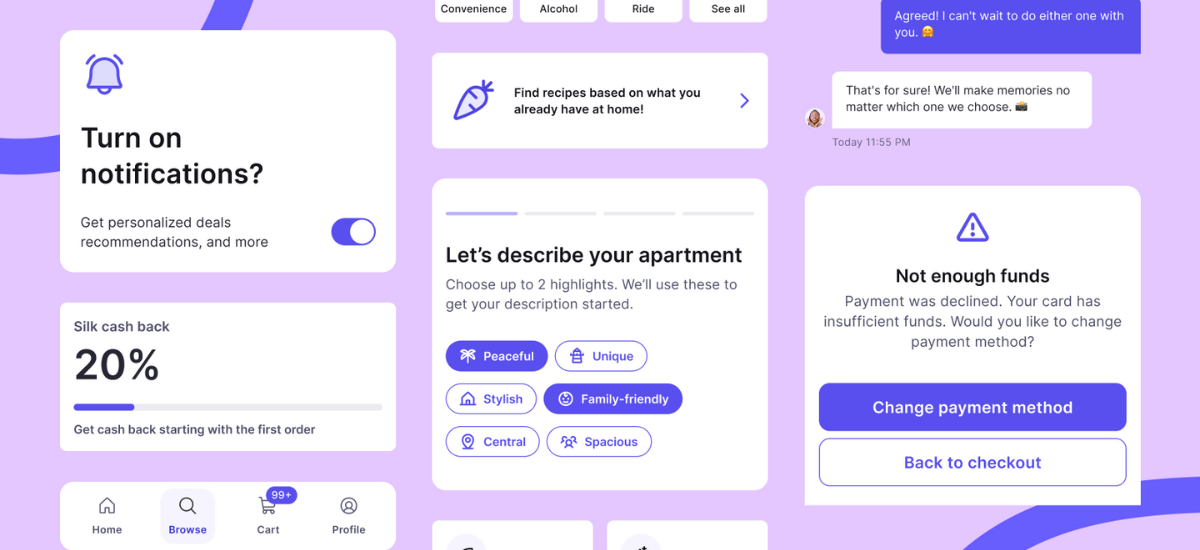
The Silk design system case study showed the power of this approach. Its complete component library, built on consistent, well-audited design principles, helped a mobile app project save 3-6 days in its original design phase.
The team streamlined their rebranding process even more impressively. They completed core redesigns in 2 days, with full rebranding done in about 3 working days. It's 4 days faster than projects without a properly audited design system.
Teams can achieve similar results by doing this and being organized with their design audit template. Projects that use complete audit-based design systems like Silk see much faster setup times, and rapid prototyping happens 50% faster than traditional approaches.
Best Practices for a Successful Design System Audit
Three key practices help design system audits work better and create real change. These principles turn audits from basic checklists into valuable tools that bring meaningful improvements.
Collaborating with cross-functional teams
Design system audits need different points of view from across your organization. Teams create shared ownership that boosts adoption when UI designers, product owners, and developers work together from day one. This teamwork turns isolated efforts into unified action.UI designers should first share user pain points and feedback. Product owners then line up the design system with business goals. Developers must join early discussions about technical feasibility and code maintenance.
Magic happens when user needs, business goals, and technical limits come together. One expert puts it well: "Your design system is only as strong as your relationships with the teams who use it". Teams build trust and take part in system development through cross-functional collaboration.
Iterative testing and feedback loops
Design systems get better through structured feedback over time. Your approach should make testing and feedback regular habits instead of one-off tasks. This ongoing mindset helps teams spot and fix issues quickly.Here's how to build effective feedback loops:
- Add feedback sessions to every sprint.
- Keep records of insights and decisions for future projects.
- Let everyone test, not just research teams.
- Show examples where feedback made things better.
Note that "a design system audit is not just a 'check-the-box' exercise—it's a critical opportunity to ensure your design system is functioning as intended". Your system grows to meet current and future needs through constant testing.
Maintaining thorough documentation for future use
Documentation connects designers with developers and keeps everyone on the same page. Teams should record changes, reasons, and guidelines for future updates during the audit process.
Good documentation shows each component's purpose, use cases, and variants clearly. This detail makes it easier to implement, extend, and audit in the future.Documentation grows with your design system. Designers and developers share the task of keeping documentation up to date as components change. This living resource helps spread knowledge and gets new team members up to speed quickly. These three practices help design system audits do more than just evaluate. They become powerful tools for consistency, optimization, and team alignment.
Conclusion
Design system audits help create cohesive and efficient digital products that line up with user needs and business goals. This piece shows how systematic UI component evaluation finds inconsistencies and streamlines workflows. The process strengthens brand identity on every platform.
Teams should set clear, SMART objectives that connect to business priorities before starting design system audits. Your audit must provide measurable value beyond finding problems. You can choose a complete system-wide assessment or focus on specific components.
The six-step audit process - from component inventory to documentation review - gives you a well-laid-out framework. Nothing gets overlooked. On top of that, a detailed checklist will give you consistency in all evaluation efforts. This becomes crucial when you get into high-use elements like buttons, forms, and typography.
Silk's impressive results prove why design system audits work in practice. Teams using this well-audited system completed prototyping 50% faster than traditional approaches. The rebranding teams saved about four days of work. These efficiency gains directly affect project timelines and budgets.Without doubt, successful audits rely on teamwork across functions. Designers, developers, and product owners create better systems together. They handle technical constraints while meeting user expectations. Regular feedback loops help your design system grow with changing needs instead of becoming outdated.
A design system audit is more than just a one-time check - it's your first step to building a living ecosystem that grows with your organization. The process needs upfront investment, but consistency, efficiency, and scalability benefits make it vital for brands focused on delivering exceptional digital experiences.


