
Python pros and cons: advantages, disadvantages and when to use it


Contents
The advantages and disadvantages of Python come down to one trade: very high development speed and the strongest AI and data community, paid for with weak raw CPU performance and a higher memory footprint.
On current CPython (3.15, released 9 October 2026) the old threading con is narrower than it was: free-threaded builds have been officially supported since CPython 3.14 (PEP 779) but are not the default, and the JIT is still experimental.
Python fits most backends, data work, automation and ML. It fits poorly where per-core throughput, tight memory or native mobile and game engines decide the outcome.
Is Python worth learning? Pros and cons summary table
Python's advantages are development speed, readability and libraries for AI and data work; its disadvantages are CPU speed, memory use, runtime type safety and mobile targets. Because the same skills cover scripting, web backends and machine learning, Python is worth learning for nearly any engineering career.
The GIL is no longer a blanket blocker: CPython supports a free-threaded build under PEP 779, though it is not the default and extensions must declare support. uv and ruff have removed most of the old tooling friction.
We recommend Python for data, machine learning and backend work, with hot paths moved to native modules. Mobile-first and CPU-bound products fit less well.
The trade-offs side by side:
| Aspect | Impact on projects | |
|---|---|---|
| Pro | Development speed and readability | Short prototypes and fast onboarding; the same code stays maintainable by a new hire |
| Pro | AI and data libraries (NumPy, PyTorch) | Most ML work starts here, so you rarely build tooling from scratch |
| Pro | Community and hiring pool | Wide talent pool and mature frameworks for backends |
| Pro | uv and ruff | Fast dependency resolution, lockfiles and linting in CI |
| Con | CPU-bound speed | Hot paths move to NumPy, Cython or a PyO3 module; the rest stays Python |
| Con | GIL | Default build still has it; free-threaded builds expose shared-state bugs and unsupported extensions |
| Con | Memory use | Footprint multiplies across worker processes in containers |
| Con | Dynamic typing | Type hints with mypy or pyright must be adopted module by module |
| Con | Mobile and browser | Platforms are supported, but Python remains a niche choice there |
Why is Python fast to develop in?
Python is fast to develop in because readable syntax, a large package index and dynamic typing shorten the path from idea to running prototype. There is no compile step, there is an interactive REPL, and a new hire can read the syntax on day one.
Frameworks carry the rest of the plumbing. Django ships an ORM, migrations, authentication and an admin interface in one install. FastAPI turns type-annotated function signatures into request validation and OpenAPI docs. For a developer who already knows either, a CRUD API with validation and documentation can be an afternoon's work.
Experienced Python users point to that breadth first:
> "Myself and others have been using Python for both quick scripting as well as developing enterprise software for Fortune 500 companies. Its power is flexibility and ease of use in both cases. The learning curve is very mild and the language is feature-rich." > > Gregory Reshetniak, Software Architect at Nokia
Simplicity gives a flat learning curve, so people from data, operations or QA can read and contribute to the code early. The same flexibility means the language rarely forces discipline on a team, so the team has to supply it (see the typing section below).
Our decision rule is to prototype in Python while requirements are still moving. Changing a data model or an endpoint costs minutes, so wrong guesses are cheap to discard. Use these conditions to check whether the rule applies:
- Scope is still shifting: start in Python, because rewrites of a prototype cost little.
- The team has mixed experience levels: start in Python, because newcomers can review and extend code quickly.
- The performance profile is already known and demanding: weigh the head start carefully, because the saved time may go into native extensions later.
Before a prototype becomes the product, close the gaps that dynamic typing leaves open, since it defers many errors to runtime:
- Add type hints and check them with mypy or pyright.
- Cover the core paths with tests (our Python testing frameworks comparison helps pick a runner).
- Do both before the first external user or integration depends on the code.
Which libraries make Python the default for AI and data?
NumPy, pandas and PyTorch make Python the default for AI and data work because each puts a Python API on top of compiled C, C++ or CUDA code. Python describes the job, and native code does the arithmetic.
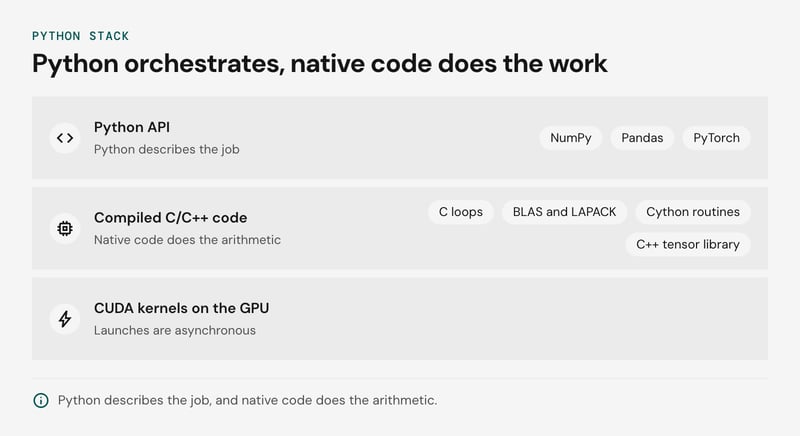
The layers side by side:
| Library | What you write in Python | What runs the work |
|---|---|---|
| NumPy | Array expressions, slicing, broadcasting | Compiled C loops, with BLAS and LAPACK behind linear algebra |
| pandas | Joins, group-bys, filters on DataFrames | NumPy arrays plus compiled Cython routines |
| PyTorch | Model definitions and training loops | A C++ tensor library and CUDA kernels on the GPU |
The split works because of how data is laid out. A NumPy array is a contiguous block of typed values, so a compiled loop can step through it directly. A Python list holds pointers to separate objects that the interpreter must inspect one by one. A single NumPy call crosses into C once and then loops natively.
PyTorch follows the same pattern on the GPU. A Python call goes through a dispatcher into C++ and queues a CUDA kernel. Kernel launches are asynchronous, so Python usually returns before the GPU finishes and can queue the next operation. In this setup Python is the orchestration layer that sequences work the hardware executes.
Interpreter speed matters when native code gets too little work per call. That happens with many tiny operations, or with a Python loop that touches rows one at a time, such as a row-wise apply in pandas. Early signs that Python itself is the bottleneck:
- A profiler shows time in your own functions, with little inside library internals.
- GPU utilization is low while one CPU core is saturated, which points to per-step Python logic or data loading.
- Code iterates over DataFrame rows or array elements.
The usual order of fixes is to vectorize first. If the logic cannot be written as array operations, Cython or a PyO3 Rust extension can take the hot loop, which is the route the libraries themselves took.
Beyond the numeric core, a library exists for nearly anything, from web frameworks to ML to games. A team rarely has to leave Python between notebook and production. Latency-sensitive inference sometimes moves to a compiled runtime, but training and experimentation code usually stays in Python. Our guide to Python for machine learning maps libraries to tasks.
Community, hiring pool and library maturity
Python's large community and hiring pool make a team easy to staff, and the same breadth means code quality varies widely between hires.
57.9% of respondents to the Stack Overflow Developer Survey 2025 used Python, a 7 percentage point increase from 2024 (Stack Overflow Developer Survey 2025). With a community that size, obscure problems usually already have an answer.
A bootcamp graduate and a core-library maintainer both put Python on a CV. We recommend treating team standards as the control for that variance:
- Type hints checked by mypy or pyright in CI.
- Ruff for linting and formatting.
- Mandatory code review.
- A short list of approved libraries.
Mature libraries are what make Python workable for large projects. Django ships authentication, an ORM and an admin interface, and asyncio sits in the standard library. You can download Python for free and write asynchronous code within minutes.
A broad package index also means deep dependency trees. Run pip-audit in CI to check installed packages against known-vulnerability databases. Teams that would rather not build this bench themselves can look at our Python development services, and Python for enterprise software covers the large-system case.
Why is Python slow? CPU-bound limits and the JIT
Python is slow on CPU-bound work because CPython interprets dynamically typed bytecode, and the experimental JIT compiler (PEP 744) does not change that yet. The current 3.15 release upgraded the JIT, but its release notes still call it experimental. Test it on your workload; don't plan around it.
The Global Interpreter Lock adds a second limit, covered in the next section.
I/O-bound work is a different case. A service that waits on databases, queues and HTTP calls spends little time in the interpreter, and asyncio ships with the standard library. Profile with cProfile first. If the profile shows mostly waiting, none of the fixes below will pay off.
For CPU-bound hot spots, the options compare as follows:
| Fix | Effort | Gain | Limits |
|---|---|---|---|
| NumPy vectorization (PyTorch works the same way) | Low | Moves array loops into compiled kernels | Only helps work expressible as array operations; temporaries cost memory |
| multiprocessing | Low to medium | Uses all cores for CPU-bound tasks | Pickling overhead, memory duplicated per process, inter-process communication |
| PyPy | Low for pure Python | JIT-compiles long-running pure-Python loops | C extension compatibility is uneven; trails current CPython releases |
| Cython | Medium | Largest gain on tight loops with C types | Extra compile step, a Python dialect to maintain, wheels per platform |
| PyO3 and Rust | High | Native speed for an isolated hot path | Rust skills needed, call-boundary cost on small calls, wider build matrix |
Each fix trades some of Python's development speed for something else: a second language, a build matrix, or duplicated memory. We recommend vectorizing with NumPy first, since the PyTorch and NumPy stack already works that way. Move to Cython or Rust only for a loop that profiling shows cannot be written as array operations.
Is the GIL still a problem?
The Global Interpreter Lock is still a problem for CPU-bound threading in the default CPython build, but free-threaded CPython (PEP 703, PEP 779) is an officially supported opt-in build.
PEP 779 moved the free-threaded build from experimental to supported in Python 3.14. In 3.15 it is still a separate build (the official macOS installer now includes it by default), a new stable ABI for free-threaded builds (PEP 803, abi3t) makes extensions easier to ship for it, and no date is set for making it the default.
In the default build, the Global Interpreter Lock lets one thread execute Python bytecode at a time, so adding threads does not speed up CPU-bound code, and lock contention can make a multi-threaded CPU-bound program slower than the single-threaded version.
The Python 3.14 release notes put the single-threaded overhead of the free-threaded build at roughly 5-10%, depending on platform and compiler. Plan for that cost on workloads that never needed threads.
Where a free-threaded migration breaks
Two failure modes account for most of the pain:
- Extensions that do not declare support. Importing a C extension without free-threaded support re-enables the GIL for the whole process, with a warning. Your own C extensions, Cython modules and PyO3 modules need to declare support, and NumPy, PyTorch and every other native dependency needs a free-threaded wheel. Verify the result at runtime instead of trusting the build flag:
python3.15t -X gil=0 -c "import sys; print(sys._is_gil_enabled())"- Shared mutable state the GIL hid. The GIL never made compound operations such as check-then-update on a dict or a counter atomic. It did make races rare enough to pass testing. Without it they surface under load, so audit shared state and guard it with threading.Lock or hand work over through queue.Queue.
What to use today
We recommend multiprocessing for CPU-bound parallelism on the default build. You pay for it in serialization and duplicated memory, but it works with every library.
For I/O-bound concurrency, asyncio ships with the standard library, and you can write asynchronous code in minutes, but it never needed free-threading. Our view is that the free-threaded build is worth a pilot when several threads must share a large in-memory structure.
Run that pilot behind a dependency audit, not as a fleet-wide switch.
Does Python use too much memory?
Python uses more memory than most compiled languages, and the cost compounds in containers because each multiprocessing or Django worker carries its own interpreter, imported modules, and object graph.
Two mechanisms drive it. Every value in CPython is a heap object with a header. A list of a million distinct integers is therefore a million objects plus a million pointers. Workers also share less than people expect: since Python 3.14, multiprocessing on Linux defaults to the forkserver start method, so children import modules afresh. Under fork, refcount writes gradually dirty copy-on-write pages.
A Django service under Gunicorn with eight workers holds eight copies of the framework, the ORM, and every installed app. In Kubernetes, the container memory limit can cap worker count before CPU does.
Mitigations, in the order we would try them:
- Run fewer workers and add threads per worker for I/O-bound Django views.
- Preload the application in the parent process (Gunicorn's preload_app) so workers start from shared pages. The saving erodes as refcounts change.
- Keep bulk numeric data in NumPy arrays, and use dataclasses with
slots=Truefor record-like objects. - For CPU-bound work, test one process with threads on the free-threaded build. That build has its own per-object overhead, so measure before committing.
Measure resident set size per worker and use tracemalloc to find the allocation sites before changing the deployment shape.
Is Python good for large projects? Typing and maintainability
Dynamic typing is a risk in large Python codebases unless type hints with mypy or pyright check them in CI, and adoption can run module by module without pausing delivery. Hints are not enforced at runtime, so an annotation nobody checks is documentation that drifts from the code.
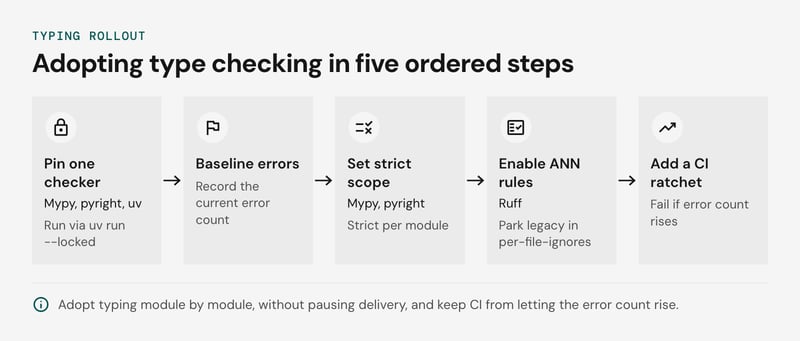
We recommend this order:
- Pin one checker in the lockfile and run it through uv run --locked, so local and CI results match.
- Run the checker in default mode across the repo and record the current error count as a baseline. Don't fix it yet.
- Declare strict scope per module. In mypy, a
[[tool.mypy.overrides]]block withdisallow_untyped_defs = truecovers one package. In pyright, list paths under strict in[tool.pyright]. Every new package starts strict. - Enable ruff's ANN rules and park legacy directories in per-file-ignores. Any ticket that touches a legacy file removes it from that list.
- Add a CI ratchet: fail the build if the baseline error count rises, and lower the stored number whenever it falls.
Type module boundaries first: service interfaces, DTOs, and the repository layer. Callers and callees disagree most often at those seams.
This pays off less in heavily dynamic code such as ORM metaprogramming or libraries without stubs. There, a # type: ignore[code] with a written reason is acceptable, and runtime validation at I/O boundaries covers what static checking cannot.
Łukasz Kuczyński, Software Engineer at Volvo IT, frames the trade-off:
> Simplicity is not a disadvantage, it is just a feature which gives you an easy start, a flat learning curve, but "with great power comes great responsibility". Every language has its special, unique features. The same goes for Python.
Is Python packaging still painful?
Python packaging is no longer the pain it was: uv lockfiles and ruff collapse the pip, venv, and conda sprawl into one workflow, and the remaining risk is PyPI supply chain, which pinned hashes and pip-audit cover.
Uv creates the environment, resolves dependencies, and writes uv.lock with a hash for every distribution. uv sync --locked fails when the lockfile is stale. ruff replaces flake8, isort, and Black with one binary configured in pyproject.toml, so a new engineer needs two tools and one config file.
The decision rule we recommend:
- Pure-Python and wheel-based stacks: standardize on uv, commit the lockfile, and run uv sync --locked in CI.
- Heavy native dependencies outside wheels (GDAL, some CUDA toolchains): conda can still be the easier route. Test uv against your real stack first.
Hashes stop a swapped artifact for a version you pinned, but not a typosquatted or compromised package you chose to install. Export the lockfile with uv export --locked --format requirements-txt, then run pip-audit -r requirements.txt on every merge and on a nightly schedule. pip-audit reports known advisories only, so review new direct dependencies by hand before they enter the lockfile.
Can you build mobile and browser apps in Python?
Python can ship to mobile and browsers, but it stays a niche choice: Kivy and BeeWare package apps for iOS and Android, and CPython treats both as lower-tier platforms.
PEP 730 (iOS) and PEP 738 (Android) made both CPython platforms with official support, at tier 3 when they landed in 3.13. Under PEP 11, tier 3 means the core team does not block a release on failures there (PEP 11 - CPython platform support). Verify the current tier in PEP 11 for the version you plan to ship.
Three constraints keep mobile Python narrow:
- Native UI: Kivy draws its own OpenGL widgets, so apps do not look native. BeeWare's Toga maps to native widgets, but new platform features arrive in Swift and Kotlin first and need bridging.
- App size: every app bundles the interpreter and standard library, which a Swift or Kotlin app does not carry.
- Wheels: compiled dependencies such as NumPy need wheels built for each mobile ABI. Where one is missing, you cross-compile it yourself. Audit every dependency before you commit.
In the browser, Python means CPython compiled to WebAssembly, as in Pyodide. The runtime downloads before your first line executes, and DOM access goes through a JavaScript bridge. That suits notebooks, teaching tools and data widgets, and it is a poor base for a consumer-facing front end.
Our view is to pick Python for mobile only when the team is Python-heavy and the app is an internal tool or utility with a thin UI. Games follow the same logic: Pygame covers 2D prototypes, but the major engines script in other languages.
How does Python integrate with C, C++ and Rust?
Python integrates with C, C++ and Rust through extension modules, so you rewrite only the profiled CPU hot paths and leave the rest of the codebase in Python. NumPy and PyTorch already work this way: Python orchestrates, and compiled C and C++ kernels do the arithmetic.
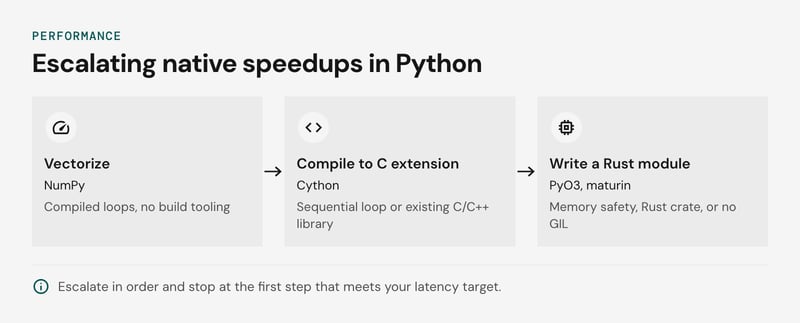
We recommend escalating in this order and stopping at the first step that meets your latency target:
- Vectorize with NumPy. Array operations run in compiled loops and need no build tooling.
- Use Cython when the hot loop is inherently sequential or must call an existing C or C++ library. Typed Cython code compiles to a C extension.
- Write a PyO3 module in Rust, built with maturin, when you need memory safety, an existing Rust crate, or work that runs outside the GIL.
Every step adds cost: per-platform wheels in CI, a second toolchain, and, for the free-threaded build, extensions that must be rebuilt and checked for thread safety. If profiling shows I/O wait instead of CPU time, skip all three.
When should you choose Python, and when not?
Choose Python when development speed, libraries, or data and AI work drive the project, and pick another language when the target is native mobile, the browser, or a hard CPU latency budget. The deciding condition differs by project type:
| Project type | Choose Python when | Pick something else when |
|---|---|---|
| AI/ML and data | NumPy, pandas and PyTorch do the heavy compute in compiled code and Python orchestrates | Inference must run at microsecond latency inside a compiled service |
| Web backends | Django fits a full-stack monolith with an admin and ORM, or FastAPI fits typed, I/O-bound APIs | Per-request CPU work dominates, or nobody on the team knows Python |
| Scripting and automation | You need the fastest route to a working pipeline, CI tool or ops script | The tool must ship as one static binary to machines without an interpreter |
| High-throughput systems | The hot paths are small enough to move into Cython or PyO3 and Rust extensions, or a free-threaded build fits | The whole service is CPU-bound, so Rust, Go or Java is the better base |
| Mobile | Kivy or BeeWare covers a prototype or internal app; PEP 730 and PEP 738 made iOS and Android tier-3 platforms in CPython 3.13 | A consumer app needs native UI, platform APIs and store-quality polish |
| Game engines | You are writing tools, asset pipelines or prototypes | Engine code must hit a per-frame time budget, which points to C++ or C# |
Python also works for large projects, provided the team enforces type hints with mypy or pyright and runs ruff in CI. Without those checks, a large dynamically typed codebase loses refactoring safety quickly. Django's conventions help keep a monolith consistent as the team grows.
The language-level trade-offs are in Python vs Java and Python versus Rust, and the framework choice is covered in Python frameworks compared.
Frequently asked questions
What are 10 disadvantages of Python?
Is Python a good language for your next project?
For data, AI, backend and automation work, usually yes; for native mobile, browser front ends and hard CPU budgets, usually not, and the decision table above shows where your project sits. If you want a second opinion on where the Python boundary should sit in your system, tell us about your project and our Python team will scope it with you.


