
iPhone vs Android in 2026: Key differences for users and apps


Contents
Neither is better for everyone. iPhone suits buyers who want long, predictable support, tight platform integration and strong default privacy.
Android suits buyers who want more price tiers, hardware choice and customization. Android leads globally, iPhone leads in the US and in premium spending, and for app builders that split decides which platform to launch first and how to monetize.
iPhone vs Android: The short answer
The iPhone vs Android decision comes down to three conditions: which devices you already own, how many years of updates you want, and how much you will use on-device AI. Both platforms are mature in 2026, with iOS 26 and Android 16 as the current major releases.
- Choose iPhone if you already use a Mac, Apple Watch or AirPods, want long software support, and want Apple Intelligence, which needs an iPhone 15 Pro or newer.
- Choose Android if you want a wider price range, sideloading, deeper customization, or Gemini across Pixel, Samsung and other makers.
- Quick win today: check whether your current phone still receives security updates and whether the model you are eyeing supports the AI features you want.
For a business building an app, the platform split matters more than personal preference. We recommend launching on iOS first when your audience is concentrated in premium-spending markets such as the US, and on Android first when it is global or price-sensitive, because platform share and spend per user differ by region. Check your own analytics for the OS split in your target market, and see which platform to develop on first for the build-side decision, and our overview of the mobile app development lifecycle for what follows. Netguru designs and builds iOS, Android and cross-platform mobile apps and advises product teams on launch order.
Which is more popular, Android or iPhone?
Android is more popular worldwide, and iPhone is more popular in the US. In September 2026, Android accounted for 69.2% of mobile web traffic worldwide and iOS for 30.8%, while in the US iOS led with 53.6% against Android's 46.4%, according to StatCounter's worldwide and US data. StatCounter measures share of web browsing, not units sold, so it reflects the phones people actively use.
Why is Android More Popular Globally While iOS Dominates the US?
By the second quarter of 2022, iPhones overtook Android-powered devices in the hands of US consumers for the first time since Apple launched their smartphone in 2007 (according to a report from Counterpoint Research). Apple has now passed 50% market share (dubbed as “active installed base”) of US smartphones. The report notes that there had already been a strong trend of Android users in the United States shifting to iOS in the last four years.
Android offers a diverse selection of phones catering to various price points, which enhances accessibility for users globally. An android phone often features expandable storage, greater flexibility in customization, and the ability to modify the operating system. With select android phones, users can choose from a wide range of manufacturers, hardware features, and customization options that are not available on other platforms.
There are a few common reasons that analysts often cite as to why Americans generally prefer the iPhone over Android devices. Some say it’s because Apple is an American company, and its devices (not just the iPhone) have long been staples in American popular culture. Some experts also say that US consumers have been more receptive to claims that the iPhone and the iOS ecosystem are superior when it comes to security and protecting user privacy.
On the economic front, analysts point out that US consumers are generally less price sensitive than those in many other countries. It also seems that Apple is the least depreciating smartphone brand, making it the preferred choice for future trade-ins and hand-me-downs. The iphone se, as an affordable and compact model, appeals to budget-conscious consumers and helps Apple reach a broader audience.
Ultimately, Apple commands the highest satisfaction and loyalty ratings in the US among major smartphone brands (leading Samsung, Google, Motorola, and LG), albeit only with a razor thin margin (according to a 2022 Statista Global Consumer Survey).
Introduction to Mobile Operating Systems
The world of mobile operating systems is largely defined by two giants: Android and iOS. Android, developed by Google, is an open-source operating system that powers a vast array of devices from leading phone manufacturers such as Samsung, Google, and OnePlus. This open approach allows Android users to enjoy a high level of customization, from tweaking the home screen and lock screen to installing third-party apps and launchers that can completely change the look and feel of their mobile device. In contrast, iOS is a closed ecosystem developed exclusively by Apple for its own devices, including the iPhone, iPad, and Apple Watch. This closed approach means that iOS users benefit from a tightly integrated experience across all Apple products, with features and updates designed to work seamlessly together. Whether you value the flexibility and variety offered by Android or the polished, unified experience of Apple devices, the choice between these two operating systems often comes down to personal preferences and how much you value customization versus seamless integration within a single brand’s ecosystem.
iPhone vs Android differences in hardware and software
Before getting to the differences between iPhone and Android users, it’s useful to go through some key distinctions between the hardware and software they use. To begin with, Android users have a wide variety of devices to choose from – with a range of options in screen sizes, processors, device features, and price points. Among these, flagship Android devices from brands like Samsung and Google offer advanced features such as foldable form factors, powerful processors, and AI capabilities, competing directly with Apple's flagship iPhone models. The availability of certain features and integrations can also depend on the specific phone model, with some features optimized for particular devices. iPhone users, on the other hand, are limited to Apple’s iPhone lineup.
One difference that stands out, particularly to those switching from one platform to the other, is that Android phones typically come with physical buttons for navigation, while iPhones use a navigational interface that is entirely touch-based. This can be a matter of preference, but it‘s worth noting that the physical buttons on Android phones can sometimes be more convenient, especially when using the device with only one hand.
When it comes to the user interface, the most notable difference is that Android users are able to customize their home screens by reorganizing their widgets and apps in many ways, whereas iPhone users are limited to a more simplistic grid layout. Android phones broadly have more customization options than iPhones, allowing Android users of the former to change the look and feel of their phones to suit their personal preferences.
When it comes to publishing apps in the application marketplace, Apple has a much stricter approval process resulting in fewer buggy or low-quality apps in its App Store. However, this also means that it can take longer for new apps to be approved and made available for Apple devices. Many popular apps, such as Adobe's Photoshop, are available on both Android and Apple hardware, ensuring broad compatibility for users of either platform.
Android users can install software from a variety of sources, including sideloading apps from outside the Google Play Store or remotely installing apps via the web, offering more flexibility than iOS, which restricts app installation to the App Store. This flexibility, however, comes with a higher risk of malicious apps, as Google's app review process is more permissive and automated compared to Apple's strict manual review, making app vetting and security measures especially important for Android users.
User Interface and Experience
When it comes to user interface and experience, Android and iOS take distinctly different paths. Android devices are renowned for their flexibility, giving users the ability to personalize nearly every aspect of their user interface. Android offers options to change launchers, apply custom icon packs, and even adjust UI elements to suit individual tastes. Features like split screen mode allow android users to multitask by running two apps side by side, while the dedicated back button provides more control over navigation throughout the entire OS. This level of customization makes Android a favorite among power users who want their mobile device to reflect their unique style and workflow.
On the other hand, iOS is designed with simplicity and ease of use in mind. The iOS UI is clean, intuitive, and consistent across all Apple devices, making it easy for users to pick up and use any iPhone or iPad without a learning curve. iOS users benefit from features like Universal Clipboard, which lets them copy text or images on one Apple device and paste it on another, and Continuity, which allows tasks to be started on one device and finished on another—such as beginning an email on an iPhone and completing it on a Mac. This seamless integration is a hallmark of the Apple ecosystem, ensuring that all Apple products work together effortlessly. Ultimately, whether you prefer the more control and customization that Android offers or the streamlined, interconnected experience of iOS, both operating systems deliver a user interface tailored to different types of users.
Demographics and Behavior: iPhone vs Android Users
Admittedly, it’s difficult to definitively say whether one consumer segment is more likely to be an iPhone user or an Android user. These things vary by country, change over time, and depend on many other variables.
Based on recent publicly available global data, here are some key takeaways on the differences between Android versus iPhone users:
- iPhone users generally earn more than Android users – iPhones tend to attract premium or higher-income customers. In a 2024 survey (from US-based eCommerce platform Slickdeals), iPhone users reported an average annual income of $53,251 and $37,040 for Android users. The same survey also reported that iPhone users spend more on clothes, beauty products, and technology-related items than Android users.
- Premium and ultra-premium consumers prefer the iPhone – Relatedly, Apple leads the market in the premium smartphone segment (according to a 2022 Counterpoint report), defined as smartphones with a wholesale price of at least $400, with 57% global market share. Furthermore, iPhones dominate the ultra-premium segment of $1,000+ devices with 78% market share.
- Younger users prefer the iPhone, older generations prefer Android – In a December 2023 survey , the percentage of iPhone users (44%) only outnumbered Android users (30%) in the 18-29 year old age group. Android users lead iPhone users in older age groups. This appears to sync with US demographics, as iPhones lead among 39-49 year olds with a 48% share compared to 43% for Android. Conversely, older generations among US consumers prefer Android devices over the iPhone.
- Customer loyalty to both platforms is high and steady – Android users are more loyal than iOS users, albeit only slightly. Android has a 91% customer retention rate, compared to 86% for iOS (according to a report from Consumer Intelligence Research Partners).
- Reasons for switching from one OS to the other – Among the list of reasons, users switch from iOS to Android and vice versa in search of a better user experience, better features, and better pricing (according to a 2023 survey of US consumers). 14% of those who switched from Android to iOS said that the latter provided a better UX, while only 4% stated that the change from iOS to Android delivered a better experience. When people choose Android, they often consider factors like affordability, customization, broader hardware options, and integration with Google services.
In addition, 29% said that they moved from an iOS device to an Android device for affordability, compared to 11% for the other way around. However, the gap in wanting better features (e.g. camera, design, etc.) isn’t as wide, with 24% of respondents stating this as their motivation to go from an iPhone to an Android device and 25% vice versa. Other reasons that didn’t matter as much for switching platforms include wanting more apps, better customer service, and faster software updates.
- Apple users feel more secure than Android users – It’s difficult to definitively state that iOS is better at protecting user security and privacy than Android. While that may be the general consensus among a lot of security experts, they also say it’s not that simple. However, when it comes to perceptions, a 2022 survey found that consumers feel more secure using Apple devices than Android ones. In addition, among those surveyed who experienced security breaches, 75% of iOS users said that they were able to fully recover their data compared to only 55% of Android users. Apple's iOS is often praised for its strong security features, seamless integration with other Apple products, and exclusive capabilities like iMessage and AirDrop, but some users find the restricted nature of Apple’s iOS ecosystem limiting compared to Android’s flexibility.
- Android users are more responsive to push notifications – Android apps tend to perform better than iOS apps when it comes to user engagement from push notifications (based on a 2021 report from Airship). The reaction rate for Android is 4.6% versus 3.4% for iOS. This means that Android users click more often on their push notifications than iPhone users.
Android users also have a higher opt-in rate of 81% compared to their iOS counterparts at 51%. This means that more Android users choose to opt in or receive push notifications. A key factor for this is that iOS doesn’t allow apps to automatically opt in their users to push notifications, whereas Android does.
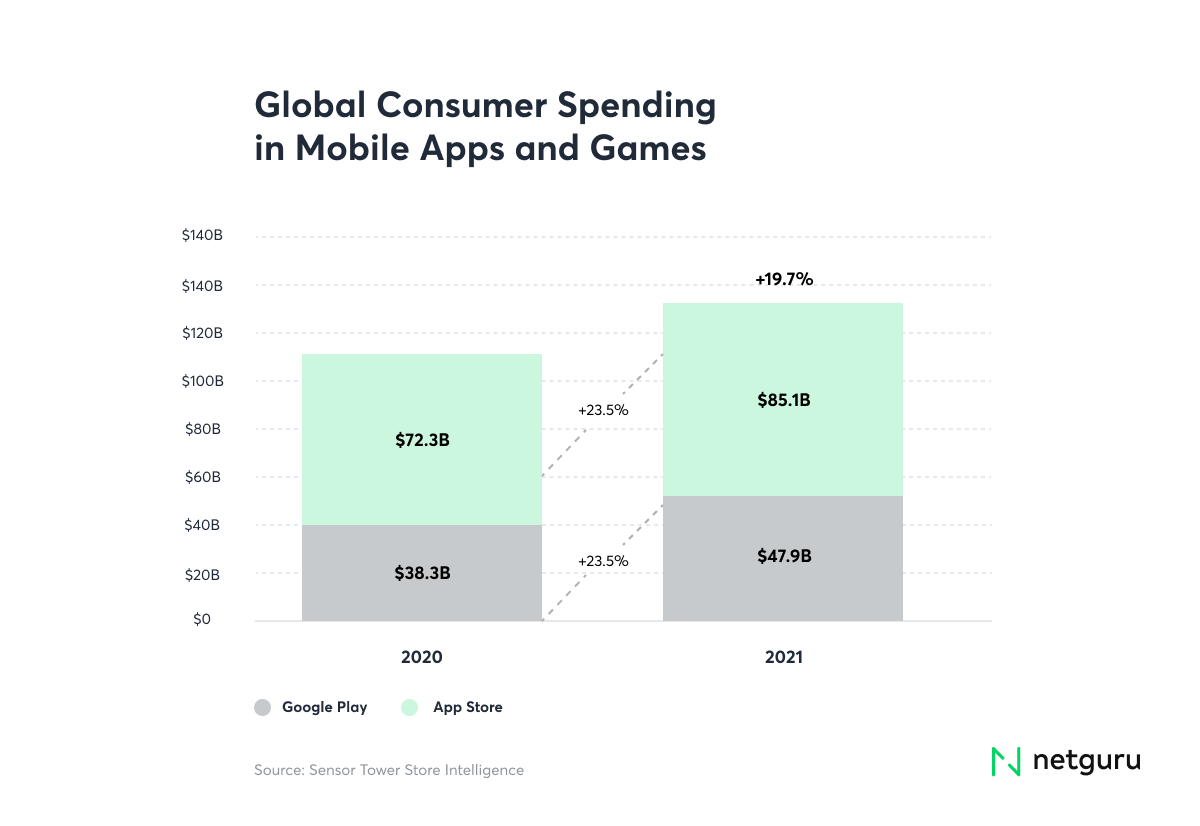
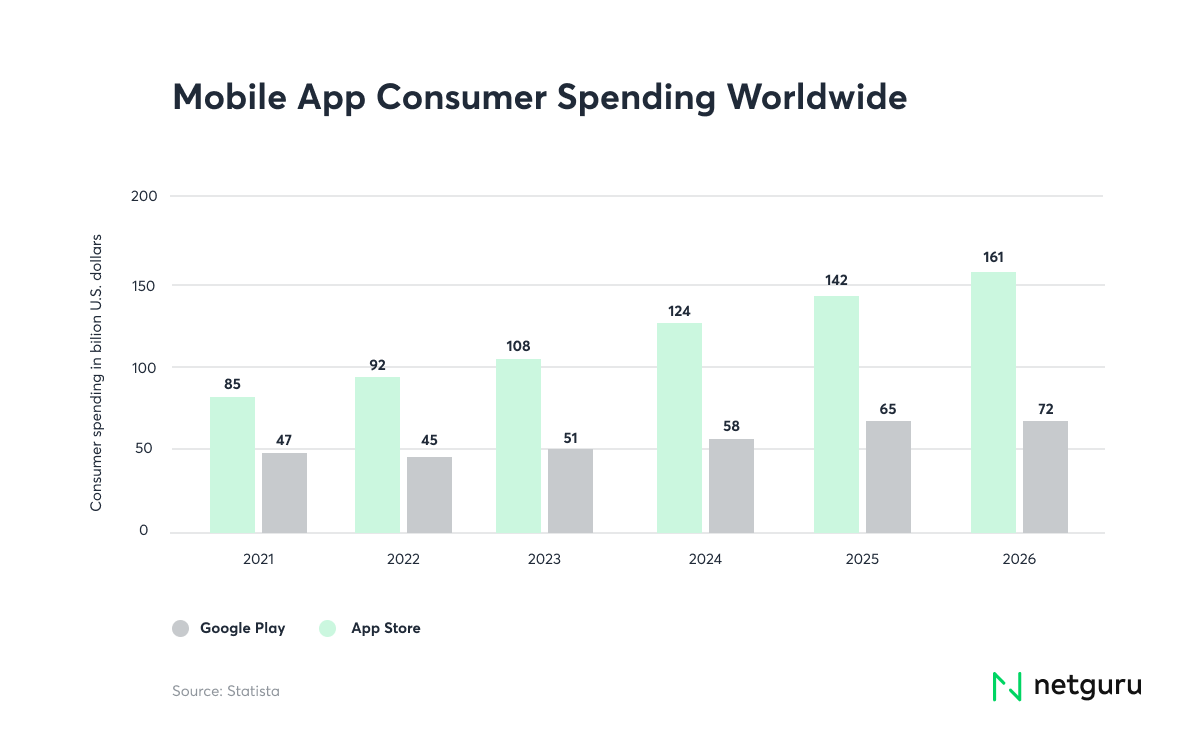
- iPhone users spend more on in-app purchases – The global average in-app spend per user, per app in 2022 for Android users is $0.47 and $1 for iOS users (according to Statista). This is consistent with global consumer spending on the top 100 subscription-based apps. iOS apps from the Apple App Store earned a total revenue of $13.5 billion in 2021, compared to $4.8 billion earned by Google Play apps (according to SensorTower). For businesses looking to monetize their apps using premium models, subscriptions, or in-app purchases, building on iOS appears to be the more optimal route.
On the other hand, for those looking to drive revenue through ads or referral marketing by way of gaming apps, they should note that there are more game installs on Google Play. However, revenue generated from gaming apps on iOS is still higher than from those on Android (76% of revenue in 2023).
When considering device integration and ecosystem, Android offers broader compatibility with other devices, including tablets, smart TVs, and wearables from various manufacturers. The Android ecosystem also benefits from seamless access to Google services like Google Calendar, Google Maps, and Google Drive, making it easier for users to stay connected and productive across platforms.
Artificial Intelligence Features
Apple Intelligence requires an iPhone 15 Pro or newer, while Gemini on Android reaches much older phones through the cloud and runs on-device only on recent flagships. Which one you get depends on hardware age more than on platform.
On iOS 26, Apple Intelligence covers the iPhone 15 Pro and Pro Max, the iPhone 16 and 17 families, and the e models, per Apple's Apple Intelligence page. Apple runs lighter requests on the device and sends heavier ones to Private Cloud Compute, which the company says does not store user data.
Gemini on Android works differently. The Gemini app is mostly cloud-based, so it runs on far older hardware: Google's requirements are Android 9 or later with at least 2 GB of RAM. The Gemini Nano model runs on-device only on selected phones, such as Pixel 8 and later and recent Galaxy S flagships.
The two approaches side by side, as documented for iOS 26 and Android 16:
| Apple Intelligence (iOS 26) | Gemini on Android (Android 16) | |
|---|---|---|
| Eligible hardware | iPhone 15 Pro and Pro Max, iPhone 16 and 17 families | Gemini app: Android 9 or later with 2 GB of RAM. Gemini Nano: Pixel 8 and later, recent Galaxy S models |
| On-device tasks | Writing Tools, notification summaries, Live Translation | Smart Reply, Recorder summaries, Pixel-specific features |
| Cloud tasks | Larger requests via Private Cloud Compute, optional ChatGPT handoff | Gemini chat, Gemini Live, generative image requests |
| Older phone | iOS 26 runs on iPhone 11 and later, but without Apple Intelligence below the iPhone 15 Pro | Gemini app via the cloud, no Nano features |
| Strength | Personal context across Messages, Mail and Notes, plus a verifiable privacy architecture | On-screen context, broad reasoning, widest hardware reach |
Google has been replacing Google Assistant with Gemini on Android phones since 2025, so smart home control and cross-device tasks now route through Gemini. Magic Eraser is no longer an Android differentiator either: Google Photos opened it to iPhone users in 2024.
Upgrade decision rule
We recommend treating AI as an upgrade trigger only when the feature must run on the device. Three conditions cover most cases:
- Data must stay local or verifiable: buy an iPhone 15 Pro or newer, or a Pixel 8 or newer with Gemini Nano features.
- Cloud AI is enough: keep the current Android phone, because the Gemini app already runs on it. An older iPhone gets nothing from Apple Intelligence, so this case favors Android hardware you already own.
- Fleet or customer base is mixed: assume a large share of devices lacks on-device AI and design the cloud path first.
This rule has limits. Language and regional availability differ by platform, and both vendors change eligibility with each release, so check Apple's and Google's current device lists before committing a purchase or a roadmap.
Apple's Focus on Privacy and Security
Apple's approach to AI emphasizes privacy and security. The company's AI-powered features, such as Siri and Apple Intelligence, are designed to work locally on the device, minimizing data transmission to the cloud. This approach ensures that user data remains secure and private. Apple's AI-powered features include:
- Siri: Apple's virtual assistant uses AI to understand and respond to user queries, providing a personalized experience.
- Apple Intelligence: This feature uses AI to prioritize notifications, surface important information, and provide a more streamlined user experience.
- Core ML: Apple's machine learning framework allows developers to integrate AI-powered features into their apps, enhancing user experience and providing innovative functionality.
App Store and Google Play
The App Store and Google Play are the primary platforms for downloading and installing apps on iOS and Android devices, respectively. Both platforms offer a wide range of apps, including games, productivity tools, and social media platforms. Each operating system also comes with its own set of stock apps—pre-installed default applications for messaging, navigation, and productivity—which can play a significant role in meeting users' core needs and may differ in terms of features and customization options.
Revenue and App Preferences
The App Store and Google Play generate significant revenue for developers, with the App Store generating $85.1 billion in 2023, while Google Play generated $47.9 billion. iOS users tend to spend more on apps, with an average spend of $12.77 per app, compared to Android users, who spend an average of $6.19 per app.
In terms of app preferences, iOS users tend to prefer apps in the following categories:
- Games: iOS users spend more on games, with 76% of revenue generated from gaming apps.
- Productivity: iOS users prefer productivity apps, such as Microsoft Office and Google Drive.
- Social Media: iOS users tend to prefer social media apps, such as Facebook and Instagram.
Android users, on the other hand, tend to prefer apps in the following categories:
- Games: Android users also spend a significant amount on games, with 31.87% of revenue generated from gaming apps.
- Education: Android users tend to prefer education apps, such as language learning and educational games.
- Food and Drink: Android users tend to prefer food and drink apps, such as restaurant finders and recipe apps.
Overall, both the App Store and Google Play offer a wide range of apps, catering to diverse user preferences and needs. This diversity in app preferences highlights the importance of understanding the target audience when developing mobile apps for either platform.
Aspects to Consider When Choosing a Platform for Your Mobile App: Google Play Store vs Apple App Store
These facts demonstrate that the differences between iOS and Android users can impact a firm’s overall digital strategy. Choosing the right mobile OS is crucial, as it affects user experience, technical capabilities, and ecosystem support. Hence, choosing a platform for a mobile application is a decision that should be taken with consideration. It’s not uncommon for businesses that want to be present on both platforms to decide to launch on one first, then leparn and improve the product before developing on the other. Companies also have to decide whether they want to develop natively or through a cross-platform approach.
To help make these decisions, here are some of the most important considerations when deciding to build an app on either Android or iOS (or both):
- Target market and demographic – If the app is intended for users outside of the United States and other high-income economies where iPhone leads the market (e.g. UK, Canada, Japan), developing it first on Android is likely to be the optimal decision. Conversely, if the app is predominantly aimed at markets where the iPhone has a stronger presence than Android devices, going for iOS is the preferable option.
However, businesses need to investigate this further within each market and drill down into customer segments. As the above-mentioned figures indicate, individuals with higher incomes tend to prefer iPhones. It’s important to do the research ahead on the preferred platform of specific audiences.
- Hardware options for consumers – iOS is only available on Apple devices, which are priced at a comparative premium. On the other hand, there’s a wide range of consumer electronic brands (e.g. Samsung, Google, Motorola, LG, ASUS) that use Android’s open-source operating system on their own smartphones. For example, an android phone can be found in many different models, offering consumers choices in affordability, hardware features like expandable storage, and customization options. There are budget friendly Android smartphones that cost as little as $150, as well as premium range Android models.
- App development considerations (technologies, cost, duration, etc.) – As technology managers very well know, there are a lot of variables during the development phase. Particularly when weighing the implications of choosing between (or both) Android and iOS, the technology options obviously vary. When it comes to programming languages, businesses need to have the talent in Java, C, C++, and Kotlin when developing for Android, while iOS developers use Objective-C or Swift. Access to (or availability of) developers isn’t necessarily a deterrent due to the wide talent pool of engineers globally for both platforms. Market rates differ, but iOS developers command slightly higher pay than those for Android (at least in the US). Of course, companies can greatly benefit from engaging a mobile app development consultancy.
When it comes to project duration, it ultimately depends on the requirements. Based on experience, the difference in project timelines between iOS and Android projects doesn’t vary significantly.
Businesses also ought to consider cross-platform development approaches, which have proven to cut costs, speed up delivery, and simplify overall development. Even if a business already has an existing app on one platform (e.g. Android), cross-platform technologies (such as Kotlin Multiplatform) make it easier to expand to other platforms while continuously enhancing the existing app. Additionally, web browsing compatibility is an important factor for web apps, as features like chatting from a desktop browser or integrating messaging apps can enhance the user experience across both mobile OS platforms.
Camera and Photo Capabilities
Camera quality in the iPhone vs Android comparison depends on the shooting use case: in our view, iPhone leads on video, Samsung Galaxy on zoom, and Google Pixel on point-and-shoot stills.
The operating system sets the baseline, and the hardware sets the ceiling. iOS 26 redesigned the Camera app around fewer controls on screen and keeps the iPhone's approach of automatic settings, Live Photos, Portrait mode and Night mode.
Android 16 goes the other way for enthusiasts, with Camera2 improvements and support for the APV professional video codec. Manual control over ISO, exposure and white balance remains an Android strength.
The comparison below is our judgement by use case, not a model benchmark, and it shifts with each hardware generation:
| Use case | iPhone | Samsung Galaxy | Google Pixel |
|---|---|---|---|
| Video | Consistent stabilization and color; ProRes and Log on Pro models | Strong, with manual video controls; quality varies by model | Video Boost cloud processing on Pro models, but less predictable footage |
| Zoom | Telephoto lens on Pro models | Dedicated optical telephoto lenses, strongest on the Ultra line | Pro Res Zoom upscales long zoom with AI |
| Point-and-shoot | Reliable exposure and skin tones with no tuning | Vivid, high-contrast output that suits social feeds | Best Take and Magic Editor fix shots after capture |
For a team shooting product video or user-generated content, we recommend iPhone, because consistent output means less editing. Choose a Galaxy Ultra when long-range optical zoom matters. Pixel suits people who edit photos on the phone itself.
The AI layer follows the same split. Apple Intelligence adds Clean Up in the Photos app and Visual Intelligence, while Gemini drives generative editing on Pixel. These features depend on the model and region, so check support for the specific device before relying on them.
Price and value: Entry, mid-range and flagship
In our assessment, the iPhone's price gap against Android is widest at entry level, narrower in the mid-range, and small at the flagship tier.
| Tier | iPhone disadvantage vs Android | Android disadvantage vs iPhone | What the choice means |
|---|---|---|---|
| Entry | Few new models and the highest starting price. Refurbished and older iPhones fill the gap. | Update windows are shorter on many budget models, and quality varies by brand. | Choice here means a wider price range. Compare update commitments before price. |
| Mid-range | Thin lineup. Last year's flagship is the usual mid-priced option. | Software support and camera consistency vary widely between brands. | More choice means more due diligence per device. |
| Flagship | Less hardware variety (foldables, charging speeds) and no sideloading outside DMA alternative marketplaces in the EU. | Resale value tends to trail iPhone, in our judgement. | Prices are close, so the decision shifts to the devices you already own and the AI layer: Apple Intelligence or Gemini. |
At entry level, Apple's lineup is the constraint. The iPhone 17e, Apple's cheapest current iPhone, starts at $599 in the US since its March 2026 launch. Android phones sell well below that price, so a buyer with a hard cap under it has a short iPhone list.
The mid-range is where "more choice" cuts both ways. Pixel and Samsung publish multi-year update commitments for many models, and lower-priced models from other brands tend to promise less. Check each model's official support page before treating any Android phone as equal to an iPhone on longevity.
A simple rule set, based on the table above:
- Budget cap below $599 for a new phone: shortlist Android models, or consider a refurbished or older iPhone.
- Mid-range Android shortlist: keep only models whose support page states an end date for security updates. Drop any phone with no stated date, or with a promise shorter than the time you plan to keep it.
- Flagship budget: with prices close, choose by the devices you already own and the AI features you expect to use, then compare support terms on the final two phones.
iOS and Android Comparison Chart
There are a lot of ways to compare and contrast iOS and Android. For product managers and executives tasked to work with technical teams, the table below provides a comparison of the two platforms. In addition to the usual factors, battery life, smartphone cameras, and Apple Music integration are important considerations. iOS devices are known for consistent battery life across models, while Android offers a wider range of endurance depending on the manufacturer. Smartphone cameras on both platforms have advanced AI features and editing tools, but iOS often leads in photo processing and integration. Apple Music is deeply integrated into the Apple ecosystem, offering seamless media sharing and exclusive features, while Android supports a broader range of music apps but lacks the same level of integration.
|
iOS |
Android |
|
|---|---|---|
|
Developer |
Apple |
Open Handset Alliance and Google |
|
Hardware options |
Apple (not available for other smartphone brands) |
Samsung, Google, Motorola, LG, and ASUS, among others |
|
Programming language |
Swift & Objective C |
|
|
Source model |
Proprietary (with some open-source elements) |
Open source |
|
Language support |
40 languages |
100+ languages |
|
Marketplace for mobile apps |
Apple App Store (no other app marketplaces allowed) |
Google Play Store (plus other less popular marketplaces such as Aptoide and Galaxy Apps) |
|
Customizability |
Limited |
Highly customizable |
|
Global market share (StatCounter, September 2026) |
30.8% |
69.2% |
|
Number of apps |
1.6 million |
3.55 million |
|
Global revenue of apps |
$85.1 billion |
$47.9 billion |
|
Age group |
Preferred by younger users (18-34 years old) |
Preferred by older users |
|
Economic profile |
Higher income on average |
Lower income on average |
|
Customer loyalty |
High and steady (but slightly lower than Android) |
High and steady (with a slight edge over iOS) |
|
In-app spending |
More spent in mobile apps |
Less spent in mobile apps |
|
User response to push notifications |
Less responsive with a reaction rate of 3.4% and opt-in rate of 51% |
More responsive with a reaction rate of 4.6% and opt-in rate of 81% |
|
User perception of security |
Perceived as more secure |
Perceived as less secure |
|
Compensation for developers (limited to US) |
iOS developers are paid slightly more |
Android developers are paid slightly less |
|
Battery life |
Consistent, optimized for each device; generally good longevity |
Varies widely by manufacturer and model; some offer larger batteries and longer endurance |
|
Smartphone cameras |
High-quality sensors, advanced photo processing, strong AI features and editing tools |
Wide range of camera quality; some models excel in hardware and AI-driven enhancements |
|
Apple Music |
Deep integration with iOS and other Apple devices, supports AirDrop, AirPlay, and exclusive features |
Available as an app, but lacks deep system integration and exclusive Apple ecosystem features |
Which should you choose? A checklist by user type
Choose by user type: pick an iPhone for privacy by default, through App Tracking Transparency and tight platform control, and pick Android for price range, customization and sideloading. The table maps four common profiles to a default pick.
| User type | Default pick | Why |
|---|---|---|
| Budget | Android | Android covers a far wider price range, and Gemini reaches mid-range phones. Apple Intelligence needs an iPhone 15 Pro or newer. |
| Privacy-minded | iPhone | App Tracking Transparency makes every app ask before tracking you across other companies' apps and websites. Android can come close with a Pixel and careful permission settings, which takes more setup. |
| Creator | iPhone for Mac-based editing, Android for file-heavy workflows | iPhone fits a Mac and Final Cut or Logic pipeline. Android gives direct file-system access, external storage and freedom to pick default apps. |
| Tinkerer | Android | Sideloading, alternative launchers and custom ROMs on supported Pixels are standard options. iOS in the EU now allows alternative marketplaces under the DMA, but the range is still narrower. |
Update length matters for anyone who keeps a phone for years. Google commits to seven years of OS and security updates for the Pixel 8 and later, per its 2023 announcement.
If none of the four profiles fits, the devices you already own usually decide. An existing Mac, Apple Watch and iMessage group chats point to iPhone. A Windows PC, Chromebook or Galaxy wearable points to Android.
Getting to Know iPhone vs Android Users
There are plenty of considerations to make when developing a mobile app. Executives and project managers can get caught up in the technology options, cost implications, and project execution. One factor that could give businesses a leg up against their competitors is taking the time to understand the differences between Android and iPhone users within their target markets and tailoring products to them accordingly.
When there are resource constraints or if the business is still testing a product idea, it is worth considering being present on only one platform. To execute this, businesses have to make the effort to understand who their users are and factor that into choosing between iOS and Android.
Nevertheless, because of cross-platform technologies, businesses can minimize the effort, cost, and risks of being available on both iOS and Android (and even as desktop and web apps). While making a decision between iOS and Android is important, this gives companies and organizations more time, resources, and mental bandwidth to focus on improving product features, engaging customers, and building the business.
iPhone vs Android FAQ
What can iPhones do that Androids can't?
Mostly features tied to Apple's other devices. iMessage and FaceTime are built-in defaults, Handoff and Continuity pass tasks between an iPhone, Mac and iPad, and Apple Watch pairs only with an iPhone. Apple Intelligence also draws on personal context across Apple's own apps. Android phones cover most of the same tasks with their own tools, such as Quick Share and Gemini, but not across Apple's devices.
Why do most people prefer iPhone over Android?
Most people worldwide don't: Android holds about 69% of the global mobile market by StatCounter's September 2026 figures. In the US, where iPhone leads, the reasons usually given are iMessage, Apple Watch and the wider set of Apple devices, long software support, strong resale value and a reputation for privacy and security.
What are the disadvantages of iPhone over Android?
A higher entry price, with the cheapest new model, the iPhone 17e, at $599 in the US. iPhone also offers less hardware choice, more limited customization and no sideloading outside the EU's alternative marketplaces, and Apple Intelligence needs an iPhone 15 Pro or newer.
Should a business launch its app on iPhone or Android first?
Launch where your paying users are. iOS first usually fits US-centric and premium audiences, because iPhone leads US usage and App Store users spend more. Android first fits global, emerging-market or price-sensitive audiences. If you need both from day one, a cross-platform approach can cut the cost, and our team can scope the launch plan and estimate the build.


