
Product management tools: How to choose a stack by job and stage


Contents
Product management software is easiest to choose by the job it does and the question it answers, and a starter stack by company stage closes this list. The right set depends on how you prioritize, which tracker and analytics you already run, and how per-seat cost grows once stakeholders need access.
Product management tools: The short answer
Product management tools cover six jobs: roadmapping, discovery, analytics, experimentation, delivery tracking, and documentation. A small team can cover them with three or four tools.
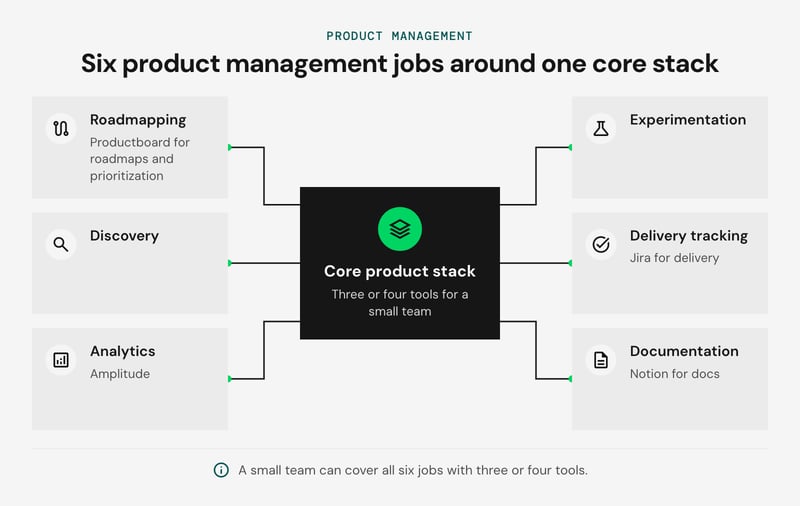
Product management software for those jobs can start as Jira for delivery, Productboard for roadmaps and prioritization, Amplitude for analytics, and Notion for docs.
Netguru designs and builds digital products with product, design, and engineering teams through its product management services.
We recommend adding a specialist tool only when a recurring question has no answer in your current stack, because each extra tool adds seats and a possible second source of truth.
Which jobs do product management tools cover?
Each of the six jobs behind product management software answers one question, and a small team can skip at least one of them at first.
The table maps each job to example tools and shows how much of it a team of roughly five to fifteen people needs on day one. The last column is our judgment, not a benchmark.
| Job | Question it answers | Example tools | Small team |
|---|---|---|---|
| Roadmapping and prioritization | Which problems do we solve next, and why? | Productboard, Jira Product Discovery | Cover |
| Discovery and user research | What do customers need, and what evidence do we have? | Dovetail, Maze | Cover lightly |
| Product analytics | What are users doing, and did the release change it? | Amplitude, Mixpanel | Cover |
| Experimentation and feature flags | Did the change move the metric, and can we roll it back? | LaunchDarkly, Optimizely | Skip for now |
| Delivery tracking | What ships this sprint, who owns it, and what is blocked? | Jira, Linear | Cover |
| Documentation and collaboration | Where does shared context live? | Notion, Figma, Confluence | Cover |
Experimentation is the job to skip first. A controlled test needs enough traffic to reach a readable result, and a simple flag in code covers rollbacks until then.
Discovery tooling can stay light for the same reason. Interview notes in a Notion database and customer feedback in Productboard work until the volume of sessions makes tagging and retrieval slow, which is the point to add Dovetail.
Analytics is the job teams most often add too early and configure too loosely. Amplitude only answers its question once the team has agreed on an event taxonomy, so write that down before instrumenting anything.
Figma usually arrives with the design team, so it rarely counts against the three-or-four-tool budget. The jobs where the same data tends to end up in two tools, such as feedback in both a roadmap tool and a doc, are where the next section's selection criteria matter most.
When does a job need its own tool?
A product manager decides what to build and then checks whether it worked, and each of those calls needs different tooling. We recommend a simple rule: a job needs dedicated software only when a recurring decision depends on it. A team that picks features from a handful of customer conversations a month can run discovery in a shared document.
A team that ships weekly and must know whether a release moved activation needs product analytics with a defined event taxonomy. Without that question, the analytics subscription has no decision to inform.
The rule bends under regulation or a large organization, where audit trails and access controls can justify a tool before the decision volume does.
Which product roadmap tools fit your prioritization method?
Product roadmap tools should follow your prioritization method: Productboard and Airfocus for scored opportunity ranking, Aha! for portfolio planning, and ProductPlan for stakeholder-facing now-next-later views. Pick the method first, since a tool bought without one gets configured around its defaults.
The following table maps each method to the tools that fit it:
| Method | Tools to shortlist | What to check |
|---|---|---|
| Opportunity scoring (RICE, value vs. effort) | Productboard, Airfocus | Can you edit the scoring model, and does feedback attach to scored ideas? |
| Portfolio planning across products or teams | Aha! | Do goals, initiatives and releases roll up across products? |
| Now-next-later | ProductPlan | Can you share a view without exposing dates or effort scores? |
| Delivery already runs in Jira | Jira | Are ideas linked to Jira issues, and who can see scores? |
For a refresher on the artifact itself, our product roadmap guide covers formats and audiences.
Check status sync with Jira before you commit
Status drift is the failure mode we'd test for first. If a roadmap tool pushes items into Jira as issues but does not read status back, the roadmap shows "in progress" long after engineering closed the ticket. Stakeholders then trust the roadmap less than the board, and the team keeps two sources of truth.
A practical trial: create ten items in the tool, push them to Jira, change their status in Jira, and see what the roadmap shows. Repeat with a changed epic name and a deleted issue. Vendor documentation states which fields sync and in which direction, but only a test with your own workflow and custom statuses confirms it.
This check matters less for a team of five that reviews the roadmap weekly, because manual reconciliation is cheap at that size. It matters a great deal once several squads feed one roadmap.
Which product discovery tools support user research?
Dovetail and Maze cover the core of user research among product discovery tools: Dovetail stores and analyzes interview and feedback data, and Maze runs unmoderated tests on prototypes.
Dovetail is the research repository, and Maze tests the prototypes that Figma holds. UserTesting adds panel recruitment and moderated sessions, and Miro hosts synthesis workshops. Notion usually ends up holding the interview notes.
The failure mode is two places that each claim to know what users said. A Dovetail insight says people stall at onboarding step two. A Notion page from the last discovery sprint says step two passed in Maze. Both have owners and dates, and the roadmap links to whichever one the PM found first.
A research repository such as Dovetail should be the only place insights are stored, and Notion should hold decisions that link back to them. When both store findings, they tend to drift apart, and the roadmap inherits the conflict.
We recommend naming the repository as the one home for insights, with four rules:
- Recordings, transcripts and tagged highlights live only in the repository.
- Notion decision pages link to insights and never restate them.
- Maze results are logged as repository insights, and the Figma file description links the same insight.
- Every insight has one owner and a review date. Superseded insights are marked, not deleted.
The setup above changes for small teams. With one PM running a handful of studies a quarter, Notion alone can be the home, and a dedicated repository earns its cost once several people run studies.
Check each vendor's pricing page for whether stakeholders who only read insights need paid seats, because per-seat pricing grows fastest there. For help setting up the practice itself, see our product discovery services.
Which product analytics tools fit, and how do they bill?
Amplitude, Mixpanel, Pendo, and PostHog answer behavior questions such as where users drop off, which features retain them, and which cohorts convert.
The four differ in fit and billing unit:
| Tool | Fits | Pricing model (check the vendor's pricing page) |
|---|---|---|
| Amplitude | Funnel, retention, and cohort analysis on a governed event schema; mid-size and enterprise product orgs | Free plan; paid tiers by plan level and usage |
| Mixpanel | Event analytics with fast self-serve reporting for PMs | Free plan; paid tiers by monthly event volume |
| Pendo | In-app guides plus analytics for teams that also own onboarding | Free plan capped by MAU; paid tiers quoted by sales |
| PostHog | Engineering-led teams that want analytics, session replay, and feature flags in one product | Usage-based with a free monthly allowance; self-hosting available |
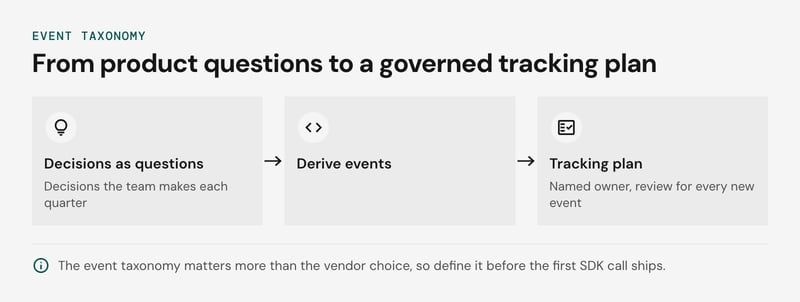
Agree on the event taxonomy before you pick a vendor, because it decides whether any of these tools can answer your questions. Define it before the first SDK call ships:
- Write down the product decisions the team makes each quarter (for example, whether activation or retention is the bottleneck), phrased as questions.
- Derive events from those questions. Use one naming convention, such as Object Action in past tense ("Report Exported"), and define each shared property once.
- Record the result in a tracking plan with a named owner, and require a review for every new event, ideally in the same pull request that adds the instrumentation.
Amplitude's data planning playbook recommends one consistent syntax, such as noun plus past-tense verb, and covers naming and governance in more depth. Pendo and PostHog can autocapture clicks, which gives early coverage without a plan, but those events still need curated names before anyone trusts a dashboard.
Event history is hard to migrate between vendors. Identity resolution, session definitions, and property schemas differ, so a raw export rarely reloads into another tool and produces the same funnels.
We recommend routing events through your warehouse or a customer data platform from the start. That keeps the history under your control if you change tools. Teams with a small engineering budget can skip that layer, but they should expect to restart their baselines at any switch.
Which tools track delivery?
Jira and Linear track delivery for product teams: Jira for configurable workflows across many teams, Linear for fast, opinionated backlog and sprint cycles.
Both answer "what is engineering building this sprint, and what state is it in?" Neither scores opportunities. Discovery and prioritization usually live in a separate tool, so the useful comparison is how well each tracker fits sprint work and what you must add around it.
| Tracker | Backlog and sprint fit | What it lacks for discovery and prioritization | Early sign the gap hurts |
|---|---|---|---|
| Jira | Boards, backlogs, sprints, and workflow rules with permissions and audit needs. Deep links to code and CI tools. | Heavy admin once workflows multiply. Idea intake and scoring sit in Jira Product Discovery, a separate Atlassian product. | Workflow changes queue behind one admin, and teams invent labels to work around them. |
| Linear | Cycles, a keyboard-first backlog, and little configuration. Suits one or a few engineering-led teams. | No built-in opportunity scoring. Methods such as RICE tend to live in a spreadsheet or a discovery tool like Productboard. | Tickets enter cycles with no visible link to the score that justified them. |
| Asana, ClickUp, Monday.com | Strong when product shares a tracker with marketing or operations. | Sprints and backlogs are templates or add-ons, and the core model is task management. Engineering often keeps its own tracker. | Status is copied by hand between two tools. |
Our decision rules, by condition:
- Several teams need shared workflows, approvals, or compliance trails: choose Jira. Add Jira Product Discovery if you want idea-to-issue links inside one vendor.
- One or a few engineering-led teams want minimal process: choose Linear, and decide up front where scoring lives.
- Product mainly coordinates with marketing or operations: consider Asana, ClickUp, or Monday.com, but only if engineering will work in it too.
Whichever you pick, test the handoff: can you trace a ticket back to the opportunity and score that justified it? In our judgment, a roadmap that disagrees with the sprint board erodes stakeholder trust, so default to the tracker engineering already uses.
All five bill per seat, and Jira and Linear list free tiers on their pricing pages. Check seat limits there before assuming either stays free as the team grows. Linear's opinionated model can chafe when cross-team governance gets complicated, and Jira's flexibility costs real administration time.
Where should documentation and collaboration live?
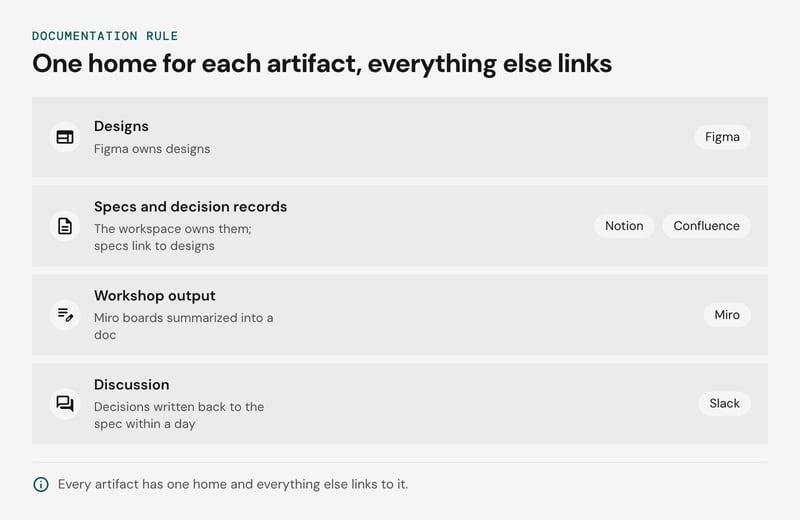
Documentation and collaboration should live in one workspace, Notion or Confluence, with Figma as the home for design files and every spec linking to them. We recommend Confluence when Jira is already your tracker, because issues link natively. Notion fits teams outside the Atlassian stack.
The trade-off between one workspace and best-of-breed:
| Approach | Fits | Main risk |
|---|---|---|
| One workspace (Notion or Confluence) | Smaller teams, or teams already on Atlassian | Weak whiteboarding and design handoff |
| Best-of-breed (docs plus Figma, Miro, Slack) | Design-heavy teams that run frequent workshops | The same decision recorded in three places |
The best-of-breed risk is the duplicate source of truth. A spec is pasted into the doc, debated in a Slack thread, and the Figma frame changes after sign-off. Six weeks later nobody knows which version engineering built against.
Our rule is that every artifact has one home and everything else links to it. Figma owns designs, the workspace owns specs and decision records, and Miro boards are workshop output that gets summarized into a doc. Slack carries discussion, and any decision made there is written back to the spec within a day.
Before adding a fourth collaboration tool, check how the vendor's pricing page treats viewer seats. Under per-seat pricing, stakeholders who only read specs can turn a cheap workspace into a large line item as the team grows.
Do you need experimentation and feature flag tools?
You can skip a dedicated experimentation and feature flag tool when your team runs a handful of flags and your product analytics already measure who saw each variant. If Amplitude already receives an exposure event for every flagged user, a config file or a small in-house flag service covers release toggles, and the analysis stays next to your funnels.
Buy a dedicated tool when one of these conditions holds:
- Non-engineers need to change targeting or percentage rollouts without a deploy.
- Several teams run overlapping experiments and need a statistics engine to analyze them.
- Auditors expect an approval trail on who changed a production flag.
The tools differ mainly in what they bundle:
- LaunchDarkly is built around flag management, with targeting rules and approval workflows.
- Optimizely targets enterprise experimentation programs, with content and web testing alongside flags.
- GrowthBook is open source and reads results from your own data warehouse.
- PostHog puts analytics, flags, and experiments in one platform.
Check each vendor's pricing page for the model before you shortlist. Plan gating on SSO and audit logs varies, and it changes the cost of the second condition above.
Stale flags are the cost people forget. A flag at 100% rollout is dead code with a branch around it, and it multiplies the test paths for every later change. We recommend giving each flag an owner and a removal date at creation, plus a cleanup ticket in Jira that opens when the rollout completes.
One caveat on experimentation: a product with low traffic rarely reaches statistical power on small changes. In that case, flags for staged rollouts earn their keep, while A/B tests do not.
Where do AI product management tools fit in the stack?
AI product management tools fit as add-ons to the tracker, roadmap tool, or doc workspace you already run. Jira, Productboard, and Notion each ship AI features inside the product, which their documentation describes as summarizing, drafting, and searching content stored there. Tickets, customer feedback, and specs stay where your permissions are already set.
We recommend enabling these features one tool at a time, after checking data handling in the vendor's documentation and trust pages:
- Whether customer content is used to train models
- Which model providers process your data, and in which regions (data residency)
- Whether admins can turn AI off per workspace or project
- Whether existing permissions and SSO rules apply to AI output
- Whether the feature is included in your plan or sold as an add-on, which changes per-seat cost as the team grows
Start a pilot with one team and non-sensitive content. If you handle regulated data, hold off until your data processing agreement covers the AI features. A standalone AI tool is worth a separate evaluation only when it needs data your current tools don't hold.
Product management software for small teams: Starter stack by stage
A sensible starter stack by stage is three or four tools for an early-stage team, discovery and flag tooling added at scale-up, and identity and governance controls added at enterprise scale. Linear, Productboard, Amplitude, and Jira cover most of the jobs along the way.
The table below is our suggested starting point, not a ranking. Each column assumes the previous stage's tools stay in place unless a cell says otherwise.
| Job | Early-stage startup | Scale-up | Enterprise |
|---|---|---|---|
| Roadmapping and prioritization | Notion page with one scoring method | Productboard | Productboard or Jira Product Discovery |
| Discovery and research | Interview notes in Notion | Productboard feedback inbox | Dedicated research repository |
| Product analytics | Amplitude with a short event taxonomy | Amplitude, taxonomy under review | Amplitude plus warehouse export |
| Experimentation and flags | Flags in your own config | Hosted feature flag service | Flag service with audit logs |
| Delivery tracking | Linear | Linear or Jira | Jira |
| Docs and collaboration | Notion, Figma | Notion, Figma | Notion or wiki with SSO and SCIM |
| Next addition | Analytics, once events are named | Experimentation and flags | SSO, SCIM, data residency review |
The early-stage column is deliberately thin. With one product squad, the tracker and a doc workspace carry the roadmap, and Amplitude only pays off after you agree what "activated" means as an event.
At scale-up, the first pain is usually feedback scattered across support tickets and sales calls. That is the point where Productboard earns its seat cost, and where per-seat pricing starts to matter for stakeholders who only read the roadmap.
At enterprise scale, procurement criteria drive the choices: SSO, SCIM provisioning, and where data is stored. Check each vendor's pricing page for which plan gates those features, and whether viewer seats are priced differently.
This table breaks down in one case. If your organization already runs Jira across several teams, adding Linear for one squad creates a second source of truth, so we'd keep Jira and add discovery on top of it.
How do you choose product management software?
Choose product management software by checking four things in order: team size and stage, fit with the tracker and analytics you already run, data ownership and identity controls, and total cost per seat as headcount grows.
Start with the tracker. If delivery runs in Jira, favor a roadmapping tool with two-way, field-level sync to Jira issues, or Jira Product Discovery inside the same instance. One-way sync leaves status to be retyped by hand.
Do the same check against Amplitude or whichever analytics tool holds your event data.
Per-seat pricing looks cheap at ten users and different at a hundred. Model cost at your headcount in 18 months, and count how many of those users only need to view the roadmap. Ask each vendor whether viewer seats are free, because stakeholders tend to outnumber the product managers who edit.
For data ownership, confirm four items on the vendor's own pages before a trial:
- SSO/SAML and SCIM provisioning, and which plan includes them
- Data residency options and where backups are stored
- A current SOC 2 Type II report
- Data processing terms that match the GDPR obligations for processors
Mistakes that sink a tool purchase
Three failure modes recur in tool selection; they come from our project experience, not measured rates.
- Buying a roadmapping tool before agreeing on a prioritization method. The tool ships with scoring fields, and each PM fills them differently. Settle on a method such as opportunity scoring in a spreadsheet first, then configure the tool to match.
- Tool sprawl with duplicate sources of truth. When a roadmap tool, a wiki, and the tracker all claim to hold feature status, they drift apart within a quarter. Name one source of truth per job and retire the overlap.
- Analytics without an event taxonomy. Amplitude charts built on inconsistent event names such as signup_done and SignUpComplete cannot be trusted. Write the tracking plan first and review it before each release.
Product management platform pricing: How tools charge
Product management tools charge per seat, by usage volume, or both, and the bill jumps when a vendor counts stakeholders who only read as paid users.
Per-seat pricing is the norm for roadmapping, delivery tracking and documentation. Productboard bills per maker, the product managers and leads who own roadmaps and prioritization, and includes contributors who submit feedback (a capped number on Business, unlimited on Enterprise). Jira and Notion bill per user. Figma splits Full seats for designers from cheaper Dev and Collab seats.
Usage-based pricing is the norm for analytics. Amplitude bills by event volume with unlimited seats on every plan, and its Free plan caps monthly events. An event taxonomy therefore sets cost as well as data quality: duplicate and near-duplicate events inflate volume without answering a new question.
Assume a team of 8 editors and 40 stakeholders across leadership, sales and support. If viewers are free, you pay for 8 seats, but if viewers count as full seats, you pay for 48, six times the seat count, before any tier upgrade.
The models side by side (confirm each row on the vendor's pricing page, since plans change):
| Tool | Charging model | Free plan | Where SSO sits |
|---|---|---|---|
| Jira | Per user, tiered | Yes, for small teams | Atlassian Guard, included on Enterprise |
| Productboard | Per maker seat | Not listed | Enterprise |
| Amplitude | Usage-based on events, unlimited seats | Yes | Growth and Enterprise |
| Figma | Per seat, by seat type (Full, Dev, Collab) | Yes, Starter | Organization and Enterprise |
| Notion | Per member | Yes | Business and Enterprise |
SSO is the second source of cost jumps. It tends to sit in the top tier or an add-on, so a team that needs SAML pays the higher rate on every seat in the workspace. We recommend pricing each tool at your headcount in 18 months, with the SSO tier included, and asking each vendor whether stakeholder seats are free, discounted or full price.
Product management tools FAQ
What is product management in software?
What are the 5 c's of product management?
What are product management tools?
Product management vs project management software
Do I need both Jira and Productboard?
Which product management tools have a free plan?
Build your shortlist
Build your shortlist from the jobs your current stack leaves uncovered, starting with the tracker you already run. If Jira holds delivery, trial Productboard for roadmapping against its Jira sync. Add Amplitude only after your event taxonomy is written down. We suggest a two-to-four-week trial on a live backlog, with SSO plan gating and viewer-seat cost checked at your projected headcount before you commit.
If the prioritization method or the stack itself is still undecided, send us a short project brief with your current tracker and analytics setup, and our product team can help settle it before you buy anything.


