
What is Mendix? The low-code platform explained for CTOs


Contents
Mendix is a low-code application development platform owned by Siemens, used to build web and mobile apps through visual modeling with custom code where needed. For a technical leader, the useful question is what sits under the visual layer and what that means for control, performance and exit.
Whether it suits you depends on how much of your workload is data-driven workflow and integration, and how much is custom front-end or compute-heavy logic.
Mendix is a Siemens-owned low-code platform for web and mobile apps
Mendix is a low-code application development platform for building web and mobile apps visually in Mendix Studio Pro. It handles forms, approval workflows, and integrations well, while custom front ends and specialist logic still need code. If you are weighing platforms, it helps to compare Mendix against Appian before committing to either.
Fit depends on your backlog and on who will maintain the apps afterward. We recommend a pilot on one bounded workflow when most of your backlog is forms, approvals, and integrations, because it tests governance and upgrade effort before you commit.
Who owns Mendix? Siemens, since 2018
Siemens has owned Mendix since 2018, when it acquired the low-code company that was founded in the Netherlands in 2005. Siemens acquired Mendix for €0.6 billion ($730 million) in August 2018 (Mendix Blog / Derek Roos, 2018).
Analyst recognition is vendor-published, so read it as a dated snapshot. According to Mendix's own announcement, Mendix was named a Leader in the 2025 Gartner Magic Quadrant for Enterprise Low-Code Application Platforms, its ninth consecutive year (Mendix blog on the 2025 Gartner Magic Quadrant). Check the edition year before quoting it, because older editions circulate widely.
Ownership affects two things a CTO should weigh:
- Roadmap tilt: Mendix now sits in the Siemens Xcelerator portfolio. Integrations with Siemens industrial software may get priority over general-purpose features. This is our judgment, and the release notes on docs.mendix.com show whether your needs are on the list.
- Vendor dependence: Mendix models run only on the Mendix Runtime, and there is no export to another platform. Hosting is flexible (Mendix Cloud, Kubernetes), but the model is not portable.
We recommend exposing core domain logic through published REST or OData services, so a later rebuild does not mean rediscovering your business rules.
How does Mendix work under the visual layer?
Mendix apps are model-driven: Studio Pro saves the application as a model in Team Server, and the Mendix Runtime executes that model on the server, which is how model-driven development works in practice. A single save-order request shows the path through the layers.
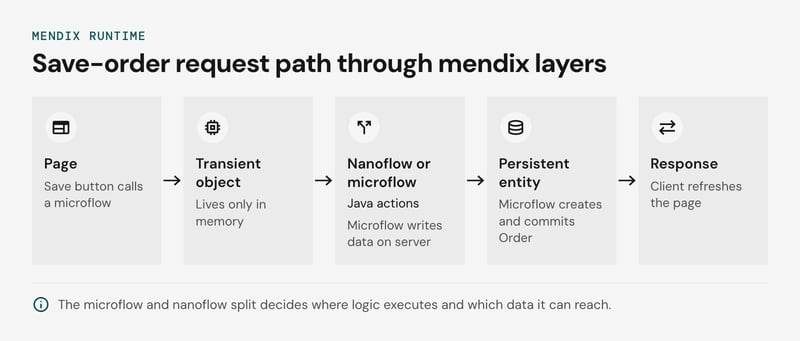
- Page. The page binds a data view to an Order entity, and a Save button calls a microflow. Until the user commits, the form edits an object held in the runtime's session memory.
- Transient object. A transient object is an entity instance that lives only in memory and is never written to the database. We use them for dialogs and view models, such as a checkout form that merges data from three entities.
- Nanoflow or microflow. A nanoflow is client-side logic that runs in the browser or on the device without a server round trip. It suits field-level validation and offline-capable native apps. A microflow is server-side logic with access to the database and to Java actions (custom Java for what visual logic cannot express). The Save button calls a microflow because it must write data.
- Persistent entity. The microflow validates the input, creates the Order object, and commits it. The domain model defines this entity and its associations (the relations between entities). The Mendix Runtime's ORM generates the schema from it and issues the SQL.
- Response. The runtime returns the result to the client, which refreshes the page.
A Marketplace connector for SAP follows the same path. It exposes SAP entities in the domain model, so a microflow can retrieve them without hand-written API calls.
The pipeline around this path is short. Studio Pro commits the model to Team Server, Mendix's Git-based version control. A build packages it into a deployment archive, and the Mendix Runtime, a Java server, runs it in Mendix Cloud or on Kubernetes. Because the runtime interprets the model, you debug and profile at the model level.
The abstraction has limits. A retrieve inside a microflow loop produces one query per iteration, so the N+1 problem returns in visual form. Pluggable widgets (custom React components for the client) and Java actions are the escape hatches. Our view is that teams should treat them as part of the architecture from the start and not as exceptions to patch in later.
What are Studio Pro and Team Server in Mendix?
Mendix terms worth knowing map onto stages of the build-run pipeline: modeling in Studio Pro, versioning in Team Server, and execution in the Mendix Runtime or the client.
The table ties each term to where it acts.
| Term | One-line gloss | Role in the pipeline |
|---|---|---|
| Entity | A domain model element, comparable to a class with attributes. | Persistent entities become database tables when the Mendix Runtime deploys the model. |
| Transient object | An instance of a non-persistent entity that lives only in session memory. | Holds form input or helper data in the client or server session and is never written to the database. |
| Microflow | Visual server-side logic built from activities. | Runs in the Mendix Runtime, where it reads and writes entities and calls Java actions or REST services. |
| Decision activity | A microflow element that branches on an expression or enumeration value. | Routes execution to different paths, such as approving or rejecting an order. |
| Nanoflow | Visual logic that runs on the client, in the browser or on a native device. | Handles UI-side steps with no server round trip, and supports offline-capable apps. |
| Team Server | Mendix's hosted version control repository (Git). | Stores the committed app model that the build and deployment steps read. |
| Working copy | Your local copy of the app model, opened in Studio Pro. | Holds uncommitted edits until you commit them to Team Server. |
The microflow and nanoflow split is the one to settle early, because it decides where logic executes and which data it can reach.
Who uses Mendix? Business developers and professional developers
Mendix is used by two groups: business developers, who model simple apps and workflows visually, and professional developers, who own the domain model, integrations, and custom code in Mendix Studio Pro.
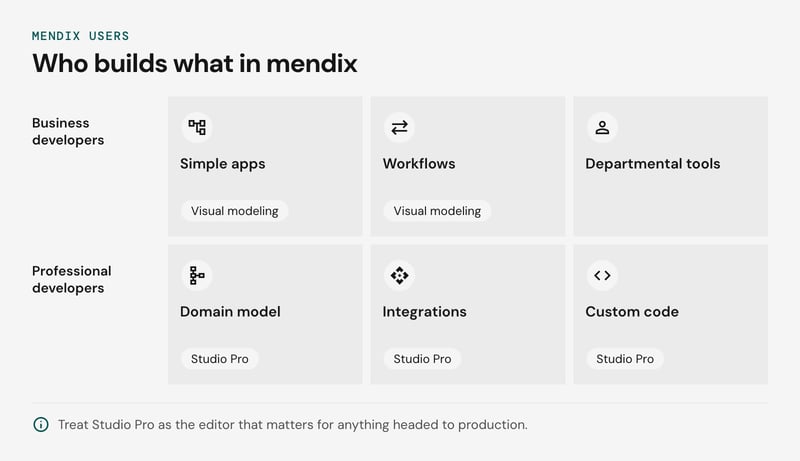
Professional developers work in Studio Pro, the desktop IDE, and extend apps with Java actions and pluggable widgets. Business developers are usually subject-matter experts in operations or finance who build departmental tools. Mendix Academy provides learning paths and certifications that run from Rapid Developer to Expert, so it is the usual entry point for both groups.
Older articles describe Mendix Studio, a separate browser-based tool for business users. The current Mendix documentation centers on Studio Pro, so treat Studio Pro as the editor that matters for anything headed to production.
Shared visual models give business, IT, and stakeholders one artifact to discuss, which is the main communication benefit. The same access creates three failure modes when business-built apps skip review:
- No ownership: the builder changes roles and nobody maintains the app.
- Duplicated entities: two teams model "Customer" separately, and the data drifts apart.
- Unversioned changes: edits bypass Team Server branching, so nobody can trace or roll back a change.
A review gate prevents all three. Our suggested version:
- Register every app with a named owner and an IT backup before it leaves a sandbox.
- Have a professional developer review any domain model change, and reuse entities from a shared module, not new copies.
- Commit all work to Team Server on a branch, and merge to main only after review. Deploy from main.
This gate is heavier than a team of two or three builders needs. In that case, steps 1 and 3 are enough, and a professional developer can spot-check the domain model each sprint.
What is Mendix used for? Use cases by industry
Mendix is a low-code application development platform used mainly for approval workflows, portals, and legacy modernization, with the Mendix Marketplace supplying connectors and prebuilt modules.
The workload decides which model features do the work. The table maps common cases to the parts of the platform they rely on:
| Workload | Typical industry | Features that carry it |
|---|---|---|
| Approvals and case handling | Insurance, banking | Domain model (entities and associations) for the case, microflows (server-side logic) for routing and validation |
| Customer and partner portals | Logistics, utilities | Role-based access on entities, REST publish and consume |
| ERP-adjacent apps | Manufacturing | Dedicated SAP connectors that map SAP entities directly, reducing hand-built API requests |
| Field and mobile apps | Energy, healthcare | Native mobile apps built on React Native, nanoflows (client-side logic) for offline handling |
| Legacy modernization | Public sector | Incremental replacement of one module at a time, Java actions for logic the visual layer can't express |
Our view is that Mendix fits best when the work is process-centric and the data is relational. It fits poorly for compute-heavy workloads or products whose differentiator is a highly custom interface. Those cases push most of the effort back into Java actions and custom widgets.
For concrete builds, see our Mendix application examples. Cost depends on the feature set and deployment model, which we cover in the deployment section below. If you are scoping a project, our low-code development service is the place to start.
Where can Mendix apps run?
Mendix apps run on Mendix Cloud, on a Kubernetes cluster you operate, or on servers you manage, and the same Mendix Runtime (the Java server that executes the app model) runs in each.
The choice is about who carries operations and where data may sit.
| Mendix Cloud | Private cloud on Kubernetes | On-premises or air-gapped | |
|---|---|---|---|
| Operations burden | Vendor-managed hosting, deployment and scaling | Your team runs the cluster, upgrades, backups and monitoring | Your team owns everything, including the Runtime host |
| Control | Lowest: platform-defined environments | High: your network policies, ingress and secrets | Highest: full network isolation |
| Data residency | Region selection within the vendor's hosting | Any region or datacenter your cluster sits in | Fixed to your premises |
We recommend Mendix Cloud as the default, and moving to Kubernetes only when a residency rule or an existing platform team requires it. A platform team already running OpenShift, AKS or EKS adds little marginal burden. A team without one inherits patching and incident response for every app.
Air-gapped setups need the most checking. Confirm licensing, image registry access and update paths with Mendix before committing, and verify supported targets in the Mendix deployment documentation. Licensing differs by option, which the Mendix pricing breakdown covers.
What do Mendix AI and agent features do today?
The Mendix AI assistant, called Maia, works inside Studio Pro (Mendix's desktop IDE) and suggests domain model and microflow changes from prompts. Agent features that act autonomously inside running apps are earlier in their lifecycle, and Mendix's agentic announcements run ahead of what ships.
The status of each capability, in plain language:
| Capability | What it does | Status |
|---|---|---|
| Maia in Studio Pro | Answers questions, proposes entities and associations in the domain model, and drafts microflows (visual server-side logic) from a prompt | Generally available, though depth varies by Studio Pro version |
| GenAI Commons and LLM connectors on the Mendix Marketplace | Let a microflow call a hosted model such as OpenAI or Amazon Bedrock and pass the result into app logic | Generally available as Marketplace modules |
| Agent building blocks for in-app agents | Let an app define an agent with a prompt, tools, and access to app data | Early release or preview, depending on the release |
| Multi-step agentic development and enterprise-wide agent orchestration | Agents that plan and build or operate across apps with little supervision | Announced as a direction by the vendor |
Treat the last row as a roadmap statement. Mendix describes these as vendor claims, and we would not plan a delivery date around them. Before committing, check the release notes on docs.mendix.com for each feature's current label.
The Mendix feature release calendar lists the planned beta and general-availability version for each Maia capability, and Mendix 11 is the current major version. Licensing is negotiated per client, so confirm which AI capabilities your plan includes.
What problem does Mendix solve, and what do vendor claims say?
Mendix addresses the gap between a long business backlog and scarce developer capacity through model-driven development: you describe data and logic visually in Studio Pro, and the platform runs the application from that model.
Mendix covers the lifecycle in one toolchain: modeling, Team Server versioning, and deployment. That lowers the entry cost for new players, since a small team can ship a web app, or a native mobile app built on React Native, without assembling a full stack first.
Mendix's own marketing claims faster delivery than hand-coded development. Treat those figures as vendor claims, check their publication date and methodology before quoting them, and note that no independent benchmark is attached.
The speed has identifiable sources, and each one stops somewhere:
| Source of speed | Mechanism | Where it stops |
|---|---|---|
| Domain model (entities and associations) | Generates persistence and default pages | Complex data design still needs an architect |
| Microflows (visual server-side logic) | Replace hand-written service glue | Heavy logic falls back to Java actions |
| Mendix Marketplace | Reusable connectors and widgets | Quality varies by publisher |
| Built-in deployment | Removes pipeline setup | Governance and testing remain yours |
The gains concentrate in the build phase. Teams with unclear requirements or difficult integrations will see less of them.
When not to use Mendix: Wrong-fit cases
Mendix is the wrong fit when a product's value sits in custom front-end behavior, high-volume data processing, or source code you must own outright.
The platform suits process-heavy internal and customer-facing apps whose logic fits visual modeling. It strains where you push past the model into custom code, because every Java action or custom React widget adds a second skill set and a second thing to upgrade.
The trade-offs side by side:
| Area | Strong fit | Weak fit |
|---|---|---|
| Microflow logic (Mendix's visual server-side logic) | Approvals, validations and integrations that stay readable on the canvas | Business rules that grow into many layers of nested sub-microflows, which are hard to review as Team Server diffs |
| Domain model retrievals | Transactional records fetched with constrained XPath queries | Loading large entity sets into memory for aggregation or batch reporting; plan batching or a separate analytics store |
| Custom front-end | Standard pages, Atlas UI and Marketplace widgets; native mobile through React Native | Custom interactions such as canvas editors or dense data visualization, which need pluggable widgets written in React |
| Java actions (custom Java called from a microflow) | Occasional extension, such as calling a vendor SDK | Core logic living in Java, which leaves you with two codebases and little benefit from the model |
| Version upgrades | Apps kept close to the current release, with few custom modules | Many Marketplace modules and custom widgets pinned to older Studio Pro versions, each needing regression testing per major upgrade |
| Exit cost | The app is expected to live on the platform for its full lifespan | Portability is a requirement: the model runs on the Mendix Runtime, so leaving means a rebuild, with no export |
On upgrades, check the release-track policy in the Mendix documentation before committing. Mendix MTS versions lose support three months after the next major version is released, while LTS versions are supported until their major version falls out of support (Mendix Docs: LTS, MTS, and Monthly Releases, 2025).
Our rule of thumb: if three or more rows land in the weak column for your product, a conventional stack (a framework such as React with a backend you own) will cost less over five years than the Mendix build saves in year one.
If the weak rows are only upgrades and exit cost, the question becomes which low-code vendor to accept lock-in with. The Mendix vs OutSystems comparison covers that trade.
How to get started and get certified
Start with the free Mendix Academy learning paths, build one app in Studio Pro on the Free Edition, add Mendix Marketplace modules, then sit the Rapid Developer certification exam. That order keeps the exam grounded in something you have already built.
- Academy first. Work through the Rapid Developer learning path. It covers the domain model (entities and associations that define your data) and microflows (server-side logic drawn as visual flows).
- First app on the Free Edition. Install Studio Pro and build a small CRUD app with one role-restricted page and one microflow, then deploy it to the free environment. Check the current Free Edition limits on mendix.com before you plan around it, because resource caps and idle behavior are the vendor's to change.
- Marketplace modules. Replace a hand-built piece with a Mendix Marketplace module or connector. Check who publishes it (Mendix or the community), its support level, and which Studio Pro version it targets.
- Rapid Developer exam. This is the entry-level certification. Confirm the current format and fee in the Academy, since both can change.
Our Mendix features post covers what to explore once the first app runs.
Mendix FAQ
What is Mendix software used for?
Who uses Mendix?
Who owns Mendix?
How much does Mendix cost?
What is a microflow in Mendix?
Is Mendix low code or no code?
Assess whether Mendix fits your roadmap
Mendix fits your roadmap if most of the backlog is process-heavy business applications and your team accepts a proprietary runtime.
Test that with one workflow. Model its domain model (the entities and associations that hold the data) and its core microflow (the server-side logic) in Studio Pro. Then check integration points, the deployment target, and who will maintain the app after launch.
Skip Mendix for latency-sensitive systems and for products that need a fully custom front end. If the pilot points toward a fully custom front end, read our guide to custom web application development before committing to either route.
If the pilot holds up, our low-code development service can help you scope the build, or you can talk to our team about an estimate.


