
React project structure: How to organize folders as your app grows


Contents
React has no official folder structure, so the right layout is the one that matches your app's current size and team count, plus a clear signal for when to change it. Flat folders suit small apps, route-based folders suit mid-size apps, and feature folders with enforced boundaries suit large apps and multiple teams.
Your framework also decides part of the tree: Next.js and React Router fix the routing folders, while Vite fixes nothing. Moving up is cheap if you do it one feature at a time.
Does React have an official folder structure?
There is no official React folder structure: the React docs leave it to you, and a Vite app imposes none. Size decides the layout.
A flat layout (components/, hooks/) fits a small app, a pages or routes layout with co-located logic fits a mid-size app, and a feature-based structure fits a large app or several teams.
Netguru designs, builds and scales React and Next.js web products. We recommend starting flat and splitting by feature only when cross-feature imports or merge conflicts appear, because an early split adds module boundaries before there is anything to protect.
Frameworks with file-based routing fix only the route files; the rest stays your call. The legacy React docs FAQ on file structure says React has no opinions on how you put files into folders.
Flat structure for small apps
A flat structure for a small app is one src/ tree with components/, hooks/, and services/, which a Vite project supports without extra configuration. Co-locating each component's test and styles in its own folder keeps related files together.
src/
  components/
    UserCard/
      UserCard.tsx
      UserCard.test.tsx
      UserCard.module.css
    Button/
      Button.tsx
      Button.test.tsx
  hooks/
    useDebounce.ts
    useUsers.ts
  services/
    httpClient.ts
    users.ts
  App.tsx
  main.tsx
The services/ folder is the only place that talks to the network. httpClient.ts wraps axios or fetch, and users.ts exposes functions such as getUsers():
// services/httpClient.ts
export async function get<T>(path: string): Promise<T> {
  const res = await fetch(`${import.meta.env.VITE_API_URL}${path}`);
  if (!res.ok) throw new Error(`Request failed: ${res.status}`);
  return res.json();
}

// services/users.ts
import { get } from "./httpClient";
export const getUsers = () => get<User[]>("/users");
Swapping axios for fetch, or the reverse, now touches one file. A quick check is to search for fetch( and axios outside services/. Any hit means a component has bypassed the wrapper, and that is where a swap would break.
Create hooks/ with the first custom hook, even if it is the only one. The folder costs nothing, and hooks have a home before they pile up inside component files. For hook patterns themselves, see our React hooks examples.
Our rule of thumb is that a flat layout holds up to roughly 30-50 components. This is a judgment call, and we have not measured it. The warning signs usually appear earlier, between 15 and 30 components:
components/no longer fits on one screen.- Two components need the same name in different parts of the UI.
- Two developers keep editing the same shared files.
Use the signals as a decision rule. If one shows up, fix it locally, for example by renaming a component or splitting one oversized file. If two show up, group the code by route or page, which the next stage covers.
Pages or routes structure for mid-size apps
A pages structure puts each route's components and hooks in that page's folder and promotes code to a shared components/ui layer only when a second page needs it.
src/
  pages/
    Orders/
      OrdersPage.tsx
      OrdersPage.test.tsx
      OrderFilters.tsx
      useOrderFilters.ts
    OrderDetail/
      OrderDetailPage.tsx
      OrderTimeline.tsx
  components/
    ui/
      Button/
      Modal/
    layout/
  hooks/
  services/
OrderFilters and useOrderFilters stay inside Orders/ because only that route uses them. Our recommendation is to promote on the second consumer, not the first. When OrderDetail needs the same filter component, move it to components/. A component with no domain knowledge, like a modal, goes to components/ui. Premature promotion fills the shared layer with single-use code.
The rule only works if promotion happens. A useful check in code review: if a page imports from another page's folder, move the shared piece up before merging.
File-based routing changes how much of this you configure: Next.js and React Router framework mode fix part of the route tree, covered in the framework section below. A plain Vite project has no routing convention, which makes pages/ your own convention, so enforce it in review or with lint rules.
This layout starts to strain when pages import each other's internals or components/ grows past what one person can scan.
Feature-based structure for large apps and multiple teams
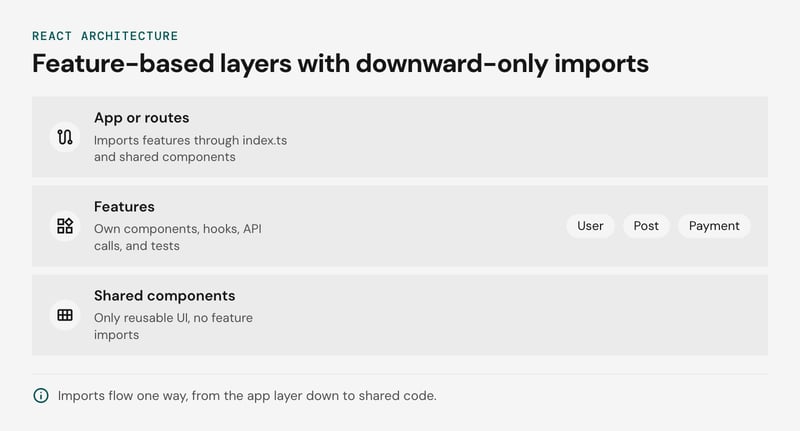
A feature-based structure groups code by business domain: each feature owns its components, hooks, API calls, and tests. A shared components/ layer holds only reusable UI. In a large app with several teams, most changes then stay inside one feature folder, which keeps review and merge scope small.
src/
  features/
    user/
      profile/
      avatar/
    post/
      post-item/
      post-list/
    payment/
      payment-form/
      payment-wizard/
  components/      only reusable UI components
    button/
    input/
    dropdown/
If a component mentions an order, a post, or a user, it belongs in a feature. Inside a feature, each folder has the same internal shape, and a single index.ts exposes what other code may use (the section on barrel files below shows that file and the lint rule that enforces it):
features/todos/
  components/todo-list/
    todo-list.component.tsx
    todo-list.test.tsx
  hooks/use-todo-list.ts
  api/
  index.ts
The dependency direction rule
Imports flow one way, from the app layer down to shared code. If two features need each other, extract the common piece into shared code.
| Layer | May import | May not import |
|---|---|---|
| App or routes | Features (through index.ts), shared components/ |
Feature internals |
| Feature | Its own files, shared components/, other features (through index.ts) |
Another feature's internal folders |
Shared components/ |
Other shared code | Any feature |
ESLint's no-restricted-imports rule can enforce the middle row with a pattern such as @features/*/*, which blocks deep imports while allowing @features/todos. Wire it into CI so enforcement does not depend on reviewers.
Dump folders bring the old problem back
Top-level stores/, types/, and utils/ folders recreate the type-based layout inside a feature-based one. Every feature imports from them, so one edit touches several teams and the merge conflicts return. Each failure has early signs you can check in pull requests:
| Failure mode | Early sign | Fix |
|---|---|---|
Top-level stores/ |
Pull requests for one feature edit store files that other teams own | Move the store into features/<name>/ and expose only what others need through index.ts |
Top-level types/ |
One types file is edited by PRs from unrelated features | Keep types beside the code that owns them |
Top-level utils/ |
A helper is imported by unrelated features, or its name contains a domain term | Split by domain and rename, for example format-currency |
| Shared layer importing a feature | components/ has an import from @features/... |
Move the component into the feature, or pass the data in as props |
Keep state, types, and helpers in the feature that owns them. Promote one to shared code only when a second feature needs it and its code contains no terms from the first feature's domain. If it does, the second feature should import it through the owner's index.ts instead.
When to move to the next structure
Move to the next React project structure when two or more of the signals below hold at the same time. One signal alone can usually be fixed inside the current layout.
- Cross-feature imports. A file in one domain imports another domain's internals, such as
@features/todos/components/todo-list/todo-list.componentinstead of@features/todos. Deep imports mean the feature has no public API. - A giant shared folder.
components/orhooks/holds more than about 20 files from unrelated domains. This threshold is our judgment, not a measured benchmark. - Merge conflicts in shared paths. Two teams edit
components/orutils/in the same sprint and keep resolving each other's conflicts. - Circular imports. Two folders import each other, and the bundler or the
import/no-cyclelint rule starts warning. This usually follows from the first signal. - Broken component co-location. Changing one screen means opening files in four distant folders because its component, hook, styles and test live apart.
- A violated dependency direction rule. Shared code imports from a feature, when it should only be imported by features.
The decision rule: with two or more signals, plan the move. With one, fix it in place by adding a lint rule or splitting the shared folder by domain.
Assume a 40-component app where components/ holds 25 files from billing and profile, and two teams touch it every sprint. That is signals two and three, so features are warranted.
The same app with one team and no conflicts can stay flat. The component range given for flat layouts earlier is a range, not a threshold. A team of two or three often stays flat well past it, while five teams can outgrow it at 20.
Comparison: Which React folder structure fits your team
The right React folder structure follows app size and team count: flat for small apps, pages for mid-size apps, and a feature-based structure for large apps with several teams. The figures below are our judgment, not benchmarks.
| Structure | App size | Team size | Main strength | Main risk |
|---|---|---|---|---|
Flat (components/, hooks/, utils/) |
A handful of screens | 1-3 developers | Nothing to learn, and every file is easy to find | components/ turns into a dump of unrelated files |
| Pages or routes with co-located logic | Dozens of screens | One team of 3-8 | The folder mirrors the URL, so a route's code is in one place | Code shared between routes gets duplicated or piles into a shared folder |
Feature-based (features/<domain>/ plus a shared components/ui) |
Many domains | Multiple teams | Each domain owns its components, hooks, api and tests behind an index.ts public API | Barrel files cost tree-shaking and invite circular imports; boundaries hold only if ESLint no-restricted-imports enforces them |
File-based routing decides part of the pages row for you, while a plain Vite project leaves the layout to you. If you are still choosing between React and Next.js, that decision largely determines how much of this layout the framework makes for you.
We recommend starting at the pages row and moving to features once two of the signals from the previous section appear together. A small team that owns many unrelated domains can reasonably adopt features earlier.
What Next.js, React Router and Vite decide for your folders
Next.js and React Router framework mode decide part of your folder layout through their routing conventions. Vite decides none of it.
Next.js app directory
The Next.js app directory maps folders to route segments, and only a page or route file makes a segment publicly reachable, according to the Next.js project structure docs. Other files can sit beside them safely.
That safety is also the failure mode: components, tests and helpers pile up between segments until the tree no longer reads as a route map, and one stray page.tsx or route.ts publishes a URL by accident.
Two features contain this. Private folders, whose names start with _ (_components/), opt a folder and its children out of routing. Route groups, wrapped in parentheses ((shop)/), organize segments without changing the URL. Two groups that resolve to the same path cause a conflict.
app/
  (marketing)/
    page.tsx
    pricing/page.tsx
  (shop)/
    cart/
      page.tsx
      _components/cart-summary.tsx
React Router framework mode
React Router framework mode declares routes in app/routes.ts and uses app/root.tsx as the app shell. Nothing else inside app/ is prescribed. Route modules export a default component plus optional loader and action functions. File-based routing is opt-in through a flat-routes helper package. Because routes.ts points at files you name, route modules can live inside feature folders, which fits a feature-based structure.
Vite
Vite imposes no folder structure: it requires an index.html at the project root, and everything else is yours. The src/ folder comes from the starter templates, not the tool. Projects still migrating off Create React App (deprecated) land in the same place, with no rules attached. So you own three decisions from day one:
- Aliases: declare them in the paths option of tsconfig.json, then either mirror them in resolve.alias or turn on Vite's resolve.tsconfigPaths option, because Vite does not read paths by default.
- Layers: decide where
hooks/andservices/live. Aservices/folder that wraps the HTTP client means swapping axios for fetch touches one file instead of dozens of components. - Enforcement: nothing checks boundaries or casing until you add ESLint rules.
Vite
A React project structure with Vite starts from index.html and src/ alone, so the feature folders and the tsconfig paths aliases are yours to wire up. Keep a dedicated hooks/ folder from the first commit, because that pattern scales at any size.
src/
  features/
    todos/
      components/
      hooks/
      index.ts
  components/ui/
  hooks/
TypeScript reads the paths option for type checking and editor resolution, while Vite resolves imports through resolve.alias. By default each tool recognizes only its own configuration, so define each alias twice, or set resolve.tsconfigPaths to true in current Vite versions and let Vite read tsconfig.json directly.
// tsconfig.json
"compilerOptions": {
  "paths": {
    "@features/*": ["./src/features/*"]
  }
}
// vite.config.ts
import { defineConfig } from 'vite';
import react from '@vitejs/plugin-react';
import { fileURLToPath, URL } from 'node:url';
export default defineConfig({
plugins: [react()],
resolve: {
alias: {
'@features': fileURLToPath(new URL('./src/features', import.meta.url)),
},
},
});If only one side is configured, the symptom is an import that the editor resolves but vite build rejects, or the reverse.
During a migration, keep the old aliases (for example @components) pointing at their current folders. Move one feature at a time, and delete an alias once no import uses it.
Where tests, styles and stories go
Component co-location puts the test, the CSS Module and the Storybook story in the same folder as the component, so one folder holds everything the component needs and moves as a unit.
components/ui/button/
  button.tsx
  button.module.css
  button.test.tsx
  button.stories.tsx
  index.ts
The index.ts re-exports only Button. Tests, styles and stories stay out of the public API, so consumers import the component and nothing else.
Tooling needs little configuration for this layout. Vitest and Jest match .test.tsx anywhere under src/, and Vite handles .module.css files natively. Storybook finds stories through a glob in its main config, such as ../src/**/*.stories.@(ts|tsx).
A separate tests/ tree that mirrors src/ duplicates every path. Our view is that this costs more than it saves: a rename or move means edits in two places, a deleted component leaves orphaned tests behind, and test imports climb through ../../../ segments. Reviewers also have to open a second tree to see whether a change was tested.
Pick one casing and enforce it. We recommend kebab-case for files and folders, as in todo-list/todo-list.tsx, with PascalCase kept for the component identifier inside. The unicorn/filename-case rule from eslint-plugin-unicorn, set to kebabCase, fails CI on a mismatched file name. It checks files only, so folder names need a review habit or a separate check.
Two things stay outside the component folder: end-to-end tests that span several features, and the .storybook/ config directory.
Keep features independent: Public APIs, barrel files and lint rules
Keep each feature independent by letting the rest of the app import only from its index.ts, and by failing CI on any deeper import. The barrel file declares the public API, and the lint rule makes it binding.
// features/todos/index.ts
export { TodoList } from './components/todo-list/todo-list.component';
export { useTodoList } from './hooks/use-todo-list';
// Internal components are not exported
// Good: uses the public API
import { TodoList } from '@features/todos';
// Avoid: bypasses the public API
import { TodoList } from '@features/todos/components/todo-list/todo-list.component';Consumers now survive internal renames. The same idea applies to the network layer: wrap axios in the feature's api module, and moving to fetch changes one file instead of every component that calls it.
Barrel files carry three costs:
- Tree-shaking: production bundlers drop unused re-exports only when they can prove the modules are side-effect free. Top-level side effects, or a missing sideEffects: false in package.json, can pull a whole feature into a chunk. Measure the bundle before you adopt the pattern everywhere; our React performance optimization guide covers where to start.
- Dev server graph: Vite serves source as native ES modules, so importing one name from a large barrel makes the browser request every file it re-exports.
- Circular imports: a file inside todos that imports from
@features/todosloops back through its own barrel. Inside a feature, use relative paths between siblings.
The convention erodes at the first deadline unless a rule enforces it. ESLint's no-restricted-imports can reject any path that reaches past a feature's index:
// eslint.config.js (rules section)
rules: {
  "no-restricted-imports": ["error", {
    patterns: [
      {
        group: ["@features/*/*"],
        message: "Import from the feature's index.ts instead."
      }
    ]
  }]
}
Run lint as a required CI step, and a deep import fails the pull request with that message.
The rule checks import strings only. It cannot tell which feature the importing file belongs to, so it does not stop payment from importing todos through the barrel. To forbid that, add per-folder overrides or a plugin such as eslint-plugin-boundaries.
Migrate to features one feature at a time
Migrate to a feature-based structure with one pull request per feature, so the app builds, ships and passes review at every step of the move.
Start with a leaf feature, one that few other modules import, and work inward. Each pass follows the same sequence:
- Create the feature folder and its index.ts. Move the components, hooks, API calls and tests into
features/todos/with git mv so history follows the files. Export only what other code already imports. - Keep old paths alive with aliases. Add the new prefix to tsconfig paths, plus a temporary entry that maps each old absolute specifier to its new location. Mirror both in Vite's resolve.alias, or enable resolve.tsconfigPaths, because Vite does not read tsconfig paths by default.
- Add the lint rule for that feature. ESLint no-restricted-imports blocks deep imports into the migrated folder from the first day.
- Keep the PR behavior-preserving. A move with no logic changes is refactoring in the strict sense, and it stays reviewable only if nothing else rides along.
- Repeat, then delete the aliases. When no import uses an old specifier, remove its entry and the empty legacy folder.
"paths": {
  "@features/*": ["src/features/*"],
  "components/todo-list/*": ["src/features/todos/components/todo-list/*"]
}
The second entry is the temporary one. Delete it in step 5.
One ESLint detail affects step 3. When several config blocks set the same rule, the later block replaces the earlier options instead of merging them. Keep a single no-restricted-imports entry and append one group per migrated feature.
'no-restricted-imports': ['error', {
  patterns: [
    {
      group: ['@features/todos/*'],
      message: 'Import from @features/todos instead.',
    },
    // append one group per migrated feature
  ],
}],
The rule catches new violations while the legacy folders shrink, so the migration cannot regress between PRs.
React project structure FAQ
How to structure a React project?
components/ and hooks/ folders, and mid-size apps group logic by route.
Move to a feature-based structure once cross-feature imports and merge conflicts keep appearing.
What is the best folder structure for a large React project?
features/<domain>/ folders with their own components, hooks, API calls, and tests, plus a shared components/ui layer. Each feature exposes one index.ts. This pays off with multiple teams, but ESLint no-restricted-imports must hold the boundaries; see web application architecture for the surrounding layers.
Should I use barrel files (index.ts) in React?
How do I set up absolute imports in React with tsconfig paths?
"@/*": ["./src/*"] under compilerOptions in tsconfig.json. Vite does not read paths by default, so mirror it with resolve.alias in vite.config.ts or set resolve.tsconfigPaths to true. A mismatch passes type-checking but fails at build time.
Where should tests and styles go in a React project?
Does Create React App still work as a starting point?
Choose the structure for your app size, then review it
Choose the simplest React project structure that fits your app's size: flat folders for small apps, route-based folders with component co-location for mid-size apps, and a feature-based structure once several teams share one codebase.
Move up a stage when cross-feature imports, oversized shared folders, or frequent merge conflicts appear. A useful checkpoint is a quarterly review of those three signals, with an ESLint no-restricted-imports rule keeping feature boundaries intact between reviews. If you are planning a restructure and want a second opinion on scope, talk to our team about it.


