
Tech stack for web development: How to choose the right one


Contents
A web development tech stack is the set of layers, from frontend framework to database, hosting and CI/CD pipeline, that a product is built and run on.
Choosing one is a series of constrained decisions: whether pages must rank in search, who can be hired to maintain the code, how traffic behaves, and which compliance rules apply. Those are the questions we settle first on web development projects.
Framework popularity matters far less than those constraints. The right answer changes with the project, and a stack that suits a marketing site can be a poor fit for an internal dashboard.
Tech stack for web development: The short answer
Decide rendering needs first, then the team you can hire. Those two usually narrow the field faster than benchmarks do.
We recommend Next.js on Node.js with PostgreSQL for a public, SEO-sensitive product built by a JavaScript team, because one language spans both tiers and PostgreSQL is a mature relational default.
That default changes when compliance, an existing Java or .NET team, or heavy data processing sets the constraints.
Web development stack layers explained
A web development stack is made of six tech stack layers: frontend, backend, database, infrastructure, DevOps and observability, and third-party services. A brochure site may use only a frontend, hosting and a CMS. A web application adds the backend and database, and web application architecture describes how the layers connect.
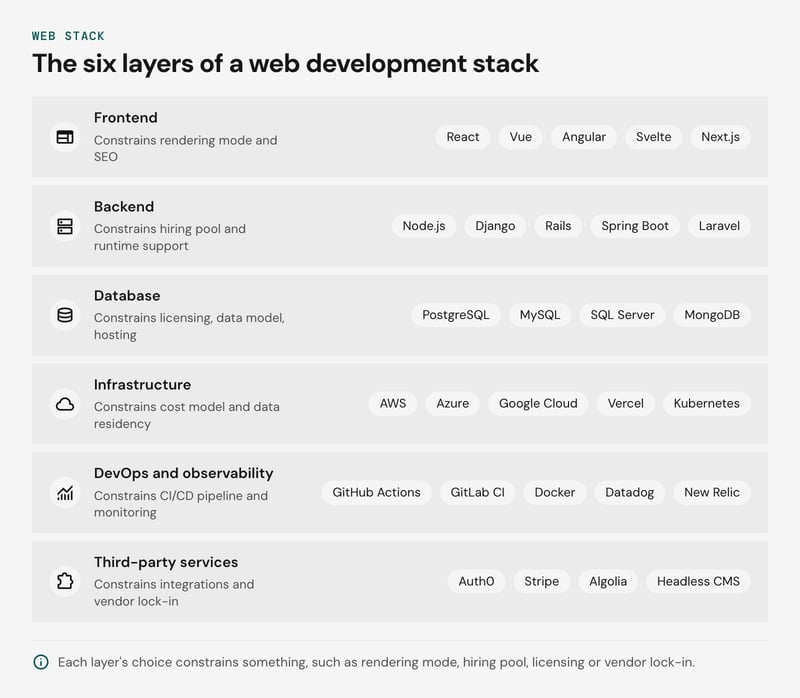
The layers side by side:
| Layer | Common current options | What the choice constrains |
|---|---|---|
| Frontend | React, Vue, Angular, Svelte; meta-frameworks such as Next.js and Nuxt | Rendering mode (SSR, SSG, CSR) and SEO |
| Backend | Node.js with NestJS or Express, Django, Rails, Spring Boot, ASP.NET Core, Laravel | Hiring pool and runtime support policy |
| Database | PostgreSQL, MySQL, SQL Server, MongoDB; managed or self-hosted | Licensing, data model, hosting options |
| Infrastructure | AWS, Azure, Google Cloud, Vercel; containers on Kubernetes | Cost model and data residency |
| DevOps and observability | GitHub Actions, GitLab CI, Docker; Datadog, New Relic, AppDynamics | CI/CD pipeline and performance monitoring |
| Third-party services | Auth0, Stripe, Algolia, a headless CMS | Integrations and vendor lock-in |
Avoid MongoDB when reporting needs joins across entities, because PostgreSQL handles that natively. Avoid picking a database before the access patterns are written down.
What tech stack does a website use?
A website needs two to six stack layers, depending on whether it is a static brochure site, a CMS-driven site, or a web app. A headless CMS with Next.js sits in the middle: content editors get a backend, and developers avoid building one.
The minimum each type needs:
| Layer | Static brochure site | CMS-driven site | Web app |
|---|---|---|---|
| Frontend | HTML/CSS/JS, or a generator such as Astro | Next.js with server-side rendering or incremental builds | React, Vue or Next.js |
| Backend | None | Node.js runtime for rendering only | Node.js, Django, Rails or Spring, with business logic and an API |
| Database | None | Held by the headless CMS | PostgreSQL or another managed database |
| Hosting | Static host with CDN | Vercel, or containers | Cloud containers or managed platform |
| DevOps | Git-based deploys | CI/CD with preview builds | CI/CD, SAST and dependency scanning, monitoring such as Datadog or New Relic |
| Third-party services | Forms, analytics | CMS, search, analytics | Auth, payments, email |
If editors publish weekly, choose the CMS-driven column. Add a custom backend and database only when users log in or write data. A site that never needs accounts gains nothing from running its own database.

How to choose a tech stack for web development
Choose a tech stack for web development by working through seven factors in order, and let the first one that rules out an option settle the question.
Settle them during discovery, as part of your web development process. If a vendor will build the product, agree the stack with them at the same stage, since it shapes both cost and hiring.
- Rendering needs. If public pages must rank in search, choose server-side rendering or static generation through a meta-framework such as Next.js. If everything sits behind a login, a client-rendered single-page app is enough, and you avoid running a render server.
- Team and hiring market. Choose the language your team already ships in. Pick a new one only if you can hire for it in your region within your growth timeline, and avoid niche stacks when you plan to double the team.
- Scale and traffic shape. If load is steady, start with a modular monolith on one PostgreSQL instance. Avoid microservices until separate teams need independent deploys. If load is spiky, choose managed hosting with autoscaling.
- Integrations. Choose the stack with maintained SDKs for your auth, payment, and search providers. Avoid any option where you would write and maintain the client library yourself.
- Security and compliance. The stack decides which static analysis (SAST) tools, dependency analyzers, and container scanners fit into your CI/CD pipeline, so check that before committing. Data rules such as the GDPR and HIPAA limit hosting region and managed-service choice (more on both below). Pick a monitoring tool such as Datadog or New Relic that has an agent for your runtime.
- Total cost of ownership. Count licenses, hosting, and maintenance hours over the product's life, not only build cost. Netguru rebuilt a 20-year-old EdTech SaaS platform whose Microsoft stack (ASP, .NET, MSSQL) needed a top-tier SQL license and more maintenance than any other product in the client's portfolio. It moved to an open-source stack with a Node.js backend and a Vue frontend (case study). If a license tier is tied to your data volume, price it before choosing.
- Maturity and long-term support (LTS). Run only LTS releases in production. Node.js publishes an end-of-life date for every release line, and PostgreSQL publishes the support window for each major version. Avoid frameworks that have no documented upgrade path.
Tech stack for an SEO-critical website vs an internal tool
An SEO-critical website needs server-side rendering or static generation, usually through Next.js, while an internal tool behind a login can be a client-rendered React app.
The split follows one question: does a crawler need to read the page? If yes, ship HTML that already contains the content. If no, skip the server-rendering cost.
The two cases side by side:
| SEO-critical site | Internal tool behind a login | |
|---|---|---|
| Rendering | SSR or SSG via a meta-framework such as Next.js | Client-side rendered SPA |
| Content source | Headless CMS for editors | Your own API and database |
| Hosting | Edge or CDN plus a Node.js runtime | Static bundle plus an API |
| Main cost | Caching and server runtime | Auth, permissions, data modeling |
Google's JavaScript SEO documentation still recommends server-side or pre-rendering because it makes pages faster for users and crawlers. A headless CMS lets editors publish without a deploy, and the meta-framework rebuilds or revalidates the affected pages.
Avoid SSR for a dashboard, admin panel, or back-office app. No crawler sees those pages, and you would pay for server runtime, cache invalidation, and hydration bugs with no ranking benefit. Plain React with a REST or GraphQL API is enough.
Two caveats apply. A prototype built as a SPA often needs its public routes rebuilt later, so decide early which routes face search. Products with both, such as a SaaS app with a public pricing and docs site, usually work best as two surfaces: Next.js for the marketing pages and a client-rendered app behind the login.
How much should team skills and the hiring market weigh?
Team skills and the hiring market should decide the stack whenever two options are technically adequate, which is most of the time. A stack your team already ships in beats a better-suited one it must learn mid-project, and the hiring market caps how fast you can grow the team.
If your team is strong in one language, choose a stack in that language and confirm you can recruit for it in your region before committing. Avoid niche frameworks when you expect to double the team within a year. A framework nobody can hire for stalls delivery and makes handover to a new maintainer slow.
Three failures tend to surface around year three:
- Hiring stall: open roles sit unfilled because few candidates know the framework, so maintenance falls to the people who built it.
- LTS lapse: the runtime you launched on leaves support. Node.js is moving from two major releases a year to one, and from Node.js 27 every release line becomes LTS (release schedule announcement). Put upgrade dates on the roadmap at launch.
- Prototype carry-over: a microframework chosen for the MVP may lack the authentication, session handling or audit hooks the production system needs.
How do scale and traffic shape the stack?
Scale and traffic shape the stack through the shape of the load. We recommend a modular monolith on PostgreSQL by default, serverless for spiky or unpredictable traffic, and always-on servers for steady load.
The trade-offs side by side:
| Option | Fits | Breaks when | Cost of reversing |
|---|---|---|---|
| Modular monolith (one Node.js or Django app, one PostgreSQL database) | Most products, until teams block each other's releases | Modules share tables and boundaries erode | Low: extract a module along an existing boundary |
| Serverless functions | Spiky or mostly idle traffic, event processing | Steady high load, long-running jobs, latency-sensitive paths with cold starts | Medium to high: code is tied to the provider's event and permission model |
| Always-on servers or containers | Steady load and predictable cost | Sharp spikes leave you paying for idle capacity or waiting on autoscaling | Low to medium |
| Microservices from day one | Several teams with independently scaling domains | Small teams, where each service adds deployment and tracing overhead | High |
Microservices on day one multiply the CI/CD pipeline, the debugging surface and the network failure modes before any scaling need exists. Our monolith vs microservices comparison covers the split in depth. Enforce module boundaries in code, with no cross-module table reads, so extraction stays cheap later.
When a monolith has to be split, we recommend the strangler fig pattern. Put a proxy in front, route one capability at a time to a new service, and retire the old code path.
A full rewrite fits only when the old system is small or cannot run on the target stack, because it freezes features until cutover.
How do integrations, security and compliance narrow the options?
Integrations and regulation narrow a tech stack by removing options that lack maintained SDKs, audited libraries or a compliant hosting path. For regulated data, we recommend Spring Boot or ASP.NET Core on PostgreSQL, run as a managed database in the region your regulator requires.
Start with integrations. If the product must talk to SAP, Microsoft Entra ID or SOAP-based partner systems, choose the stack with the best-maintained client libraries, which tends to mean Java or .NET. Avoid a language where your team would hand-write the connector.
Regulation comes next. GDPR restricts transfers of personal data outside the EEA (GDPR, Chapter V on EUR-Lex), and HIPAA requires a business associate agreement with any host that handles protected health information.
Both favor a managed PostgreSQL service with region pinning, encryption and audit logging, provided the provider signs the agreement. Self-host the database only if you have staff to own patching, backups and audit evidence.
Use OWASP ASVS as the control checklist, and wire the scanners for your language into the pipeline from the first commit.

What a tech stack costs over its life
Total cost of ownership for a web tech stack is the sum of licenses, hosting, maintenance and hiring over the product's life, and licenses are the line that differs most between stacks. A Node.js and PostgreSQL stack carries no license fee because both are open source, so its cost sits in managed hosting, upgrades and engineering time.
The cost lines, and what to check for each:
| Cost line | What drives it | What to check |
|---|---|---|
| Licenses | Database edition, per-core vs per-server licensing, core count as load grows | Vendor licensing page, priced against your own contract |
| Hosting | Managed vs self-hosted database, region, replicas, traffic shape | Provider price calculator with your expected load |
| Maintenance | Support window of the runtime and framework, dependency churn | Node.js release schedule or the framework's support policy |
| Security tooling | SAST, vulnerability scanners, container analysis and dependency analyzers wired into CI | Whether each tool supports your language and package manager |
| People | Size of the hiring market for the language | Your local job market, not a global ranking |
Per-core licensing is the usual surprise. On SQL Server, the edition you need (Standard or Enterprise) and the core count decide the bill, so adding capacity for load also adds license cost. On PostgreSQL, the same growth adds hosting cost only. If you already hold a Microsoft enterprise agreement, the license gap may be small, so price it before ruling the stack out.
If you are weighing a similar move, our guide to rebuilding legacy web apps covers how to sequence it. We recommend modeling three years of licenses, hosting and upgrade effort for each shortlisted stack before the first sprint, and treating any stack whose cost depends on core count as a variable cost.
Which common stacks fit which projects?
Match the stack to the project shape: Next.js with a headless CMS fits SEO-critical content sites, and the framework-led backends (Django, Ruby on Rails, Spring Boot, ASP.NET Core, Laravel) fit transactional business applications.
The table lists each common stack with what it does well and the conditions that rule it in or out.
| Stack | Good at | Fits when | Avoid when |
|---|---|---|---|
| MERN/MEAN (MongoDB, Express, React or Angular, Node.js) | One language across client and server; flexible document schemas | Small team, interactive UI, data shape still changing | Data is highly relational or reporting-heavy; PostgreSQL is the safer default |
| Next.js + headless CMS | Server-side rendering, static generation, editor-friendly content | Marketing sites, catalogs, publications where SEO and editorial workflow matter | The product is an internal tool behind a login with no SEO need |
| Django | Built-in admin and ORM, Python data and ML libraries | Data-heavy apps, analytics or ML in the same codebase | Real-time features are the core of the product |
| Ruby on Rails | Convention-driven CRUD delivery, mature testing culture | MVPs and products where time to first release leads | Ruby engineers are hard to hire in your market |
| Spring Boot | Strict typing, mature tooling, long-lived services | Enterprise integrations, large teams, regulated domains | A small team needs a prototype in weeks |
| ASP.NET Core | Throughput, first-class tooling, Azure integration | Teams already invested in Microsoft tooling | The default plan includes a SQL Server license you haven't priced |
| LAMP/PHP with Laravel | Low-cost hosting, large talent pool, Laravel productivity | Content-driven sites, CMS-based builds, brownfield PHP | A highly interactive front end is the main feature |
The "avoid when" column is our judgment, not a benchmark. For Rails specifics, see our Ruby on Rails technology stack guide. Where the frontend is React-heavy, as in MERN and Next.js, React.js development covers the team and tooling side.
Treat the table as a set of defaults. A team fluent in Spring Boot will ship a CRUD product faster there than in a stack it is still learning, so the hiring market overrides the table when the two disagree.
FAQ
Which tech stack is best for web development?
What is the technology stack in web development?
Get a stack recommendation for your project
A stack recommendation starts from your constraints: rendering needs, team skills, hiring market, integrations, and compliance. We map those to each layer of the stack.
When your team already writes TypeScript, we recommend Node.js development for the backend, with a web development team covering frontend, database, and infrastructure.
Send us your scope, team profile, and traffic expectations to get an estimate for your project.


