
Mobile app maintenance: Types, 2026 deadlines, plans and SLAs

Contents
Mobile app maintenance is the work that keeps a live app accepted by the stores, secure and stable as operating systems, SDKs and dependencies change underneath it. For a CTO or product owner, the hard part is rarely knowing that updates are needed.
It is knowing which deadline is next, which signal should trigger a fix, who owns the store accounts and what response time to expect when production breaks.
What is mobile app maintenance?
Mobile app maintenance is the work of keeping a released app working, compliant and secure as operating systems, store rules and dependencies change. It covers corrective, adaptive, perfective and preventive work.
The Google Play target API level requirement moves roughly every year, and updates that miss it are blocked.
Netguru builds, upgrades and maintains production mobile apps on iOS, Android, React Native and Flutter, and we recommend funding all four types from launch, because platform deadlines arrive whether or not the roadmap has room.
Each time a new Android version ships, teams also have to decide whether and when to update their app.
Types of mobile app maintenance: Corrective, adaptive, perfective, preventive
The four types of mobile app maintenance, corrective, adaptive, perfective and preventive, each start from a different event: a crash spike, a platform deadline, usage data or a toolchain change.
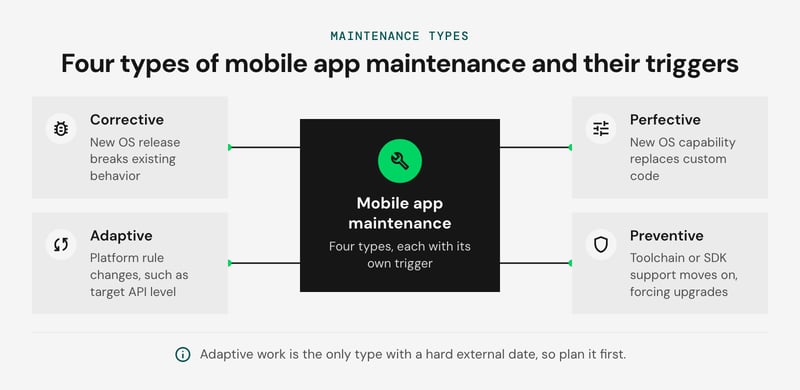
Tying each type to its trigger shows what to schedule and what to leave on the backlog.
The following table maps each type to a real platform event:
| Type | Trigger event | Work it produces | Signal that surfaces it |
|---|---|---|---|
| Corrective | A new iOS or Android major release breaks existing behavior | Hotfix, staged rollout, expedited review when the crash is severe | Firebase Crashlytics shows crash-free users dropping and a new issue cluster on the new OS version |
| Adaptive | Platform rule changes, such as Apple's privacy manifest and required reason APIs (enforced on uploads since May 2024) or the yearly Google Play target API level | Declare reasons in the manifest, audit third-party SDKs, raise targetSdkVersion and fix behavior changes | App Store Connect upload warnings, Play Console policy notices |
| Perfective | A new OS capability replaces custom code, such as the Android photo picker | Remove the custom flow, simplify permissions, retest | Funnel drop-off, store reviews, support tickets |
| Preventive | Toolchain support moves on: 16 KB page size support needs Android Gradle Plugin 8.5.1 or later and a compatible Gradle version | Upgrade AGP, Gradle and Kotlin together, rebuild native libraries, automate bumps with Dependabot or Renovate | Gradle deprecation warnings, Play Console release warnings |
Adaptive work is the only type with a hard external date, so plan it first. Preventive work is what keeps it small: a team already on a current AGP and Gradle pairing treats a page-size or target API change as a one-sprint task. A team three AGP versions behind has to untangle the toolchain before it can touch the requirement.
Corrective work is the least predictable, but the September iOS release and the annual Android release give you the dates to staff for. Perfective work is the first to be cut under pressure, and we recommend keeping a fixed share of each release for it.
Why does a live app need maintenance?
A live app needs maintenance because store compliance, security exposure and retention each degrade on a schedule the platforms and attackers set. We recommend treating store compliance as the hard floor: scheduling it first ensures a missed deadline won't block every update, including hotfixes.
- Store compliance. The Google Play target API level requirement resets every year, and apps that fall behind lose the ability to ship updates and can be hidden from users on newer Android versions. Apple's Upcoming Requirements page sets the minimum Xcode and SDK version for App Store Connect uploads, and uploads built with older toolchains are rejected.
- Security. Unpatched third-party SDKs and transitive dependencies are the usual entry point. OWASP MASVS gives a baseline to audit against.
- Retention. Android vitals sets bad-behavior thresholds for crash and ANR rates, and Play states that exceeding them can reduce an app's discoverability.
Google Play target API level deadline and other yearly platform deadlines
Four platform deadlines force maintenance work every year: Google Play's target API level in late summer, Apple's minimum Xcode and SDK in spring, iOS and Android betas from June, and privacy manifest checks on every App Store Connect upload. Dates are as of October 2026, so confirm each against its linked source before you commit a sprint.
| When | Platform | Requirement or event | What it forces |
|---|---|---|---|
| Spring (since April 28, 2026) | Apple | Uploads to App Store Connect must be built with Xcode 26 and an iOS 26 SDK, per Upcoming Requirements | Xcode, Swift and CI image upgrade |
| June | Apple, Google | WWDC and Android beta releases | Run your regression suite on betas; file bugs early |
| Late August (August 31, 2026) | Google Play | New apps and updates must target Android 16 (API 36), with extensions to November 1, 2026, per the Google Play target API level requirement | targetSdkVersion, compileSdk, AGP and Gradle bumps |
| September | Apple | Public iOS release | Test on the release candidate before launch day |
| From February 1, 2027 | Google Play | Updates for apps targeting Android 15+ must support 16 KB page sizes on 64-bit devices | Rebuild or upgrade native libraries |
| Every upload | Apple | Privacy manifest and required reason API checks | SDK upgrades or declarations |
Our recommendation is to work backward from the deadline. Start the target bump on the June beta and ship it by early August, so a rejected build still leaves room for a hotfix.
What breaks when you raise targetSdk
- Edge-to-edge. Apps targeting API 35 draw behind system bars on Android 15 devices, and API 36 removes the opt-out. Hard-coded top padding, bottom sheets and keyboard handling are the usual casualties, so review inset handling screen by screen.
- Background execution. Foreground services need declared types from API 34, and Android 15 caps dataSync services at six hours. Sync and upload code is where regressions tend to appear; read the Android 16 behavior changes for job quotas.
- Build chain. A newer compileSdk needs a newer AGP, which sets a minimum Gradle and JDK. Upgrade in this order: Gradle, AGP, Kotlin and KSP, compileSdk, then targetSdkVersion, checking the AGP compatibility table at each step.
- 16 KB pages. Native .so files must be 16 KB aligned. Recent AGP and NDK releases handle your own code, but prebuilt third-party libraries and older React Native or Flutter engines may not, so check their release notes.
How SDKs without a privacy manifest block review
App Store Connect flags binaries that call required reason APIs, such as UserDefaults, file timestamps or disk space, without a declared reason in PrivacyInfo.xcprivacy. Apple's list of commonly used third-party SDKs must ship their own manifest and signature.
An outdated SDK without one holds up the whole binary. The fix is usually a major-version upgrade of that SDK, which can pull in API changes of its own. Audit your Podfile.lock or Swift Package resolution against Apple's list before the next Xcode bump. If the calendar has outgrown your team, our mobile development team can own it.
Which signals tell you when to act?
Four signals tell you when to act: Android vitals thresholds, crash-free sessions after a release, ANR rate, and symbolication gaps. Each maps to a hotfix, a next-release fix, or a watch.
Google Play publishes Android vitals: a user-perceived crash rate of 1.09% and a user-perceived ANR rate of 0.47% across the app, and 8% for any single phone model. Crossing them can reduce the app's discoverability on Play. Staying under these limits is easier when the team follows proven Android development best practices, from clean architecture to disciplined crash debugging.
The store thresholds are a floor. The crash-free sessions trigger below is our illustrative default, so tune it to your traffic.
| Signal and source | Trigger | Action |
|---|---|---|
| Crash-free sessions in Firebase Crashlytics or Sentry, new release | Drops more than 1 point below the previous release during staged rollout (illustrative) | Halt rollout, ship a hotfix, request expedited review on iOS |
| User-perceived crash rate, Android vitals | Above 1.09% overall or 8% on one device model | Hotfix if rising release over release; otherwise next release |
| ANR rate, Android vitals | Above 0.47% overall | Hotfix if it began with the latest release; otherwise next release |
| Hang rate and crashes, Xcode Organizer and App Store Connect | Regression against the previous version | Next release, hotfix if it clusters on a core flow |
| Unsymbolicated crashes | Top crash groups show no readable stack | Fix dSYM and R8 mapping upload in CI before the next build |
| Crash cluster on one old OS version | Under a small share of sessions, stable | Watch |
Sequence matters. Fix symbolication first, because every other trigger depends on stacks you can read. Automate the upload in the release pipeline so a build can't ship without it.
These signals are inputs to maintenance decisions, not a monitoring strategy. For tooling depth, see our guide to mobile application performance management.
How do you keep dependencies, SDKs and toolchains current?
Keep dependencies, SDKs and toolchains current by upgrading on a fixed cadence, one layer at a time, and grouping update PRs so each batch is merged or rejected as a unit.
Why Dependabot PRs pile up on React Native projects
Dependabot and Renovate open one PR per package, but a React Native app's packages are coupled through the native layer. A camera or navigation bump often needs a newer react-native, Gradle or CocoaPods version, so CI fails and the PR stalls. The queue grows until nobody reads it.
We recommend grouping updates (groups in Dependabot, groupName in Renovate) and excluding react-native itself from the bots. Upgrade the framework by hand, using the Upgrade Helper diff.
How to keep a React Native or Flutter app up to date
Skipping React Native or Flutter versions multiplies effort because each release changes template files, build configuration and native module compatibility. A three-version jump means debugging all three sets of changes at once, with no way to tell which one broke the build. Our view is to move one minor version at a time, roughly quarterly. That interval is a judgement call, not a vendor guideline.
On Flutter, step through stable releases, run flutter pub outdated, read the breaking-changes page for each release, and let dart fix apply deprecation fixes before you move on.
Upgrade order for the native toolchains
The order below follows the compatibility tables in the Android Gradle plugin release notes and Apple's Xcode requirements. Change one row per PR.
| Step | Android | iOS |
|---|---|---|
| 1 | Gradle wrapper, to the minimum the target AGP requires | Xcode, to the version App Store Connect requires |
| 2 | AGP | Swift language mode (for example, strict concurrency) |
| 3 | Kotlin, then KSP or kapt processors | SwiftPM and CocoaPods dependencies |
| 4 | Libraries and Compose | Deprecated API cleanup |
Each row ships with its own Fastlane lane run, pinned in GitHub Actions or Bitrise (runner image or stack matching the Xcode version), so an upgrade PR builds the same way a release does. Add a regression pass from your quality assurance suite before merging, because a toolchain bump can change runtime behavior without touching app code.
How do you handle security patching?
Handle security patching by setting the patch window from the CVSS severity band, then moving a finding up one tier when it is exploited in the wild or reachable from your app's code paths.
Dependabot or Renovate security alerts start the clock, and triage for reachability should finish within one business day. Dependency hygiene of this kind maps to OWASP MASVS (MASVS-CODE, components without known vulnerabilities). The windows below are our suggested starting point, not an industry benchmark.
| CVSS band (FIRST scale) | Patch window | Release path |
|---|---|---|
| 9.0-10.0, or listed in CISA KEV | 72 hours | Hotfix build, expedited review request |
| 7.0-8.9 | 14 days | Out-of-cycle patch release |
| 4.0-6.9 | Next scheduled release | Batched with routine updates |
| 0.1-3.9 | Quarterly upgrade | Dependency grouping PR |
Pair that triage with periodic scans of your release builds, since Android static analysis tools catch vulnerable libraries and insecure code that dependency alerts alone can miss.
Write these into the maintenance SLA, so the clock is contractual and not negotiated mid-incident.
Expiry dates cause outages with no code change and no CVE, so each one belongs on a shared calendar with alerts at 60, 30 and 7 days:
- Pinned certificates or public keys in the app: a pinned leaf expiring breaks every installed version. Ship a backup pin and rotate before the old one lapses.
- API and backend TLS certificates, including CDN and third-party endpoints the app calls. Lifetimes are shrinking, so automate renewal and still track it.
- Apple Distribution certificate and provisioning profiles, which expire after one year.
- APNs certificates (token-based keys avoid the yearly renewal) and the Sign in with Apple client secret, a JWT that lapses after at most six months.
- Android upload key and Play App Signing settings, including any key-rotation deadline.
What should a mobile app maintenance plan or retainer include?
Mobile app maintenance services cover corrective fixes, platform adaptation, perfective improvements, and preventive upkeep, delivered under an SLA with response times set by severity. A plan is only as good as its incident rules and the store mechanics behind them.
Teams without in-house capacity often hand routine upkeep to a partner, such as our software maintenance services, while a core team keeps ownership of product decisions.
A retainer should name five things in writing:
- Monitoring: Firebase Crashlytics or Sentry, Android vitals, and Xcode Organizer, with named owners for each alert.
- Platform and dependency work: Dependabot or Renovate triage, plus the yearly SDK and target API deadlines.
- Release cadence: a regular train, with a hotfix path that runs through TestFlight and Play internal or closed testing tracks.
- Reporting: a monthly summary of crash-free rate, ANR rate, adoption of the latest version, and open risks.
- Handover: runbooks, signing keys, and store account ownership that stay with you.
The SLA is where plans differ most. The table maps each severity to what the stores let you do. Use the response targets as a starting point for your own thresholds.
| Severity | Example | Response target | Store mechanic |
|---|---|---|---|
| P0 | Launch crash, failed login or payments, active exploit | Acknowledge in 30 min, 24/7; mitigate within 4 h | Halt rollout, flip feature flag, trigger force-update gate, request expedited review |
| P1 | Core flow broken for a segment; Android vitals bad-behavior threshold crossed | Acknowledge in 2 h; fix in 1-2 business days | Halt rollout if still staged; ship hotfix via beta track, standard review |
| P2 | Non-core defect with a workaround | Acknowledge in 1 business day; fix in next release | Regular train, rollout starting at a low percentage |
| P3 | Cosmetic issue, backlog item | Triage weekly | Batched into a planned release |
A staged rollout limits exposure but cannot recall a binary. Halting a Google Play rollout or pausing an App Store Connect phased release stops new automatic installs. Users who already updated keep the bad build, and App Store users can still update manually. Recovery means shipping a higher build or changing behavior server-side.
Run a blameless post-incident review within five business days. Record the timeline, whether Crashlytics, Sentry, or Xcode Organizer alerted before user reviews did, and why the rollout percentage did not catch it. Each review should end with one action on tests, one on alerting, and one on rollout configuration. Track post-update metrics for the following release to confirm the fix held.
Four mistakes recur in retainers:
- One person holds the Apple Developer and Play Console owner role.
- The binary in the field has no minimum-version check, so there is no way to force an update on iOS.
- The SLA clock starts at store approval, not at acknowledgement.
- Hotfixes skip the beta track and ship untested.
In-house team or outsourced partner: How to choose?
Choose in-house maintenance when the engineers who built the app still own it day to day; choose a partner when you lack platform coverage or out-of-hours response. Many teams split the work: the product team owns the backlog, and a partner owns upgrades and on-call.
The trade-offs side by side:
| Factor | In-house team | Outsourced partner |
|---|---|---|
| Response time | Fast in working hours; nights and weekends depend on a rota | Written into the SLA, with response times by severity |
| Knowledge retention | Strong while the team is stable | Depends on documentation; name a lead who stays |
| Platform coverage | Gaps when the one iOS or Android specialist is away; React Native and Flutter upgrade paths need regular practice | A bench across Swift, Kotlin, React Native and Flutter |
| Bus factor | One departure can stall releases | Spread across people, but only if you hold the access |
Whoever does the work, the company should own these items:
- Repository and CI secrets: GitHub Actions or Bitrise, plus Fastlane config.
- Signing assets: the Android upload key or Play App Signing enrollment, and Apple certificates and provisioning profiles.
- Store accounts: Apple Developer Program, App Store Connect (including Xcode Organizer data access) and Google Play Console, with at least two admins on company email.
- Runbooks: release and rollback steps, expedited review requests, and alert routing from Crashlytics or Sentry.
The most damaging handover failure is a store account registered to a departed engineer's personal Apple ID or Google account. Nobody can then ship a hotfix, renew a certificate or accept updated agreements, and recovery runs through store support in the middle of an incident.
How much does mobile app maintenance cost?
Mobile app maintenance cost is set by five drivers, and in our view they rank in this order by how far each one moves the budget:
- Platform count. iOS, Android, and any cross-platform layer each bring their own OS releases, store deadlines, and toolchains. React Native and Flutter upgrade paths add a framework version to track on top.
- SLA tier. The response times you commit to set on-call staffing, and out-of-hours cover costs more than business-hours support.
- Dependency debt. Each skipped SDK or framework release makes the next upgrade larger.
- Backend scope. APIs, infrastructure, and third-party integrations the app depends on all need upkeep.
- Release cadence. More frequent releases mean more regression testing, store review, and Android vitals monitoring.
For apps with a large backend, drivers 3 and 4 often trade places. As a planning figure, our mobile app maintenance cost breakdown budgets 15-20% of the original MVP build cost per year, and covers how to budget for each driver.
Mobile app maintenance FAQ
How often should a mobile app be updated?
What happens if you stop maintaining an app?
What do mobile app maintenance services include?
Get a maintenance plan for your live app
A maintenance plan for a live app starts with an audit of three things: upcoming platform deadlines, named owners, and whether an SLA with response times covers them.
Check the next Google Play target API level and Apple minimum Xcode and SDK dates. Then name who owns each upgrade and who responds when a P0 crash lands out of hours. Any item without an owner or a response time is where mobile app maintenance work tends to get dropped.
Our enterprise mobile app development team can run that audit with yours and take over the upgrades and on-call your team can't cover.


