
AI agent architecture: production layers and design decisions


Contents
In a production AI agent the model is the smallest decision, and the architecture around it decides whether the agent holds up once real users arrive. Most teams should start with one agent plus tools and add agents only where roles must be separated.
What does a production AI agent architecture consist of?
A production AI agent architecture consists of an orchestration pattern, context control, tools, guardrails, a durable execution runtime, and observability around the model. The model is one swappable part. Most failures after the demo come from the layers around it: runaway loops, tool side effects repeated on retry, context that grows every turn, and state lost when a long task outlives its function.
An AI agent architecture is the structure that lets an LLM plan, call tools, keep state, and stay inside defined limits. This guide draws on two agents we run: Omega, our internal multi-agent sales assistant in Slack, and Chatguru, our open-source RAG agent for commerce. Netguru builds production AI agents and the orchestration, runtime and observability around them for enterprise clients.
Teams without in-house capacity can bring in a dedicated AI Pod team for the build.
Which layers does a reference architecture have?
A production AI agent architecture has four stacked layers, a vertical observability band beside all of them, and a human-in-the-loop exit from the agent service. Each layer forces one decision, and the layers differ in how cheaply you can change them later.
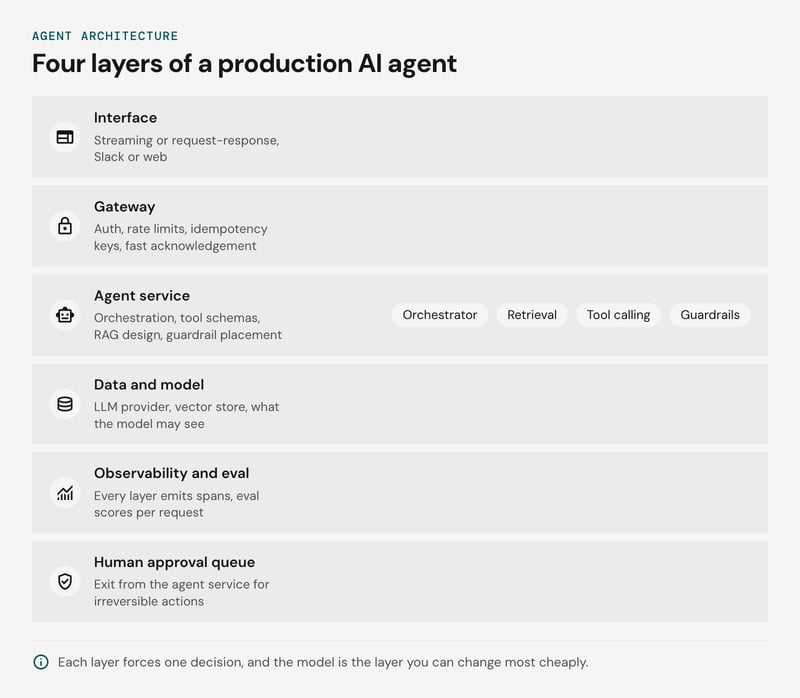
The diagram, described top to bottom: the interface sits on top, then the gateway. Below it is the agent service, which holds the orchestrator, retrieval, tool calling and guardrails. Data and model form the bottom layer. The observability and eval band runs down the side across every layer, and one arrow leaves the agent service toward a human approval queue.
The table reads top-down and shows what Chatguru runs in each layer:
| Layer | Decision it forces | What Chatguru uses | What is swappable |
|---|---|---|---|
| Interface | Streaming or request-response, Slack or web | React 18, Vite and a WebSocket client that streams tokens | The cheapest layer to change |
| Gateway | Auth, rate limits, how fast to acknowledge a request | FastAPI with streaming auth and rate limiting, optional Redis | Replaceable, but it changes your retry and failure semantics |
| Agent service | Orchestration pattern, tool schemas, retrieval design, guardrail placement | A LangChain orchestrator with retrieval, tools and guardrails | Orchestrator and retriever with effort. Tool schemas and guardrails are contracts you own |
| Data and model | Which LLM provider, which vector store, what the model may see | PostgreSQL catalog, pgvector index, Azure OpenAI | The provider, if it sits behind one client interface and an eval suite can confirm the swap |
Langfuse sits beside all four layers. Chatguru's LLM provider is the easiest part to change, which is why we pick the model last: a config edit and a passing eval run.
The gateway is the layer prototypes skip. In Omega it has to acknowledge Slack events within Slack's 3-second window and cope with redelivered events. Long runs then move to a runtime that holds state, covered below.
Observability is a band because every layer emits spans. The OpenTelemetry GenAI semantic conventions give you attribute names for model calls and token usage. In Chatguru one Langfuse trace covers retrieval, planning, the model call and the first streamed token, with eval scores attached. In an internal benchmark trace the whole turn took 840 ms: retrieval 88 ms, agent planning 36 ms, a GPT-4o call 704 ms for 412 tokens, and the first streamed token at 312 ms, with relevance scored 0.92 and grounding 0.97. Those are reference values from internal testing, not a performance guarantee, but they show what a trace should let you see.
Should you start with one agent plus tools?
Start with one agent plus tools, and split only when a role needs its own prompt, permissions, or model. Tool calling on a single agent covers most production workloads, and every added agent adds a model hop and another prompt to maintain.
The full trade-off lives in our comparison of multi-agent systems and solo agents. A single agent is cheaper to trace, evaluate, and debug. Multi-agent designs pay off when responsibilities truly conflict.
Use this decision rule: split a role out only when one condition below holds and its test fails on the single-agent version.
- Permissions differ. Test whether per-tool credentials or scopes can enforce the boundary. A read-only CRM tool and a write tool can share one agent with separate scopes. Split when the roles need different identities or approval flows.
- Prompts conflict. Run your eval set with one combined prompt and again with role-specific prompts. Split only if the combined version scores measurably worse on the affected role.
- Models differ. Compare cost saved with latency added. A small router model ahead of a stronger one pays off when most requests resolve on the cheap path.
Each split adds a prompt, an eval set, and a set of trace spans to keep current. Anthropic's Building effective agents post advises finding the simplest approach first and adding complexity only when it demonstrably helps. We agree.
Early signs that a split was premature:
- Handoff messages keep growing because the second agent needs most of the first agent's context.
- Eval failures cluster at the handoff between agents.
- One agent only reformats or forwards what the other produced.
The critic agent is the most common premature split. If the check is a schema validation, a grounding score, or a policy rule, an eval gate or guardrail inside the agent service does it deterministically and at lower cost.
Chatguru runs as one agent with tools: cart operations, product lookup and a hand-off to a live agent. Narrow scope pays off in client work too. ARC Europe's GPT-based claims agent proof of concept on Microsoft Azure had one task and cut claim assessment from 30 to 5 minutes, delivered in under 6 weeks. Omega, our Slack sales assistant, is the multi-agent contrast, and it shows where orchestration goes wrong.
Which orchestration pattern fits?
Choose the orchestration pattern whose failure mode you can detect and cap. Omega shows why: four approaches to coordinating its role agents each failed in a different way.
Omega began as a single agent. Complex requests, such as building a proposal from call notes, CRM data and internal benchmarks, overwhelmed it, so we split it into role agents: a SalesAgent that interprets intent, a DatabaseAgent that fetches context, a PrimaryAgent that does the work and a CriticAgent that reviews it. Then the coordination problems started.
| Approach | How it coordinates | What happened in Omega |
|---|---|---|
| Round-robin | Every agent takes a turn in order | Slow, burned tokens, took too many turns to reach an answer |
| Selector | A controlling step picks the next agent from the context | Kept picking the same agent; agents passed control back and forth in loops while the shared history grew |
| GraphFlow | An explicit graph defines the path between agents | Agents were not always selected in the expected order, and the graph logic became hard to manage and debug |
| Critic agent | A reviewer agent checks output and can restart the process | Interrupted or restarted flows that did not need it, so we tested removing it |
The lesson we took: adding agents does not guarantee better results. Without strict routing, token management and role separation, there are too many voices in the room and no clear direction.
The next step was a structured experiment between two architectures, both without the "primary agent" and with the critic demoted to an optional feedback tool:
- Swarm: specialized agents hand tasks to each other with shared context and tool calls. More natural delegation, with a risk of ping-ponging and growing context windows.
- Single agent plus tools: one main agent calls other agents as tools when needed. Simpler, faster and easier to debug, at the cost of some flexibility.
We set evaluation metrics for that comparison (task success rate, token efficiency and latency) and used real bug reports from earlier Omega versions as test cases. Whatever pattern you pick, ship it with a maximum turn count and a fallback response, so a loop ends instead of running until the token budget does. The failure stories in full are in six AI failure examples that showed us how to build an AI agent.
How did we choose the estimation flow?
For Omega's sales-estimation flow we compared four architectures on four criteria: UX in Slack, latency, reusability across other sales tasks, and maintainability.
| Option | How it works | Strengths | Weaknesses |
|---|---|---|---|
| Orchestrated agent pipeline | A fixed sequence, each agent hands off to the next | Clear separation of concerns, easy to debug and monitor | Rigid, higher latency from sequential steps, complex state sharing |
| Event-driven multi-agent system | Agents react to events in parallel, Slack threads act as the event bus | Scalable, real-time UX, resilient through event replay | Complex event handling, race conditions, hard to trace |
| Hybrid orchestrator with dynamic agent teams | An orchestrator assembles agent teams per phase | Reuses existing agents, flexible team composition | Heavy prompt engineering, phase transitions need care, less transparent logic |
| Swarm agents with handoff | Agents hand off by expertise with full shared context | Adapts on the fly, human handoff at any step | Hard to predict and trace, more handoffs add processing time |
We combined the hybrid orchestrator and the swarm. A selector-style orchestrator assembles a coordinated team for structured phases, such as breaking a project scope into modules with a module architect agent, a critic and domain experts. In exploratory phases, such as refining assumptions, agents hand off freely based on confidence and missing inputs. At any point an agent can hand control back to the sales rep. The full comparison is in our sales-estimation agent flow post.
Does plan-and-execute fit a production agent?
Plan-and-execute fits a production agent when the task has structured phases you can name in advance, and it fits poorly when the next step depends on the last tool result.
The planner emits a visible step list, and that list is checkpointable. A durable runtime can resume at step four after a failure instead of replaying the run. A human approval can also sit between the plan and its first action, where it is cheap to reject.
The costs are two. The planner adds a model round trip before any tool calling starts, which delays the first useful output. And a plan goes stale: if step two returns something the planner did not assume, the executor keeps following a plan that no longer applies. Production versions need an explicit replan trigger.
Our rule is to use this pattern for multi-phase work with expensive or irreversible steps. Skip it for interactive chat, where a single agent looping over tools answers sooner.
How do you control agent context?
Context control is the decision about what enters the prompt on each model call, with a token budget assigned to every source before it can crowd out the others.
Omega deliberately started without retrieval-augmented generation, relying on caching, prompt engineering and simple routing. The trouble came with Slack summaries. As we documented in our AI failure examples write-up, feeding whole channel histories into GPT-4 overflowed the context window: messages were cut off, and summaries of long, fragmented threads misread conversations or added details nobody had written.
The fix was a controlled context window:
- A cap on the number of starting messages loaded from a thread. When a conversation is longer, earlier messages are summarized first and the summary is injected before the agent continues.
- A nightly AWS Step Functions pipeline that goes through every Slack channel where Omega is active and updates a database with recent activity, so a DatabaseAgent reads summaries and not raw history.
From those two builds we use a simple rule for what each source gets:
| Source | Treatment | Reason |
|---|---|---|
| Product catalog, documents, CRM records | Retrieval (RAG), top results per query | Answers need exact facts, and the data changes independently of the conversation |
| Slack threads, past conversations | Scheduled summary | The gist and the decisions matter; verbatim text is mostly noise |
| Current task state and last tool results | In the prompt, trimmed | The next step needs them verbatim |
Chatguru was retrieval-first from day one, because every answer must come from the client's catalog. Its retrieval returns 8 relevant SKUs in about 88 ms with an average relevance score of 0.84 in internal benchmarks, and that fixed slot of retrieved products is the first claim on the token budget.
Nightly summaries lag by up to a day. If your agent must answer about this morning's thread, load the most recent messages directly, capped, and let the summary cover everything older. Teams with short, single-purpose conversations can skip the pipeline and keep history in the prompt.
How should tools be designed and chained?
Design each tool as one narrow action with a typed schema, scoped permissions, and an idempotency key, and chain tools in code whenever the sequence is known in advance.
A tool such as search_drive(query, folder_id) is easier for the model to call correctly than a generic fetch(source, params). Building effective agents recommends treating tool definitions with the care of a prompt: explicit parameter descriptions and formats that are hard to misuse.
Omega's tools wrap the Slack API, the Google Drive API (custom tools that read scope documents, extract feature lists and write outputs), Apollo for company data and BlueDot for call transcripts. A webhook-triggered sync makes files uploaded in Slack available to the agents through Drive. Each capability is a self-contained module, so one can change without breaking the rest.
Idempotency matters because tool calls run more than once. Slack redelivers events it considers unacknowledged, and AWS Lambda retries failed asynchronous invocations by default. In Omega we switched Lambda retries off to stop duplicate messages. The safer general rule is for the tool, not the model, to derive a key from the event ID, tool name and normalized arguments, and check a store before any side effect. Chatguru's cart tools are the obvious case: a retried add-to-cart must not add a second item.
Permissions belong on each tool. Keep read tools and write tools separate, and put write tools behind an allowlist or human approval. Tool output is untrusted input: a Drive document or call transcript can carry an injected instruction.
Selection quality degrades as the tool list grows, because every schema takes context and similar descriptions compete. We know of no universal threshold, so we recommend an eval gate on tool selection and a filtered tool subset per task. The Model Context Protocol makes it easy to attach many tools at once, but it does not narrow them for you.
| Situation | Use | Reason |
|---|---|---|
| Fixed sequence, such as find product, check stock, add to cart | Chain in code | Fewer model calls, easier to test |
| Next step depends on earlier results, such as open-ended research | Let the model plan | Path cannot be written in advance |
Where do guardrails and human approval sit?
Guardrails sit at three points in the request path: input, tool call and output. Human-in-the-loop approval is an exit the orchestrator triggers from the agent service, and the prompt has no say in it.
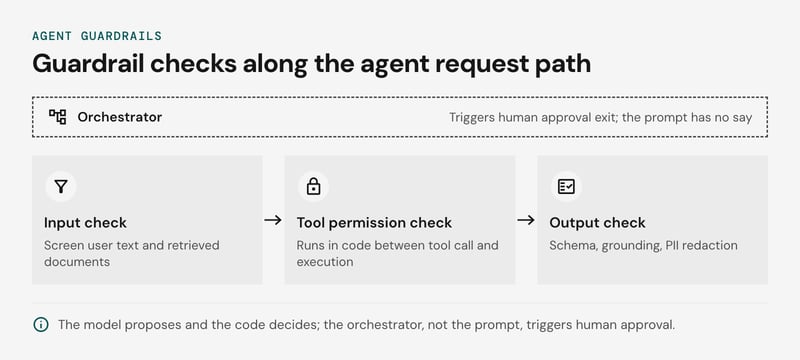
- Input check. Screen user text and retrieved documents for prompt injection before the model sees them. Retrieved content is the harder case, because an instruction hidden in a document arrives looking like data. The OWASP Top 10 for LLM Applications lists both prompt injection and excessive agency as risks.
- Tool permission check. Run it in code, between the model's tool call and its execution. Enforce a per-role allowlist, scoped credentials and schema validation. Route write actions above a risk threshold to approval. The model proposes and the code decides.
- Output check. Validate the schema, check grounding against retrieved sources and redact personal data. A second model call with a narrow rubric fits where rules can't express quality. It adds latency and cost, so we recommend rules first.
Chatguru's agent service carries policies, fallbacks and out-of-scope detection. Omega's estimation flow defines exit conditions: an agent pauses, asks for more input or hands back to the sales rep when confidence is low or information is missing.
Human exit triggers should be explicit: an eval score below threshold, a write action over its permission limit, exhausted retries, or repeated tool failure. The exit also has to survive asynchronous replies, pauses and timeouts, because people answer in Slack when they get to it. On AWS Step Functions a task-token callback pauses the workflow until a reviewer responds. Give each pause a timeout that expires to "declined" if no response arrives.
A read-only agent serving internal users can skip approval and keep the permission check. Approval queues pay off once an agent can change something that is expensive to undo. More on these risks in the real pitfalls of AI agents.
What runtime holds agent state?
A durable execution runtime holds agent state in production. For Omega that meant moving orchestration from bare AWS Lambda to AWS Step Functions in 2025, after serverless functions turned out to be the wrong fit for a conversational agent.
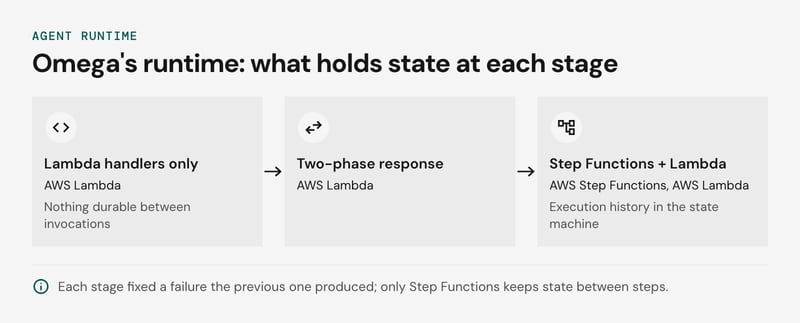
Some Omega conversations involve 20 or more internal message turns, vector embedding lookups, database queries and calls to external APIs. Lambda cold starts added more than 3 seconds, Slack times out after 3 seconds and retries, and users saw duplicate answers. Lambda's 15-minute execution limit cut longer multi-agent flows mid-conversation, and there was no native state management.
| Stage | What holds state | What it fixed or broke |
|---|---|---|
| Lambda handlers only | Nothing durable between invocations | Duplicate replies from Slack retries; flows cut at the execution limit |
| Two-phase response | Still nothing durable | Lambda returns 200 OK to Slack at once, then re-invokes itself to do the work, with AWS retries switched off. It met the 3-second window but left orphaned executions and hard debugging |
| Step Functions with Lambda steps | Execution history in the state machine | State between steps, built-in retries and error handling, a visible flow per run |
One quick fix helped stay under three seconds: moving Python imports from the top of the file into the functions that needed them, so the first response loaded only what it used. It goes against PEP 8 and it was a patch, not a design.
Step Functions solves the remaining problem. Each step's output is persisted, so a failed tool call retries on its own without replaying the model calls before it, and the approval exit from the previous section maps onto a waitForTaskToken pause that holds no function open. For heavier, longer-running tasks we also tested EC2 instances and internal MCP servers. Keep large payloads, such as retrieved documents, in object storage and pass references between states, because the state machine limits payload size per transition. The AWS Step Functions and Lambda documentation lists the limits.
Where this does not apply: if every request finishes in seconds and no chat platform sets an acknowledgement deadline, Lambda plus a conversation table in a database is enough. Step Functions adds state-machine definitions to maintain and a per-transition cost. We would add it when a flow has several tool calls, an approval wait, or a runtime longer than a single function invocation allows.
Production checklist: from prototype to production, layer by layer
Build the production version in this order: wrap the prototype loop in durable execution, add tracing, gate releases on evals, add guardrails, then tune context. Keep one agent plus tools until a role needs separate permissions or prompts, and only then change the orchestration pattern.
The order follows what is expensive to retrofit. State and traces are hard to add once conversations are live, while an extra agent is cheap to add later. Evaluation depth is in testing AI agents.
| Layer | Question to answer | What we chose | Signal to change |
|---|---|---|---|
| Interface | Which channel's timeouts and retries does the agent inherit? | Slack for Omega; a React and WebSocket streaming UI for Chatguru | Duplicate replies from channel retries |
| Orchestration pattern | One agent or several? | One agent plus tools in Chatguru; role agents under a selector-style orchestrator in Omega | A role needs its own permissions or prompt |
| Context and retrieval | What enters the prompt on each turn? | pgvector retrieval in Chatguru; capped history plus nightly summaries in Omega | Traces show irrelevant chunks or token budget overruns |
| Tools | Can a retried call do harm? | Self-contained tool modules per integration | A tool gains write access to a system of record |
| Guardrails | What can the agent do without approval? | Policies, fallbacks and out-of-scope detection in Chatguru; exit conditions that hand back to a person in Omega | A new tool or a new data source |
| Runtime | Where does conversation state live? | AWS Step Functions for Omega's orchestrated flows | A single step nears Lambda's execution limit |
| Observability and evals | Can you replay one bad turn? | Langfuse traces; Promptfoo for prompt tests and flow simulations before release | Scores drift while tests still pass |
| Deployment | Can you rebuild the stack from code? | Terraform with separate development and production environments; Docker for Chatguru | Prompt changes ship outside the pipeline |
For tracing, instrument model calls, retrieval and tool calls as spans from day one. The OpenTelemetry GenAI semantic conventions give you attribute names that survive a change of tracing backend. How we wire Promptfoo and Langfuse is in AI chatbot evaluation and observability.
FAQ
What is an AI agent architecture?
What are the core parts of AI agent architecture?
What makes a good AI agent architecture?
What are AI agent architecture best practices for production?
How do you move an AI agent from prototype to production?
What is a multi-agent architecture?
Build the chassis before you tune the engine
Settle your AI agent architecture before you tune the model, because the model is the one part you can swap later. A chassis carries the engine, steering, and brakes. The orchestration pattern, context control, guardrails, and durable runtime do the same for an agent.
Keep the agent count as low as the task allows, and wire in tracing before the first user arrives. To work through your own design layer by layer with our engineers, book an AI agents workshop, or tell us about the agent you want to build and we'll scope the production version with you.


