
AI software development: What AI does at each SDLC stage

Contents
AI software development means using language models and coding agents at every stage of the lifecycle, from requirements to maintenance. The gains are real but uneven.
They depend on review capacity, codebase quality and how work is organized. Autocomplete, chat assistants and agents need different levels of oversight, and each fails in its own way.
AI in software development: Short takeaways
AI in software development now helps at every SDLC stage, from GitHub Copilot autocomplete to coding agents that run multi-step changes, but review capacity caps the gain. More generated code means more pull requests.
Netguru designs, builds and scales digital products, and we recommend starting with bounded, well-tested, reversible tasks, because agents drift on ambiguous work and thin tests hide their mistakes.
- Autocomplete suits boilerplate; review its output for subtle bugs.
- Chat assistants lose context on large repositories.
- Coding agents fit bounded, reversible, well-tested tasks.
- Review capacity limits delivery speed.
Is there an AI that can develop software?
Yes, AI can develop software when the task is bounded, and no AI builds a whole product on its own. Coding agents such as Claude Code and OpenAI Codex read a repository, plan a change, edit files, run tests and can open a pull request.
The models behind them suggest code, spot errors and propose fixes. A developer still has to judge whether the change fits the system, its constraints and its history.
An agent performs well when three conditions hold: the task has a clear definition of done, the tests fail when the change is wrong, and the result can be reverted cheaply. Ambiguity breaks that pattern, because the agent fills gaps with plausible guesses.
The split we recommend:
| Hand to an agent | Keep manual |
|---|---|
| Dependency upgrades with a green test suite | Requirements that stakeholders haven't settled |
| Test backfill for an existing module | Cross-cutting architecture changes |
| A well-specified endpoint or migration script | Authentication, payments and other security-sensitive logic |
| Mechanical refactors with clear before and after behavior | Trade-offs that depend on product or business context |
Every agent task also produces a pull request that someone has to read, so review capacity sets how much work you can delegate. Teams building this capability can look at our AI development services for how that division of labor is set up in practice.

Artificial intelligence in software development: Three levels of tools
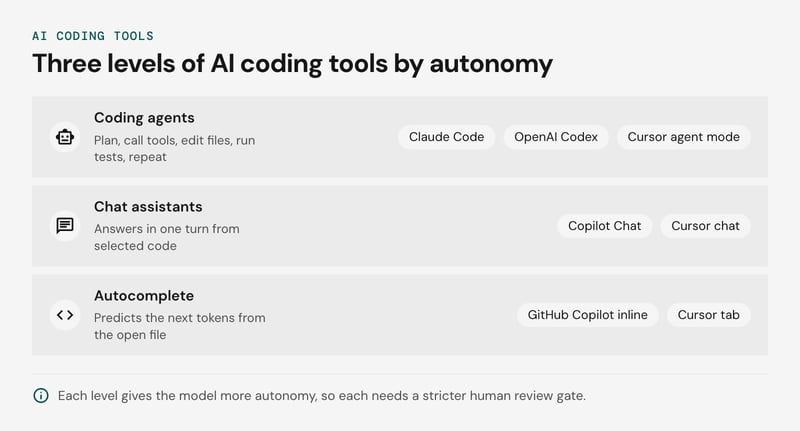
AI tools in software development fall into three levels: autocomplete, chat assistants and coding agents. Each level gives the model more autonomy, so each needs a stricter human review gate. Our GitHub Copilot guide covers the first two in more depth.
| Level | How it works | Best task | Typical failure | Oversight needed |
|---|---|---|---|---|
| Autocomplete (GitHub Copilot inline, Cursor tab) | Predicts the next tokens from the open file and neighboring files in its context window | Boilerplate, tests for a known pattern, familiar APIs | Subtle bugs that pass a skim | Developer reads every suggestion |
| Chat (Copilot Chat, Cursor chat) | Answers in one turn from selected code or retrieved files | Explaining code, drafting a function, reading a stack trace | Confident answers that miss files outside the context | Developer checks the answer against the real codebase |
| Agents (Claude Code, OpenAI Codex, Cursor agent mode) | Agent loop: plan, call tools to read and edit files and run tests, read the output, repeat | Bounded multi-file changes with a test suite as the check | Drift from the brief; lost context as tool output fills the window on large repos | Pull request review, sandboxed execution, scoped permissions |
Early signs that a level is failing
- Autocomplete: suggestions are accepted without edits, and reviewers later find wrong defaults or off-by-one errors that compiled and passed a skim.
- Chat: answers cite functions or files that do not exist, or ignore a module that was never pasted into the conversation.
- Agents: the diff touches files outside the brief, the same failing command is retried, or later edits contradict earlier ones in a long session.
MCP and prompt-injection exposure
The Model Context Protocol widens the agent level's reach. It gives agents a standard way to call external tools such as issue trackers, databases and browsers. Every connected server also adds a path for untrusted text into the context window.
OWASP lists prompt injection as the first entry in its Top 10 for LLM applications. A poisoned issue comment or web page can carry instructions the agent follows.
Security researcher Simon Willison calls the riskiest combination the lethal trifecta: one agent that reads untrusted content, can reach private data and can communicate externally. Remove any one of the three and an injected instruction has less to work with.
Default controls we recommend:
- Read-only credentials for every connected server.
- Manual approval for any write action.
- An allowlist of approved MCP servers.
- A sandbox with no production secrets.
When to move up a level
Agents multiply the volume of changes a reviewer faces, so review capacity runs out before generation speed does. Move a team from chat to agents only when all three conditions hold:
- Autocomplete and chat habits are stable, meaning reviewers already check suggestions line by line.
- The target task has a test suite that fails before the change and passes after it.
- Reviewers have capacity for extra pull requests.
If any condition is missing, stay at chat for that task. Keep every agent change behind a normal pull request.
How AI helps at each SDLC stage
AI helps at every SDLC stage, from drafting acceptance criteria to triaging incidents, but the main risk and the part that stays human change at each one. AI code review, AI test generation and static application security testing (SAST) each sit at a different gate.
Whatever the tooling, these gates work best when they sit on top of established software development best practices such as peer review, security checks and clear acceptance criteria.
The table maps the seven stages.
| Stage | AI use | Tool category | Main risk | Stays human |
|---|---|---|---|---|
| Requirements | Drafts user stories and Given/When/Then acceptance criteria from tickets and call transcripts | Chat assistants | Plausible assumptions that read like agreed requirements | Scope and priority |
| Design | Proposes architecture options, drafts ADRs, checks them against the repo | Chat assistants, coding agents with repo access | Options that ignore team skills, run cost and compliance constraints | Choosing the option |
| Coding | Completes lines, edits several files, runs multi-step changes in a sandbox | Autocomplete (GitHub Copilot), IDE assistants (Cursor), coding agents (Claude Code, OpenAI Codex) | Insecure or unidiomatic code arriving in larger diffs | Task framing, ownership of merged code |
| Review | First-pass AI code review of each diff, next to SAST in CI | AI code review tools, SAST | Reviewer overload; AI comments trusted over SAST findings | The merge decision |
| Testing | AI test generation for unit cases, edge-case suggestions, flaky-test triage (why automation matters) | AI test generation tools | Tests that assert current behavior, bugs included | What counts as correct |
| Deployment | Drafts pipeline config, infrastructure code and release notes | Pipeline assistants, agents | Over-broad permissions in generated infrastructure code | Production approval, rollback |
| Maintenance | Explains legacy code, drafts refactors, triages incidents from logs | Chat assistants, coding agents | Refactors that change behavior without test coverage | Priorities, incident command |
Requirements and design
In requirements, a chat assistant turns a transcript or vague ticket into draft user stories and acceptance criteria in minutes. Ask it to list open questions and assumptions separately from the criteria. Otherwise its gap-filling guesses end up in the backlog looking like decisions, and the product owner has to catch them.
In design, a model with repo access can lay out two or three architecture options and draft the ADR. For a choice between a queue and webhooks, it can list the ordering, retry and operational trade-offs. It cannot see your on-call capacity, vendor contracts or hiring plans, and those usually decide the choice.
We recommend treating its output as a structured starting point for the design review, with the architect making the call.
How AI changes coding and refactoring
AI changes coding and refactoring most where the task is local and well specified: boilerplate, glue code and mechanical refactors. GitHub Copilot and Cursor suggest or edit code in the IDE, and coding agents extend that to multi-file changes. Gains shrink as an edit depends on context the model cannot see.
Studies of speed point in different directions. In a 2023 controlled experiment with 95 developers, those using GitHub Copilot finished a JavaScript HTTP server task 55.8% faster.
METR's 2025 randomized trial followed 16 experienced open-source developers on 246 tasks in their own mature repositories. They took 19% longer with AI tools, although they had expected to be faster.
Our reading is that greenfield tasks and familiar-codebase tasks behave differently. The first study used a self-contained build, and the second used repositories the developers knew well. Missing context may explain part of the gap, but neither study isolates that cause.
Three failure modes show up in practice:
- Plausible but wrong edits. Generated code compiles, passes lint and matches house style, yet calls an internal API with the wrong contract or drops an edge case. In a multi-file edit the error repeats across files, and a consistent-looking diff invites a lighter review.
- Migrations that cannot be verified. An agent can port a module or upgrade a framework, but the result is only as trustworthy as the tests around it. Without characterization tests, "it builds" is the only check, so write those first. Our refactoring guide explains why tests come first.
- More pull requests per developer. Generating code is cheap and reviewing it is not. If review capacity stays flat, pull request cycle time rises and reviewers approve faster than they read.
We recommend pointing AI at refactors that already have a green test suite, capping diff size, and tracking pull request cycle time and review queue length alongside output.
Language models can suggest changes and flag errors. Design decisions and the final merge call stay with a developer who knows the system.
Can AI code review catch what humans miss?
AI code review catches pattern-level defects such as unchecked inputs, missing null handling and inconsistent error paths, but it misses problems that depend on intent.
A review bot reads the diff plus whatever context fits in its window. It will flag a swallowed exception. It will not notice that a discount rule contradicts what product agreed last sprint, or that a new endpoint breaks an assumption in a service it never saw.
The trade-offs side by side:
| AI code review | Human reviewer | |
|---|---|---|
| Strength | Consistent, fast first pass on every pull request | Knows intent, history and neighboring systems |
| Weakness | False positives; blind to cross-service context | Slow, and attention drops as diffs grow |
| Keeps | Style, common bug patterns, obvious security smells | Design fit, risk calls, merge approval |
The bottleneck is review capacity. Coding agents and IDE assistants such as Cursor and Claude Code raise the number and size of pull requests, while the number of people qualified to approve them stays flat.
The 2025 DORA State of AI-assisted Software Development report surveyed nearly 5,000 technology professionals and found that AI adoption now has a positive relationship with software delivery throughput and still a negative one with delivery stability.
False positives make that worse. Each noisy comment costs a reviewer a triage decision, so a bot that flags style nits can lengthen pull request cycle time.
We recommend running AI code review as a first pass on every pull request, tuned to a short list of high-precision checks, with human sign-off required for merge. Track the share of bot comments developers act on, alongside pull request cycle time. Teams with low pull request volume may find the tuning effort does not pay back.
What can AI do in testing, deployment and maintenance?
AI can draft tests, triage failing pipelines, summarize incidents and explain legacy code, but production deploys, rollbacks and access changes stay under human approval. The dividing line is reversibility: a draft costs a reviewer a few minutes, while an unreviewed production change costs an incident.
AI test generation needs the most care. A model that reads a function and writes tests for it encodes the function's current behavior as the expected behavior, so an off-by-one error passes its own test.
Write the cases from acceptance criteria, then let the model add boundary values, fixtures and mocks. Mutation testing shows whether generated tests assert anything. Our deeper notes on AI in quality assurance and why test automation matters cover the test-design side.
The division of labor we recommend:
| Task | AI may | Humans keep |
|---|---|---|
| Test authoring | Draft edge cases, fixtures, mocks | Expected behavior, what counts as a pass |
| Pipeline triage | Read failing logs, cluster flaky tests, open a fix as a pull request | Merging the fix, quarantining tests |
| Deployment | Draft release notes, summarize diff risk | Production deploys, rollbacks, access changes |
| Incidents | Build a timeline from alerts and chat, draft the postmortem | Root-cause conclusion, customer communication |
| Docs and legacy code | Explain modules, draft runbooks and decision records | Checking claims against real behavior |
Agents reach logs, tickets and dashboards through Model Context Protocol servers. Scope those servers read-only by default and give write access per tool, never per agent. Keep secret scanning in pre-commit hooks and CI, because agents can copy tokens from environment output into commits and logs, and prompt context can carry them to a third-party model.
Treat AI explanations of legacy code as hypotheses. Pin the current behavior with characterization tests before any refactoring, and the explanation becomes something you can verify.
Does AI make developers faster? What the studies say
AI makes developers faster on bounded, well-specified tasks and can slow them down in large mature codebases, so the studies disagree mostly because they measure different work. The primary sources side by side:
| Source | Year | Sample | Setting | Direction |
|---|---|---|---|---|
| Peng et al., Copilot task-completion experiment | 2023 | 95 developers | One self-contained task: a JavaScript HTTP server | Faster with Copilot |
| Three field experiments (Cui et al.) | 2024 | 4,867 developers | Daily work inside company repos | 26.08% more completed tasks, pooled |
| METR randomized controlled trial | 2025 | 16 developers, 246 tasks | Maintainers' own mature open-source repos | Slower with AI |
The 2023 experiment gave developers a greenfield task with no existing code. In the METR study, experienced maintainers worked on repositories they knew well, where unwritten context decides whether a suggestion is usable. The field experiments sit between the two: ordinary work at Microsoft, Accenture and a Fortune 100 electronics manufacturer, with results that varied by experiment and larger gains for less experienced developers.
Self-reported experience adds a third signal. In the Stack Overflow 2025 survey, 84% of respondents used or planned to use AI tools, while 46% distrusted the accuracy of the output and 33% trusted it. Surveys capture perception, and METR's participants estimated that AI had sped them up even though the measured result went the other way.
The DORA report moves from task speed to team delivery and ties outcomes to the practices around the tools.
Our reading is that two variables explain most of the disagreement. Codebase quality determines how often a suggestion fits. Review capacity determines whether faster drafting becomes faster delivery or a longer pull request queue.
METR's February 2026 update estimated that returning developers now took 18% less time with AI (confidence interval from 38% less to 9% more). METR calls that very weak evidence, because developers unwilling to work without AI dropped out of the experiment.
The 2023 and early-2025 trials used earlier-generation tools, so treat their direction as a hypothesis for your own repositories. Run a few weeks of measured work on your own code before extrapolating from any of them.
What are the real risks of AI-generated code?
AI-generated code carries five risks, and each has one control a team can enforce: a SAST gate, license scanning, data-handling terms, pull request size limits, and unassisted review practice.
| Risk | How it shows up | One control |
|---|---|---|
| Insecure code | Plausible output with injection flaws, weak cryptography or hardcoded credentials | Block merges on static application security testing findings, and run secret scanning on every push, including coding-agent branches |
| License and IP exposure | Output that reproduces licensed public code, or adds dependencies with restrictive licenses | License and dependency scanning in CI, plus the vendor's public-code matching filter where one exists |
| Proprietary code leaking | Source, config and secrets pasted into prompts or sent as context to a consumer-tier tool | Enterprise terms that exclude your data from training, and secret redaction before context leaves the editor |
| Review overload | Agents produce diffs faster than reviewers can read them | A hard size limit on pull requests, with review capacity treated as the throttle on AI output |
| Junior skills erosion | Junior developers merge changes they cannot explain | Scheduled unassisted review and debugging exercises |
The security evidence is older than the current tools but still describes the failure type. In Pearce et al.'s study of GitHub Copilot, roughly 40% of the 1,689 programs generated across 89 security-relevant scenarios contained vulnerabilities.
The models were 2021-era, so read it as a baseline for the failure type, not a current rate. OWASP's Top 10 for LLM Applications also lists sensitive information disclosure as a risk category.
Vibe coding, meaning accepting generated code without reading it, is where the five risks compound. Nobody reviews the diff, the scanner becomes the only check, and the author cannot explain the change. We recommend that production repositories merge no code a human has not read, and that agent-authored pull requests meet the same size limit as human ones.
Two caveats apply. A line cap slows agent workflows that touch many files, so split large changes by type, such as mechanical renames and behavior changes. The skills-erosion control is our judgment, since we know of no controlled study of it, and teams without junior developers can skip it.
How do you embed AI in your SDLC and measure it?
Embed AI in your SDLC in four steps: bounded tasks first, review and security gates second, agent context files third, then expand scope while tracking DORA metrics. The order matters because each step produces the baseline and controls the next one needs. For a worked example of this sequence under compliance constraints, see how one team ran an AI-assisted SDLC in a regulated industry.

- Start with bounded tasks. Pick work with a clear definition of done and an existing test suite: test scaffolding, dependency upgrades, small refactors, documentation fixes. Run GitHub Copilot, Cursor, Claude Code or OpenAI Codex on a few of these with one or two teams, and capture a baseline for the metrics below before the first merge.
- Add gates before volume. Wire a SAST scan, dependency and license checks, and a pull request size limit into CI. AI code review can pre-screen diffs, but a named human approves every merge. Agent output scales faster than review capacity does, so the gate has to exist first.
- Write agent context files. Put build commands, test conventions, architecture notes and forbidden paths in the repository (AGENTS.md, CLAUDE.md, Cursor rules, Copilot instructions). Expose issue trackers, docs and CI logs through Model Context Protocol servers, read-only at first, so agents work from your actual constraints.
- Expand by evidence. Move to larger changes, such as multi-file features and agent-driven migrations, only where the earlier metrics held. Teams that want help running this rollout can use our AI development services or staff it through an AI pod.
Measure outcomes at team level, against your own baseline:
- Change failure rate, the DORA metric: the share of deployments that cause a rollback, hotfix or incident.
- Pull request cycle time, from opened to merged, read together with PR size and reviewer queue time.
- Escaped defects: bugs found in production per release, tagged by whether AI-assisted code was involved.
Track all three together. Cycle time can fall while change failure rate rises, which means the team is shipping faster and breaking more.
Lines generated and suggestion acceptance rate both mislead. Acceptance rate counts suggestions taken, not code that survives review or stays in production a month later. Lines generated rewards verbose output and inflates diffs, which raises review load. Neither tells you whether delivery improved.
The caveat is team size. A team with a handful of weekly deployments has too little data for a stable change failure rate, so use a longer window and review incidents individually.
Frequently asked questions
Will AI replace software engineers?
What does an AI software developer do?
Where to use AI first: A decision summary
Start AI where output is cheap to verify, and add coding agents only as fast as review capacity grows. Autocomplete and chat assistants suit most teams from day one. AI test generation and AI code review pay off in codebases that already have CI and reasonable coverage.
Coding agents fit bounded tasks such as dependency upgrades, refactors and test backfill, where each run ends in a reviewable diff. We recommend tracking cycle time, change failure rate and review queue length, not lines generated, and pausing expansion when the queue grows.
For help scoping a pilot, see our AI development services, or get an estimate for your project.


