
Mobile app MVP development: What to build and decide first

Contents
A mobile app MVP is the smallest release that tests your riskiest assumption with real users in the app stores. Getting there is mostly a sequence of early decisions: the one job the app does, native or cross-platform, which store to launch on, which backend to use, and which events you track.
Lock those in before development starts and the build stays short. The right answers depend on your audience split, your team's skills and how much native device access the core job needs.
What is MVP in app development?
An MVP in app development is a first version cut down to the features needed to learn whether users want the product, which makes it a test and not a finished app.
Eric Ries popularized the minimum viable product in The Lean Startup. On mobile, the build also has to pass store review and report how people behave.
If your audience is not mobile-first, a web-based MVP can be a faster way to test the same assumption before committing to store releases.
We recommend naming the riskiest assumption before choosing features, because it decides what the release must prove and what can wait. Naming that assumption is also where our MVP development services start, before the mobile development team writes any code.
What goes into a mobile app MVP?
A mobile app MVP contains one core job, the features that job needs to work end to end, and the instrumentation that shows whether users completed it. Start from the riskiest assumption and cut anything that does not test it, because each extra feature delays the first real-user data.
Take a class-booking app for independent fitness studios. The riskiest assumption is that members will book and pay in the app and stop messaging the front desk. The core job is booking a class in the fewest steps, designed for a member doing it on a phone on the way to the studio.
We define activation rate for this app as the share of new installs that book a first class within seven days. That number is what the MVP exists to move.
MoSCoW prioritization sorts the backlog against that job:
| Priority | Features | Reason |
|---|---|---|
| Must | Class schedule, sign-up, booking, payment, push reminder, analytics events, crash reporting | Booking cannot complete, or cannot be measured, without them |
| Should | Waitlist, cancellation with refund, add to calendar | They help retention but do not test the assumption |
| Cut for now | Social feed, loyalty points, in-app chat, trainer profiles, admin dashboard | Each tests a different assumption. Studio staff can manage the schedule in the backend-as-a-service console |
A useful filter for the Should column: if a feature does not change the booking path or the activation rate, it waits for version two.
Thin-app rejection is the risk to check before you lock the list. Apple's Guideline 4.2 on minimum functionality expects an app to include features, content, and UI that go beyond a repackaged website. A webview wrapped around the studio's existing booking page is a likely rejection.
The Must list passes on its own merits, because a native schedule view and push reminders are things a website cannot match. Keep both in the first build, and confirm against the current guideline text before submission.
Native or cross-platform for an MVP?
Cross-platform development is the default for a mobile app MVP, with Flutter or React Native chosen by who you can hire; go native only when the core job needs platform APIs.
The four options compare as follows on the three criteria that move an MVP. The hiring and speed columns are our judgement, not measured data.
| Option | Hiring pool | Native module needs | Speed to first release on both stores |
|---|---|---|---|
| Native (Swift and Kotlin) | Deep for each platform, but you need two engineers or two teams | None, you call platform APIs directly | Slowest: two codebases, two sets of review fixes |
| Flutter | Dart specialists, a smaller pool than JavaScript | Platform channels for anything the plugins don't cover | Fast: one codebase and one UI layer |
| React Native | Largest pool, since web teams already write TypeScript | Native modules in Swift/Kotlin when a library is missing | Fast, fastest when a web team is already in place |
| Kotlin Multiplatform | Android engineers plus someone who can write SwiftUI | Shared logic calls platform APIs through expect/actual declarations | Middle: shared business logic, with UI written per platform unless you adopt Compose Multiplatform |
The decision rule follows the order of the columns:
- The core job depends on deep platform APIs (background Bluetooth, HealthKit, home-screen widgets, a custom camera pipeline): build native, or Kotlin Multiplatform with native UI if an Android team will own it.
- You have web engineers or plan to hire them: React Native. Hiring speed usually decides the first release date more than framework benchmarks do.
- You have no mobile team and the product depends on a custom, animation-heavy interface: Flutter, because rendering is consistent across both platforms.
- An Android team exists and iOS comes later: Kotlin Multiplatform lets you ship Android first and share the domain logic when iOS follows.
For a standard booking, marketplace or content app, performance gaps between Flutter and React Native will not decide whether users complete the core job. Our Ionic vs React Native comparison covers the hybrid-web option in more depth.
The rule weakens in one case. If you launch on iOS only and your team already writes Swift, a single native build is often the quickest path, and a cross-platform framework adds a layer you would not need until Android arrives.
iOS first or both stores?
Launch iOS-only when your target audience skews iOS, and launch on both stores when an Android-heavy segment would otherwise be cut out of the test.
iOS-first fits products aimed at markets where iPhones hold the larger share, such as the US. It also keeps testing narrow: TestFlight builds distributed through App Store Connect give you one toolchain and a short list of devices to debug against. Our iPhone vs Android user comparison covers how the two audiences differ.
Go to both stores when your riskiest assumption concerns a segment that is mostly on Android, such as emerging markets or a mixed-device B2B workforce. An iPhone-only test of that assumption produces data about the wrong users.
A shared Flutter or React Native codebase does not halve the work. QA, store listings, and review handling still run twice, once against the App Store Review Guidelines and once against Google Play policy.
Google Play closed testing adds a scheduling constraint. Under Google's testing requirements, a personal developer account created after 13 November 2023 must run a closed test with at least 12 testers, opted in for 14 days in a row, before it can apply for production access.
If you ship on both stores, start that test alongside your first TestFlight build so it does not gate launch day.
Backend-as-a-service or custom backend?
Choose a backend-as-a-service for your mobile app MVP unless you already need relational queries, strict data residency, or full data export. Those three requirements are the usual reasons to build a custom backend first.
A backend-as-a-service gives you auth, a database, push notifications, and file storage without a backend team, which keeps the build focused on the riskiest assumption. The two common picks differ mainly in data model. Firebase pairs Firestore, a document database, with Firebase Analytics and Crashlytics. Supabase is built on Postgres and is open source, so leaving it is cheaper.
The exit triggers to check before you commit:
- Relational queries: reporting across users, subscriptions, and orders needs joins, which a document model handles poorly. Postgres handles them natively.
- Data residency: if customers or regulators require data in a specific region, confirm the provider offers it before launch.
- Export limits: if you cannot dump all data in a standard format, a later migration becomes a rewrite.
- Usage-based pricing: check how the bill grows with reads, writes, and active users once retention cohorts start compounding.
Two habits keep the exit cheap. Put every BaaS call behind a repository layer in the app, so a swap touches one module. Define your own event schema for analytics, so Firebase Analytics events survive a backend change.
If the product is regulated, such as fintech or health, we recommend a custom backend from day one. For a vendor-by-vendor comparison, see our mBaaS services overview.
How to build a mobile app MVP step by step
Build a mobile app MVP in six steps: discovery, design, build, beta, store submission, and launch. Each step ends in a named output, and the two store gates, Apple review and Google Play closed testing, go on the calendar from day one.
The durations below are scope-driven. We deliberately give no fixed weeks, because the drivers differ for every product (see the MVP timeline guide for worked ranges).
| Step | Deliverable | What drives duration |
|---|---|---|
| 1. Discovery | Written riskiest assumption, must-have and cut lists, event schema | Number of untested assumptions; access to target users |
| 2. Design | Clickable prototype of the one core flow, tried with real users | Screens in the core flow |
| 3. Build | Working app on a staging backend, with analytics and crash reporting wired in | Must-have list length; native or cross-platform |
| 4. Beta | TestFlight build and a Google Play closed testing track in use | Tester recruitment; number of fix cycles |
| 5. Store submission | Listing approved in App Store Connect and Play Console | Review outcome and any rejection |
| 6. Launch | Production release; dashboards for activation and retention cohorts | Staged rollout size |
Where store review fits. On Android, the 14-day closed test above runs during the beta step, so recruit the 12 testers while the app is still being built.
On iOS, the first external TestFlight build of each version goes through Beta App Review. Apple says it typically reviews at least 50% of submissions within 24 hours and 90% within 48 hours.
Submit the production build in App Store Connect while the last beta fixes land, and keep a few days of buffer for a rejection against the App Store Review Guidelines, because a resubmission restarts the review.
During the build step, one person owns the cut list and keeps new features out of the sprint. QA tests each sprint's build so defects surface while the code is fresh, and conversations with users start in beta, not after launch.
The whole sequence can be short when scope stays tight. Netguru took Prospero.Ai's fintech MVP from start to both app stores in 5 weeks, below budget.
How much does it cost to develop an MVP app?
The cost of a mobile app MVP follows five scope drivers: platforms, framework, backend, integrations, and design depth. Each is decided before the first sprint, so each is a lever you control. Feature count matters less than where these five land.
Platform and framework choice moves the budget most, and our breakdown of cross platform mobile app development cost shows how far native and shared-codebase builds can diverge.
| Driver | Lower-cost choice | Higher-cost choice |
|---|---|---|
| Platforms | One store first | iOS and Android at launch |
| Framework | Cross-platform development with Flutter or React Native, one codebase | Two native codebases |
| Backend | Backend-as-a-service such as Firebase | Custom backend and infrastructure |
| Integrations | One auth or payment provider | Several third-party systems, regulated data |
| Design depth | Standard platform components | Custom motion and a branded design system |
A decision rule for scoping
Start with the lower-cost choice on all five drivers. Move a driver to the higher-cost column only when your riskiest assumption cannot be tested without it. Applied per driver:
- Platforms: launch on both stores only if the test needs both user groups together, such as a marketplace with buyers on one platform and sellers on the other.
- Framework: go native if the core test depends on camera pipelines, background processing, or other deep device access.
- Backend: stay on backend-as-a-service until you need custom server logic or data residency, and check whether its pricing scales with reads.
- Integrations: include only those the core user flow cannot run without.
- Design depth: keep standard components unless the test is about brand perception.
In our view, integrations are the driver teams underestimate most. Each one adds contracts, sandbox access, and failure cases to test. Regulated data raises that cost further, so treat it as a reason to move the driver to the higher-cost column.
For figures, see our MVP costs guide. The MVP timeline guide shows how the same drivers stretch the calendar.
What to set up for analytics and crash reporting before the first build
Firebase Analytics and Firebase Crashlytics belong in the first tester build, with the event schema frozen beforehand, so activation rate is measurable from the first session.
Commit the schema to the repo as a short table. Renaming an event after testers start splits your data into two series.
| Event | Fires when | Parameters |
|---|---|---|
| sign_up | Account is created | method |
| onboarding_complete | Last onboarding step finishes | steps_skipped |
| core_action_completed | User finishes the one core job | item_type |
| push_prompt_shown | System permission dialog appears | trigger |
| push_permission_result | User answers the dialog | granted |
Our working definition of activation rate is users who fire core_action_completed within a set window of first open, divided by users who fire first_open. Choose the window from your product's natural cycle.
For Crashlytics, upload iOS dSYMs and Android mapping files so stack traces are readable. In Flutter, route FlutterError.onError and PlatformDispatcher.instance.onError to it. React Native uses the @react-native-firebase/crashlytics package. Android vitals reports crash and ANR rates for Google Play installs, so watch it beside Crashlytics once a track is live.
For consent, disable automatic collection in the Android manifest and Info.plist, then call setAnalyticsCollectionEnabled after the user opts in. Where GDPR applies, this is the safe default. Keep the App Store privacy labels and the Play Data safety form in line with what the SDKs collect.
Ask for push permission after core_action_completed, behind your own pre-prompt screen. iOS shows its system dialog once, and Android 13 and later gate notifications behind the POST_NOTIFICATIONS runtime permission. A prompt at launch spends that one dialog before the user has seen any value. If the core job depends on notifications, as in delivery tracking, move the ask earlier.
What should you measure after launch?
After launch, track activation rate, Day-1/7/30 retention cohorts, and crash-free sessions. Downloads only count installs, and an install says nothing about whether your riskiest assumption held.
Installs also include people who never open the app, and a paid campaign or a store-listing change can move the number without any change in product value.
Define one activation event. Pick the first moment a user completes the core job, such as a first booking or a first transfer, and name it in the event schema. Activation rate is users who fire that event divided by new installs in the same period. Several activation events give you a number nobody can act on.
Read retention by install cohort. Group users by install week and compare each cohort at Day-1, Day-7, and Day-30.
| Checkpoint | What it points to | If it drops |
|---|---|---|
| Day-1 | Onboarding and first value | Fix the path to the activation event |
| Day-7 | Whether a habit is forming | Revisit the core job and its triggers |
| Day-30 | Lasting value | Question the riskiest assumption itself |
MVP cohorts are small, so treat a single week's curve as a signal to investigate. Look for a shape that holds across several cohorts.
Watch stability from the first build. Firebase Crashlytics reports crash-free sessions and crash-free users per release. Android vitals shows the same problem from the Play Store side, including ANRs, and Google applies bad-behavior thresholds that affect store visibility.
Android vitals sets the overall bad-behavior threshold at a 1.09% user-perceived crash rate and a 0.47% user-perceived ANR rate. The per-device threshold is 8% for each.
Each release then follows the Build-Measure-Learn loop from Eric Ries's The Lean Startup: ship a small change, read the cohort, and decide what to build next.
When to iterate, pivot or scale after the MVP
Decide before launch which activation rate and retention cohorts will make you iterate, pivot or scale, and write the thresholds down next to your riskiest assumption. Numbers chosen after launch tend to bend toward whatever the data shows.
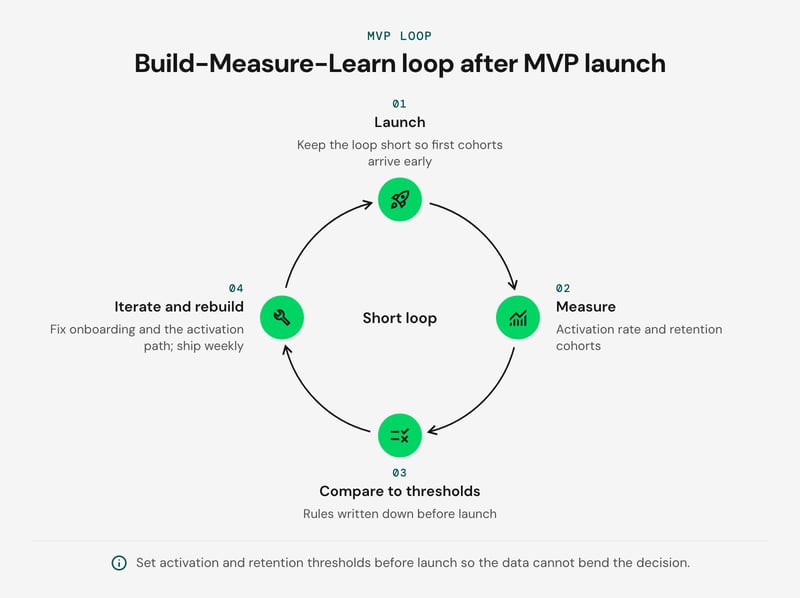
The thresholds below are illustrative, not benchmarks. Derive yours from the assumption the MVP exists to test.
| Decision | Rule set before launch (illustrative) | Action |
|---|---|---|
| Iterate | Activation rate under 40%, but users who activate retain on a flattening curve | Fix onboarding and the path to the activation event; ship weekly |
| Pivot | Activation met, yet the last two cohorts fall to near zero by Day 30 after two iteration cycles | Treat the riskiest assumption as false; change the user, the job or the channel |
| Scale | Activation above target and Day-30 retention flat across three consecutive cohorts | Run the architecture check, then fund growth |
Daily active users and average revenue per user are worth adding only at the scale stage. Before that, they are too noisy to separate a weak product from a weak campaign. Keep the Build-Measure-Learn loop short, so the first cohorts arrive early enough to act on.
Before scaling, check four places where MVP shortcuts turn into debt:
- Backend-as-a-service: quotas, pricing at 10x traffic, and how hard it is to export data.
- Cross-platform code: how many Flutter platform channels or React Native native modules you wrote to work around gaps.
- Event schema: whether event names and properties stayed stable, so cohort comparisons still hold.
- Core flow tests: whether the activation path has automated coverage before releases speed up.
If two of the four are red, a hardening sprint comes before growth spend.
Where cost, testing, PoC vs MVP and common mistakes fit
Four sibling posts go deeper on cost, testing, PoC vs MVP and common mistakes. Pick the next read by the question that is blocking your decision today.
- Cost: read the MVP costs guide if you need a budget figure before committing a team or talking to investors.
- Testing: read MVP testing methods once a first build, such as a TestFlight release, is in testers' hands and you must choose between interviews, usability sessions, and analytics-led tests.
- PoC vs MVP: read PoC vs MVP if your riskiest assumption is whether the technology works, not whether users want it. It also places the minimum lovable product relative to both.
- Mistakes: read common MVP mistakes before you sign off scope, or whenever the must-have list has grown since the last review.
If more than one rule applies, follow the order of the build. Settle PoC vs MVP before scope is fixed, read the mistakes post at sign-off, and turn to testing once real users have a build. The cost post can come at any point before the team is committed.
Mobile app MVP FAQ
How long does it take to build a mobile app MVP?
How do I develop a mobile app MVP?
What is MLP vs MVP?
Plan your mobile app MVP with Netguru
Netguru plans a mobile app MVP around your riskiest assumption and ships it to the stores your test needs, native or cross-platform depending on your team and roadmap. The work covers discovery, scoping, build, and launch, with analytics and crash reporting in the first release. Our software development team handles the backend too, as a backend-as-a-service or custom APIs.
Send us one paragraph on the assumption you need to test and the users you can reach in the first month, and we can scope a first estimate from that.


