
Web design trends 2026: What to adopt, test or skip


Contents
Most 2026 web design trends are cheap to adopt visually and expensive to adopt in production. Each one carries a cost in INP, LCP, CLS, accessibility or cache efficiency, and that cost decides whether a trend belongs on your site.
Each trend below gets a verdict (adopt, test or skip) and the implementation trade-off behind it.
Web design trends 2026: Adopt, test or skip
Adopt bento grid layouts and machine experience (MX) design in 2026, test AI-powered personalization and motion effects, and skip neo-brutalism on any page where conversion depends on legibility.
Every trend below spends budget in Core Web Vitals (INP, LCP, CLS), accessibility or cache efficiency, and the bill usually arrives after launch. Netguru designs and builds web products, design systems and design-to-code workflows for enterprise and scale-up clients.
We recommend adopting a trend only when it can sit behind a design token or feature flag, because a reversible trend is cheap to be wrong about.
The verdicts below follow the order of the sections that cover each trend's implementation cost, failure modes and fallbacks:
| Trend | Main cost | Best fit | Verdict |
|---|---|---|---|
| Bento grid layout and barely-there UI | Collapses badly on mobile; breaks reading order for screen readers | SaaS feature pages, dashboards | Adopt |
| Machine experience (MX) design | Engineering time on semantic markup and structured data | Stores, content sites, SaaS docs | Adopt |
| AI-powered personalization | Fragments CDN cache; can slow LCP | Stores with strong first-party data | Test |
| Scrollytelling, parallax, page animation | INP when driven by JS; needs a prefers-reduced-motion fallback | Launches, long-form storytelling | Test, CSS-first |
| Kinetic typography | CLS from variable-font shifts; harder to read | Hero headlines only | Test |
| 3D elements and video heroes | Page weight, mobile GPU load, autoplay limits | Product showcases | Test |
| Dark mode and earthy palettes | Second palette and separate image treatment | Any product with design tokens | Adopt |
| Neo-brutalism, maximalism, retro | WCAG 2.2 contrast failures; weaker conversion paths | Portfolios, brand-led campaigns | Skip on conversion pages |
Why bento grids and barely-there UI are replacing busy layouts
Bento grid layouts and barely-there UI are replacing busy layouts because they give each message one tile and let white space carry the hierarchy.
Bento tiles map onto component libraries and design tokens, so they are cheap to maintain. A neutral base with one bold accent keeps the page minimal while still adding depth. Material Design, introduced by Google in 2014, documents the layout, type and color rules this style borrows.
Both patterns fail in three predictable places:
- Mobile collapse. Tiles spanning 2x1 or 2x2 columns on desktop fall into one long column on a phone, so a hero tile can end up below minor ones.
- Reading order. CSS Grid placement and order change what sighted users see, but screen readers and keyboard focus follow DOM order, which risks failing WCAG 2.2 Meaningful Sequence and Focus Order.
- Thin type. Light-weight gray text on white is the common barely-there failure.
According to W3C WCAG 2.2, body text needs a 4.5:1 contrast ratio and large text needs 3:1. Interface components such as buttons and input borders need 3:1 against adjacent colors.
The one accent color must meet these WCAG 2.2 contrast requirements both as text and as a component fill. A pale accent on a neutral base often passes as a decorative fill and fails as a link.
We recommend writing the DOM in priority order and using grid-template-areas to rearrange tiles at breakpoints. Design the mobile stack first in Figma, and annotate reading order on each frame, because a Figma frame shows visual position and says nothing about DOM sequence. Keep body weight at 400 or above.
What is machine experience (MX) design?
Machine experience (MX) design is the practice of making a site's content readable by AI agents and crawlers, using semantic HTML, server-rendered output, and structured data. Human-facing polish does not help a parser that receives an empty <div id="root">.
The order below follows cost and payoff, cheapest first:
- Semantic HTML. Use landmarks (header, nav, main, article), one h1, and heading levels that never skip. Use real a and button elements. In a bento grid, make each tile an article or section with its own heading, so every tile parses as a unit.
- SSR or static generation for anything you want read. Product copy, pricing, and article text must be in the first HTML response. Check with curl or by disabling JavaScript. Not every AI crawler is documented to execute scripts, so we treat server-rendered HTML as the safe baseline. For an existing SPA, this is the costly step.
- JSON-LD structured data. Add Organization, Article, Product, or BreadcrumbList markup, following Google Search Central's structured data documentation, which recommends JSON-LD. Every marked-up value must match visible content. Validate in the Schema Markup Validator on each release.
- Key content outside client-only widgets. Tab panels, accordions, and carousels should ship their text in the DOM. Text inside canvas or WebGL is invisible to parsers. For kinetic typography, animate real text with CSS transforms and keep the string in the markup.
Steps 1 and 4 cost little and also help WCAG 2.2 conformance, since assistive technology reads the same semantics. Structured data cannot repair thin or hidden content, and a small brochure site may get most of the benefit from steps 1 and 3 alone.
How is AI changing web design?
AI is changing web design through AI-powered personalization, generated layouts and imagery, and chat widgets, and each carries a cost in caching, consent, or brand sameness.
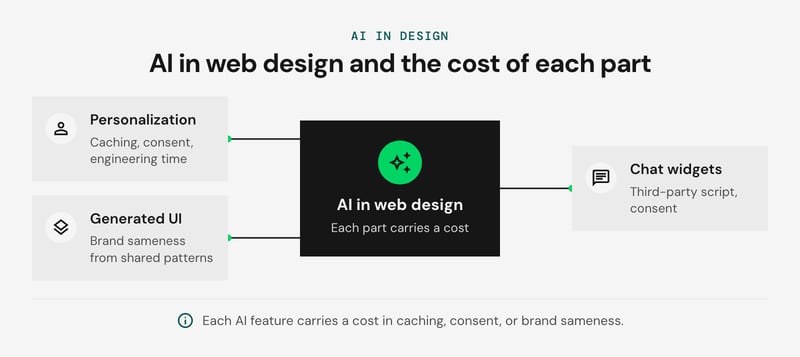
Personalization has the largest engineering cost. A page that varies per visitor cannot be served as one cached object, so requests fall through to origin and LCP degrades. Behavioral targeting also needs consent under GDPR and ePrivacy rules, which means a share of visitors will always get the default.
We recommend personalizing a few slots at the edge and leaving the rest of the page static:
- Pick two or three slots. A hero headline, a recommendation module and a CTA are enough.
- Cache by segment. Serve a handful of variants per page, not one per user.
- Reserve slot dimensions. Fixed sizes protect CLS when the variant resolves late.
- Design the no-consent default first. It is the version many visitors will see.
This pays off only on high-traffic pages with a measurable conversion goal. Elsewhere, the added complexity rarely earns its keep.
Chatbots are the cheapest AI feature to add and the easiest to get wrong. Their third-party JavaScript adds main-thread work, so load the widget on first interaction and watch INP. If transcripts are stored, they need the same consent and retention review as any other behavioral data.
Sameness is the design risk. Generators in Figma and Framer draw on the same common patterns, so unedited output converges on similar layouts and stock-looking imagery. Start from a component system you control.
A design system's buttons, cards and navigation can be themed to a brand's identity, and tokens keep that customization consistent. Custom illustration carries the brand's own look.
Netguru's redesign for Mailgun shipped 50+ custom illustrations and redesigned controls.
Use AI for first drafts, variant generation and alt-text suggestions. Keep brand, hierarchy and accessibility decisions with a designer. For an outside check on whether AI-assisted output still holds up, an independent UX review can catch usability and accessibility gaps before launch.
Are scrollytelling, parallax and page animation still worth the cost?
Scroll-driven animations are worth the cost when they run in CSS on the compositor (Chromium and Safari today, with a static fallback elsewhere), and rarely worth it when a JavaScript scroll listener drives them. Parallax and scroll-jacking are older patterns, and the cost sits in the implementation.
The two approaches side by side:
| CSS animation-timeline | JS scroll listeners (GSAP ScrollTrigger style) | |
|---|---|---|
| Where it runs | Compositor, when only transform and opacity change | Main thread, every scroll tick |
| INP risk | Low, since no handler competes with input | Rises when handlers share the thread with click and tap handlers |
| CLS risk | None if you animate transform | Present if the code animates top, height or injects elements |
| Browser support | Chromium 115+ and Safari 26+; Firefox not yet stable, so keep the fallback | Universal |
| Best for | Reveals, progress bars, simple parallax | Pinned sequences, timeline scrubbing, canvas or WebGL scenes |
Scroll itself is not an INP interaction. Main-thread scroll work still delays the next tap or keypress, and that delay is what INP records. A hero parallax that initializes through a JS library can also push back LCP, so never lazy-load or defer the hero image for the effect.
Gate the animation twice, so reduced-motion users and unsupported browsers both get static content:
@media (prefers-reduced-motion: no-preference) {
  @supports (animation-timeline: view()) {
    .reveal {
      animation: reveal linear both;
      animation-timeline: view();
      animation-range: entry 0% cover 30%;
    }
  }
}
@keyframes reveal {
  from { opacity: 0; transform: translateY(24px); }
  to   { opacity: 1; transform: none; }
}
The default state is the finished layout, and motion is an enhancement on top. Apply the same prefers-reduced-motion check to View Transitions API page transitions.
We recommend keeping motion that explains something. The Fat Milk website turns its abstract logo into an animated expansion of white space, which carries the brand.
Keep full-page scroll-jacking out of production builds, because it takes scroll control from the user and lags on mid-range phones. Pinned scrollytelling is still defensible for editorial and data stories, where a GSAP bundle and a longer QA pass are the price.
Does kinetic typography improve or hurt readability?
Kinetic typography hurts readability when it moves body copy and helps when it is confined to one hero line. The penalty shows up in Core Web Vitals (INP, LCP, CLS) before any user complains.
Animating a variable font axis such as wght or wdth changes glyph advance widths, so every frame can re-wrap the line and push neighboring content. That is main-thread reflow, and it can register as CLS if the block is not size-locked. Long-running type animation also competes with input handling, which raises INP.
Our rule is one animated line, in the hero only, with all body copy static. Three controls keep that line cheap:
- Reserve the space. Give the headline a fixed or min-height container, or animate transform and opacity in place of font axes.
- Match the fallback. Use font-display: swap with a fallback face tuned through size-adjust and ascent-override. If the headline is the LCP element, preload the font file.
- Respect motion settings. Gate the animation behind prefers-reduced-motion: no-preference. WCAG 2.2 success criterion 2.2.2 requires a pause mechanism for auto-starting motion that lasts more than five seconds.
When do 3D elements and video heroes pay off?
3D elements and video heroes pay off when the product itself is spatial, such as a configurator, a showroom, or a hardware demo. For anything else, a poster image or a Lottie animation keeps LCP intact.
Three.js and WebGL add a library bundle, model and texture downloads, and a continuous render loop. On mid-range Android GPUs that loop drops frames and drains battery, and a busy main thread can degrade INP. The HTTP Archive Web Almanac 2025 reports the median mobile page weight at 2,559 KB. A 3D hero spends that budget fast.
The options side by side:
| Option | Use when | Cost |
|---|---|---|
| Three.js / WebGL | Users rotate or inspect the product | Bundle, assets, sustained GPU load |
| Muted video hero | Motion carries the story | Autoplay works only when muted; iOS also needs playsinline, and Low Power Mode can still block it |
| Lottie | Simple vector motion, icons, loops | Small JSON file, but it needs a pause control |
| CSS noise or grain | You only want a tactile feel | An inline SVG feTurbulence filter or a tiled PNG, negligible LCP impact |
Load poster-first. Make the poster image the LCP element with explicit width and height so CLS stays at zero. Then swap in the video or canvas after the load event or on first interaction.
Under prefers-reduced-motion: reduce, or when Data Saver is on, keep the poster and skip the swap. Since more traffic is mobile, load weight is also an energy decision.
Are dark mode and earthy colors still a safe default?
Dark mode and earthy palettes are a safe default only when every color pair passes contrast in both themes. WCAG 2.2 requires 4.5:1 for body text (SC 1.4.3) and 3:1 for large text and UI component boundaries (SC 1.4.11). Clay, olive and sand sit at mid luminance, so terracotta text on a sand background often fails.

A pair that passes in the light theme says nothing about the dark one, so test each pair in both. In our view dark mode is table stakes in 2026. Treat it and the palette as one theming job: a second palette, semantic design tokens, and separate image handling.
Name tokens by role. Components reference color.surface.default or color.text.primary, and each theme maps the role to a value. In Figma, variables with Light and Dark modes hold that mapping, and the same names export to CSS custom properties switched by prefers-color-scheme or a data attribute.
A small palette keeps the token set small. The design system Netguru built for Joystream runs on 175 design tokens across 190+ global components.
The dark mappings that need their own values:
| Token | Dark-theme treatment |
|---|---|
| surface | Dark gray near #121212, not pure black; raise elevation with lighter surfaces |
| text.primary | Off-white instead of #fff, which limits halation on OLED |
| accent | Lightened, slightly desaturated version of the light accent; re-check 3:1 against the surface |
| border | Re-derived so UI boundaries still reach 3:1 |
Images need their own pass. Serve logos and line art as SVG with currentColor, or use <picture> with a prefers-color-scheme: dark source. The browser downloads only the matching source, so the second asset adds no bytes for light-theme visitors. Photos usually need a mild brightness() filter in the dark theme, and transparent PNGs with baked-in light halos need re-export.
On a content site with low return traffic, a full dark theme may not repay the design time. A color-scheme-aware baseline with tokens in place covers most of the value.
Brutalism, maximalism and retro: When do they break conversion?
Neo-brutalism, maximalism and retro styles break conversion when they cost contrast, legibility or navigation predictability, and that cost is highest in checkout and form flows.
Three failure modes show up first:
- Raw color pairs. Neo-brutalist palettes of saturated yellow, hot pink and electric blue fail WCAG 2.2 contrast requirements as soon as one is set as text on another. Pure yellow on white measures well under 2:1, against the 4.5:1 that SC 1.4.3 sets for body text. Thick black borders usually pass SC 1.4.11, so audit the fills and the text, not the outlines.
- Overprinted text. Headlines over patterns, gradients or video change contrast from pixel to pixel. Test the worst region of the background, not the average.
- Unconventional navigation. Hidden menus, scattered links and icon-only labels slow task completion.
This is our judgement, not a measured result: it is where a style stops being a brand choice and becomes a cost.
Spend the expression where it builds distinctiveness, such as the logo, illustration or one hero section, while the layout stays clean and readable.
Checkout stays conventional: standard fields, visible labels and default focus states, themed through design tokens that already pass contrast.
Ecommerce web design trends worth adopting
Ecommerce web design trends worth adopting protect Core Web Vitals: fast LCP on product images, AI-powered personalization limited to recommendations, and a plain checkout.
The first product photo or hero image is usually the LCP element, so set its priority and weight before adding any motion. Personalization belongs in recommendation rails, where a wrong guess costs one tile.
Checkout stays plain so forms keep stable CLS and responsive INP.
The fit by site type, side by side:
| Site type | Adopt | Skip or limit |
|---|---|---|
| Store | LCP-tuned product images, AI-powered personalization in recommendations | Experimental layouts and animation in checkout |
| SaaS | Bento grid layout for feature overviews, machine experience (MX) design with clean structured data | Heavy hero animation on pricing pages |
| Content site | Text-first templates, stable CLS | Heavy motion, including long scroll-driven animation sequences |
One caveat: personalization needs enough traffic and catalog depth to learn from. A store with a few dozen SKUs gets more from better merchandising and faster images than from a recommendation engine.
What are the latest trends in mobile web design?
The latest mobile web design trends are single-column bento grid layouts, View Transitions API navigation, thumb-zone controls, and energy-efficient pages, each bounded by Core Web Vitals (INP, LCP, CLS) budgets.
A bento grid layout collapses to one column on mobile, so DOM order has to match task priority: primary tile first, supporting tiles by importance, decorative tiles last or removed. Reordering with CSS order splits visual and keyboard sequence, so fix the source order instead.
The trade-offs side by side:
| Trend | Mobile check | Implementation cost |
|---|---|---|
| Bento grid layout | Set aspect-ratio on tiles to protect CLS; verify reading order | Low CSS effort, high editorial discipline |
| View Transitions API | Test INP on mid-range Android; provide a plain-navigation fallback | Medium, depends on browser support |
| Thumb-zone controls | Primary actions in the lower reach area; meet the WCAG 2.2 target-size minimum | Low, but changes navigation patterns |
| Energy-efficient pages | Prioritize the LCP image, trim JavaScript, use variable fonts | Ongoing performance budgeting |
Motion needs a prefers-reduced-motion branch, and playful effects should degrade to a static state.
As more users arrive on phones, fast loading becomes the constraint every other trend has to fit inside.
Web design trends FAQ
Is web design still worth it in 2026?
What are the web design trends for 2026?
What are the 7 c's of website design?
What trends are outdated in 2026?
What to try first
We recommend starting with design tokens, scroll-driven animations and machine experience (MX) design. In our view they carry the lowest adoption cost and are the easiest to roll back.
- Design tokens: every team. First step: move color, spacing and type scale into one token file and check WCAG 2.2 contrast there.
- Scroll-driven animations: marketing and product-story pages. First step: ship one CSS animation-timeline effect behind prefers-reduced-motion, then watch INP.
- MX design: sites that depend on search or AI citation. First step: add structured data to your top three templates.
- Bento grid layout: modular feature pages. First step: rebuild one page with CSS Grid.
- AI-powered personalization: teams with first-party data and consent handling. First step: personalize one server-rendered module.
- Kinetic typography: hero sections only. First step: animate one headline with transform and opacity in a size-locked container.
- Neo-brutalism: brands with a strong voice; skip it for conservative or regulated audiences. First step: prototype one landing page.
For a second opinion on which of these fits your stack, our Responsive Web Design services team can review it. Improve your product's UX


