
Enterprise web development: Architecture, stack, security and cost guide


Contents
Enterprise web development is the design, build and long-term operation of web platforms that must integrate with systems of record (ERP, CRM), enforce role-based access and meet compliance duties across many internal teams.
A standard build optimizes for launch speed and content; an enterprise build optimizes for integration, governance and change over years.
What is enterprise web development, and how is it different?
A system of record is the ERP, CRM or other application that owns the authoritative copy of the data. An enterprise platform has to read and write those systems, enforce role-based access control (RBAC) across many user groups, and pass audits.
A standard build faces few of these constraints. For commerce-heavy builds, the same constraints shape platform choice, as the comparison of SAP Commerce and Saleor shows.
Netguru designs and builds enterprise web platforms that integrate with ERP and CRM systems, identity providers and regulated data environments. We recommend fixing the system-of-record and identity boundaries before choosing a front-end framework, because changes there are the most expensive to reverse.
A single-product company with one user role, no ERP and no regulated data can ship a standard build, and the enterprise overhead would buy it nothing.
For teams that need more than a web front end, our custom enterprise software development services cover the internal and customer-facing applications these platforms connect to. A web portal development company typically handles the authentication, role-based access, and API integrations that tie those back-end systems to a single login for employees, partners, and customers.
The differences side by side:
| Dimension | Standard web build | Enterprise web build |
|---|---|---|
| Data | Self-contained database | Reads and writes ERP and CRM systems of record, usually through queues and idempotent APIs |
| Access | Single login, one or two roles | RBAC or attribute-based access control, SSO through SAML or OpenID Connect |
| Architecture | One deployable application | Composable architecture: replaceable services (headless CMS, microservices or a modular monolith) behind an API layer |
| Compliance | Privacy policy, cookie banner | Audit evidence for SOC 2, GDPR, HIPAA or accessibility rules, depending on sector |
| Operations | Basic uptime monitoring | SLOs, centralized logging, tracing and on-call ownership |
| Change | Redeploy the site | Phased migration and versioned integrations, with named owners |
Business benefits of an enterprise web platform
An enterprise web platform pays back through six outcomes you can measure, and each one carries a cost that belongs in the business case. The table pairs every benefit with the metric that proves it and the trade-off it introduces.
| Benefit | Metric to track | Trade-off |
|---|---|---|
| Faster change delivery (composable architecture, microservices) | Lead time for changes, deployment frequency | More pipelines, contract tests and a platform team to run them |
| One authoritative data flow through system of record integration (ERP, CRM) | Manual re-entry hours, sync discrepancy rate | The ERP's API limits and release cycle cap what the platform can do |
| Lower access risk (RBAC, SSO with SAML and OIDC) | Time to deprovision a leaver, orphaned accounts | Role sprawl over time; the identity provider becomes a dependency |
| Audit readiness (SOC 2, GDPR, HIPAA) | Staff-days of evidence collection per audit | Control overhead; log retention can conflict with data minimization |
| Availability under load | SLO attainment, error-budget burn | Redundancy and multi-region hosting raise the infrastructure bill |
| Faster diagnosis through observability (APM, centralized logging, alerting) | Mean time to resolve, share of alerts that are actionable | Telemetry storage cost; unfiltered alerts cause fatigue |
The integration row usually decides whether the case holds, because a platform that re-keys data into the ERP by hand moves the cost instead of removing it. Idempotent writes and a reconciliation job keep the discrepancy metric honest.
Baseline two or three of these metrics before the build starts. Teams with only a handful of engineers should expect the microservices overhead to outweigh the delivery gain, and a modular monolith is the safer starting point.
Key features of an enterprise website
Enterprise web development enhances customer experience, improves operational efficiency, and supports revenue growth. An enterprise site has to handle growth, offer reliable security, and integrate smoothly with essential business tools. Let's break down the key features that make these sites successful:
Scalability: An enterprise website that handles growth can expand alongside your business, managing increased traffic, transactions, and new features without slowing down or crashing. Whether you're adding new users, expanding services, or launching global campaigns, the website remains fast and reliable. Techniques like cloud hosting and load balancing are often used to ensure scalability.
Security: Enterprise websites need strong defenses to protect sensitive data from cyber threats. Security features include SSL encryption for secure data transmission, firewalls to block unauthorized access, and multi-factor authentication to verify users. Compliance with regulations like GDPR or HIPAA matters too, especially in finance and healthcare.
Integrations: Enterprise sites often integrate with other systems like CRMs (to manage customer data), ERPs (to handle backend operations), and payment gateways. These integrations let the tools share data without manual re-entry.
For example, when a customer places an order, the website communicates with the ERP to check inventory and with the CRM to update customer records. Every part of the business then works from the same data.
Performance optimization: Enterprise websites need to perform well even under heavy usage, which requires optimizing load times, reducing server strain, and ensuring that the site runs smoothly no matter how many users are on it. Techniques like caching, CDNs, and database optimization help reduce lag and improve the user experience. Poor performance can lead to higher bounce rates, so keeping the site fast is essential.
User experience (UX): A great user experience is about making the website easy to navigate, responsive, and visually appealing through effective web design. For enterprise sites, good UX means that users can quickly find what they need, whether they're customers making purchases or employees accessing internal tools.
Key elements include a clear layout, fast loading times, mobile optimization, and consistent website's design across all devices. A well-thought-out UX keeps users engaged, reduces frustration, and drives conversions.
Types of enterprise web architectures
Choosing the right web architecture matters for an enterprise website, affecting flexibility and growth. Here are the main types:
Composable architecture: This system lets businesses select the best tools and services for each part of their web app, providing high scalability and adaptability. Teams choose it for quick updates and easy integration with new technologies. However, it requires more planning and coordination upfront. The advantage is a website that evolves smoothly with changing business needs.
Monolithic architecture: A monolithic system connects all website components into one unified structure. While it's simpler to build, it limits scalability, and any updates can impact the entire application. This architecture works best for simpler enterprise sites that don't require frequent changes.
Microservices architecture: Microservices divide an application into smaller, independent services that can be updated separately. This enhances flexibility and allows businesses to respond quickly to market changes. Languages like Node.js and PHP are commonly used. Microservices are ideal for large enterprises needing agility and frequent updates.
Headless CMS: A headless CMS separates the front-end from the back-end, providing design freedom and improved performance. It allows content delivery across multiple platforms (web, mobile, apps) without being tied to a specific front-end. While continuous updates are needed, it offers a highly flexible, future-proof system.
Examples of enterprise websites
1. Western Union (financial services)
Western Union, the world's leading money transfer company, recently rebranded with a modern, bold visual identity. The website handles millions of global transactions daily, offering smooth integration with payment systems while meeting strict financial regulations like GDPR. The refreshed brand and interface align with Western Union's goal of staying relevant and trusted as the financial services market changes.

2. Otodom (real estate platform)
Otodom, Poland’s leading real estate platform, enhanced its product design and user experience through UX/UI improvements and A/B testing. These efforts increased the subscription rate by 116%. The platform integrates with real-time property listings, offering users a personalized experience with features like customizable search notifications.
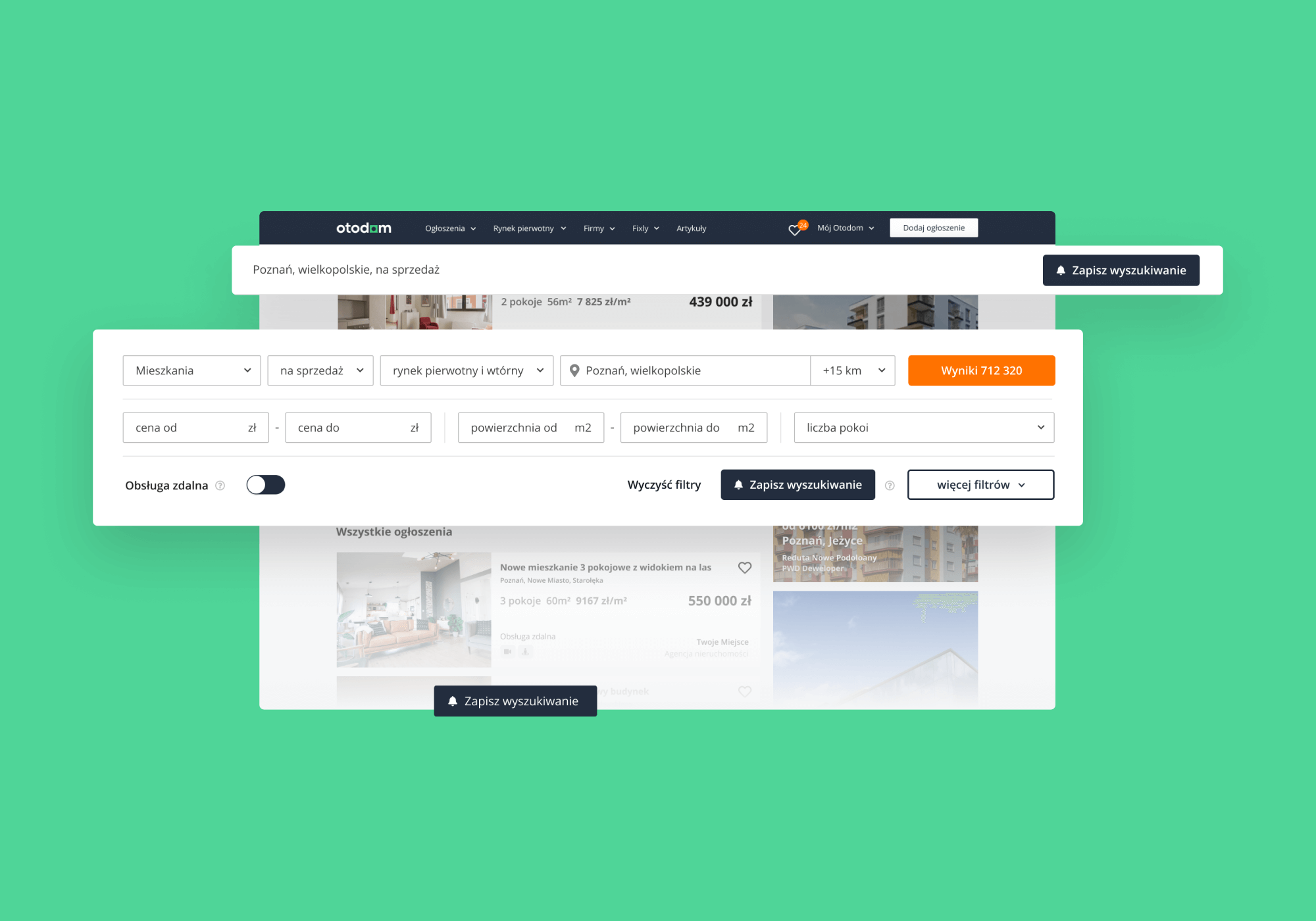
Otodom’s ability to handle high traffic and provide fast, reliable service makes it a standout example of scalable, data-driven enterprise web development in the real estate sector.
3. Reddit (social media platform)
Reddit’s rebranding simplified its visual identity while preserving the platform’s eclectic and community-driven spirit. Known as “the heart of the internet,” Reddit’s website manages millions of daily interactions, driven by real-time content and community discussions.

The refreshed 3D mascot, Snoo, and custom typography further enhance brand cohesion. With a focus on scalability and a unique user experience, Reddit’s website supports diverse content types, real-time feedback loops, and easy navigation, all while encouraging conversations across its community.
4. Prime Video (entertainment platform)
Prime Video's rebranding highlights the platform's immersive and expansive content offerings. Using Amazon's iconic "dimple" as a design element, the website is built to handle millions of streaming requests and vast content libraries. With smooth integration into Amazon's technology infrastructure, Prime Video offers personalized recommendations, fast load times, and a user-friendly interface for global audiences.

5. UBS (banking and wealth management)
UBS, a global financial services giant, uses its website to provide secure, interactive demos of its banking and wealth management apps.
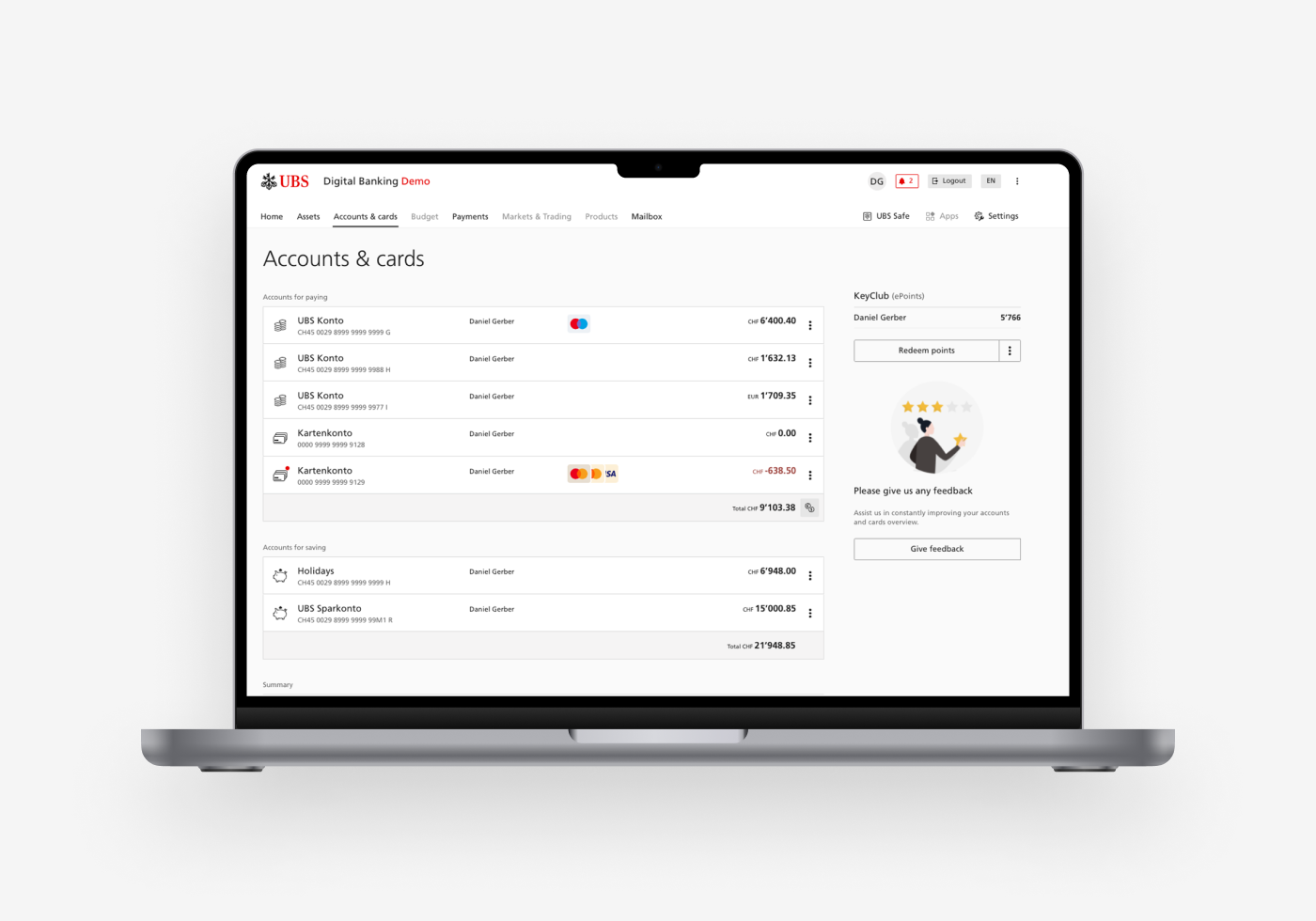
These demo versions show the platform’s functionality without revealing sensitive data. UBS’s site also integrates CRM systems and client portals to offer a personalized, secure experience for its users.
With a focus on high performance, real-time financial updates, and compliance with strict international regulations, UBS’s website is a good example of enterprise-level web development in finance.
6. Polpharma API (pharmaceutical manufacturing)
Polpharma, a leading European pharmaceutical manufacturer, partnered with us to redesign and develop api.polpharma.com, using Webflow for rapid deployment and scalability. The website gives direct access to essential product information and ensures an intuitive user experience for global clients.

By integrating advanced SEO tools, real-time analytics, and a flexible CMS, the site supports Polpharma’s commitment to strengthening the European supply chain and enhancing public health. This modern, user-friendly platform aligns with Polpharma’s strategic vision while maintaining a competitive edge in the global market.
Security and compliance requirements for enterprise web apps
Enterprise web app security requirements come down to SSO through SAML or OpenID Connect, RBAC, and audit logging, mapped to SOC 2, GDPR, or HIPAA depending on industry and data type.
Use OpenID Connect with PKCE for new browser, mobile, and API clients. Keep SAML 2.0 for workforce or B2B customers whose identity provider (Entra ID, Okta) only federates that way. NIST SP 800-63C defines federation assurance levels, which helps when a regulator asks how strong an assertion must be.
Start with role-based access control (RBAC) for stable job functions. Move to attribute-based rules when the decision depends on context, such as a clinician seeing only patients on their care team, or an analyst limited to EU records. We recommend coarse roles in the token and attribute checks in a policy engine behind the API gateway.
The regulation-to-control mapping:
| Regulation | Typical industry | Required controls |
|---|---|---|
| SOC 2 (AICPA attestation, not a law) | SaaS and any provider holding customer data | SSO with MFA, RBAC with periodic access reviews, change management, centralized logging and alerting |
| GDPR | Any sector processing EU residents' personal data | Data minimization, purpose-bound access, records of processing, encryption, breach detection, erasure workflows |
| HIPAA Security Rule | US healthcare and business associates | Unique user IDs, minimum-necessary access, audit controls on ePHI access, transmission encryption |
| PCI DSS 4.0 | Payments, retail, fintech | MFA into the cardholder data environment, logged access to cardholder data, routine log review |
Audit logs should record who acted, on what record, when, from where, and with which outcome. Write them to an append-only store separate from the application database.
Observability closes the loop. Ship application logs and APM traces (OpenTelemetry works across most stacks) to a central store, and alert on failed-login spikes, privilege changes, and bulk exports.
The detection target comes from the law. GDPR Article 33 requires notifying the supervisory authority within 72 hours of becoming aware of a breach. A team that finds anomalies only in a weekly log review will struggle to meet that.
Two caveats. HIPAA obligations also reach business associates, so check the HHS Security Rule guidance against your vendor chain. SOC 2 scope is yours to define, so a narrow scope can pass an audit and still leave gaps customers care about.
The enterprise web development process
Enterprise web development follows the usual stages, with added deliverables for system of record integration (ERP, CRM), compliance evidence, and run-phase ownership. The generic steps are in our web development process guide. The table lists what changes at enterprise scale.
| Stage | Enterprise deliverables |
|---|---|
| Discovery | System-of-record map (which ERP, CRM, or identity provider owns each entity), SOC 2/GDPR/HIPAA scope, SLOs signed off by business owners |
| Architecture | ADRs for service boundaries, SSO and RBAC model, versioned API contract per integration, migration sequence |
| Design | Shared component library checked against WCAG 2.2, role-specific view variants |
| Build | Integration adapters behind an anti-corruption layer, contract tests against ERP and CRM sandboxes, SAST and dependency scanning in CI |
| Release | Load test on production-like data, feature flags, canary rollout, rehearsed rollback |
Migrating off a legacy system incrementally
A legacy migration works best as a strangler pattern. Route one capability at a time through the API gateway to a new service, and keep the legacy system as system of record until that capability's data cutover is reconciled. Start with the capability that changes most often, since it returns the most from the new path.
Handling ERP and CRM contract changes
Vendors change APIs on their own schedule, so treat each integration as a contract you do not control. Pin API versions, run consumer-driven contract tests (Pact, for example) nightly against the vendor sandbox, and alert on schema drift. Make writes idempotent and wrap calls in a circuit breaker so a vendor outage degrades one feature, not the whole portal.
Day-2 operations
Observability goes live with the first release. Instrument services with OpenTelemetry for traces, send logs with correlation IDs to a centralized store, and route APM alerts by SLO burn rate. Each integration and each service gets one named owner and an on-call rota.
For upgrade cadence, we recommend monthly dependency patching, quarterly minor framework upgrades, and one planned major-version upgrade per year. Adjust this to your vendors' support windows, and to your change-approval process if you work under HIPAA or SOC 2 controls.
Selecting the right technology stack
For most enterprise web development, we recommend a Spring Boot or .NET backend, a TypeScript front end, and a headless CMS, connected through an API gateway. Choosing the right technology stack comes down to the system of record you integrate with and the team you can hire.
The architecture around that stack is composable. A composable architecture assembles independently replaceable services (CMS, search, identity, commerce) behind APIs, so one can be swapped without a rebuild. Microservices suit that model only when team boundaries justify them. Below roughly three teams, we suggest a modular monolith with clean module borders that can be split later.
Spring Boot, .NET and Node.js compared
The three backend options differ most in integration fit, hiring pool and how well they hold up as teams multiply:
| Spring Boot (Java) | ASP.NET Core (.NET) | Node.js (NestJS, Express) | |
|---|---|---|---|
| Integration fit | Java-based ERPs, Kafka and JMS brokers, mature SAML 2.0 and OIDC support in Spring Security | Microsoft Dynamics, SQL Server, Entra ID for SSO | API aggregation, backend-for-frontend, real-time features |
| Hiring pool | Deep in banking, insurance and large IT shops | Strong where the company already runs on Microsoft | Overlaps with front-end talent, so full-stack hiring is easier |
| Team scale | Strong typing and module conventions suit many teams on long-lived services | Comparable conventions, with tight tooling in Visual Studio and Azure | Needs enforced conventions and TypeScript strictness as the codebase grows |
| Watch for | Heavier memory footprint and slower startup than Node.js | Fewer ERP connectors outside the Microsoft stack | CPU-bound work blocks the event loop and belongs in a separate service |
The Stack Overflow Developer Survey is a useful check on hiring-pool size by language.
Our decision rule is to pick Spring Boot or .NET by the vendor behind your ERP, CRM and identity provider, since the connectors and the existing team's skills outweigh raw benchmark differences. Node.js earns its place as a backend-for-frontend between a React or Next.js client and the core services.
Content, hosting and observability
A headless CMS such as Contentful, Contentstack or Strapi keeps editorial workflows out of the application release cycle. Content reaches the front end through an API, and a CDN caches it at the edge.
For hosting, managed Kubernetes (EKS, AKS or GKE) fits teams running many microservices. A managed platform service fits a handful of services better. A cloud provider's SOC 2 report covers its infrastructure, not your application code, so GDPR data residency and HIPAA safeguards still need your own controls and region choices.
Instrument every service with OpenTelemetry, which supports Java, .NET and JavaScript and gives APM traces, centralized logs and alerting one vocabulary, whichever backend you choose.
Enterprise web development framework
Choose an enterprise web development framework by team size and release frequency: a modular monolith for small teams, domain services for several squads, and full microservices only when teams must deploy independently.
The thresholds in the table are our judgment, not benchmarks. Treat them as starting points to test against your own delivery data.
| Team size (illustrative) | Release cadence | Framework choice | Why |
|---|---|---|---|
| Up to about 8 engineers | Weekly or faster | Modular monolith on Spring Boot or ASP.NET Core, TypeScript front end | One deployable and one pipeline keep coordination cost near zero |
| About 8-30 engineers, several squads | Weekly to biweekly | Domain-split services, a backend-for-frontend per channel, shared design system | Squads own bounded contexts without a deploy queue |
| 30+ engineers | Several releases a day across teams | Microservices with independent pipelines, OpenTelemetry tracing, a platform team | Independent deploys pay for the added observability and contract-testing work |
| Any size, regulated | Quarterly, behind a change board | Spring Boot or .NET on long-term-support versions, strict RBAC and audit logging | Release gates, not code velocity, set the pace |
The usual mistake is adopting the third row with the team size of the first. Microservices add network failure modes, so you need circuit breakers, idempotent APIs and centralized logging before the first service split.
Two things override the table. If your system of record is SAP or Dynamics, the vendor's integration tooling can outweigh team size. Existing Java or C# skills on your team usually beat a theoretically better framework.
Java enterprise web development
Java with Spring Boot suits enterprise web development when your organization already runs JVM services, federates identity over SAML 2.0, or integrates with SAP or Oracle systems of record. ASP.NET Core fits best when Microsoft Entra ID, Azure, and SQL Server already anchor identity and data. Existing estate decides it more than language quality.
The trade-offs side by side, with the stack facts taken from each vendor's documentation:
| Concern | Spring Boot (Java) | ASP.NET Core (.NET) |
|---|---|---|
| SAML 2.0 SSO | Spring Security includes SAML 2.0 service provider | No first-party SAML 2.0 handler; use a maintained third-party library or let the identity provider broker it |
| OIDC | Spring Security OAuth2 client and resource server | Built-in OpenID Connect handler; Microsoft.Identity.Web for Entra ID |
| RBAC and ABAC | Method security with @PreAuthorize and expression-based rules | Policy-based authorization with requirements and handlers |
| Observability | Actuator, Micrometer, OpenTelemetry | OpenTelemetry, built-in logging and Activity tracing |
| System of record integration | SAP Cloud SDK for Java, Oracle JDBC, mature Kafka and workflow engines | Dynamics 365, SQL Server, Windows-integrated authentication |
| Audit trail | Hibernate Envers through Spring Data | EF Core interceptors, SQL Server temporal tables |
Spring Modulith gives you enforceable module boundaries inside one deployable, which matches the modular monolith recommended in the framework section. Resilience4j covers circuit breakers and retries when you split into domain services. Spring Boot 3 and later require Java 17 or newer, so check your application servers and base images before committing.
The SAML row carries the most weight in regulated sectors. Many banks, insurers, and hospital groups still run SAML 2.0 for workforce SSO, and Spring Security handles it without extra dependencies. In .NET you take on a library whose maintenance and security patching you now own, unless a broker such as Entra ID or Keycloak sits in front.
Neither stack makes you SOC 2, GDPR, or HIPAA compliant. Those controls live in access reviews, encryption, retention rules, and logging practice. The OWASP Application Security Verification Standard is a better checklist than any framework feature list.
Java has its own failure mode in dependency sprawl. Log4Shell (CVE-2021-44228) showed how one transitive logging library can expose an entire estate. If you choose Spring Boot, generate an SBOM in CI and set a patch window for transitive dependencies. An early warning sign is a build nobody can explain in full, with several logging or JSON libraries on the classpath.
We recommend .NET when most of the team writes C#, the estate is Microsoft-heavy, or the product extends Dynamics 365. A strong .NET team will ship more safely on ASP.NET Core than on a Spring Boot stack it learns mid-project.
We recommend Java when the estate is mixed, SAP or Oracle dominates, or your platform team already runs JVM observability and deployment tooling. Both stacks can sit behind the same API gateway and OpenTelemetry pipeline, so a mixed estate is workable.
Front-end technologies
Front-end technologies dictate how users interact with the website. Frameworks like Bootstrap and Vue.js are widely used for their unique strengths. Bootstrap is favored for its responsive design capabilities, so layouts adapt to each device. This keeps the user experience consistent across all platforms, so visitors stay engaged and return.
On the other hand, Vue.js is recognized for its speed and flexibility, making it a great choice for projects with tight deadlines. Vue.js’s efficiency in building user-friendly, visually appealing interfaces enables businesses to deliver high-quality user experiences tailored to diverse audiences.
Back-end technologies
The back-end manages data storage, processing, and retrieval, ensuring the website functions smoothly behind the scenes. Common hosting options include shared hosting, virtual private servers (VPS), and cloud hosting, each with its own balance of scalability and cost.
Technologies like Node.js and PHP are frequently used for their ability to handle high traffic and support microservices architecture. These back-end solutions provide the foundation needed to manage complex business operations and ensure scalability for future growth.
Database solutions
Data management sits at the center of enterprise web development, so the database choice matters. Technologies like MongoDB and Redis are popular for managing large volumes of data efficiently. These databases are known for their speed, flexibility, and scalability, making them ideal for meeting the diverse data needs of large-scale businesses.
Many enterprise projects adopt a hybrid approach, combining relational and non-relational databases to use the strengths of both, which ensures optimal performance and reliability in managing the complex data requirements of enterprise applications.
Enterprise web development cost and timeline
Enterprise web development cost and timeline have no reliable single range. Four drivers, led by system of record integration and compliance scope, move both figures more than feature count does.
In our judgement, a quote that doesn't price these drivers separately is incomplete. Check each one before you accept an estimate:
| Driver | What raises cost | Timeline effect | Ask before estimating |
|---|---|---|---|
| System of record integration (ERP, CRM) | Legacy or batch-only APIs, no vendor sandbox, two-way sync with idempotency and retry handling | Gated by sandbox access and the API owner's availability | How many systems, and who owns each API? |
| Compliance scope (SOC 2, GDPR, HIPAA) | Audit logging, access controls, data residency, data subject request flows, business associate agreements for HIPAA | SOC 2 Type 2 evaluates controls over a period of time, so evidence collection can run past launch | Which regimes apply, and to which data? |
| Data migration | Many source systems, duplicate or inconsistent records, mapping rules, rehearsal cutovers | Each dry run adds a cycle; cleanup often starts late | What is the system of record for each entity? |
| Stakeholder groups | Per-group role definitions in the RBAC matrix, separate approval chains, conflicting requirements | Sign-off rounds multiply with each group | Who can veto a release? |
Integrations and migration are usually the two least-known items at kickoff, so they carry the widest estimate error. Compliance scope is the easiest to fix early, because it is a legal question that can be settled in a week.
We recommend a paid discovery phase that ends with an integration inventory, a compliance matrix and a migration dry-run plan. Estimate the build against those three documents.
This overhead does not pay off for a greenfield internal tool with one data source and no regulated data. A fixed estimate from a short scoping call is workable there.
Challenges in enterprise web development
Enterprise web development is hardest at system of record integration, where an ERP or CRM contract change can break every service coupled to it. The system of record is the platform that owns the authoritative copy of a business entity, such as customers in the CRM or invoices in the ERP. Moving to microservices does not remove this coupling.
Four failure modes recur when those contracts change, each with an early sign:
- Field drift: a vendor release renames or deprecates a CRM field, and the web app that reads it directly renders blanks. Early sign: null rates rising on one field after a vendor update.
- Latency cascade: checkout calls the ERP synchronously, and its batch window stalls the portal. Early sign: p95 latency that follows ERP job schedules.
- Duplicated mapping: each microservice maps ERP data on its own, so one contract change needs several coordinated deploys. This is a distributed monolith.
- Unsafe retries: a timed-out order call is retried without an idempotency key and creates duplicate orders.
We recommend a strangler-style fix, one capability at a time, following Martin Fowler's strangler fig pattern:
- Build one adapter service as an anti-corruption layer in front of the ERP or CRM, and make it the only owner of the mapping.
- Run consumer-driven contract tests against the vendor sandbox in CI, and rerun them when the vendor publishes a release.
- Route one capability, such as order status, through the adapter behind the API gateway. Shift traffic gradually and keep the legacy path until results match.
- Add idempotency keys, a circuit breaker and a cached read model, so the portal degrades instead of failing when the ERP is down.
A single-team product with one integration can keep the adapter as a module inside the existing codebase. A separate service pays off once several teams consume the same system of record.
Stakeholder sprawl and approval cycles slow delivery in a different way. Security, legal, architecture and business owners each hold a gate, and sequential reviews can stretch the schedule more than the build does.
Name one decision owner, record choices as ADRs, and start compliance review in the first sprint so it runs alongside development. For problems that apply beyond enterprise scale, see common web development challenges.
Managing complex business processes
Enterprise websites need to accommodate various business workflows, often involving multiple departments and user groups. This requires precise planning and integration of automated processes to reduce operational friction. The key is aligning these workflows with business goals and continuously improving the system to adapt to new demands.
Ensuring cross-platform compatibility
With a wide range of devices and browsers in use, ensuring that a website works consistently everywhere is a significant challenge. Teams solve it with rigorous testing and responsive design principles to create adaptable layouts that work the same way on every platform.
Addressing evolving needs
Enterprise websites must remain flexible as business requirements change. This challenge is met by developing scalable web solutions and enabling continuous updates to quickly respond to market shifts, user expectations, or new technologies.
Enterprise web development maintenance and support
Maintenance and support are essential for ensuring that enterprise websites continue to function optimally and meet the evolving needs of businesses. Key aspects include:
- Regular updates: Websites need regular updates to stay secure, stable, and compatible with the latest technologies and browsers. This includes updating software, plugins, and security patches to protect against vulnerabilities.
- Performance monitoring: Continuous performance monitoring helps identify issues and optimize website performance, so the website remains fast, responsive, and capable of handling high traffic volumes.
- Content management: Effective content management involves regularly updating and managing website content to keep it fresh, relevant, and engaging, which maintains user interest and improves search engine rankings.
- Technical support: Providing technical support ensures that any technical issues are promptly addressed, keeping the website available and functional. This includes troubleshooting, bug fixes, and resolving compatibility issues.
- Backup and recovery: Reliable backup and recovery ensures that website data is safe and can be restored in case of any issues or disasters. This minimizes downtime and data loss, ensuring business continuity.
Web development services for enterprises
Enterprise web development services are designed to address the complex needs of large-scale businesses, delivering tailored solutions that support growth, scalability, and operational efficiency.
One core service is the development of custom web solutions. These services ensure that the website aligns with a company’s specific goals and processes, tailoring features to meet unique business requirements. This customization allows enterprises to build web applications that not only meet current objectives but are flexible enough to evolve with the business.
Building scalable and secure web applications is another key aspect. These solutions are designed to handle large user bases, heavy data loads, and complex workflows. Whether it's processing thousands of transactions or running complex business operations, these applications are built to remain secure and high-performing even under pressure.
A focus on responsive, user-centric design keeps the website usable on every device, from desktops to smartphones. A consistent experience across all devices keeps users engaged and satisfied, regardless of where or how they access the site.
System integration is another core service. Enterprise web development connects CRMs, ERPs and other internal software into one platform, so the systems share data and support the same business processes.
Finally, ongoing maintenance and support matter for long-term success. These services provide regular updates, performance monitoring, and security patches, ensuring that the website remains functional, secure, and optimized for evolving business needs.
Frequently asked questions
What is enterprise web development?
Why is scalability important in enterprise web development?
What security measures are essential in enterprise web development?
Conclusion
Enterprise web development enables businesses to scale, optimize operations, and strengthen their digital presence. By making informed decisions—such as selecting the right technology stack and ensuring cross-platform compatibility—businesses can build solutions that evolve with them as they grow.


